Deployment in Cloud Computing A Beginner Friendly Guide
Deployment in cloud computing is the process of putting your software or application onto cloud servers so users can access it online. This guide breaks down everything you need to know, from basic concepts to practical steps. You will learn about different cloud deployment models, popular tools, and proven tips to deploy your apps with confidence.
Have you ever wondered how apps end up live on the internet? The answer lies in deployment in cloud computing. It is the bridge between writing code and sharing it with the world. Without deployment, your hard work stays hidden on your computer. With deployment, anyone can access your app from anywhere.
This guide is here to help you understand cloud deployment from the ground up. Whether you are a student, a new developer, or a curious learner, you will find clear and practical information ahead. We will walk through types, tools, benefits, and best practices. By the end, you will feel confident about deploying applications in the cloud.
Key Takeaways
- Cloud deployment makes apps accessible: Users can reach your software from anywhere with an internet connection.
- Multiple models exist: Public, private, hybrid, and multi-cloud options give you flexibility based on your needs.
- Tools like Docker and Kubernetes simplify the process: They handle containerization and orchestration with ease.
- CI/CD pipelines speed up releases: Automating your deployment pipeline reduces errors and saves time.
- Best practices matter: Monitoring, security, and auto-scaling keep your cloud apps running smoothly.
📑 Table of Contents
- What Is Deployment in Cloud Computing?
- Types of Cloud Deployment Models
- How Deployment in Cloud Computing Works
- Popular Tools for Cloud Deployment
- Benefits of Cloud Deployment
- Common Challenges and How to Overcome Them
- Best Practices for Deployment in Cloud Computing
- Quick Tips for Beginners
- Conclusion
What Is Deployment in Cloud Computing?
Let us start with the basics. Deployment in cloud computing means uploading your software to cloud servers. These servers are managed by providers like Amazon Web Services, Microsoft Azure, or Google Cloud. Once deployed, users can access your app through a browser or an API.
Think of it like renting a store space instead of building one from scratch. You do not need to own the hardware. The cloud provider handles the servers, cooling, and power. You just bring your application and pay for what you use.
This approach has changed how companies release software. In the past, teams had to buy physical servers. They managed them in a basement or a data center. Today, cloud hosting makes this process faster, cheaper, and more flexible.
Why Does Deployment Matter?
Deployment matters because it directly affects how your users experience your app. A slow or broken deployment frustrates users. A smooth one keeps them happy. Here are a few reasons why getting deployment right is so important:
- Availability: Your app should be online and ready when users need it.
- Speed: Fast deployment means you can release updates quickly.
- Reliability: A good setup keeps your app running without crashes.
- Scalability: Your app should handle more users when traffic spikes.
When you get application deployment right, everything downstream gets better. Your team works more efficiently. Your users stay satisfied. Your business grows faster.
Types of Cloud Deployment Models
Not all cloud deployments look the same. There are several deployment models you should know about. Each one fits different needs, budgets, and team sizes. Let us explore them one by one.
Public Cloud Deployment
Public cloud deployment is the most common type. A third-party provider owns and manages the servers. You rent space on those servers to run your apps. Think of AWS, Azure, and Google Cloud as the big players here.
This model works great for startups and small teams. You do not need to invest in hardware. You pay only for what you use. Cloud services like these offer auto-scaling, which means your app can handle more traffic automatically.
However, public cloud may not suit every situation. Some companies have strict data rules. They may need more control over their infrastructure.
Private Cloud Deployment
Private cloud means you use cloud resources exclusively for your organization. These servers might sit in your own building or be hosted by a provider. Only your team has access to them.
This model gives you maximum control and security. It is popular in industries like banking and healthcare. But it also costs more. You are responsible for maintaining the hardware and software.
Hybrid Cloud Deployment
Hybrid cloud combines public and private clouds. You keep sensitive data on a private cloud. You run less critical workloads on a public cloud. This gives you the best of both worlds.
Many companies use hybrid cloud for cloud migration. They move parts of their system gradually. This reduces risk and keeps things running during the transition.
Multi-Cloud Deployment
Multi-cloud means using more than one public cloud provider. For example, you might use AWS for storage and Azure for computing. This approach prevents vendor lock-in. It also improves redundancy.
Multi-cloud can be complex to manage. But tools like Terraform and Kubernetes make it easier. If you want to learn more, search for multi-cloud strategies and best practices.
Comparison of Cloud Deployment Models
| Feature | Public Cloud | Private Cloud | Hybrid Cloud | Multi-Cloud |
|---|---|---|---|---|
| Cost | Low upfront cost | High upfront cost | Medium | Medium to High |
| Control | Shared | Full control | Mixed | Shared across providers |
| Security | Good | Highest | Strong | Good |
| Scalability | Excellent | Limited | Good | Excellent |
| Best For | Startups and small teams | Regulated industries | Gradual migration | Large enterprises |
Each deployment model has strengths. Choose the one that matches your goals, budget, and team size.
How Deployment in Cloud Computing Works
Now that you know the models, let us look at how deployment in cloud computing actually happens. The process involves several steps and tools working together.
The Deployment Pipeline
A deployment pipeline is an automated path your code follows. It starts when a developer writes code and ends when the code runs in the cloud. The pipeline usually has these stages:
- Build: The code is compiled and packaged.
- Test: Automated tests check for bugs.
- Stage: The app runs in a test environment.
- Deploy: The app goes live in production.
This pipeline is a core part of CI/CD, which stands for Continuous Integration and Continuous Deployment. CI/CD helps teams release updates fast and often.
CI/CD and DevOps
DevOps is a set of practices that brings development and operations teams together. It focuses on automation, collaboration, and speed. CI/CD tools like Jenkins, GitLab CI, and GitHub Actions automate the deployment pipeline.
When you use DevOps practices, your team can deploy code multiple times a day. This is a huge improvement over old methods where releases happened once a month. Speed and reliability go hand in hand here.
Infrastructure as Code
Infrastructure as code is another key concept. It means managing your cloud resources through code instead of manual steps. Tools like Terraform and AWS CloudFormation let you define your setup in files.
This approach makes cloud deployment repeatable and consistent. You can recreate your entire environment with a few commands. It also reduces human errors that come from manual setup.
Popular Tools for Cloud Deployment
The right tools make deployment in cloud computing much easier. Here are some of the most popular ones you should know about.
Containerization Tools
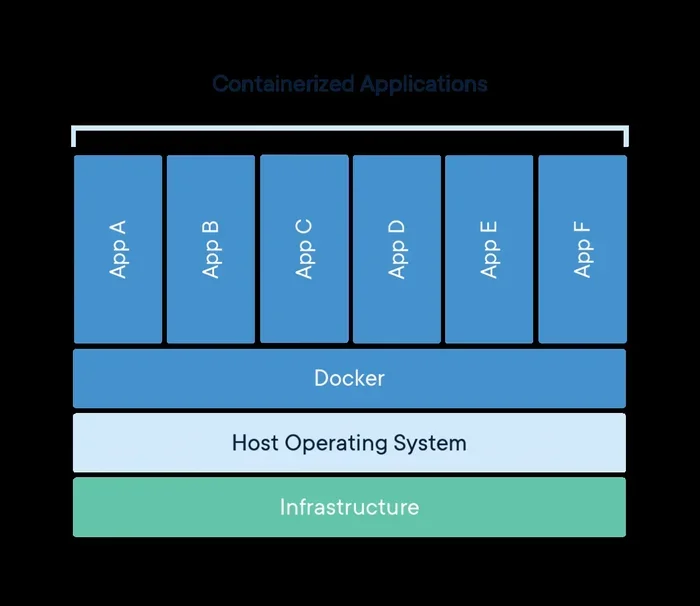
Containerization packages your app and its dependencies into a single unit called a container. This ensures your app runs the same way everywhere. Docker is the most widely used containerization tool.
Containers are lightweight compared to virtual machines. They start faster and use fewer resources. Many teams use Docker to deploy applications consistently across different environments.
Orchestration Tools
When you run many containers, you need a way to manage them. That is where orchestration tools come in. Kubernetes is the industry leader here. It handles scaling, load balancing, and health checks automatically.
With Kubernetes, your app can handle traffic spikes without any manual work. It is a powerful tool for anyone serious about cloud deployment.
Cloud Provider Platforms
Each major cloud provider has its own deployment tools. AWS offers Elastic Beanstalk and CodeDeploy. Azure has Azure App Service. Google Cloud has App Engine. These platforms simplify cloud hosting by handling much of the setup for you.
If you are just starting out, these managed services are a great choice. They let you focus on your code rather than server management.
Benefits of Cloud Deployment
There are many reasons why deployment in cloud computing has become the standard. Let us look at the key benefits.
- Cost Savings: You avoid buying expensive hardware. Pay-as-you-go pricing keeps costs low.
- Global Reach: Cloud providers have data centers worldwide. You can serve users from different regions easily.
- Flexibility: You can scale up or down based on demand. This is called auto-scaling.
- Faster Time to Market: Automated pipelines help you release updates in minutes, not weeks.
- Disaster Recovery: Cloud providers offer backup and redundancy. Your app stays safe even during outages.
- Serverless Options: With serverless computing, you do not manage servers at all. You just write code and the provider handles the rest.
These benefits explain why companies of all sizes are moving to the cloud. Cloud migration is no longer just a trend. It is a smart business move.
Common Challenges and How to Overcome Them
Cloud deployment is not without its challenges. Being aware of them helps you plan better.
Security Concerns
When your app runs in the cloud, it is exposed to the internet. This means you need strong security practices. Use encryption, access controls, and regular audits. Most cloud providers offer built-in security tools. Learn them and use them.
Cost Management
Pay-as-you-go pricing is great until costs spiral out of control. To avoid surprise bills, set up billing alerts. Monitor your usage regularly. Turn off resources you are not using. Auto-scaling helps too, because it reduces capacity when traffic is low.
Vendor Lock-In
Relying too heavily on one provider can be risky. If that provider raises prices or changes its policies, you may face challenges. Using open-source tools like Kubernetes and Terraform helps you stay portable. Consider a multi-cloud strategy for long-term flexibility.
Complexity
Cloud environments can get complex fast. Many moving parts, many services, many configurations. Start simple. Use managed services. Gradually add complexity as your team gains experience. You do not need to use every feature on day one.
Best Practices for Deployment in Cloud Computing
Follow these tips to make your cloud deployment smoother and more reliable.
- Start small: Deploy a simple version of your app first. Add features gradually.
- Automate everything: Use CI/CD pipelines to reduce manual work and human errors.
- Monitor your apps: Use tools like Prometheus or Datadog to track performance and catch issues early.
- Keep secrets safe: Never hardcode API keys or passwords in your code. Use secret management tools.
- Test in staging: Always test your app in a staging environment before pushing to production.
- Use containers: They make your app portable and consistent across environments.
- Back up your data: Regular backups protect you from data loss and help with disaster recovery.
These best practices come from real-world experience. They help teams deploy with confidence and sleep better at night.
Quick Tips for Beginners
- Tip 1: Pick one cloud provider first. Master it before exploring others.
- Tip 2: Use free-tier services to practice without spending money.
- Tip 3: Learn the basics of Docker. It is the most valuable skill for modern deployment.
- Tip 4: Read your cloud provider’s documentation. It is full of helpful guides and tutorials.
- Tip 5: Join online communities. Sites like Stack Overflow and Reddit are great for asking questions.
Remember, nobody becomes an expert overnight. Take it one step at a time. Every deployment you make teaches you something new.
Conclusion
Deployment in cloud computing is the process that brings your software to life. It connects your code to your users. Throughout this guide, we explored the different types of cloud deployment models, the tools that make it possible, and the benefits that make it worthwhile.
We covered public, private, hybrid, and multi-cloud options. We looked at CI/CD pipelines, containerization, and infrastructure as code. We also shared practical tips and common challenges to watch out for. The world of cloud deployment is vast, but you now have a solid foundation to build on.
Start small, stay curious, and keep learning. The more you practice deploying applications in the cloud, the more confident you will become. Your journey into cloud deployment starts with a single step. Take it today.
Frequently Asked Questions
What is deployment in cloud computing?
Deployment in cloud computing is the process of uploading your software to cloud servers so users can access it online. It replaces the need for physical hardware and lets you scale your app easily.
What are the four main cloud deployment models?
The four main models are public cloud, private cloud, hybrid cloud, and multi-cloud. Each model offers a different balance of cost, control, and scalability to fit your needs.
What tools are used for cloud deployment?
Popular tools include Docker for containerization, Kubernetes for orchestration, Terraform for infrastructure as code, and Jenkins or GitHub Actions for CI/CD pipelines. These tools automate and simplify the deployment process.
Is cloud deployment expensive?
It can be very cost-effective. Most providers offer pay-as-you-go pricing and free tiers for beginners. You only pay for the resources you actually use.
What is the difference between deployment and hosting?
Hosting refers to the servers that keep your app running. Deployment is the process of putting your app onto those servers. They work together but are not the same thing.
Do I need DevOps skills for cloud deployment?
Not necessarily. Many cloud providers offer managed services that handle deployment for you. However, learning basic DevOps practices like CI/CD and infrastructure as code will make you much more effective over time.
=== CONCLUSION ===
Deployment in cloud computing opens the door to faster, more flexible software delivery. This guide has covered the models, tools, benefits, and best practices you need to get started. The key is to begin with simple steps, practice regularly, and keep building your knowledge. With the right approach, you can deploy your applications confidently and efficiently in the cloud.