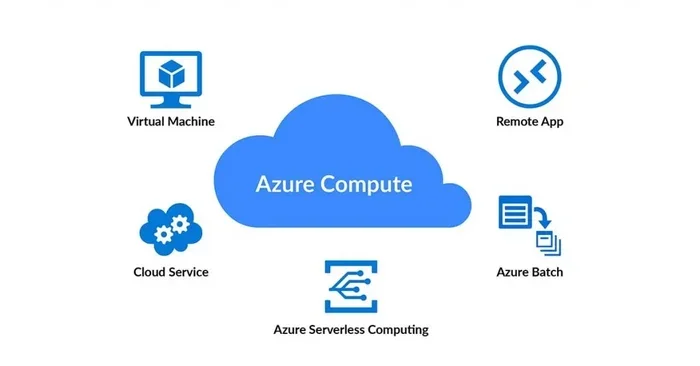
Cloud Computing Microsoft Azure A Complete Beginner Guide
Cloud computing Microsoft Azure is a powerful platform that helps businesses and individuals build, manage, and deploy applications through Microsoft’s global network of data centers. This guide covers everything a beginner needs to know, from core concepts to practical setup steps. You will learn about Azure services, pricing, security, and certification paths that can boost your career.
Cloud computing has changed the way we build and run software. Instead of buying expensive servers, you can rent computing power over the internet. Cloud computing Microsoft Azure is one of the most popular platforms for doing exactly that. It gives you access to thousands of services, from simple storage to advanced artificial intelligence tools. If you are new to this world, this guide will walk you through everything step by step.
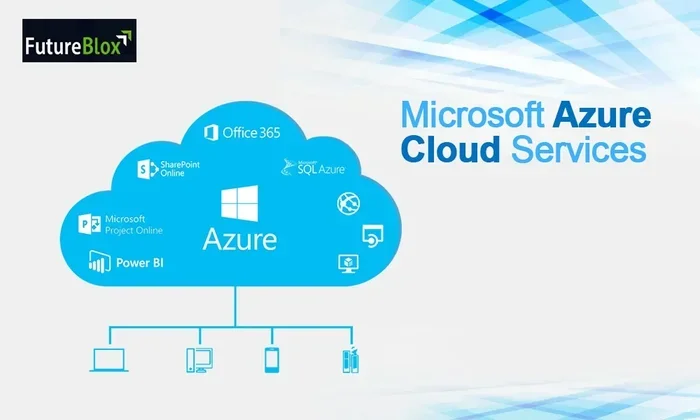
Microsoft Azure, often called just “Azure,” is the company’s cloud computing platform. It launched in 2010 and has grown into a giant. Today, it powers millions of applications worldwide. Businesses of all sizes use it to host websites, run databases, and build smart apps. The best part? You do not need a computer science degree to start learning it.
Key Takeaways
- Azure is a leading cloud platform: It competes closely with AWS and Google Cloud and offers a massive range of services for computing, storage, and networking.
- Beginners can start for free: Microsoft offers a free tier and a $200 credit for new users, making it easy to explore without financial risk.
- Certifications add real value: Earning an Azure certification can significantly improve your job prospects and technical credibility.
- Security is a top priority: Azure includes built-in compliance tools, threat detection, and identity management to keep your data safe.
- Hybrid cloud support is a standout: Azure Arc and Azure Stack let you manage on-premises and cloud resources from one place.
- Practical skills matter most: Hands-on experience with the Azure portal and real-world projects is the best way to learn.
📑 Table of Contents
- What Is Cloud Computing Microsoft Azure?
- Core Azure Services You Should Know
- Getting Started with Microsoft Azure
- Azure Pricing and Cost Management
- Azure Certifications and Career Paths
- Cloud Security in Azure
- Hybrid Cloud and Azure Arc
- How Azure Compares to Other Cloud Platforms
- Final Thoughts on Cloud Computing Microsoft Azure
What Is Cloud Computing Microsoft Azure?
At its core, cloud computing Microsoft Azure is a collection of remote servers that you can access over the internet. These servers handle computing tasks that would normally require your own physical hardware. Think of it like renting a powerful computer that lives in someone else’s data center.
Microsoft runs data centers in more than 60 regions around the world. This means your applications can run close to your users, no matter where they live. The platform offers over 200 products and services. These range from basic virtual machines to complex machine learning models.
Why Do People Use Azure?
There are many reasons businesses and developers choose Azure over other platforms:
- Scalability: You can increase or decrease resources based on demand. If your website suddenly gets a traffic spike, Azure handles it automatically.
- Cost savings: You pay only for what you use. No need to buy expensive hardware upfront.
- Global reach: Deploy apps in multiple countries with just a few clicks.
- Integration with Microsoft tools: Azure works seamlessly with Office 365, Active Directory, and Visual Studio.
- Strong security: Microsoft invests billions in cybersecurity every year.
Quick Tip: When you first sign up, always look for the free tier. Azure gives you access to many services at no cost, which is perfect for learning and experimenting.
Core Azure Services You Should Know
Azure offers a huge library of services. For beginners, it helps to group them into categories. Here are the most important ones you will encounter.
Azure Virtual Machines
Virtual machines are software versions of computers. They run operating systems and applications just like a physical PC. You can create a Windows or Linux virtual machine in minutes. This is one of the most popular cloud computing examples for hosting websites or running development environments.
Azure App Service
If you want to build a web app or mobile app backend, Azure App Service is a great choice. It handles the server setup and maintenance for you. You just upload your code, and Azure takes care of the rest. It supports languages like C#, Java, Python, and Node.js.
Azure Blob Storage
Azure Blob Storage is designed for storing massive amounts of unstructured data. This includes images, videos, documents, and log files. It is highly durable and accessible from anywhere in the world. Many apps use blob storage as their primary file system.
Azure SQL Database
For structured data, Azure SQL Database provides a fully managed relational database. Microsoft handles backups, updates, and scaling. You can focus on building your application instead of managing database servers.
Azure Active Directory
Azure Active Directory (also called Entra ID) manages user identities and access. It lets you control who can sign in to your apps and what they can do. This is essential for cloud security in any organization.
Getting Started with Microsoft Azure
Starting with cloud computing Microsoft Azure is easier than you might think. You do not need any special equipment or software. All you need is a web browser and a Microsoft account.
Step 1: Create a Free Account
Go to the Azure website and sign up for a free account. Microsoft gives you a $200 credit to spend within 30 days. You also get access to many free services that never expire. This is the perfect way to explore without worrying about costs.
Step 2: Explore the Azure Portal
The Azure Portal is your control center. It is a web-based dashboard where you can manage all your resources. You can create virtual machines, set up storage accounts, and monitor usage. Spend some time clicking around and familiarizing yourself with the layout.
Step 3: Deploy Your First Resource
Try creating a simple resource, like a storage account or a virtual machine. The portal provides step-by-step wizards that guide you through the process. Here is a simple workflow:
- Log in to the Azure Portal.
- Click “Create a resource” on the left menu.
- Choose the service you want (for example, Storage Account).
- Fill in the required details like name and region.
- Click “Review + Create” and then “Create.”
- Wait a few minutes for deployment to finish.
That is it! You have just deployed your first cloud resource.
Expert Insight: Many beginners get overwhelmed by the sheer number of Azure services. Start with just two or three services. Master those before moving on to more advanced offerings. Building a strong foundation is the key to long-term success.
Azure Pricing and Cost Management
One of the biggest concerns for beginners is Azure pricing. The good news is that Azure is very transparent about its costs. You can estimate expenses before you commit to anything.
How Azure Pricing Works
Azure uses a pay-as-you-go model. This means you pay for the compute time, storage, and data transfer you actually consume. Prices vary based on the region, service type, and resource size. For example, a small virtual machine costs much less than a large one.
Tips to Keep Costs Low
- Use the Azure Pricing Calculator: This free tool lets you estimate costs before you deploy anything.
- Set up budgets and alerts: Azure can notify you when your spending exceeds a certain threshold.
- Shut down unused resources: A running virtual machine that you are not using still costs money. Always stop or delete resources you no longer need.
- Leverage free tiers: Many Azure services offer a permanent free tier with limited capacity.
| Service | Free Tier Available | Pricing Model |
|---|---|---|
| Virtual Machines | Yes (limited size) | Pay per hour/second |
| Blob Storage | Yes (5 GB) | Pay per GB stored |
| App Service | Yes (Basic tier) | Pay per app per month |
| SQL Database | Yes (5 DTU) | Pay per database |
| Azure Active Directory | Yes (Free tier) | Free for basic features |
Keeping an eye on your spending is a critical skill. The sooner you build cost-aware habits, the better your experience with cloud computing Microsoft Azure will be.
Azure Certifications and Career Paths
If you want to turn your Azure knowledge into a career, certifications are your best friend. Microsoft offers a clear path for learners at every level.
Beginner Certifications
The Azure Fundamentals certification (AZ-900) is the perfect starting point. It covers basic cloud concepts and core Azure services. You do not need any technical experience to take this exam. It is a great way to validate your knowledge and boost your resume.
Intermediate and Advanced Certifications
Once you have the fundamentals down, you can pursue more specialized paths:
- Azure Administrator (AZ-104): Focuses on managing Azure subscriptions, identities, and storage.
- Azure Developer (AZ-204): Covers building and deploying cloud applications.
- Azure Solutions Architect (AZ-305): For designing complex cloud solutions at scale.
Each certification opens doors to new job opportunities. Employers actively seek professionals with azure certification credentials. The demand for cloud skills continues to grow every year.
Common Mistakes to Avoid: Do not try to study for multiple certifications at once. Focus on one exam at a time. Also, do not rely only on theory. Hands-on practice in the Azure portal is essential for passing the exams and building real skills.
Cloud Security in Azure
Cloud security is a top priority for any organization using cloud computing Microsoft Azure. Microsoft takes this responsibility very seriously and builds protection into every layer of the platform.
Built-In Security Features
Azure comes with many security tools right out of the box:
- Azure Security Center: Monitors your resources for threats and provides security recommendations.
- Azure Key Vault: Stores secrets, keys, and certificates securely.
- Network Security Groups: Control incoming and outgoing traffic to your resources.
- Multi-Factor Authentication: Adds an extra layer of protection for user sign-ins.
Compliance and Trust
Azure complies with over 100 industry standards and regulations. These include GDPR, HIPAA, and ISO 27001. For businesses in healthcare, finance, or government, this compliance support is critical. It helps them meet legal requirements while using the cloud.
Remember, cloud security is a shared responsibility. Microsoft secures the infrastructure, but you are responsible for configuring your resources correctly. Always follow best practices for access control and data protection.
Hybrid Cloud and Azure Arc
Not every company wants to move everything to the cloud. Some keep certain workloads on-premises for compliance or performance reasons. This is where hybrid cloud comes in.
Azure Arc is a powerful feature that lets you manage resources across on-premises, multi-cloud, and edge environments from a single control plane. It brings Azure management to servers and Kubernetes clusters wherever they run. This flexibility is one of the reasons many enterprises choose cloud computing Microsoft Azure over competitors.
With Azure Arc, you get consistent governance, policy enforcement, and monitoring. You do not have to treat your on-premises servers as second-class citizens. They are fully integrated into your Azure management experience.
How Azure Compares to Other Cloud Platforms
The cloud market is dominated by three major players: Microsoft Azure, Amazon Web Services (AWS), and Google Cloud Platform (GCP). Each has its strengths. Here is a quick comparison.
| Feature | Azure | AWS | Google Cloud |
|---|---|---|---|
| Market Share | Second largest | Largest | Third largest |
| Hybrid Cloud Support | Excellent (Azure Arc) | Good (Outposts) | Moderate |
| Microsoft Integration | Best in class | Limited | Limited |
| AI and ML Services | Strong (OpenAI partnership) | Strong | Very strong |
| Free Tier | Generous | Generous | Generous |
| Global Data Centers | 60+ regions | 30+ regions | 35+ regions |
Azure stands out for its strong integration with Microsoft products and its hybrid cloud capabilities. If your organization already uses Windows Server, Active Directory, or Office 365, Azure is a natural fit. The platform also benefits from Microsoft’s partnership with OpenAI, giving it an edge in artificial intelligence services.
AWS remains the market leader with the most services and the longest track record. Google Cloud excels in data analytics and machine learning. But for most beginners, cloud computing Microsoft Azure offers the best balance of power, simplicity, and career value.
Final Thoughts on Cloud Computing Microsoft Azure
Cloud computing Microsoft Azure is one of the most versatile and powerful platforms available today. Whether you are a student exploring new technologies, a developer building your first app, or an IT professional advancing your career, Azure has something to offer you.
The platform might seem overwhelming at first. There are hundreds of services and countless features to explore. But remember, every expert started as a beginner. The key is to start small, stay curious, and build hands-on experience one step at a time.
Take advantage of the free tier and the $200 credit. Create a free account today and start experimenting. Deploy a simple web app, set up a storage account, or try your hand at virtual machines. Every project you build will deepen your understanding and confidence.
The world of cloud computing is moving fast. Azure continues to innovate with new services and features every quarter. By starting your learning journey now, you position yourself for success in a rapidly growing field. The skills you build today will serve you for years to come.
So what are you waiting for? Dive into cloud computing Microsoft Azure and see where it takes you. The cloud is waiting, and the possibilities are truly endless.
Frequently Asked Questions
What is cloud computing Microsoft Azure used for?
Cloud computing Microsoft Azure is used for hosting websites, running applications, storing data, building AI models, and much more. Businesses use it to reduce hardware costs and scale their operations quickly. It serves everything from small personal projects to enterprise-level solutions.
Is Azure hard to learn for beginners?
Not at all. Azure is designed to be beginner-friendly. The Azure Portal provides intuitive wizards and guided experiences. Microsoft also offers free learning paths through Microsoft Learn. Start with the fundamentals and build your skills gradually over time.
How much does Azure cost for a beginner?
Azure offers a free account with $200 in credits for the first 30 days. Many services also have permanent free tiers. Most beginners can learn and experiment without spending any real money. Just be sure to monitor your usage and set up billing alerts.
Can I get a job with Azure certification?
Yes, Azure certifications are highly valued by employers. The AZ-900 Fundamentals certification is a great starting point. It demonstrates your understanding of cloud concepts and Azure basics. Many job listings specifically ask for Azure skills, especially in enterprise environments.
What is the difference between Azure and AWS?
Both are major cloud platforms, but Azure has stronger integration with Microsoft products like Windows Server and Office 365. AWS has a larger market share and more services overall. Azure also excels in hybrid cloud scenarios with Azure Arc. The best choice depends on your specific needs and existing technology stack.
Do I need programming skills to use Azure?
No, you do not need programming skills to start. Many Azure services are managed through the web-based portal. However, knowing a programming language like Python or C# can help you build more advanced applications. You can learn both cloud concepts and coding at the same time.
=== CONCLUSION ===
Cloud computing Microsoft Azure is an incredibly powerful and accessible platform for anyone looking to build a career in tech or modernize their business. From virtual machines and storage to AI and security tools, Azure covers it all. The free tier and generous credits make it easy to start learning today. Focus on hands-on practice, pursue certifications, and build real projects. The cloud is the future, and Azure gives you the tools to be part of it.