The Ultimate Guide to Load Balancing in Cloud Computing
Load balancing in cloud computing is the process of distributing incoming network traffic across multiple servers to ensure no single server gets overwhelmed. This guide covers everything you need to know, from core concepts and types to real-world strategies and expert tips. Whether you are a developer, IT student, or business owner, you will walk away with practical insights to improve your application’s reliability and speed.
Key Takeaways
- Load balancing in cloud computing ensures high availability and prevents server overload by distributing traffic intelligently.
- There are several types of cloud load balancers, including application, network, and internal balancers, each serving different needs.
- Common algorithms like round robin, least connections, and IP hash help optimize traffic distribution effectively.
- Benefits include improved uptime, better scalability, enhanced security, and reduced latency for end users.
- Choosing the right strategy depends on your workload type, traffic volume, and performance goals.
- Watch out for common mistakes like ignoring health checks and overlooking session persistence when setting up your balancer.
- Auto scaling and load balancing work hand in hand to keep cloud environments resilient and cost efficient.
📑 Table of Contents
- What Is Load Balancing in Cloud Computing?
- How Does Load Balancing Work?
- Types of Load Balancing in Cloud Computing
- Benefits of Load Balancing in Cloud Computing
- Choosing the Right Load Balancing Strategy
- Common Mistakes and How to Avoid Them
- Load Balancing and Auto Scaling: A Perfect Pair
- Expert Tips for Optimizing Load Balancing
- Conclusion
What Is Load Balancing in Cloud Computing?
Imagine you run a popular online store. On a busy day, thousands of customers try to access your website at the same time. Without a proper system in place, one server would crash under the pressure. That is where load balancing in cloud computing comes in.
Load balancing is the process of distributing incoming network traffic across multiple servers. This ensures no single server bears too much demand. The result? Faster response times, fewer outages, and a smoother experience for every user.
In cloud environments, load balancing is not optional. It is essential. Cloud platforms like AWS, Google Cloud, and Microsoft Azure all offer built-in load balancing tools. These tools help businesses maintain high availability and server redundancy without manual intervention.
Think of a load balancer as a smart traffic cop. It directs cars (or data packets) to the fastest, least congested route. When one road gets jammed, it reroutes traffic to clear roads. This keeps everything moving smoothly.
Why Does Load Balancing Matter?
Modern applications handle massive amounts of traffic. A single server simply cannot keep up during peak hours. Load balancing solves this problem by spreading the work across a pool of servers.
Here are a few reasons why load balancing in cloud computing is critical:
- Prevents downtime: If one server fails, the balancer redirects traffic to healthy servers automatically.
- Improves speed: Users experience faster load times because requests reach the nearest or least busy server.
- Supports growth: As your user base grows, you can add more servers without interruption.
- Enhances security: Many load balancers include SSL termination and DDoS protection features.
How Does Load Balancing Work?
Understanding the mechanics of load balancing helps you make better decisions for your infrastructure. The process involves several key components working together seamlessly.
When a user sends a request to your application, the request first hits the load balancer. The balancer then evaluates the request and decides which server should handle it. This decision is based on a load distribution algorithm. Once assigned, the server processes the request and sends the response back through the balancer to the user.
Health Checks: The Guardian of Your Infrastructure
One of the most important features of any load balancer is the health check. A health check continuously monitors each server in the pool. It sends small test requests to verify that every server is responding correctly.
If a server fails a health check, the balancer removes it from the pool immediately. Traffic is then routed only to healthy servers. This process, known as failover, happens in seconds and keeps your application running without interruption.
Here is how health checks typically work:
- The load balancer sends a ping or HTTP request to each server at regular intervals.
- The server responds with a status code indicating it is healthy.
- If a server does not respond or returns an error, the balancer marks it as unhealthy.
- Traffic is automatically rerouted to the remaining healthy servers.
- Once the failed server recovers, the balancer adds it back to the pool.
Session Persistence: Keeping Users on Track
Some applications require session persistence, also known as sticky sessions. This means all requests from a specific user are directed to the same server throughout their session. This is important for applications that store temporary data on the server, like shopping carts or user dashboards.
Without session persistence, a user might add items to their cart on Server A, but their next request lands on Server B. Server B would not know about the cart, and the user would lose their data. Load balancers can be configured to handle this scenario gracefully.
Types of Load Balancing in Cloud Computing
Not all load balancers are the same. Different types serve different purposes, and choosing the right one depends on your specific needs. Let us break down the main types.
Application Load Balancer (Layer 7)
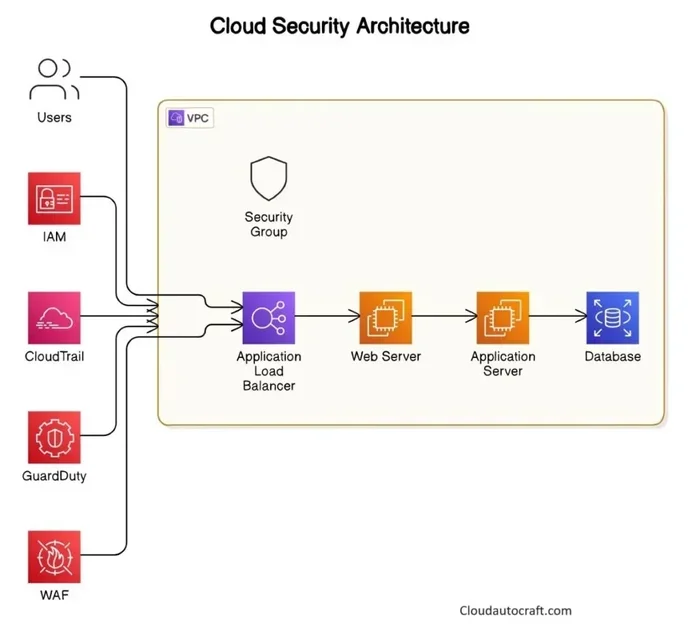
An Application Load Balancer operates at Layer 7 of the OSI model, which is the application layer. It examines the content of each request and makes intelligent routing decisions. This is perfect for web applications that need content switching based on URL paths or domain names.
For example, you can route traffic to /api endpoints to one set of servers and traffic to /images to another set. This level of control helps optimize application performance across your infrastructure.
Network Load Balancer (Layer 4)
A Network Load Balancer works at Layer 4, the transport layer. It routes traffic based on IP address and port number. Unlike the application balancer, it does not inspect the content of the request.
Network load balancers excel at handling massive volumes of traffic with very low latency. They are ideal for TCP and UDP traffic, making them a popular choice for gaming servers, streaming services, and IoT applications.
Internal Load Balancer
An Internal Load Balancer distributes traffic within a private network. It is not exposed to the public internet. This type is useful for microservices architecture, where different components of your application communicate with each other behind the scenes.
Internal balancers help maintain server redundancy and efficient traffic distribution without exposing services to external threats.
Global Load Balancer
A Global Load Balancer routes traffic across multiple geographic regions. If you have servers in the US, Europe, and Asia, a global balancer directs users to the nearest region. This dramatically reduces latency and improves the user experience worldwide.
Global load balancing also provides geographic failover. If an entire region goes down, traffic is rerouted to the next available region automatically.
Benefits of Load Balancing in Cloud Computing
The advantages of implementing load balancing in cloud computing go far beyond simple traffic distribution. Let us explore the key benefits in detail.
Improved Uptime and Reliability
Uptime is the holy grail of web hosting. Users expect websites to be available 24/7. A load balancer ensures that even if one or more servers go down, your application stays online. The failover mechanism kicks in instantly, and users rarely notice any disruption.
Better Scalability
Cloud environments thrive on horizontal scaling, which means adding more servers to handle increased demand. A load balancer makes horizontal scaling seamless. When you add a new server to the pool, the balancer starts sending traffic to it right away.
This is different from vertical scaling, which means upgrading a single server’s hardware. Vertical scaling has limits, but horizontal scaling with a load balancer can grow almost endlessly.
Reduced Latency
Latency is the time it takes for a request to travel from the user to the server and back. Load balancers reduce latency by directing traffic to the closest or least busy server. Users experience faster page loads and smoother interactions.
Enhanced Security
Many modern load balancers include built-in security features. SSL termination handles encryption and decryption at the balancer level, freeing up servers to focus on processing requests. Load balancers also help absorb and mitigate DDoS attacks by distributing malicious traffic across multiple servers.
Cost Efficiency
By distributing traffic efficiently, load balancers help you make the most of your existing infrastructure. You avoid over-provisioning servers and only pay for what you need. Combined with auto scaling, load balancing keeps costs optimized while maintaining performance.
Choosing the Right Load Balancing Strategy
Selecting the right load distribution algorithm is just as important as choosing the right type of load balancer. Different algorithms suit different workloads. Here are the most common ones used in cloud environments.
Round Robin
The round robin algorithm distributes traffic sequentially. The first request goes to Server A, the second to Server B, the third to Server C, and then it starts over. This method is simple and works well when all servers have similar capacity.
However, round robin does not account for server load. If Server A is already at 90% capacity but Server C is idle, round robin would still send the next request to Server A. This can create bottlenecks.
Least Connections
The least connections algorithm sends traffic to the server with the fewest active connections. This is more intelligent than round robin because it considers the real-time load on each server.
This algorithm works best when servers handle varying amounts of traffic or when requests have different processing times. For example, a video upload request takes much longer than a simple page view. Least connections ensures the busier server does not get overloaded.
IP Hash
IP hash uses the client’s IP address to determine which server receives the request. A mathematical function converts the IP address into a hash value, which maps to a specific server. This method provides excellent session persistence without needing sticky session configuration.
IP hash is commonly used in caching scenarios and when consistent user-server mapping is important for application performance.
Weighted Algorithms
Weighted round robin and weighted least connections assign different weights to servers based on their capacity. A more powerful server gets a higher weight and receives more traffic. This approach is ideal for heterogeneous environments where servers have different hardware specifications.
Common Mistakes and How to Avoid Them
Even experienced engineers make mistakes when setting up load balancing. Here are some common pitfalls and how you can avoid them.
Skipping Health Checks
Some teams set up a load balancer and forget to configure proper health checks. Without health checks, the balancer cannot detect when a server goes down. This leads to users hitting dead servers and experiencing errors.
Always configure health checks that match your application’s actual behavior. Use endpoint-specific checks that verify not just that the server is running, but that your application is functioning correctly.
Ignoring Session Persistence
If your application relies on in-memory session data, ignoring session persistence can cause serious issues. Users may lose their login state, shopping cart contents, or form data mid-session.
Evaluate your application’s session handling requirements early. Configure sticky sessions or use a shared session store like Redis to avoid this problem entirely.
Overlooking SSL/TLS Configuration
Improper SSL configuration is a common load balancing mistake. If you terminate SSL at the load balancer but do not configure the backend communication correctly, you may create security gaps.
Ensure that traffic between the load balancer and backend servers is also encrypted, especially in compliance-sensitive industries like healthcare and finance.
Not Planning for Auto Scaling
Load balancing and auto scaling go hand in hand. If you set up a load balancer but do not configure auto scaling policies, you miss out on one of the biggest benefits of cloud computing.
Configure your auto scaling group to add or remove servers based on metrics like CPU usage, memory consumption, or request count. The load balancer will automatically include new instances and remove terminated ones.
Load Balancing and Auto Scaling: A Perfect Pair
Auto scaling and load balancing are two sides of the same coin. Auto scaling adjusts the number of servers based on demand, while the load balancer distributes traffic across all available servers.
Together, they create a self-healing, scalable infrastructure. When traffic spikes, auto scaling launches new servers. The load balancer detects these new servers through health checks and starts routing traffic to them. When traffic drops, auto scaling removes excess servers, saving you money.
This combination is at the heart of modern cloud architecture. It allows applications to handle unpredictable traffic patterns without manual intervention. Companies like Netflix, Airbnb, and Spotify rely on this approach to serve millions of users simultaneously.
Expert Tips for Optimizing Load Balancing
Expert Insight: “The best load balancing setup is one you monitor constantly. Set up alerts for unusual traffic patterns, server failures, and response time spikes. A load balancer is only as good as the visibility you have into its performance.”
Here are some practical tips to get the most out of your load balancing setup:
- Monitor response times: Track how long each server takes to respond. If one server is consistently slower, investigate the cause.
- Use geographic routing: For global audiences, use a global load balancer to route users to the nearest region.
- Test failover regularly: Simulate server failures to ensure your balancer redirects traffic correctly.
- Keep configurations version controlled: Store your load balancer settings in code. This makes it easy to roll back changes and audit configurations.
- Right-size your servers: Choose server instances that match your workload requirements. Over-provisioning wastes money; under-provisioning hurts performance.
Quick Tip: Start with a simple round robin or least connections algorithm. As your application grows and your traffic patterns become more complex, you can switch to more advanced algorithms. Do not over-engineer your setup from day one.
Conclusion
Load balancing in cloud computing is a foundational technology that keeps modern applications fast, reliable, and scalable. From distributing traffic intelligently to enabling seamless failover and supporting auto scaling, load balancers play a vital role in any cloud architecture.
By understanding the different types of load balancers, choosing the right distribution algorithm, and avoiding common mistakes, you can build an infrastructure that delivers an excellent user experience. Whether you are running a small web app or a large enterprise platform, the right load balancing strategy makes all the difference.
Start by evaluating your current setup. Identify bottlenecks, configure health checks, and explore the load balancing options available on your cloud platform. With the right approach, you will enjoy better uptime, faster performance, and a more resilient application.
Remember, load balancing in cloud computing is not a one-time setup. It is an ongoing process of monitoring, tuning, and optimizing. Keep learning, keep testing, and keep improving. Your users will thank you for it.
Frequently Asked Questions
What is the main purpose of load balancing in cloud computing?
The main purpose of load balancing in cloud computing is to distribute incoming network traffic across multiple servers. This prevents any single server from becoming overloaded, which improves application performance, uptime, and reliability for end users.
What is the difference between Layer 4 and Layer 7 load balancing?
Layer 4 load balancing operates at the transport layer and routes traffic based on IP address and port number. Layer 7 load balancing operates at the application layer and can inspect the content of requests, allowing for intelligent routing based on URL paths, headers, and cookies.
Can load balancing improve website speed?
Yes, absolutely. Load balancing improves website speed by directing traffic to the least busy server and reducing response times. It also supports geographic routing, which sends users to the nearest server, further reducing latency and improving the overall user experience.
What is session persistence in load balancing?
Session persistence, also known as sticky sessions, ensures that all requests from a specific user are directed to the same server during their session. This is important for applications that store temporary user data on the server, such as shopping carts or login sessions.
How does auto scaling work with load balancing?
Auto scaling and load balancing work together to create a dynamic infrastructure. When traffic increases, auto scaling launches new servers. The load balancer detects these servers and starts routing traffic to them. When traffic decreases, auto scaling removes excess servers, keeping costs optimized.
Which cloud providers offer load balancing services?
All major cloud providers offer load balancing services. Amazon Web Services provides the Application Load Balancer and Network Load Balancer. Google Cloud offers Cloud Load Balancing. Microsoft Azure provides Azure Load Balancer and Application Gateway. Each platform has its own strengths and pricing models.