Cloud Based Project Management Tools for Better Teams
Cloud based project management tools have transformed the way teams plan, track, and deliver work. These platforms bring team collaboration, task management, and workflow automation into one place, no matter where your team is located. Whether you manage a small group or a large organization, the right cloud based project management software can significantly improve team productivity and project organization. This guide covers everything you need to know to choose and use these tools effectively.
Teams today work across cities, countries, and even continents. Keeping everyone on the same page can feel impossible. That is where cloud based project management comes in. These tools give teams a shared space to plan, track, and complete work together. They replace scattered emails and messy spreadsheets with one organized platform.
The shift to cloud based project management software has been massive. More than 70 percent of teams now use some form of online collaboration tool. This trend is not slowing down. Companies of all sizes are realizing that cloud based tools help them move faster, communicate better, and deliver projects on time. If you are still relying on old-school methods, it is time to explore what the cloud can do for your team.
Key Takeaways
- Centralized Work: Cloud based project management tools keep all tasks, files, and communication in one place, making project organization effortless.
- Remote-Friendly: These platforms support remote work and team collaboration across time zones and locations.
- Key Features Matter: Look for task management, project tracking, resource management, and workflow automation when choosing a tool.
- Top Options Exist: Leading platforms like Asana, Monday.com, and Trello offer different strengths for various team needs.
- Right Fit Is Critical: Consider team size, budget, and project complexity when selecting cloud based project management software.
- Best Practices Help: Setting clear workflows and training your team ensures you get the most value from your chosen tool.
📑 Table of Contents
- What Is Cloud Based Project Management?
- Why Cloud Based Project Management Tools Matter for Teams
- Top Features to Look For in Cloud Project Management Software
- Popular Cloud Based Project Management Tools Compared
- How to Choose the Right Cloud Based Project Management Tool
- Tips for Getting the Most Out of Your Cloud Project Management Setup
- Conclusion
What Is Cloud Based Project Management?
Cloud based project management refers to software hosted on the internet rather than installed on a single computer. Teams access these platforms through a web browser or mobile app. Everything lives online, which means updates happen in real time. There is no need to sync files or send versions back and forth.
Think of it like Google Docs for project work. When one person updates a task, everyone sees the change instantly. This kind of project tracking keeps teams aligned and reduces confusion. Cloud based project management covers a wide range of features, from simple to-do lists to complex workflow automation systems.
These platforms support project planning, task delegation, team communication, and resource management all in one place. Whether you are running an agile project management sprint or planning a months-long campaign, there is a cloud tool that fits your style.
How It Differs from Traditional Project Management
Traditional project management often relies on desktop software or even paper-based systems. Files get stored locally, and sharing them requires email attachments. This creates bottlenecks and version control headaches. Cloud based project management solves these problems by keeping everything online and accessible from any device.
Another big difference is real-time collaboration. With traditional tools, team members often work in silos. Cloud platforms bring everyone together in a shared workspace. This boost in team collaboration directly improves team productivity and team efficiency.
Why Cloud Based Project Management Tools Matter for Teams
The modern workplace is more distributed than ever. Remote work has become the norm for many companies. Teams need tools that keep them connected no matter where they are. Cloud based project management tools fill this gap perfectly.
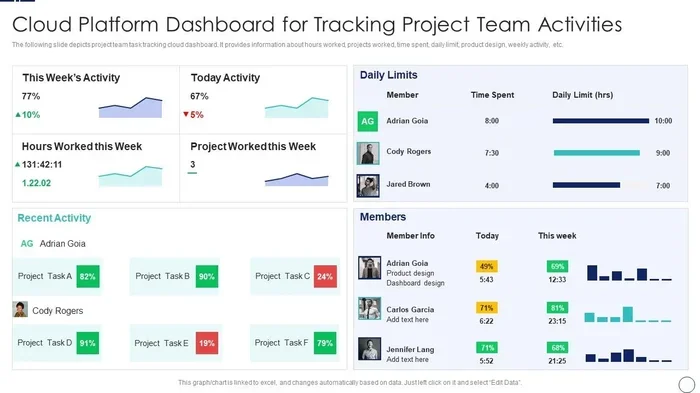
These platforms make it easy to see who is doing what and when things are due. They provide a project dashboard that gives everyone a bird eye view of progress. This visibility helps managers spot problems early and adjust plans quickly.
Beyond visibility, cloud tools improve work management by automating repetitive tasks. For example, you can set up rules that automatically assign tasks when a project stage changes. This kind of workflow automation saves hours of manual work each week.
Benefits for Remote and Hybrid Teams
Remote teams face unique challenges. Time zone differences, lack of face to face interaction, and communication gaps can slow progress. Cloud based project management tools address these issues head-on.
- Asynchronous Collaboration: Team members can leave comments, update tasks, and share files at any time. Everyone stays in the loop without needing to be online simultaneously.
- Centralized Communication: Instead of switching between email, chat, and spreadsheets, your team has one place for all project discussions.
- File Sharing and Storage: Documents, images, and attachments live alongside the tasks they relate to. No more searching through cluttered inboxes.
- Mobile Access: Team members can check in on projects from their phones while on the go.
Impact on Team Productivity
Research shows that teams using cloud based project management tools report higher satisfaction and better output. When people can see their tasks clearly and track progress, they stay more engaged. Project scheduling becomes simpler when everyone has access to the same timeline and dependencies.
These tools also reduce the mental load of keeping track of everything. Instead of holding multiple things in your head, you can trust the system to remind you and your team of upcoming deadlines. This frees up mental energy for actual creative and strategic work.
Top Features to Look For in Cloud Project Management Software
Not all cloud based project management tools are created equal. Different teams need different features. However, some core capabilities stand out across the best platforms. Here is what you should prioritize when evaluating options.
Task Management and Assignment
The foundation of any good project management software is solid task management. You should be able to create tasks, assign them to team members, set deadlines, and track status. Look for tools that let you break large projects into smaller, manageable action items. Task delegation becomes much easier when the platform is intuitive and clear.
Project Tracking and Dashboards
A good project dashboard gives you instant insight into project health. You should see progress at a glance, identify bottlenecks, and understand workload distribution. Project tracking features like Gantt charts, Kanban boards, and timeline views help teams visualize their work in different ways.
Collaboration and Communication
Team communication is vital for project success. Look for tools with built-in commenting, @mentions, and notification systems. Some platforms integrate with popular communication apps like Slack or Microsoft Teams. This keeps all team collaboration in one ecosystem rather than scattered across multiple apps.
Workflow Automation
Workflow automation is a game changer for work management. The best cloud based project management tools let you create rules and triggers that handle repetitive tasks automatically. For example, when a task moves to “done,” it can automatically notify the next person in the pipeline. This reduces manual follow ups and keeps projects moving smoothly.
Resource Management
Resource management helps you understand who is available and who is overloaded. Good tools show team capacity so you can assign work more effectively. This prevents burnout and ensures projects stay on track. Project organization improves when you can see the full picture of your team workload.
Popular Cloud Based Project Management Tools Compared
The market is full of options, which can make choosing difficult. Here is a look at some of the most popular cloud based project management platforms and what they do best.
| Tool | Best For | Key Strength | Starting Price |
|---|---|---|---|
| Asana | Task management and cross-team projects | Clean interface and easy task delegation | $10.99/user/month |
| Monday.com | Workflow automation and visual tracking | Highly customizable boards and automations | $9/seat/month |
| Trello | Simple project organization and Kanban fans | Drag and drop simplicity | Free plan available |
| ClickUp | All-in-one work management | Feature rich with docs, goals, and whiteboards | $7/member/month |
| Basecamp | Small teams and client projects | Message boards and simple project planning | $15/user/month |
| Wrike | Large teams and enterprise resource management | Advanced reporting and proofing tools | $9.80/user/month |
Each of these cloud based tools brings something unique. Asana excels at making task management feel effortless. Monday.com shines with its visual approach to workflow automation. Trello is perfect for teams that want simple, flexible project organization without a steep learning curve.
ClickUp packs a ton of features into one platform, making it a strong choice for teams that want an all-in-one solution. Basecamp keeps things straightforward, which works well for smaller teams or agencies managing client work. Wrike offers deeper analytics and reporting, which larger organizations often need.
Choosing the Right Tool for Your Team Size
Team size matters a lot when picking cloud based project management software. Small teams of 5 to 10 people often do well with free or low-cost tools like Trello. These platforms are easy to set up and do not require much training.
Mid size teams of 10 to 50 people benefit from tools like Asana or Monday.com. These platforms offer more advanced features like project tracking, custom workflows, and integrations with other apps. Large teams and enterprises often need Wrike or ClickUp for their robust resource management and reporting capabilities.
How to Choose the Right Cloud Based Project Management Tool
Choosing the right cloud based project management tool is not just about picking the most popular one. It is about finding the best fit for your team and your projects. Here is a practical approach to making this decision.
Step 1: Define Your Team Needs
Start by asking your team what they need most. Do they struggle with task management? Are they missing team communication features? Do they need better project scheduling tools? Write down the top 3 to 5 pain points you want to solve. This list becomes your evaluation criteria.
Step 2: Consider Your Budget
Budget plays a big role in cloud based project management tool selection. Many platforms offer free tiers that work well for small teams. As you scale, paid plans unlock more features. Calculate your per user cost and compare it against the value you expect to gain. Remember that the cheapest option is not always the best. Focus on the features that matter most to your team.
Step 3: Test Before You Commit
Most cloud based tools offer free trials or free plans. Use these to test the platform with your real team. Set up a small project and see how the tool handles it. Pay attention to ease of use, mobile experience, and how quickly your team adopts the new system. Project organization works best when everyone actually uses the tool consistently.
Step 4: Check Integrations
Your cloud based project management tool should play nicely with your existing tech stack. Check for integrations with tools you already use for communication, file storage, and time tracking. Popular integrations include Slack, Google Drive, Dropbox, and Zoom. These connections make your work management ecosystem more seamless.
Tips for Getting the Most Out of Your Cloud Project Management Setup
Choosing the right tool is only half the battle. How you use it determines the real impact on your team. Here are practical tips to maximize the value of your cloud based project management investment.
Set Clear Workflows from Day One
Do not just create tasks and hope for the best. Define clear workflows for how work moves through your team. Map out each stage of your project planning and project scheduling process. When everyone understands the workflow, task delegation becomes smoother and team efficiency improves.
Train Your Team Properly
Even the best cloud based tools will fail if people do not know how to use them. Invest time in onboarding sessions. Create short video tutorials or written guides for common tasks. Encourage team members to explore features at their own pace. Team productivity increases when everyone feels comfortable with the platform.
Keep Your Boards Clean
It is easy for project dashboards to become cluttered over time. Schedule regular cleanup sessions where your team archives completed tasks and removes outdated information. A clean workspace makes project tracking easier and keeps everyone focused on what matters now.
Use Reporting to Drive Improvement
Most cloud based project management platforms offer reporting features. Use these to track team productivity and identify areas for improvement. Look at metrics like task completion rates, average time to finish tasks, and workload distribution. These insights help you refine your processes over time.
Encourage Consistent Use
The biggest mistake teams make is adopting a tool but not using it consistently. Make cloud based project management part of your daily routine. Encourage team members to update task statuses, log hours, and share progress regularly. Consistency is what turns a tool into a real advantage for team collaboration and project organization.
Common Mistakes to Avoid
- Overcomplicating your setup: Start simple and add complexity only when your team is ready. Too many custom fields and workflows can overwhelm people.
- Ignoring mobile access: Many team members work from phones or tablets. Make sure your chosen tool has a solid mobile app.
- Skipping training: Do not assume everyone will figure it out on their own. Proper training reduces frustration and boosts adoption.
- Choosing features over fit: A tool with 100 features is useless if it does not match your team workflow. Focus on fit first, features second.
Conclusion
Cloud based project management has become essential for modern teams. These tools bring team collaboration, task management, and workflow automation into a single, accessible platform. Whether your team works in an office, remotely, or in a hybrid setup, the right cloud tool can transform how you plan and deliver work.
The key is to choose a platform that fits your team size, budget, and project needs. Take time to define your requirements, test options with free trials, and invest in proper training. When done right, cloud based project management drives better team productivity, cleaner project organization, and stronger results across the board.
Start small, stay consistent, and let the cloud do the heavy lifting. Your team will thank you for it.
Frequently Asked Questions
What is cloud based project management?
Cloud based project management refers to software hosted online that helps teams plan, track, and manage projects from any device with internet access. Unlike traditional desktop tools, these platforms allow real-time collaboration, automatic updates, and centralized file sharing. Popular examples include Asana, Monday.com, and Trello.
Why should small teams use cloud based project management tools?
Small teams benefit from cloud based project management tools because they eliminate the need for expensive infrastructure and complex setup. Most platforms offer free or low-cost plans that include task management, team communication, and project tracking features. These tools help small teams stay organized, collaborate effectively, and scale as they grow.
Can cloud based project management tools support remote teams?
Absolutely. Cloud based project management tools are built for distributed teams. They provide features like asynchronous updates, mobile access, and real-time project dashboards that keep remote team members connected. Workflow automation and shared workspaces make remote work feel seamless regardless of time zones or locations.
How do I choose the right cloud based project management tool?
Start by identifying your team’s biggest pain points and priorities. Consider factors like team size, budget, project complexity, and needed features such as resource management or workflow automation. Take advantage of free trials to test options with your actual team before committing to a paid plan.
Are cloud based project management tools secure?
Most reputable cloud based project management platforms invest heavily in security. They use encryption, two factor authentication, and regular security audits to protect your data. Always check the security certifications and compliance standards of any tool before sharing sensitive project information.
What is the difference between cloud based and on premise project management software?
Cloud based project management tools are hosted online and accessed through a browser, while on premise software is installed on local servers. Cloud tools offer easier setup, automatic updates, and better remote access. On premise solutions give more control over data but require higher IT maintenance and upfront costs.