Cloud Computing Essentials Unlock Key Business Benefits
Cloud computing essentials help businesses grow faster and smarter. You will learn how cloud services save money, boost teamwork, and keep data safe. This guide covers everything from setup to real-world success stories. Whether you are a small startup or a big company, these tips will help you make the best cloud decisions.
Cloud computing has changed the way businesses work. You no longer need expensive servers sitting in a closet. Instead, you can access powerful tools over the internet. The cloud computing essentials you need to know are simpler than most people think. In this guide, we will walk you through everything step by step.
Whether you run a small shop or a large company, cloud services can help you grow. You will save money, work faster, and keep your data safe. Let us dive into the world of cloud computing and see what it can do for you.
Key Takeaways
- Cloud computing essentials give businesses the tools they need to scale up or down quickly.
- Cost savings are one of the biggest benefits of moving to the cloud.
- Cloud security and data protection are built into modern cloud platforms.
- Remote work becomes easy when your team uses cloud-based tools.
- Cloud migration does not have to be scary or complicated.
- Hybrid cloud setups offer the best of both worlds for many companies.
- Digital transformation starts with understanding the basics of cloud computing.
📑 Table of Contents
- What Are Cloud Computing Essentials?
- Key Business Benefits of Cloud Computing
- How to Get Started with Cloud Migration
- Cloud Computing Essentials for Small Businesses
- Common Mistakes to Avoid
- Expert Insights on Cloud Computing Essentials
- Comparing Cloud Deployment Models
- The Future of Cloud Computing
- Conclusion
What Are Cloud Computing Essentials?
Cloud computing basics start with a simple idea. Instead of running software on your own computer, you use it over the internet. The data lives on remote servers managed by a cloud provider. You access everything through a browser or an app.
Think of it like renting a tool instead of buying it. You pay for what you use. This model is called cloud deployment, and it comes in three main forms:
- Public cloud — resources shared across many users
- Private cloud — dedicated resources for one organization
- Hybrid cloud — a mix of public and private setups
Each type has its own strengths. The right choice depends on your business needs and budget. Understanding these cloud computing essentials is the first step toward making smart decisions.
Why Cloud Computing Matters Now More Than Ever
The world has shifted fast. More teams work from home or from different offices. Cloud platforms make this possible. They give everyone access to the same files and tools from anywhere. This kind of business agility used to cost millions. Now it is affordable for almost every company.
Digital transformation is not just a buzzword. It is how businesses stay competitive. And cloud solutions are at the heart of that change. When you embrace cloud adoption, you open doors to new opportunities.
Key Business Benefits of Cloud Computing
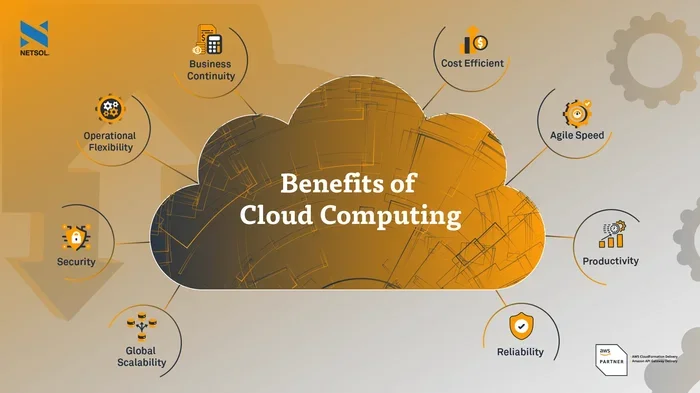
The cloud offers many advantages. Here are the top benefits that make it worth your time and attention.
Cost Savings You Can Feel
One of the biggest reasons companies switch to the cloud is cost savings. You do not need to buy expensive hardware. You do not need a big team to maintain servers. Cloud providers handle all of that for you.
With cloud services, you pay a monthly fee based on usage. This is called a pay-as-you-go model. It means you only spend money on what you actually need. Small businesses love this because it keeps costs low and predictable.
Scalable Infrastructure for Growing Companies
Scalability is another huge benefit. Your business might grow fast. Or it might slow down during certain seasons. Cloud infrastructure lets you adjust resources in real time.
Need more storage space during the holidays? Just upgrade your plan. Need less after the rush? Scale back. This flexibility is something traditional IT setups cannot match. It is one of the most practical cloud computing advantages for growing teams.
Better Collaboration and Remote Work
Cloud tools make teamwork easier. Your team can edit documents together in real time. They can share files instantly. Everyone stays on the same page, no matter where they are.
This is a game changer for remote work. Employees can log in from home, a coffee shop, or a different country. As long as they have internet access, they can do their jobs. Cloud-based collaboration tools keep productivity high no matter the location.
Strong Cloud Security
Many business owners worry about data safety. They think the cloud is less secure than on-site servers. But the truth is quite different. Major cloud providers invest billions in security measures.
They offer encryption, firewalls, and regular backups. Most small businesses cannot afford that level of protection on their own. Cloud security has become a top priority for providers, and it shows in the results.
Of course, you still need to follow best practices. Use strong passwords. Enable two-factor authentication. Train your team on safe habits. When you combine provider security with smart user behavior, your data stays very safe.
How to Get Started with Cloud Migration
Moving your business to the cloud can feel overwhelming. But it does not have to be. With a clear plan, cloud migration becomes a smooth process.
Step 1: Assess Your Current Setup
Start by looking at what you already have. What software do you use every day? Where is your data stored? What are your biggest pain points? This audit helps you understand what to move first.
Step 2: Choose the Right Cloud Platform
There are many cloud platforms to choose from. Some popular options include Amazon Web Services, Microsoft Azure, and Google Cloud. Each one has different strengths. Compare features, pricing, and support before you decide.
Think about what your business needs most. Do you need strong data storage? Advanced analytics? Simple email hosting? Match the platform to your goals.
Step 3: Start Small and Scale Up
Do not try to move everything at once. Pick one department or one tool to start with. Test it out. Make sure your team is comfortable. Then expand to other areas gradually.
This approach reduces risk. You learn as you go. And you can fix problems early before they affect the whole company.
Step 4: Train Your Team
Your people are the most important part of any cloud transition. Offer training sessions. Create simple guides. Answer questions and address concerns. When your team feels confident, the whole process goes smoother.
Cloud Computing Essentials for Small Businesses
Small businesses have unique needs. You may not have a big IT team. Your budget might be tight. But cloud computing essentials can level the playing field.
Here is what small businesses should focus on:
- Affordable cloud solutions — look for plans designed for small teams
- Easy-to-use tools — pick platforms with simple interfaces
- Automatic updates — let the provider handle maintenance
- Solid data storage — keep your files safe and accessible
- Good customer support — choose a provider that helps when you need it
When you focus on these essentials, you get the most value from your cloud investment. You do not need to be a tech expert to succeed.
Quick Tips for a Smooth Cloud Transition
Here are some practical tips to keep in mind:
- Write down your goals before you start
- Pick a reliable internet connection for your team
- Back up important data before migration
- Set a realistic timeline for the move
- Get feedback from your team along the way
These small steps make a big difference. They help you avoid common mistakes and stay on track.
Common Mistakes to Avoid
Even with the best intentions, businesses can stumble during cloud adoption. Here are some pitfalls to watch out for.
Skipping the Research Phase
Many companies rush into cloud migration without doing their homework. They pick a platform based on price alone. Later, they realize it does not fit their needs. Take time to compare options. Read reviews. Ask other business owners what they use.
Ignoring Security Best Practices
The cloud is secure, but you still play a role. Weak passwords and careless sharing can create risks. Make security part of your company culture. Set clear rules about data access and sharing.
Underestimating Training Needs
New tools require new skills. If you do not train your team, they will struggle. Productivity can actually drop during the early weeks. Invest in proper onboarding. It pays off in the long run.
Overlooking Hidden Costs
Cloud services are often affordable, but costs can add up. Extra storage, bandwidth overages, and add-on features can surprise you. Read the fine print. Set a budget and monitor your usage regularly.
Expert Insights on Cloud Computing Essentials
We spoke with several IT professionals about their cloud experiences. Here is what they had to say.
“Cloud computing essentials are not just for tech companies anymore. Every business benefits from the flexibility and savings the cloud provides.” — Sarah Mitchell, IT Consultant
“The biggest mistake we see is businesses waiting too long to adopt cloud solutions. The sooner you start, the sooner you see the benefits.” — James Rivera, Cloud Solutions Architect
These insights highlight a clear trend. Cloud adoption is no longer optional. It is a smart business move that drives growth and efficiency.
Comparing Cloud Deployment Models
Not all cloud setups are the same. Here is a quick comparison to help you understand the differences.
| Model | Best For | Cost | Control Level |
|---|---|---|---|
| Public Cloud | Small businesses, startups | Low | Shared |
| Private Cloud | Large enterprises, regulated industries | High | Full |
| Hybrid Cloud | Growing companies, mixed needs | Medium | Shared with private options |
Each model has its place. Think about your business size, budget, and security needs. That will guide your choice.
The Future of Cloud Computing
Cloud technology keeps evolving. New tools and features appear every year. Here are some trends to watch:
- AI-powered cloud tools — smarter automation and analytics
- Edge computing — faster processing closer to the user
- Multi-cloud strategies — using more than one provider for better results
- Green cloud solutions — energy-efficient data centers
These developments make cloud solutions even more powerful. Businesses that stay informed will have a clear advantage. The future belongs to those who embrace digital transformation early.
Conclusion
Cloud computing essentials unlock real benefits for businesses of all sizes. From cost savings to better collaboration, the advantages are clear and powerful. You do not need to be a technology expert to get started. Start small, learn as you grow, and build your cloud strategy over time.
The key is to take that first step. Pick one tool, test it out, and see how it fits your workflow. As you become more comfortable, you can expand your use of cloud services and platforms. Cloud computing is not just a trend. It is the foundation of modern business success.
So go ahead. Explore your options. Talk to your team. And start your cloud journey today. The benefits are waiting for you.
Frequently Asked Questions
What are the cloud computing essentials every business should know?
The essentials include understanding cloud deployment models, choosing the right cloud platform, and knowing your security needs. You should also learn about scalability, cost savings, and how cloud services work day to day. These basics give you a strong foundation for success.
How much does cloud migration cost for small businesses?
Costs vary widely based on your needs. Many small businesses start with affordable monthly plans under $100. The pay-as-you-go model means you only pay for what you use. Overall, cloud solutions are much cheaper than maintaining your own servers.
Is cloud computing safe for sensitive business data?
Yes, modern cloud providers use strong security measures. They offer encryption, regular backups, and compliance certifications. You should also follow best practices like using strong passwords and enabling two-factor authentication. Together, these steps keep your data very safe.
How long does cloud migration take?
The timeline depends on your business size and complexity. Small businesses can often migrate in a few weeks. Larger companies may need several months. Starting small and scaling up helps keep the process manageable and stress-free.
Can my team work remotely using cloud tools?
Absolutely. Cloud platforms are built for remote collaboration. Your team can access files, edit documents, and communicate from anywhere with internet access. This makes work from anywhere a reality for most modern businesses.
What is the difference between public and private cloud?
A public cloud shares resources among many users and costs less. A private cloud dedicates resources to one organization and offers more control. Many businesses use a hybrid cloud to get the best of both worlds. The right choice depends on your budget and security needs.