Cloud Computing Risk Assessment Matrix Best Practices
A cloud computing risk assessment matrix helps organizations spot, rank, and tackle risks before they cause real damage. It gives teams a clear visual way to map out threats, measure their impact, and decide which ones need action first. This guide walks you through proven best practices, real examples, and actionable steps you can start using today. Whether you are new to cloud security or looking to sharpen your existing process, you will find practical advice here.
Running a business in the cloud is exciting. You get flexibility, scalability, and cost savings. But with those benefits come real risks. Data breaches, service outages, and compliance failures can all hurt your bottom line. That is exactly why a cloud computing risk assessment matrix matters so much.
A risk assessment matrix is a simple but powerful tool. It helps you list every possible risk, rate how likely it is to happen, and score how bad the impact would be. Think of it as a map that shows you where the dangers are hiding in your cloud environment. With this map, you can make smart choices about what to fix first.
In this article, we will walk you through the best practices for building and using a cloud computing risk assessment matrix. You will learn what goes into a solid matrix, how to avoid common pitfalls, and what experts recommend for long-term success. Let us dive in.
Key Takeaways
- Clear risk visibility: A cloud computing risk assessment matrix gives you a bird’s-eye view of every threat and its potential impact.
- Better decision-making: Using a structured matrix helps leaders allocate resources to the most urgent risks first.
- Regulatory compliance: A solid matrix supports meeting cloud compliance requirements like GDPR, HIPAA, and SOC 2.
- Proactive risk mitigation: Building and maintaining a matrix keeps your organization ahead of emerging cloud security risks.
- Vendor trust: Assessing third-party risks through a matrix strengthens your vendor risk management strategy.
- Scalable framework: A well-designed matrix grows with your business and adapts to new cloud environments.
📑 Table of Contents
- What Is a Cloud Computing Risk Assessment Matrix
- Why Every Organization Needs a Risk Matrix
- Key Components of a Risk Assessment Matrix
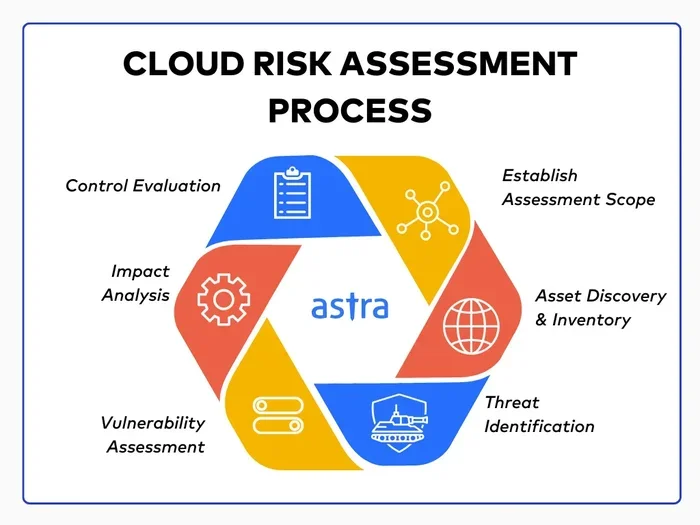
- Step-by-Step Guide to Building Your Matrix
- Common Cloud Computing Risks to Include
- Best Practices for Maintaining Your Risk Matrix
- Comparing Risk Matrix Approaches
- Conclusion
What Is a Cloud Computing Risk Assessment Matrix
A cloud computing risk assessment matrix is a structured framework used to identify and evaluate risks tied to cloud services. It typically combines two dimensions: the likelihood of a risk event and the severity of its consequences. Together, these dimensions create a grid that makes it easy to prioritize risks.
How the Matrix Works
Imagine a simple table. One axis lists the probability of a risk occurring, from rare to almost certain. The other axis lists the impact, from negligible to catastrophic. Each risk gets a score based on where it falls on this grid. The result is a clear picture of which risks demand immediate attention and which can wait.
For example, a data breach in a public cloud might score high on both probability and impact. That means it sits in the red zone of your matrix. A minor software glitch that causes brief downtime might score low on both. That one lands in the green zone. This visual approach makes risk assessment fast and intuitive.
Why It Matters for Cloud Environments
Cloud environments are dynamic. Resources spin up and down. New services get added regularly. This fluidity creates a shifting cloud threat landscape that traditional security tools often struggle to keep up with. A risk assessment matrix gives you a living document that evolves alongside your infrastructure.
It also helps you communicate risk to stakeholders who may not be technical experts. A color-coded grid speaks a universal language. Executives, auditors, and team members can all look at the same matrix and understand the big picture.
Why Every Organization Needs a Risk Matrix
Some business leaders skip risk assessment because it feels like extra work. But the cost of skipping it can be enormous. A single data breach averages millions of dollars in losses. Beyond money, breaches damage trust and reputation. A cloud computing risk assessment matrix is your first line of defense.
Building a Strong Risk Mitigation Strategy
Without a matrix, your risk mitigation efforts are scattered. You might fix one problem while ignoring another that is equally dangerous. A matrix forces you to be systematic. It ensures that every identified risk gets a score, a owner, and a plan.
Here are key benefits of using a risk assessment matrix in your organization:
- Prioritization: Focus resources on the risks that matter most.
- Consistency: Apply the same evaluation criteria across all cloud services.
- Documentation: Keep a record that auditors and regulators can review.
- Proactive defense: Spot risks before they turn into incidents.
- Team alignment: Everyone understands the current risk posture.
Expert Insight
According to industry experts, organizations that use a formal risk assessment framework reduce their incident response time by up to 40 percent. The matrix acts as a roadmap that guides your security team to the right threats at the right time.
Key Components of a Risk Assessment Matrix
A strong cloud computing risk assessment matrix includes several essential parts. Leaving any of them out weakens the whole system. Let us break down what your matrix needs to contain.
Risk Identification
Start by listing every possible risk in your cloud environment. These risks can come from many sources. Think about cloud computing vulnerabilities like misconfigured storage buckets, weak access controls, or outdated encryption. Also consider external factors such as vendor outages or regulatory changes.
A useful trick is to organize risks into categories:
- Security risks: Data breaches, unauthorized access, malware.
- Operational risks: Service downtime, performance degradation.
- Compliance risks: Failing to meet GDPR, HIPAA, or SOC 2 requirements.
- Financial risks: Unexpected cost overruns, vendor lock-in.
- Reputation risks: Loss of customer trust due to incidents.
Risk Scoring and Rating
Once you have your list, assign each risk a score. Most matrices use a scale of 1 to 5 for both probability and impact. Multiply the two numbers to get a risk score. A score of 25 means extreme danger. A score of 1 means very low concern.
Your risk severity rating should follow a consistent scale. Here is a simple breakdown:
- Critical (20-25): Immediate action required.
- High (12-19): Address within days.
- Medium (6-11): Plan remediation within weeks.
- Low (1-5): Monitor and review periodically.
Risk Ownership and Response Plans
Every risk in your matrix needs an owner. That person is responsible for tracking the risk and executing the response plan. Without clear ownership, risks slip through the cracks. Assign owners based on expertise and role in the team.
Each risk should also have a defined response strategy. Common strategies include:
- Avoid: Eliminate the risk by changing your approach.
- Mitigate: Reduce the probability or impact.
- Transfer: Shift the risk to a third party, such as an insurer.
- Accept: Acknowledge the risk and monitor it without action.
Step-by-Step Guide to Building Your Matrix
Building a cloud computing risk assessment matrix does not have to be overwhelming. Follow these steps to create a practical and effective matrix from scratch.
Step 1: Assemble Your Team
Gather people from IT, security, legal, finance, and operations. Different perspectives uncover risks that a single team might miss. Include anyone who touches your cloud services daily.
Step 2: Inventory Your Cloud Assets
List every cloud resource your organization uses. This includes virtual machines, databases, storage buckets, APIs, and third-party SaaS tools. A complete risk register starts with a full asset inventory.
Step 3: Identify Risks
Work through your asset list and identify risks for each item. Use the categories we discussed earlier. Ask questions like “What could go wrong here?” and “How would it affect our business?”
Step 4: Score Each Risk
Rate every risk on probability and impact using your agreed scale. Record the scores in your matrix. Double-check for consistency across the team to avoid bias.
Step 5: Create Response Plans
For every risk rated medium or higher, write a response plan. Define the actions, timeline, and person responsible. Store these plans where the team can access them easily.
Step 6: Review and Update Regularly
Cloud environments change constantly. New services, new threats, and new business needs all affect your risk profile. Schedule a review every quarter at minimum. Update scores, add new risks, and retire risks that are no longer relevant.
Quick Tips
- Use a shared spreadsheet or dedicated risk management tool so everyone can collaborate in real time.
- Keep your probability and impact scales simple. A 1-to-5 scale works best for most teams.
- Involve leadership early. Their buy-in makes it easier to fund risk mitigation actions.
- Automate data collection where possible. Tools that monitor cloud infrastructure risks can feed data directly into your matrix.
Common Cloud Computing Risks to Include
Not all risks are created equal. Some appear frequently in cloud environments and deserve special attention. Here are the most common ones to include in your cloud computing risk assessment matrix.
Data Breach Risk
A data breach remains the number one fear for organizations using the cloud. Sensitive customer data, intellectual property, and financial records are all potential targets. The data breach risk depends on your encryption practices, access controls, and monitoring capabilities.
Vendor Lock-In Risk
Relying heavily on one cloud provider creates lock-in risk. If the provider raises prices, changes terms, or suffers an outage, your business takes the hit. Evaluate this risk as part of your vendor risk management process.
Compliance and Regulatory Risk
Different industries face different compliance rules. Healthcare organizations must follow HIPAA. Financial institutions must meet PCI DSS. Global companies deal with GDPR. Failing to meet these requirements can result in heavy fines. Your matrix should include a compliance risk category.
Service Availability Risk
Even the largest cloud providers experience outages. When your critical services go down, your business loses revenue and customers. Assess the risk probability of downtime based on the provider’s uptime guarantees and your own redundancy plans.
Insider Threat Risk
Not all risks come from outside. Disgruntled employees, careless staff, or compromised credentials can cause serious damage. Include insider threats in your risk scoring methodology and ensure you have monitoring in place.
Best Practices for Maintaining Your Risk Matrix
Building the matrix is only half the battle. Keeping it accurate and useful over time requires discipline. Here are the best practices that separate effective programs from forgotten spreadsheets.
Keep It Simple and Focused
Do not try to track every conceivable risk. Focus on the risks that actually matter to your business. A cluttered matrix becomes noise rather than a useful tool. Start with the top 20 to 30 risks and expand as your program matures.
Use Consistent Scoring Criteria
Consistency is the backbone of a reliable matrix. If one team rates “high impact” differently than another, your scores become meaningless. Define clear criteria for each rating level and train everyone on them.
Integrate with Your Security Tools
Modern risk management benefits from automation. Connect your matrix to security information and event management tools. This way, real-time security incident response data can update your risk scores automatically.
Communicate Results Clearly
A matrix is useless if no one looks at it. Share the results in regular risk review meetings. Use dashboards and reports to make the data accessible to non-technical stakeholders. Transparency builds a culture of risk awareness.
Align with Your Cloud Service Agreement
Review your cloud service agreement regularly. Provider terms change, and new features may introduce risks you have not yet assessed. Aligning your matrix with your contract ensures you are covering all contractual risk areas.
Common Mistakes to Avoid
- Skipping the review cycle: A stale matrix gives false confidence. Update it at least every quarter.
- Ignoring low-probability risks: A rare risk with catastrophic impact still deserves attention.
- Over-relying on automation: Tools help, but human judgment is essential for nuanced evaluations.
- No executive sponsorship: Without leadership support, risk mitigation efforts stall.
Comparing Risk Matrix Approaches
Not all matrices look the same. Different organizations use different approaches depending on their size, industry, and cloud maturity. Here is a quick comparison of three common methods.
| Approach | Best For | Pros | Cons |
|---|---|---|---|
| Qualitative Matrix | Small to mid-size teams | Simple, fast, easy to understand | Subjective ratings may vary |
| Quantitative Matrix | Large enterprises with compliance needs | Data-driven, precise scoring | Requires significant data and expertise |
| Hybrid Matrix | Organizations transitioning to mature risk programs | Combines speed with accuracy | More complex to set up |
For most organizations starting out, a qualitative approach works best. You can always evolve toward a hybrid model as your risk assessment framework matures. The important thing is to start now rather than waiting for the perfect system.
Matching the Approach to Your Risk Tolerance Levels
Every organization has a different appetite for risk. A startup might accept higher risks to move faster. A hospital cannot afford any data exposure. Define your risk tolerance levels early and choose a matrix approach that fits your culture and regulatory environment.
Conclusion
A cloud computing risk assessment matrix is not just a compliance checkbox. It is a living tool that empowers your organization to navigate the cloud safely and confidently. By identifying risks, scoring them consistently, and assigning clear owners, you turn uncertainty into actionable insight.
Start simple. Build your matrix with the most critical risks first. Review it regularly. Involve your whole team. Over time, you will develop a risk-aware culture that protects your data, your customers, and your bottom line. The cloud offers incredible opportunities, and with the right risk mitigation strategies in place, you can enjoy those opportunities without unnecessary fear.
Take action today. Open a spreadsheet, gather your team, and start mapping your risks. The best time to assess your cloud computing risk assessment matrix is now. Every day without one is a day you are flying blind.
Frequently Asked Questions
What is a cloud computing risk assessment matrix and why do I need one?
A cloud computing risk assessment matrix is a tool that helps you identify, score, and prioritize risks in your cloud environment. You need one because it gives you a clear, visual way to decide which risks to address first and ensures nothing important falls through the cracks.
How often should I update my risk assessment matrix?
You should review and update your matrix at least every quarter. Cloud environments change quickly, and new risks emerge regularly. Frequent reviews keep your risk assessment framework accurate and useful for decision-making.
Can a small business benefit from a risk matrix?
Absolutely. Small businesses often face the same cloud risks as large enterprises but with fewer resources to absorb the damage. A simple risk assessment matrix helps small teams prioritize their limited security budget and focus on the most impactful risks.
What are the most common risks included in a cloud risk matrix?
The most common risks include data breaches, service outages, compliance failures, vendor lock-in, and insider threats. Each of these can be scored based on its risk probability and potential impact on your business operations.
Do I need special software to build a risk matrix?
No, you can start with a simple spreadsheet. However, as your risk mitigation strategies grow more complex, dedicated risk management tools can automate scoring, track changes, and generate reports for auditors and stakeholders.
How does a risk matrix help with compliance requirements?
A well-maintained matrix documents your risk evaluation process, which auditors and regulators love to see. It demonstrates that you have a systematic approach to managing cloud compliance requirements and are actively working to reduce exposure.