Top Benefits of Cloud Computing for Modern Businesses
The top benefits of cloud computing are transforming how businesses operate today. Companies using cloud services save money, scale faster, and work more flexibly. Cloud computing solutions enable teams to collaborate from anywhere and stay secure. This guide covers every major advantage and shows you how to get started. Read on to learn why cloud migration is a smart move for your business.
Businesses today move fast. They need tools that keep up. Cloud computing has become the backbone of modern work. From startups to large corporations, companies are making the shift. The top benefits of cloud computing go far beyond just saving money. They change how teams think, collaborate, and grow. In this article, we break down every major advantage in plain language.
If you have ever wondered what cloud services can do for your business, you are in the right place. We will cover cost savings, flexibility, security, and much more. By the end, you will see why cloud migration deserves a spot on your priority list. Let us dive in.
Key Takeaways
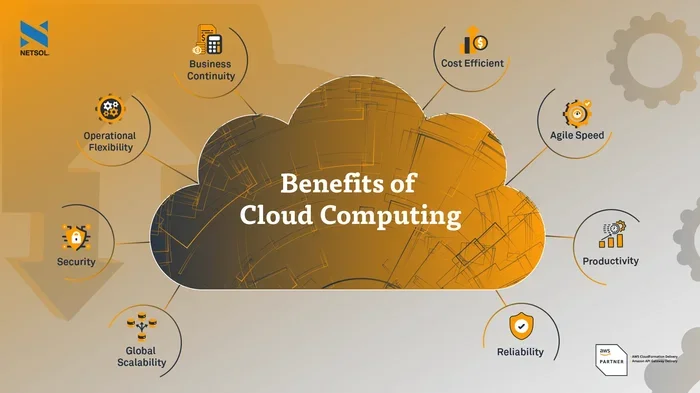
- Cost Savings: Cloud computing eliminates the need for expensive hardware and reduces IT spending significantly.
- Scalability: Businesses can grow or shrink their cloud services based on real-time demand with ease.
- Remote Work Support: Cloud platforms let teams access files and tools from any location in the world.
- Disaster Recovery: Automated backups and redundant systems keep your data safe during outages or emergencies.
- Security: Leading cloud providers offer advanced security features that most businesses cannot afford on their own.
- Speed and Agility: Cloud hosting allows faster deployment of new tools and applications.
- Competitive Edge: Adopting digital transformation through the cloud helps small and large businesses stay ahead.
📑 Table of Contents
What Are the Top Benefits of Cloud Computing?
The top benefits of cloud computing touch every part of a business. They affect your budget, your team, and your future plans. Here is a closer look at each one.
1. Significant Cost Savings
Running your own servers costs a lot. You need to buy hardware, pay for electricity, and hire IT staff to maintain everything. Cloud computing removes all of that. You pay only for what you use. This model is called pay-as-you-go, and it works brilliantly for businesses of all sizes.
Small businesses especially benefit from this approach. They do not need to make huge upfront investments. Instead, they can use cloud hosting and scale their spending as they grow. Cloud services turn big capital costs into smaller, predictable monthly bills.
Here is a quick look at how costs compare:
- Traditional IT: High upfront costs for servers and equipment.
- Cloud Computing: Low upfront costs with flexible monthly payments.
- Maintenance: Handled by the cloud provider, not your team.
- Scaling Costs: You only pay for extra resources when needed.
Over time, the savings add up fast. Many companies report cutting their IT costs by 30 to 50 percent after moving to the cloud. That money can go toward growth, hiring, or new products.
2. Scalability and Flexibility
One of the greatest top benefits of cloud computing is scalability. Your business needs change throughout the year. Maybe you get a spike in traffic during the holidays. Or perhaps you launch a new product that needs more server power. Cloud platforms let you adjust resources in minutes.
You do not need to buy new servers or wait for deliveries. With a few clicks, you can add more storage, power, or user seats. And when things slow down, you scale back. This business agility is a game changer.
Think about a retail store that sells online. During Black Friday, traffic might be ten times higher than normal. With cloud computing solutions, the website handles the surge without crashing. After the holiday, resources scale back down. You save money and keep your customers happy.
3. Support for Remote Work and Collaboration
Remote work is here to stay. The pandemic proved that teams can be productive from anywhere. Cloud platforms make this possible by giving everyone access to the same tools and files.
Your team can work from home, a coffee shop, or a different country. As long as they have an internet connection, they can log in and get to work. Collaboration tools built into cloud services make sharing files, editing documents, and communicating seamless.
Here are some ways cloud computing supports remote teams:
- Real-time document editing with tools like Google Workspace or Microsoft 365.
- Video conferencing and messaging through cloud-based apps.
- Shared dashboards that give everyone the same up-to-date information.
- Access to company systems from any device, anywhere in the world.
This flexibility helps you attract top talent. You are no longer limited to hiring people who live near your office. Your team can be global, and that is a huge advantage.
4. Strong Data Security
Many business owners worry about security in the cloud. They think keeping data on their own servers feels safer. But the truth is different. Leading cloud providers invest billions in security every year. They have teams of experts working around the clock to protect your data.
Most small and mid-sized businesses cannot afford that level of protection on their own. Cloud services come with built-in encryption, firewalls, and regular security updates. They also follow strict compliance standards like GDPR, HIPAA, and SOC 2.
Here are some cloud security features you get right out of the box:
- Data encryption both in transit and at rest.
- Multi-factor authentication to prevent unauthorized access.
- Regular security audits and threat monitoring.
- Automatic software updates to patch vulnerabilities quickly.
- Disaster recovery and automated backups built into the system.
Of course, security is a shared responsibility. You still need to train your team and follow best practices. But with a trusted cloud provider, your data is far safer than it would be on an old local server.
5. Reliable Disaster Recovery
Every business faces the risk of data loss. It could come from a cyberattack, a natural disaster, or even a simple hardware failure. Cloud computing makes disaster recovery much easier and more affordable.
Cloud providers store copies of your data across multiple data centers. If one location goes down, your data is still safe in another. Automated backups run on a schedule, so you never have to worry about forgetting to save.
In the past, setting up a disaster recovery plan was expensive and complex. It required duplicate hardware and a dedicated team. Today, cloud hosting handles all of that for a fraction of the cost. Your business continuity plan becomes simpler and more reliable.
Consider a small law firm that loses its office server to a fire. Without cloud backup, they could lose years of client files. With the cloud, they simply log in from a different location and everything is there. That kind of resilience is priceless.
6. Faster Innovation and Speed to Market
Speed matters in business. The faster you can launch a product or test a new idea, the better your chances of success. Cloud computing accelerates this process dramatically.
With cloud platforms, developers can set up new environments in minutes. They do not need to wait weeks for hardware to be provisioned. This speed means you can test ideas, get feedback, and iterate faster.
Digital transformation is not just a buzzword. It is a real strategy that helps businesses stay competitive. Companies using cloud services can experiment more and take less risk. They can try new features, gather data, and adjust quickly.
Here are some examples of how cloud computing speeds up innovation:
- Launching a new app or website in hours instead of months.
- Testing features with a small group before a full rollout.
- Using AI and analytics tools hosted in the cloud for faster insights.
- Integrating with third-party tools through cloud APIs and marketplaces.
When you move fast, you learn fast. And learning fast gives you a real edge over competitors who are still stuck on old systems.
How Cloud Computing Transforms Business Operations
The benefits we covered above add up to a bigger picture. Cloud computing does not just improve one area of your business. It transforms how everything works together. Let us look at the operational side.
Streamlined IT Management
Managing on-premise servers is a full-time job. Your IT team spends hours on maintenance, updates, and troubleshooting. Cloud services take all of that off their plate. The cloud provider handles the infrastructure, so your team can focus on strategic projects.
This shift is huge. Instead of fixing servers, your IT staff can work on initiatives that drive revenue. They can build better tools, improve workflows, and support your team more effectively.
Better Decision Making with Data
Cloud platforms come with powerful analytics tools. These tools help you understand your customers, your sales, and your operations. You can spot trends, find problems, and make decisions backed by real data.
For example, an e-commerce business can use cloud-based analytics to see which products sell best at different times of the year. They can adjust inventory, run targeted promotions, and increase profits. All of this happens in real time.
Improved Customer Experience
When your systems are fast and reliable, your customers notice. Cloud hosting ensures your website and apps stay online and responsive. Fewer outages mean happier customers and more trust in your brand.
Plus, cloud-based CRM tools give your team a complete view of each customer. Your sales and support staff can personalize their interactions and solve problems faster. That kind of experience keeps customers coming back.
Common Mistakes to Avoid When Moving to the Cloud
Switching to the cloud is exciting, but it is not without risks. Many businesses make avoidable mistakes during cloud migration. Here are a few to watch out for.
Skipping the Planning Phase
Some companies rush into cloud computing without a clear plan. They pick a cloud provider and start moving everything at once. This approach often leads to confusion, wasted money, and downtime. Take time to map out your migration strategy. Identify which apps and data to move first, and set clear goals.
Ignoring Security Best Practices
Just because your cloud provider handles security does not mean you can relax. You still need strong passwords, access controls, and employee training. Cloud security is a shared responsibility. Do your part to keep your data safe.
Not Training Your Team
New cloud tools only work if your team knows how to use them. Invest in training and onboarding. Make sure everyone understands how to access files, use collaboration tools, and follow security protocols. A well-trained team gets more value from your cloud investment.
Quick Tips for Getting the Most Out of Cloud Computing
Ready to make the most of cloud services? Here are some practical tips:
- Start small. Move one app or workload to the cloud first. See how it goes before migrating everything.
- Set a budget. Cloud computing is cost-effective, but costs can add up if you are not careful. Monitor your usage regularly.
- Choose the right provider. Compare cloud providers based on your needs, budget, and security requirements.
- Leverage free trials. Most cloud platforms offer free tiers or trials. Use them to test features before committing.
- Review and optimize. Check your cloud usage every month. Shut down unused resources and adjust plans as needed.
- Prioritize training. Help your team feel confident with new tools. The better they understand the cloud, the more value you will get.
Conclusion
The top benefits of cloud computing are clear and compelling. From cost savings and scalability to better security and faster innovation, the cloud delivers real value. Businesses of every size can benefit from moving their operations to cloud platforms.
Cloud migration is not just a trend. It is a smart strategy for staying competitive in a fast-changing world. Whether you are a small startup or a growing enterprise, cloud computing solutions can help you work smarter, not harder.
Start by evaluating your current setup. Identify the areas where cloud services can make the biggest impact. Then take it one step at a time. The cloud is ready for you. All you have to do is take the leap.
Frequently Asked Questions
What are the top benefits of cloud computing for small businesses?
Cloud computing helps small businesses save money, scale quickly, and compete with larger companies. They get access to enterprise-grade tools without the high costs. Cloud services also make remote work and collaboration easier for small teams.
Is cloud computing safe for sensitive business data?
Yes, leading cloud providers invest heavily in security. They offer encryption, multi-factor authentication, and regular audits. However, businesses must also follow best practices and train their teams to keep data safe.
How much can a business save by moving to the cloud?
Savings vary, but many companies cut IT costs by 30 to 50 percent. The pay-as-you-go model means you only pay for what you use. There are also savings on hardware, maintenance, and IT staff.
What is the difference between cloud hosting and traditional hosting?
Cloud hosting uses a network of virtual servers, while traditional hosting relies on a single physical server. Cloud platforms offer better scalability, uptime, and flexibility. They also cost less because you do not need to maintain hardware.
How long does cloud migration take?
The timeline depends on the size and complexity of your business. Small migrations can take a few weeks. Larger ones might need several months. A good cloud migration plan helps keep the process smooth and on track.
Can cloud computing support hybrid work models?
Absolutely. Cloud services are built for flexibility. They allow employees to access tools and files from any device, anywhere. This makes hybrid and fully remote work models practical and productive.