Benefits of Virtualization in Cloud Computing Explained
The benefits of virtualization in cloud computing are huge for businesses today. It helps companies save money, scale fast, and run apps more smoothly. Virtualization lets you run multiple systems on one physical machine, making your cloud infrastructure smarter and leaner. This guide covers everything you need to know, from basics to real-world wins. Read on to see why so many organizations are making the switch.
Let’s talk about something that has completely changed how businesses run their technology. The benefits of virtualization in cloud computing go far beyond just saving a few bucks. If you have ever wondered how companies manage thousands of applications without buying a room full of servers, virtualization is the answer.
In simple terms, virtualization creates a software version of something physical. This could be a server, a storage device, or even a whole network. Instead of relying on one piece of hardware for one job, you can squeeze many jobs into a single machine. The result? Less waste, lower costs, and a lot more flexibility. In this article, we will walk through every major benefit in plain language. Whether you are a small business owner or an IT leader, you will find useful insights here.
Key Takeaways
- Massive Cost Savings: Virtualization cuts hardware and energy costs dramatically.
- Better Scalability: Scale your resources up or down in minutes, not weeks.
- Improved Disaster Recovery: Keep your data safe with fast backup and restore options.
- Higher IT Efficiency: Do more with less staff and fewer physical machines.
- Flexible Workload Management: Move workloads easily across servers and environments.
- Stronger Security: Isolate workloads to protect sensitive data better.
📑 Table of Contents
- What Is Virtualization in Cloud Computing?
- Key Benefits of Virtualization in Cloud Computing
- Types of Virtualization You Should Know
- Real-World Examples of Virtualization Success
- How to Get Started with Virtualization
- Common Mistakes to Avoid
- Expert Insight: Why Virtualization Is the Foundation of Modern Cloud
- Final Thoughts
What Is Virtualization in Cloud Computing?
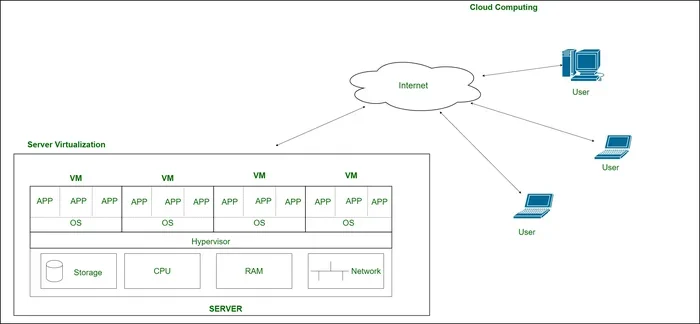
Before we dive into the perks, let us make sure we are on the same page. Virtualization is the process of creating a virtual version of a physical resource. In the cloud, this usually means running multiple virtual machines on one physical server. Each virtual machine acts like its own independent computer. It has its own operating system, its own memory, and its own share of processing power.
Think of it like an apartment building. One physical building houses many separate apartments. Each family lives independently, but they share the same structure. That is exactly how virtualization works. A single physical server becomes a data center that hosts many virtual environments. And the cloud is what makes all of this accessible over the internet, from anywhere in the world.
How Does It Actually Work?
A piece of software called a hypervisor sits between the hardware and the virtual machines. The hypervisor splits the physical resources into smaller chunks. Each chunk gets assigned to a different virtual machine. This means one powerful server can run ten, twenty, or even more virtual environments at the same time. The virtualization software handles all the分配 automatically, so you do not need to manage each one by hand.
This is what makes cloud infrastructure so powerful. Providers like Amazon Web Services and Microsoft Azure use virtualization at a massive scale. They take thousands of physical servers and turn them into a huge pool of shared resources. Customers can then grab exactly what they need, when they need it.
Key Benefits of Virtualization in Cloud Computing
Now let us get to the good stuff. The benefits of virtualization in cloud computing touch nearly every part of a business. Here are the top reasons organizations are embracing this technology.
1. Significant Cost Savings
Money talks, right? The biggest draw for most companies is the cost reduction. Traditional IT setup requires buying a separate server for each application. That means a lot of upfront spending on hardware consolidation never happens with virtualization.
Here is what you save with virtualization:
- Hardware costs: Fewer physical servers mean less purchasing.
- Energy bills: Fewer machines use less electricity and cooling.
- Maintenance: Less hardware means less repair and upkeep.
- Space: You need far less room in your data center.
Studies show that companies can reduce their IT costs by 30 to 50 percent after moving to a virtualized setup. That is a big chunk of change that can go toward growing the business instead.
2. Better Scalability and Flexibility
Business needs change fast. One month you might need ten servers, and the next month you need thirty. With traditional setups, scaling up means buying and installing new hardware. That takes weeks or even months. Virtualization changes the game entirely.
With cloud migration and virtualization, you can scale your resources in minutes. Need more power for a seasonal spike? Just add more virtual machines. Traffic died down? Remove them and stop paying for what you do not use. This resource allocation flexibility is one of the most valued benefits of virtualization in cloud computing.
Imagine your online store gets a huge traffic surge during a holiday sale. Without virtualization, your site might crash. With virtualization, the cloud can instantly spin up extra capacity to handle the load. When the rush is over, you scale back down. Easy and affordable.
3. Improved Disaster Recovery and Business Continuity
Every business worries about downtime. A server crash, a natural disaster, or a cyberattack can shut everything down. But virtualization makes disaster recovery much simpler and faster.
Because virtual machines are just files, they are incredibly easy to back up and move. You can copy a whole virtual machine to another location in minutes. If something goes wrong, you spin it back up almost instantly. This means your uptime stays high and your business continuity plans actually work.
Traditional backup methods often involve physical tapes or external drives. They are slow and prone to failure. Virtual backup is faster, more reliable, and can be automated. You set it once, and it runs in the background without you lifting a finger.
4. Higher IT Efficiency and Productivity
Running a traditional data center takes a lot of hands-on work. IT staff must install, configure, and maintain each physical server. With virtualization, much of this work becomes automated.
Here is how IT efficiency improves:
- Faster deployment: New virtual machines can be ready in minutes, not days.
- Simplified management: One dashboard can control hundreds of virtual environments.
- Less manual work: Automated tools handle routine tasks like updates and patches.
- Better team focus: IT staff can spend time on strategic projects instead of fixing hardware.
This means smaller IT teams can manage much larger environments. It also means your team spends less time putting out fires and more time building things that drive value.
5. Stronger Security and Isolation
Security is a top concern for every business. Virtualization actually offers some strong security advantages. Each virtual machine runs in its own isolated environment. If one machine gets infected, the others stay safe. This workload isolation is a natural security benefit.
You can also run sensitive applications in separate virtual machines from less secure ones. For example, your customer payment system can live in a locked-down virtual environment. Meanwhile, your marketing tools run in a different virtual space. If one gets compromised, the other stays protected.
Many virtualization platforms also include built-in security features. Things like encrypted communications, access controls, and audit logs come standard. This gives you a solid security foundation without adding extra cost.
6. Greener Operations and Reduced Environmental Impact
Sustainability matters more than ever. Virtualization helps companies reduce their carbon footprint. Fewer physical servers mean less electricity consumed and less heat generated. This directly reduces the energy needed for cooling and power.
Many organizations now report their environmental impact as part of their corporate responsibility goals. Virtualization is an easy win for these initiatives. You get better technology performance while also doing good for the planet. It is a win-win that customers and stakeholders appreciate.
Types of Virtualization You Should Know
Not all virtualization is the same. Different types serve different purposes. Understanding them helps you make better decisions for your cloud infrastructure.
Server Virtualization
This is the most common type. It splits one physical server into multiple virtual servers. Each one runs its own operating system and applications. This is the backbone of most cloud services you use every day.
Storage Virtualization
Storage virtualization combines physical storage from multiple devices into one virtual storage pool. It makes managing data easier and improves performance. You can scale storage up or down without worrying about the physical hardware underneath.
Network Virtualization
Network virtualization creates virtual networks that run on top of physical network hardware. It allows you to segment traffic, improve security, and manage networks more efficiently. This is especially useful for companies with complex networking needs.
Desktop Virtualization
Also known as virtual desktop infrastructure, this lets users access a full desktop environment from any device. It is great for remote work and BYOD (bring your own device) policies. Employees can work from anywhere with a secure, consistent setup.
Real-World Examples of Virtualization Success
Let us look at how real companies use virtualization to get results. These examples show the benefits of virtualization in cloud computing in action.
Example 1: A Growing E-Commerce Business. A small online retailer started with three physical servers. As sales grew, they struggled to keep up. They moved to a virtualized cloud setup and immediately saw their costs drop. They could handle traffic spikes during sales events without any downtime. Within a year, they scaled to support ten times their original traffic with the same physical hardware.
Example 2: A Healthcare Provider. A hospital needed a reliable way to store and access patient records. They used virtualization to create isolated environments for different departments. The disaster recovery capabilities gave them peace of mind. Patient data stayed safe and accessible, even during unexpected outages. Their IT team also saved hours each week on maintenance tasks.
Example 3: A Software Development Company. A team of developers needed to test applications across different operating systems. Virtualization let them run multiple operating systems on a single workstation. This sped up their testing process and reduced the need for extra hardware. They shipped products faster and with fewer bugs.
How to Get Started with Virtualization
Ready to explore virtualization for your business? Here are some practical steps to get started.
- Assess your current setup. Look at your existing servers and workloads. Identify which ones would benefit most from virtualization.
- Choose a virtualization platform. Popular options include VMware, Hyper-V, and KVM. Pick one that fits your budget and needs.
- Start small. You do not need to virtualize everything at once. Pick a few low-risk workloads and test the waters.
- Train your team. Make sure your IT staff understands the new tools and processes. Proper training makes the transition smoother.
- Monitor and optimize. Once you are running, keep an eye on performance. Use monitoring tools to spot issues early and adjust resources as needed.
The benefits of virtualization in cloud computing become clearer the more you use it. Start with a simple project, learn from the experience, and expand from there.
Common Mistakes to Avoid
Even with great technology, some pitfalls can slow you down. Here are mistakes to watch out for:
- Over-provisioning resources: Giving every virtual machine too much power wastes money. Right-size your allocations carefully.
- Ignoring security: Virtual machines still need proper security measures. Do not let the convenience make you lazy.
- Skipping documentation: Keep clear records of your virtual environments. It saves headaches during troubleshooting and audits.
- Not planning for growth: Design your setup with future needs in mind. A rigid setup will hold you back later.
Expert Insight: Why Virtualization Is the Foundation of Modern Cloud
Industry experts agree that virtualization is the backbone of cloud computing. Without it, the cloud as we know it would not exist. Every major cloud provider relies on virtualization to deliver services to millions of customers worldwide. The technology has matured significantly over the past decade, and it continues to evolve. New advancements in performance optimization and automation are making virtualization even more powerful and accessible.
If you are still running a traditional, non-virtualized setup, now is the time to explore the transition. The benefits of virtualization in cloud computing are not just theoretical. They are proven results that businesses of all sizes are achieving every day.
Final Thoughts
The benefits of virtualization in cloud computing touch every part of an organization. From cutting costs and boosting scalability to improving security and helping the planet, the advantages are hard to ignore. Whether you are a startup or a large enterprise, virtualization gives you the tools to run smarter and faster.
Start small, learn as you grow, and soon you will wonder how you ever managed without it. The technology is ready, the tools are accessible, and the results speak for themselves. Take the first step today and see the difference for yourself.
Frequently Asked Questions
What are the main benefits of virtualization in cloud computing?
The main benefits include significant cost savings, better scalability, improved disaster recovery, higher IT efficiency, stronger security, and reduced environmental impact. These advantages make virtualization essential for modern businesses running in the cloud.
How does virtualization reduce costs?
Virtualization reduces costs by allowing multiple virtual machines to run on a single physical server. This means fewer hardware purchases, lower energy consumption, less maintenance, and smaller physical space requirements. Companies often see IT cost reductions of 30 to 50 percent.
Is virtualization the same as cloud computing?
No, they are not the same, but they are closely related. Virtualization is the technology that creates virtual versions of hardware. Cloud computing uses virtualization to deliver computing resources over the internet. Virtualization is the foundation that makes cloud computing possible.
Can small businesses benefit from virtualization?
Absolutely. Small businesses often benefit the most because they can access enterprise-level technology without the high costs. Virtualization lets small companies do more with less, scale as they grow, and maintain strong security and backup capabilities.
What is a hypervisor in virtualization?
A hypervisor is a software layer that sits on top of physical hardware and creates and manages virtual machines. It divides the physical resources among multiple virtual environments, ensuring each one gets the computing power it needs to run independently.
How does virtualization improve disaster recovery?
Virtual machines are just files, which makes them easy to back up, copy, and restore. If a physical server fails, you can quickly spin up the virtual machines on another server. This dramatically reduces downtime and helps maintain business continuity during unexpected events.
=== CONCLUSION ===
The benefits of virtualization in cloud computing are clear and compelling. From massive cost savings to improved scalability, stronger security, and greener operations, this technology delivers real value. It has become the foundation of modern IT and cloud infrastructure. Whether you are just starting to explore or looking to expand your current setup, virtualization offers something for every business. The key is to start, learn, and grow with the technology. Your future self and your bottom line will thank you.