Why Cloud Security Cameras for Business Are Essential
Cloud security cameras for business are transforming how companies protect their premises, assets, and employees. These cloud-based security systems offer remote monitoring, real-time alerts, and cloud recording without the hassle of bulky on-site hardware. Whether you run a small shop or a large office, cloud security cameras for business give you peace of mind from anywhere in the world.
Running a business means juggling a hundred things at once. You handle customers, manage staff, and keep the doors open. But one thing you cannot afford to ignore is security. Break-ins, theft, and vandalism can hurt any business, big or small. That is where cloud security cameras for business come in. They are one of the smartest investments you can make today.
Unlike old-school surveillance setups, cloud-based security cameras store your footage online. This means no messy wires, no bulky hard drives, and no worries about losing video when a device breaks. You get remote monitoring, real-time alerts, and powerful video analytics all in one place. In this article, we will walk you through everything you need to know about cloud security cameras for business. Let us dive in.
Key Takeaways
- Scalable and flexible: Cloud security cameras for business grow with your company, so you never pay for more than you need.
- Remote access anywhere: You can view live feeds and playback footage from your phone, tablet, or laptop.
- Lower upfront costs: No expensive servers or on-site storage means less money spent at the start.
- Smart alerts and analytics: Motion detection alerts and video analytics help you respond faster to threats.
- Easy setup and maintenance: Most systems install in minutes and update themselves automatically.
- Better cybersecurity: Cloud providers invest heavily in data protection, keeping your surveillance footage safe.
📑 Table of Contents
What Are Cloud Security Cameras for Business?
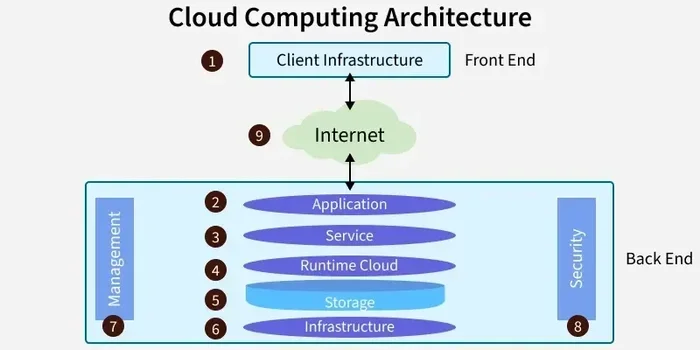
A cloud security camera system is a video surveillance setup that sends footage to an online server instead of a local hard drive. Think of it like saving photos to the cloud on your phone. The camera captures video, compresses it, and uploads it to a secure cloud video management platform. You can then access that footage from any device with an internet connection.
These systems use IP cameras, which are digital cameras that send data over a network. Some are wireless security cameras that connect via Wi-Fi, while others use ethernet cables for a more stable connection. Either way, the key difference is that the video storage cloud handles all the heavy lifting. You do not need a server room or a tech team to manage it.
How Is This Different from Traditional Systems?
Traditional business surveillance systems rely on a device called a DVR or NVR. These boxes store footage on local hard drives. They work fine, but they have limits. If someone steals or damages the hardware, you lose your evidence. If the hard drive fills up, older footage gets overwritten. And accessing footage remotely is often clunky and slow.
Cloud security cameras for business solve all of these problems. Your footage lives on secure remote servers. It is backed up automatically. And you can pull up any clip from anywhere in the world. The difference is night and day.
Key Benefits of Cloud Security Cameras for Business
So why are so many companies switching to cloud-based security? The benefits are hard to ignore. Let us break them down.
1. Remote Monitoring on the Go
One of the biggest advantages of cloud security cameras for business is remote access cameras. You can check your surveillance footage from your office, your couch, or even halfway across the world. All you need is a smartphone and an internet connection.
Imagine you run a retail store. It is Saturday night, and you are at home. You get a notification that your motion detection alerts went off at the front door. You open your app, pull up the live feed, and see a person lingering near the entrance. You call the police right away. Without cloud security cameras, you would not have known until the next morning. This kind of remote monitoring is a game-changer for business owners.
2. Scalable Security Solutions
Every business grows. Your security camera system should grow with you. Cloud-based systems are incredibly scalable. You can start with a few cameras and add more as your needs change. There is no need to buy new equipment or rewire your entire setup.
This makes cloud security cameras for business perfect for startups and growing companies. You pay for what you use. When you open a second location, you simply add more cameras to your plan. The cloud video management platform handles everything seamlessly.
3. Cost Savings Over Time
Let us talk money. Traditional surveillance systems can be expensive upfront. You need cameras, a DVR, hard drives, cables, and sometimes a dedicated server. Maintenance and upgrades add to the cost over time.
Cloud security cameras for business slash those upfront expenses. Most systems work on a monthly subscription model. You pay a flat fee per camera, and that covers storage, software updates, and support. There are no surprise repair bills. Over time, the savings add up significantly.
4. Smarter Alerts and Video Analytics
Modern cloud security cameras for business are smart. They use video analytics to tell the difference between a person walking by, a car passing, and a stray animal triggering your sensor. This means fewer false alarms and more accurate real-time alerts.
Some systems can even recognize faces, read license plates, and detect unusual behavior. These smart security cameras give you actionable insights, not just raw footage. You can track foot traffic, monitor peak hours, and optimize your operations based on data.
5. Enhanced Data Protection
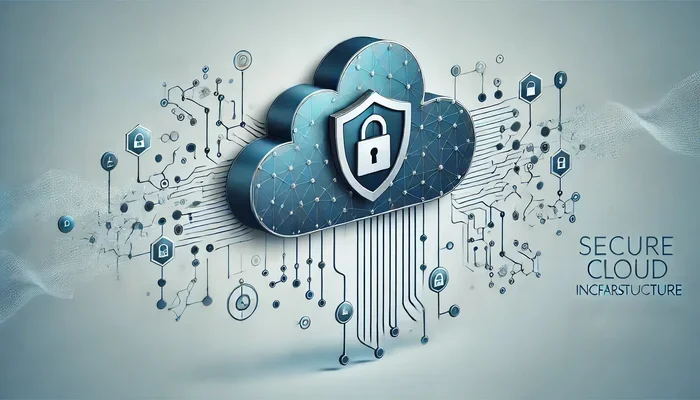
You might wonder: is storing footage in the cloud safe? The answer is yes. Reputable cloud-based security providers use bank-level encryption and multiple layers of protection. Your surveillance footage is safer in the cloud than on a local hard drive sitting in an unlocked closet.
Cloud providers also handle backups automatically. If one server goes down, your footage is copied to another. You never lose critical evidence. This level of business security solutions is almost impossible to achieve with traditional setups.
How Cloud Security Cameras for Business Work
Understanding how cloud security cameras for business work is simpler than you might think. Here is a quick breakdown of the process.
- The camera captures video. The IP camera records high-definition footage of your property.
- The footage is compressed. The camera compresses the video file to save bandwidth and storage space.
- The video is uploaded to the cloud. Through your internet connection, the footage is sent to a secure cloud server.
- You access it via an app or web portal. You can view live feeds, search past footage, and download clips from any device.
The entire process happens in seconds. You do not need to touch any hardware or manage any software. The security camera software runs in the cloud and updates itself. It is truly set-it-and-forget-it technology.
What About Internet Outages?
A common concern is what happens when your internet goes down. Most cloud security cameras for business have a local buffer. They store a few hours of footage on an SD card or onboard storage. Once the internet is back, the footage syncs to the cloud automatically. So you never lose a moment of business surveillance.
Choosing the Right Cloud Security Camera System
Not all cloud security cameras for business are created equal. Choosing the right one depends on your specific needs. Here is what to look for.
Camera Quality and Field of View
Start with image quality. Look for cameras that shoot at least 1080p resolution. For larger areas, 4K cameras give you incredible detail. Also consider the field of view. Wide-angle lenses cover more ground, which means fewer cameras needed to monitor a space.
For example, a small café might need two wide-angle cameras to cover the entrance and the dining area. A large warehouse, on the other hand, might need several IP cameras with longer-range lenses to cover every aisle.
Night Vision and Weather Resistance
If your business operates after dark or outdoors, night vision is a must. Most quality wireless security cameras offer infrared night vision that captures clear footage in complete darkness. For outdoor use, look for cameras with an IP65 or IP67 weather rating. This ensures they can handle rain, snow, and extreme heat.
Storage and Retention Plans
Cloud recording plans vary by provider. Some offer 30 days of storage, while others go up to 90 days or more. Think about how long you need to keep surveillance footage. If you operate in a high-risk area, longer retention is better. Also check if the plan supports continuous recording or only clips triggered by motion detection alerts.
Ease of Use and Mobile App
The best cloud security cameras for business are easy to set up and use. Look for a system with a clean mobile app. You should be able to view live feeds, review clips, and adjust settings in just a few taps. If the app is confusing, you will not use it. And that defeats the purpose of having remote monitoring in the first place.
Integration with Other Tools
Many cloud video management platforms integrate with other business tools. You can connect cameras with alarm systems, access control systems, and even point-of-sale software. This creates a unified business security solutions ecosystem. When an alarm triggers, the camera starts recording automatically. When a sale is processed, the system logs the activity. These integrations make your operations smoother and safer.
Common Mistakes to Avoid
Setting up cloud security cameras for business is straightforward, but some common mistakes can undermine your efforts. Here is what to watch out for.
- Skipping a site assessment. Before buying cameras, walk your property and identify weak spots. Cover all entrances, parking areas, and high-value zones.
- Ignoring bandwidth requirements. Multiple cloud recording cameras need a solid internet connection. If your Wi-Fi is weak in certain areas, consider adding a mesh network or running ethernet cables.
- Choosing the cheapest plan. Budget plans often limit storage and features. Pick a plan that gives you enough retention time and good video analytics.
- Neglecting camera maintenance. Even the best wireless security cameras need occasional cleaning and software updates. Dust on the lens and outdated firmware can reduce performance.
- Forgetting about privacy laws. Depending on your location, there may be rules about where you can place cameras and how you store surveillance footage. Always check local regulations before installing your business surveillance system.
The Future of Cloud Security Cameras for Business
The world of cloud security cameras for business is evolving fast. Here are some exciting trends to watch.
Artificial intelligence is making cameras smarter every year. Future systems will not just detect motion. They will understand context. They will recognize regular employees versus strangers. They will flag suspicious behavior before anything happens. This is the next frontier of video analytics.
Edge computing is another big development. Instead of sending all footage to the cloud, some cameras process data locally and only upload what matters. This reduces bandwidth usage and speeds up real-time alerts. The result is faster, more efficient cloud-based security.
As cybersecurity cameras become more advanced, the cost of entry will continue to drop. Small businesses that could not afford surveillance systems a few years ago will soon have access to enterprise-grade cloud security cameras for business. The future is bright, and it is cloud-powered.
Final Thoughts
Cloud security cameras for business are no longer a luxury. They are a necessity. They give you remote monitoring, smart alerts, and reliable video storage cloud without the complexity and cost of traditional systems. Whether you protect a small office, a busy retail store, or a sprawling warehouse, the right cloud security camera system keeps your business safe around the clock.
The best time to invest in business security solutions is now. Start small if you need to. Add cameras as your budget allows. Choose a scalable security system that grows with your company. The peace of mind you get from knowing your property, employees, and customers are protected is priceless. Take the step today and explore what cloud security cameras for business can do for you.
Frequently Asked Questions
Are cloud security cameras for business hard to install?
Not at all. Most cloud-based security camera systems are designed for easy DIY setup. You mount the camera, connect it to Wi-Fi, and download the app. The entire process usually takes less than 15 minutes per camera. No complicated wiring or IT expertise is required.
How much does a cloud security camera system cost per month?
Pricing varies by provider and the number of cameras. Most plans range from $10 to $50 per camera per month. This typically includes cloud recording, storage, software updates, and customer support. Compare plans to find one that fits your budget and needs.
Can I access my footage without the internet?
Live streaming requires an internet connection. However, many systems store a short buffer of footage locally on the camera or an SD card. Once your internet is restored, this footage syncs to the cloud automatically. So you rarely lose any surveillance footage even during outages.
Are cloud security cameras for business safe from hacking?
Reputable providers use strong encryption, two-factor authentication, and regular security updates. To stay safe, always choose trusted brands, use strong passwords, and keep your firmware updated. A well-configured cloud security camera system is very difficult to breach.
What is the difference between cloud recording and local recording?
Cloud recording stores your surveillance footage on remote servers accessed via the internet. Local recording saves footage to a physical device like a hard drive or SD card on-site. Cloud recording offers better accessibility, automatic backups, and protection against hardware theft or damage.
How many cameras do I need for my business?
This depends on the size and layout of your property. A small retail store might need 2 to 4 cameras. A larger office or warehouse could need 8 to 15 or more. Walk your property, identify entry points and high-risk areas, and build a scalable security system that covers everything without gaps.