Top Cloud Computing Companies for Small Business Guide
Looking for the best cloud computing companies for small business? This guide covers the top providers, pricing plans, and key features to help you choose wisely. You will learn how cloud services boost productivity, cut costs, and keep your data safe. We break down each provider so you can make a smart, confident decision for your business.
Cloud computing has changed the way small businesses operate. Instead of buying expensive servers and hiring IT teams, companies can now rent powerful tools online. The right cloud computing companies for small business offer storage, software, and computing power at a fraction of the cost. This guide walks you through the best options available today.
Whether you run a bakery or a marketing agency, cloud solutions can help you work smarter. You can access your files from anywhere, collaborate with your team in real time, and scale your operations as you grow. Let us dive into the world of cloud services and find the perfect match for your business.
Key Takeaways
- Cloud computing levels the playing field: Small businesses get enterprise-grade tools without big budgets.
- Multiple providers fit different needs: Google Cloud, Microsoft Azure, AWS, and others each shine in different areas.
- Pricing is flexible: Pay-as-you-go models let you scale up or down based on usage.
- Security is a top priority: Reputable providers offer strong encryption and compliance standards.
- Migration is easier than you think: Most companies can move to the cloud in weeks, not months.
- Choosing the right fit matters: Consider your budget, team size, and tech needs before picking a provider.
📑 Table of Contents
What Is Cloud Computing for Small Business?
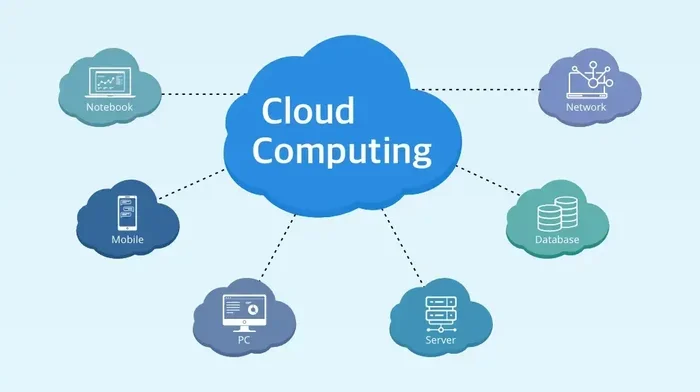
Cloud computing means using remote servers hosted on the internet to store, manage, and process data. Instead of keeping everything on your own computer or office server, you tap into powerful systems run by specialized providers. Think of it like renting electricity instead of building your own power plant.
How Cloud Services Work
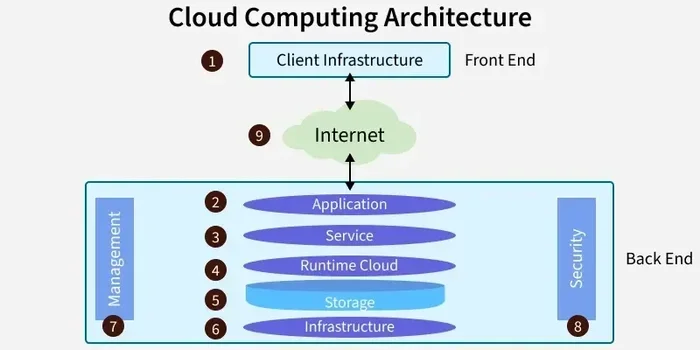
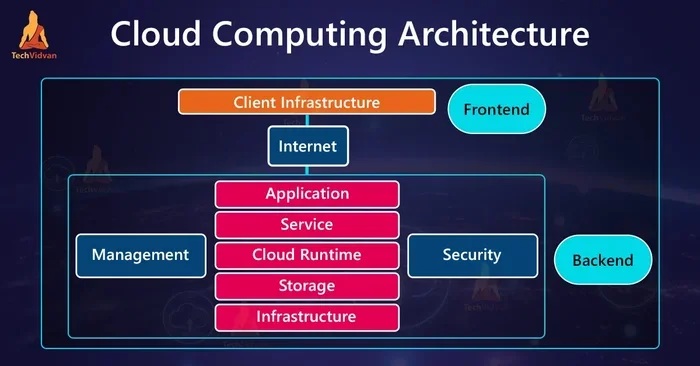
When you use a cloud service, your data travels over the internet to a data center. That data center belongs to the cloud provider. They handle all the hardware, maintenance, and security. You simply log in and access your tools or files from any device.
This setup is incredibly convenient. Your team can work from home, a coffee shop, or a client’s office. Everything stays synced and up to date. You do not need to worry about backups or server crashes.
Types of Cloud Services
There are three main types of cloud services that cloud computing companies for small business offer:
- SaaS (Software as a Service): Ready-to-use apps like Google Workspace or Microsoft 365. You just log in and start working.
- IaaS (Infrastructure as a Service): Virtual servers and storage. You build your own setup on top of the provider’s hardware.
- PaaS (Platform as a Service): A development environment where you can build and launch apps without managing the underlying infrastructure.
Most small businesses start with SaaS because it requires zero technical setup. As your needs grow, you may explore IaaS or PaaS options.
Why Small Businesses Need Cloud Solutions
Cloud computing is no longer a luxury. It has become a necessity for small businesses that want to compete and grow. Here is why making the switch matters so much.
Benefits of Moving to the Cloud
- Lower costs: You skip the upfront cost of buying hardware. Monthly subscriptions fit into any budget.
- Scalability: Need more storage or power during a busy season? You can scale up instantly. When things slow down, you scale back.
- Remote work support: Cloud tools let your team collaborate from anywhere in the world. This is huge for modern businesses.
- Automatic updates: Your provider handles software updates and security patches. You always have the latest features.
- Disaster recovery: Your data is backed up in multiple locations. Even if your office faces a problem, your files stay safe.
The cloud computing benefits go beyond just savings. They give small businesses the flexibility and resilience that used to be available only to large corporations.
Quick Tip
Start with a free trial from any major provider. Most cloud computing companies for small business offer 30-day free trials. This lets you test the platform before committing to a plan.
Top Cloud Computing Companies for Small Business
Not all cloud providers are the same. Each one has its own strengths, pricing, and focus areas. Here are the top options to consider.
Google Cloud Platform
Google Cloud is a strong choice for small businesses that rely on Google tools. It integrates seamlessly with Google Workspace, which many teams already use. The platform offers solid storage, computing power, and AI tools at competitive prices.
Google Cloud is known for its simplicity. The dashboard is clean and easy to navigate, even if you are not a tech expert. Their customer support is also well-regarded in the industry.
Microsoft Azure
Microsoft Azure is one of the biggest names in cloud computing. It works especially well for businesses that already use Microsoft products like Office 365 or Windows Server. Azure offers a huge range of services, from basic storage to advanced AI and machine learning tools.
The learning curve can be a bit steeper with Azure. But once you get the hang of it, the platform is incredibly powerful. Microsoft also offers excellent enterprise-grade security, which matters as your business grows.
Amazon Web Services (AWS)
AWS is the market leader in cloud infrastructure. It offers the widest range of services of any provider. From basic website hosting to complex data analytics, AWS has you covered. Many large companies use AWS, but it also works well for small businesses.
The main downside of AWS is its complexity. There are many services and pricing options, which can feel overwhelming. However, AWS offers a free tier that lets you explore without spending a dime.
Other Notable Providers
A few other cloud computing companies for small business deserve mention:
- Cloudflare: Great for website performance and security. Their plans are affordable and easy to set up.
- DigitalOcean: Popular with startups and developers. Simple pricing and a user-friendly interface.
- IBM Cloud: Strong in enterprise-grade security and hybrid cloud setups.
Comparison Table
| Provider | Best For | Starting Price | Ease of Use |
|---|---|---|---|
| Google Cloud | Google Workspace users | Free tier available | Very Easy |
| Microsoft Azure | Microsoft ecosystem users | Free tier available | Moderate |
| AWS | Scalable infrastructure needs | Free tier available | Moderate |
| Cloudflare | Website security and speed | Free plan available | Very Easy |
| DigitalOcean | Startups and developers | $5/month | Easy |
Expert Insight
According to industry analysts, cloud computing companies for small business have seen a 40% increase in adoption over the past three years. The shift to remote work and the need for flexible tools have driven this growth significantly.
How to Choose the Right Cloud Provider
With so many options out there, picking the right provider can feel tricky. Here is a simple framework to guide your decision.
Factors to Consider
- Your Budget: Look at the total cost of ownership, not just the monthly fee. Factor in data transfer costs, storage fees, and any add-ons you might need.
- Your Team’s Tech Skills: If your team is not very technical, choose a provider with a simple interface. Google Cloud and Cloudflare are great for beginners.
- Integration Needs: Check if the cloud platform works well with the tools you already use. If you live in Microsoft, Azure makes sense. If you live in Google, go with Google Cloud.
- Security Requirements: Look for providers that offer encryption, two-factor authentication, and compliance certifications like SOC 2 or GDPR.
- Scalability: Choose a provider that can grow with you. You do not want to outgrow your platform in a year.
Common Mistakes to Avoid
- Ignoring hidden costs: Some providers charge extra for data transfer or API calls. Always read the fine print.
- Overcomplicating your setup: Start simple. You can always add more services later. Do not try to use every feature at once.
- Skipping backups: Even though cloud providers handle redundancy, you should still maintain your own backups for critical data.
- Not training your team: A great cloud platform is useless if your team does not know how to use it. Invest in onboarding.
Cloud Computing Costs and Pricing
One of the biggest advantages of cloud computing is the cost savings. But understanding the pricing models is essential to avoid surprises.
Understanding Cloud Pricing Models
Most cloud computing companies for small business use a pay-as-you-go model. This means you only pay for what you use. Here is how the common pricing structures work:
- Free Tier: Many providers offer a limited free plan forever. This is perfect for testing or very small operations.
- Monthly Subscription: A fixed monthly fee for a set amount of storage, users, or features. Google Workspace and Microsoft 365 use this model.
- Pay-Per-Use: You pay based on actual usage. This is common with AWS and Azure for computing and storage services.
- Reserved Instances: You commit to a one- or three-year term and get a significant discount. This works well for predictable workloads.
For most small businesses, a combination of free tier and monthly subscription works best. Start small, monitor your usage, and upgrade as needed.
Quick Tip
Set up billing alerts with your provider. This prevents unexpected charges and keeps your cloud cost management under control from day one.
Cloud Security Tips for Small Business
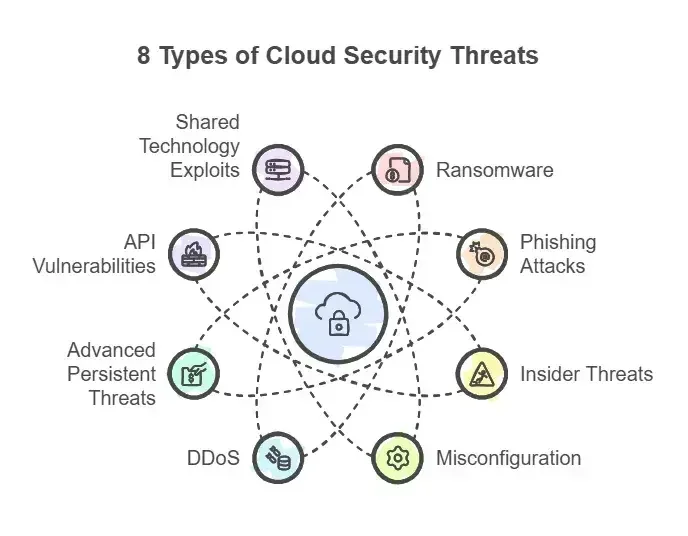
Security is one of the top concerns for small businesses moving to the cloud. The good news is that reputable providers invest heavily in protecting your data. But you also play a role in keeping things safe.
Best Practices for Cloud Security
- Use strong passwords: Create unique, complex passwords for every cloud account. Use a password manager to keep track of them.
- Enable two-factor authentication: This adds an extra layer of protection. Even if someone gets your password, they cannot access your account without the second factor.
- Limit user access: Only give team members access to the data and tools they need. This reduces the risk of accidental or intentional data breaches.
- Encrypt sensitive data: Make sure your provider offers encryption for data at rest and in transit. This keeps your information unreadable to unauthorized users.
- Keep software updated: Enable automatic updates so you always have the latest security patches.
- Train your team: Teach your employees about phishing scams and safe browsing habits. Human error is still the biggest security risk.
The cloud security provided by major cloud computing companies for small business is robust. But remember, security is a shared responsibility. The provider secures the infrastructure, and you secure your account and data.
Final Thoughts
Choosing the right cloud computing companies for small business is one of the most impactful decisions you can make. The cloud gives you access to powerful tools, flexible pricing, and enterprise-grade security without the massive upfront costs. Whether you pick Google Cloud, Microsoft Azure, AWS, or another provider, the key is to start with your specific needs in mind.
Take your time, explore free trials, and do not be afraid to ask questions. The best provider is the one that fits your budget, your team, and your goals. With the right cloud partner, your small business can compete with the biggest players in your industry. The cloud is not just a technology trend. It is a smart business move that pays off for years to come.
Start your cloud journey today. Your future self and your growing business will thank you.
Frequently Asked Questions
What is the best cloud computing company for a small business just starting out?
Google Cloud and Microsoft Azure are excellent choices for beginners. Both offer free tiers and user-friendly dashboards. Google Cloud integrates seamlessly with Google Workspace, which many small businesses already use. Azure is a great pick if your team relies on Microsoft tools like Office 365.
How much does cloud computing cost for a small business?
Costs vary widely based on your needs. Many providers offer free tiers that cover basic usage. Paid plans typically range from $5 to $50 per user per month. The pay-as-you-go model means you only pay for what you actually use, keeping costs predictable and manageable.
Is cloud computing safe for small business data?
Yes, reputable cloud providers invest heavily in security. They use advanced encryption, multi-factor authentication, and comply with strict industry standards. However, you should also follow best practices like using strong passwords and limiting user access. Cloud security is a shared responsibility between you and your provider.
How long does it take to migrate to the cloud?
Most small businesses can complete a basic cloud migration in two to four weeks. The timeline depends on the amount of data and the complexity of your setup. Starting with a simple SaaS tool like Google Workspace or Microsoft 365 can be done almost immediately.
Can I switch cloud providers later if I am not satisfied?
Yes, you can switch providers, though it requires some planning. The best way to avoid headaches is to choose a provider that supports standard data formats. This makes it easier to export your data and move to a new platform if needed. Always read the data portability policies before committing.
Do I need IT expertise to use cloud services for my small business?
No, most modern cloud platforms are designed for non-technical users. SaaS tools like Google Workspace and Microsoft 365 require zero IT knowledge. If you need more advanced services like IaaS, you may want to hire a consultant for initial setup. But day-to-day management is straightforward for most business owners.