Business Continuity Management in Cloud Computing Strategies
Business continuity management in cloud computing is the process of keeping your operations running smoothly when disasters strike. It combines cloud backup, disaster recovery, and operational continuity plans to protect your data and systems. This guide covers everything you need to know about building a business continuity plan that works in the cloud. You will learn key strategies, common pitfalls, and expert tips to keep your business safe.
Every business today depends on technology. When systems go down, money gets lost. Customers get frustrated. And trust gets broken. That is why business continuity management in cloud computing has become so important. It is the practice of making sure your business keeps running no matter what happens. Whether it is a cyberattack, a power outage, or a natural disaster, the cloud gives you the tools to stay up and running.
In this guide, we will walk you through everything you need to know. We will cover the basics, the key components, how to choose the right provider, and common mistakes to avoid. By the end, you will have a clear picture of how to build a business continuity plan that actually works. Let us get started.
Key Takeaways
- Cloud-based continuity plans keep your business running during outages, cyberattacks, and natural disasters.
- Data replication and failover are essential tools that minimize downtime and data loss.
- Choosing the right cloud service provider with strong uptime guarantees is critical for resilience.
- Regular testing and updates to your business continuity plan ensure it works when you need it most.
- Multi-cloud strategies add an extra layer of protection against single-provider failures.
- Risk assessment and business impact analysis help you prioritize what matters most.
📑 Table of Contents
- What Is Business Continuity Management in Cloud Computing?
- Key Components of a Cloud Business Continuity Plan
- Why Cloud Computing Is Essential for Business Continuity
- Choosing the Right Cloud Service Provider for Continuity
- Common Challenges in Cloud Business Continuity
- Building Your Business Continuity Strategy in the Cloud
- Conclusion
What Is Business Continuity Management in Cloud Computing?
Business continuity management in cloud computing is the process of preparing your organization to handle disruptions using cloud-based tools and services. It goes beyond just having a backup. It is a full framework that covers people, processes, and technology.
Think of it this way. If your office floods, what happens to your data? If your servers crash, how fast can you get back online? A solid business continuity plan answers these questions before they become real problems.
Why Does It Matter?
Downtime costs businesses money. A lot of it. Studies show that the average cost of one hour of downtime can reach thousands of dollars. But it is not just about money. Your reputation takes a hit too. Customers lose faith in companies that cannot stay available.
Cloud computing changes the game. Instead of relying on one physical location, your data and applications live across multiple data centers. This means even if one server goes down, another takes over. That is the power of cloud resilience.
Key Components of a Cloud Business Continuity Plan
Building a strong business continuity plan for the cloud requires several key pieces. Let us break them down so you know exactly what to focus on.
Data Replication
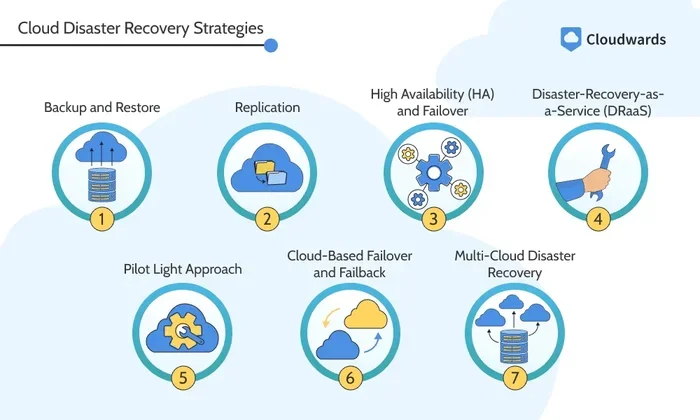
Data replication means copying your data to more than one location. In the cloud, this happens automatically. Your data gets mirrored across multiple data centers in different regions. If one location fails, your data is still safe in another.
Here are some tips for effective data replication:
- Set up replication across at least two geographic regions.
- Use automated tools to reduce human error.
- Test your replication process regularly to confirm it works.
- Monitor replication lag to ensure data stays current.
Recovery Time Objective and Recovery Point Objective
Two terms you will hear often are recovery time objective (RTO) and recovery point objective (RPO). These are the backbone of any continuity plan.
RTO is the maximum amount of time your business can afford to be offline. RPO is the maximum amount of data you can afford to lose, measured in time. For example, if your RPO is one hour, you need to back up your data at least every hour.
Setting realistic RTO and RPO goals is essential. Here is how to approach it:
- Identify your most critical systems.
- Determine how long each system can be down.
- Decide how much data loss is acceptable.
- Build your cloud strategy around these numbers.
Failover and High Availability
Failover is the process of switching to a backup system when the primary one fails. High availability means your systems are designed to stay online almost all the time. Together, these two concepts form the backbone of cloud resilience.
Most major cloud providers offer built-in failover features. You just need to configure them correctly. The goal is simple: when something breaks, the cloud picks up the slack without you even noticing.
Why Cloud Computing Is Essential for Business Continuity
Business continuity management in cloud computing offers advantages that traditional on-premises setups simply cannot match. Let us look at why the cloud is the go-to choice for modern continuity planning.
Scalability and Flexibility
When a disaster hits, your needs can change overnight. The cloud lets you scale up or down in minutes. Need more server capacity during a crisis? The cloud delivers. No need to buy and install physical hardware.
Cost Efficiency
Running a secondary physical data center is expensive. You pay for the hardware, the space, the power, and the staff. Cloud-based disaster recovery eliminates most of these costs. You pay only for what you use, which makes it a smart choice for businesses of all sizes.
Global Reach
Cloud providers have data centers all over the world. This global reach means your data is protected no matter where a disaster strikes. A flood in one region does not take down your entire operation because your data lives in another region too.
Automated Threat Mitigation
Many cloud platforms come with built-in security features that help with threat mitigation. Automatic updates, firewalls, and intrusion detection systems run in the background. This frees up your team to focus on other priorities.
Choosing the Right Cloud Service Provider for Continuity
Not all cloud service providers are created equal. When it comes to business continuity management in cloud computing, your choice of provider can make or break your plan. Here is what to look for.
Uptime Guarantees
Look for providers that offer strong uptime guarantees. Most top providers promise 99.9% or even 99.99% uptime. Read the fine print. Understand what is covered and what is not.
Data Center Redundancy
Data center redundancy means having backup systems in place at multiple physical locations. If one data center goes offline, another one takes over seamlessly. Ask your provider how many redundant data centers they operate and where they are located.
Disaster Recovery as a Service (DRaaS)
DRaaS is a cloud service model that handles disaster recovery for you. Instead of building your own recovery infrastructure, you lease it from the provider. This is a great option for smaller businesses that do not have a large IT team.
Comparison: On-Premises vs. Cloud vs. DRaaS
| Feature | On-Premises | Public Cloud | DRaaS |
|---|---|---|---|
| Setup Cost | High | Low | Medium |
| Scalability | Limited | High | High |
| Management Effort | High | Low | Low |
| Recovery Speed | Slow | Fast | Fast |
| Best For | Large enterprises | All business sizes | Small to mid-size businesses |
Common Challenges in Cloud Business Continuity
Even with the best plan, challenges can arise. Being aware of them helps you prepare. Here are the most common issues businesses face with business continuity management in cloud computing.
Misunderstanding Shared Responsibility
One of the biggest mistakes is assuming the cloud provider handles everything. The truth is, continuity is a shared responsibility. Your provider secures the infrastructure, but you are responsible for your data, configurations, and applications. Understand the shared responsibility model before you sign any contract.
Neglecting Regular Testing
A business continuity plan that has never been tested is not a plan at all. Many businesses create a plan, file it away, and forget about it. Then when a real disaster hits, the plan falls apart. Schedule regular tests at least twice a year.
Ignoring Vendor Lock-In
Relying too heavily on one cloud service provider can be risky. If that provider has an outage, you are stuck. A multi-cloud strategy spreads your risk across multiple providers. This way, if one goes down, the others keep you running.
Underestimating Bandwidth Needs
During a failover event, your systems need to handle a sudden surge in traffic. If your internet connection or network bandwidth is not up to the task, recovery slows down. Plan for extra capacity so you are not caught off guard.
Quick Tips to Avoid These Mistakes
- Review your provider’s service level agreement (SLA) carefully.
- Run disaster recovery drills at least every six months.
- Use a multi-cloud strategy to reduce dependency on one provider.
- Document every process and keep it updated.
- Train your team so everyone knows their role during an outage.
Building Your Business Continuity Strategy in the Cloud
Now that you understand the key components and common challenges, let us talk about how to actually build your business continuity plan. Follow these steps to create a strategy that holds up under pressure.
Step 1: Conduct a Business Impact Analysis
A business impact analysis helps you identify which systems and processes are most critical. Ask yourself: What happens if this system goes down for one hour? One day? One week? Rank your systems by priority so you know where to focus your efforts first.
Step 2: Define Your RTO and RPO
Based on your impact analysis, set clear recovery time objective and recovery point objective targets for each system. These numbers will guide every decision you make about cloud backup, replication, and failover.
Step 3: Choose Your Cloud Model
Decide whether a public cloud, private cloud, or hybrid cloud makes the most sense for your needs. Each has pros and cons. A multi-cloud strategy can offer the best of both worlds, but it also adds complexity. Choose what fits your budget and team capabilities.
Step 4: Implement Data Replication and Backup
Set up automated data replication across multiple regions. Use cloud backup services to create regular snapshots of your data. Make sure your backups are encrypted and stored securely.
Step 5: Test, Test, Test
Run regular failover tests to make sure everything works as expected. Simulate different disaster scenarios. Document the results and use them to improve your plan. Testing is not a one-time event. It is an ongoing process.
Step 6: Train Your Team
Your plan is only as good as the people executing it. Train every team member on their specific role during a disruption. Make sure everyone knows who to contact, what to do, and where to find the business continuity plan documents.
Expert Insight
According to industry experts, the most successful business continuity management in cloud computing strategies are the ones that evolve. Review your plan at least once a year. Update it whenever you add new systems, move to a new provider, or experience a real incident. Continuity is not a destination. It is a journey.
Conclusion
Business continuity management in cloud computing is no longer optional. It is a necessity. The cloud gives you the tools to protect your data, minimize downtime, and keep your operations running through any disruption. From data replication and failover to DRaaS and multi-cloud strategies, there are many approaches you can take.
The key is to start now. Do not wait for a disaster to force your hand. Build your business continuity plan today, test it regularly, and keep it updated. Your business depends on it. With the right cloud service provider and a solid strategy, you can face any challenge with confidence. Stay prepared, stay resilient, and keep your business moving forward no matter what comes your way.
Frequently Asked Questions
What is the difference between business continuity and disaster recovery in the cloud?
Business continuity is the broad strategy that keeps your entire organization running during a disruption. Disaster recovery is a subset of that strategy focused specifically on restoring IT systems and data after an outage. In the cloud, both work together to minimize downtime and data loss.
How much does cloud business continuity cost?
The cost varies widely depending on your needs. Small businesses can start with basic cloud backup for as little as a few dollars per month. Larger enterprises with complex multi-cloud strategies and DRaaS may spend significantly more. The key is to balance cost with your recovery time objective and recovery point objective requirements.
How often should I test my cloud business continuity plan?
Experts recommend testing your plan at least twice a year. However, you should also run tests after any major infrastructure change or when you add new systems to your environment. Regular testing helps you catch issues before a real disaster strikes.
Can a small business benefit from business continuity management in cloud computing?
Absolutely. In fact, small businesses often benefit the most because they typically lack the resources for expensive on-premises backup systems. Cloud-based solutions level the playing field by providing enterprise-grade data replication, failover, and disaster recovery at a fraction of the cost.
What should I look for in a cloud service provider for business continuity?
Look for strong uptime guarantees, data center redundancy, built-in DRaaS options, clear shared responsibility terms, and a proven track record. Also check their service level agreement to understand exactly what is covered during an outage.
Is a multi-cloud strategy worth the extra complexity?
For many organizations, yes. A multi-cloud strategy reduces the risk of being tied to a single provider. If one cloud service provider experiences an outage, your workloads can fail over to another provider. This adds a powerful layer of cloud resilience to your business continuity plan.