Business Continuity in the Cloud Keeps Your Data Safe
Business continuity in the cloud is a smart way to keep your data safe and your operations running, no matter what happens. With cloud-based solutions, you get fast recovery, lower costs, and better protection against system outages. This guide covers everything you need to know about setting up a solid cloud continuity plan. You will learn how it works, why it matters, and how to choose the right solution for your business.
Every business faces risks. Storms hit. Servers crash. Cyberattacks shut down systems. When these things happen, downtime costs money. It hurts your reputation. It frustrates your customers. That is why business continuity in the cloud has become so important. More companies are moving their continuity plans to the cloud every year. They want a safer, faster, and more affordable way to protect their data. Cloud-based continuity helps you stay running even when things go wrong.
In this article, we will walk you through everything you need to know. We will explain what cloud continuity is and how it works. You will learn about the key benefits and how to pick the right solution. We will also share common mistakes to avoid and best practices to follow. By the end, you will have a clear roadmap for keeping your business safe. Let us dive in.
Key Takeaways
- Cloud-based continuity protects your data: Storing backups in the cloud ensures your information stays safe even during a system outage.
- Faster recovery times save money: Cloud solutions reduce downtime and help you get back online quickly.
- Scalability is a major benefit: You can grow your continuity plan as your business grows without huge upfront costs.
- RTO and RPO guide your strategy: Understanding these metrics helps you set the right recovery goals.
- Hybrid cloud offers flexibility: Combining on-premises and cloud resources gives you the best of both worlds.
- Regular testing is essential: A plan only works if you test it often and train your team.
📑 Table of Contents
- What Is Business Continuity in the Cloud?
- How Cloud Business Continuity Works
- Benefits of Moving Continuity to the Cloud
- Choosing the Right Cloud Continuity Solution
- Common Challenges and How to Solve Them
- Best Practices for Cloud Business Continuity
- Quick Tips for a Strong Cloud Continuity Plan
- Common Mistakes to Avoid
- Expert Insights
- Conclusion
What Is Business Continuity in the Cloud?
Business continuity in the cloud means using cloud technology to keep your operations running during a disruption. Instead of relying only on physical servers at your office, you store data and applications in the cloud. This approach is part of a broader strategy called business continuity planning. The goal is simple: minimize downtime and protect your data no matter what happens.
Think of it like insurance for your digital life. You hope you never need it. But when something goes wrong, you are really glad you have it. Cloud continuity uses remote data centers to host copies of your critical systems. If your main office goes offline, your team can still work from anywhere. They just need an internet connection.
Why Cloud-Based Continuity Matters
Traditional continuity plans relied on physical backups and secondary office locations. These setups are expensive. They require constant maintenance. And they often fail when you need them most. Cloud-based continuity solves many of these problems. It offers redundancy, which means your data exists in multiple locations. If one server goes down, another takes over automatically. This is called failover, and it happens in seconds.
Another big reason cloud continuity matters is cybersecurity. Cloud providers invest heavily in security. They use advanced encryption, firewalls, and monitoring tools. Most small and mid-sized businesses cannot afford this level of protection on their own. By moving to the cloud, you get enterprise-grade security without the enterprise price tag.
How Cloud Business Continuity Works
Understanding how business continuity in the cloud works helps you make better decisions. The process involves several key steps and technologies working together behind the scenes.
Key Components of Cloud Continuity
A solid cloud continuity setup includes several important pieces. Let us look at each one:
- Data backup: Your files, databases, and applications are copied and stored in the cloud on a regular schedule.
- Data replication: Copies of your data are synced across multiple cloud servers in real time or near real time.
- Automated failover: If a primary system fails, the cloud automatically switches to a backup system without human intervention.
- Cloud hosting: Your applications and data live on remote servers managed by a cloud provider.
- Monitoring and alerts: Tools watch your systems 24/7 and notify you of any issues before they become big problems.
Together, these components create a safety net. They ensure that even if something goes wrong, your business operations keep moving forward.
Understanding RTO and RPO
Two important metrics guide any business continuity in the cloud strategy: Recovery Time Objective (RTO) and Recovery Point Objective (RPO). These terms sound technical, but they are easy to understand.
RTO is how quickly you need to restore your systems after an outage. For example, if your RTO is four hours, you must be back online within four hours of a disruption. RPO is how much data you can afford to lose. If your RPO is one hour, you can only lose up to one hour of data. Cloud solutions help you meet both of these goals more easily than traditional methods.
Many cloud continuity platforms offer disaster recovery as a service (DRaaS). This means the provider handles the recovery process for you. You set your RTO and RPO targets, and the cloud platform works to meet them automatically.
Benefits of Moving Continuity to the Cloud
There are many reasons why companies are switching to cloud-based continuity. Let us explore the biggest advantages.
Cost Savings and Scalability
One of the biggest benefits of business continuity in the cloud is cost savings. Traditional continuity setups require expensive hardware, physical space, and dedicated IT staff. Cloud solutions replace all of that with a subscription model. You pay for what you use, and you can scale up or down as needed.
This is especially helpful for growing businesses. As your company expands, your continuity needs grow too. With cloud hosting, you simply add more storage or computing power. There is no need to buy new servers or build a new data center. The cloud grows with you.
Faster Recovery Times
Speed matters when disaster strikes. Every minute of downtime costs money. Cloud-based IT resilience allows for much faster recovery than traditional methods. With automated failover and data replication, your systems can come back online in minutes, not hours or days.
Studies show that cloud-based recovery can reduce uptime costs by up to 80 percent compared to on-premises solutions. That is a huge savings for any business. Plus, your customers will notice the difference. Fast recovery means fewer complaints and a better reputation.
Remote Work Support
The shift to remote work has made cloud continuity even more important. When your team works from home, they still need access to critical systems and data. Cloud-based continuity ensures that your employees can work from anywhere, at any time, without interruption. This level of business resilience keeps your team productive no matter what is happening in the physical world.
Choosing the Right Cloud Continuity Solution
Not all cloud continuity solutions are the same. Picking the right one for your business takes some thought. Here are the key factors to consider.
What to Look for in a Provider
When evaluating cloud providers for continuity, look for these features:
- Strong uptime guarantees: Look for providers that offer at least 99.9 percent uptime in their service level agreement (SLA).
- Automatic backups: The system should back up your data regularly without you needing to do anything manually.
- Clear RTO and RPO options: The provider should let you set and adjust your recovery goals easily.
- Security certifications: Look for certifications like SOC 2, ISO 27001, and GDPR compliance.
- 24/7 support: You need help available around the clock, not just during business hours.
Hybrid Cloud vs. Pure Cloud
Some businesses choose a hybrid cloud approach. This means keeping some systems on-premises while moving others to the cloud. A hybrid setup can be a great middle ground. It gives you control over sensitive data while still enjoying the benefits of cloud recovery.
However, pure cloud continuity offers the most flexibility and simplicity. Everything lives in the cloud, which means fewer things to manage and maintain. For most businesses, a pure cloud approach is the best choice for business continuity in the cloud.
| Feature | On-Premises | Cloud-Based | Hybrid Cloud |
|---|---|---|---|
| Upfront Cost | High | Low | Medium |
| Recovery Speed | Slow | Fast | Medium |
| Scalability | Limited | High | Medium |
| Maintenance | High | Low | Medium |
| Security Control | Full | Provider-managed | Shared |
| Remote Access | Difficult | Easy | Good |
As you can see, cloud-based solutions offer clear advantages in most areas. The hybrid option is worth considering if you have strict compliance or security requirements.
Common Challenges and How to Solve Them
Cloud continuity is not without its challenges. Being aware of potential problems helps you avoid them.
Security Concerns in the Cloud
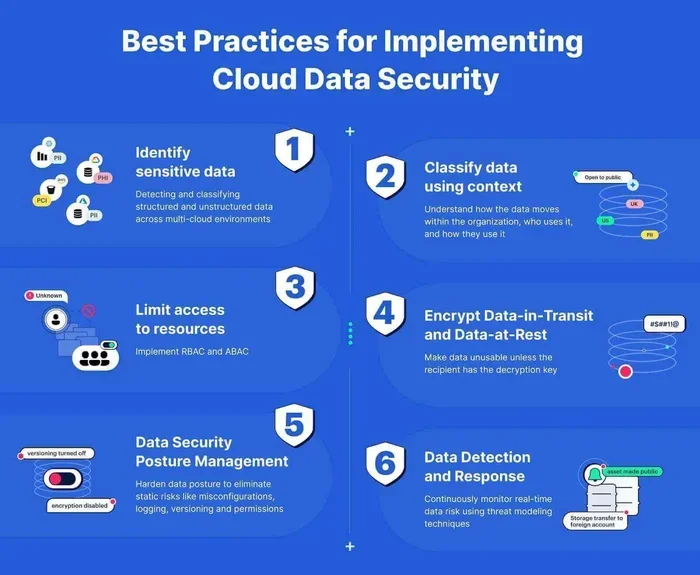
One of the biggest concerns businesses have is security. They worry about putting sensitive data in the cloud. The truth is that major cloud providers offer security that most companies cannot match on their own. However, you still need to take steps to protect your data. Use strong encryption, enable multi-factor authentication, and regularly review access permissions. Good data protection practices go a long way in keeping your cloud environment safe.
Managing Downtime During Migration
Moving your continuity plan to the cloud can cause temporary disruption if not done carefully. Plan your cloud migration during a slow period. Test the new setup thoroughly before cutting over. Work with your provider to create a detailed migration plan. And always keep your old system running until you are 100 percent confident the new one works.
Vendor Lock-In
Another concern is becoming too dependent on a single cloud provider. This is called vendor lock-in. To avoid this, choose providers that support open standards and make it easy to export your data. You can also use multi-cloud strategies, where you spread your workloads across two or more providers. This adds another layer of protection and keeps your options open.
Best Practices for Cloud Business Continuity
Setting up cloud continuity is only half the battle. You need to maintain and improve your plan over time. Here are the best practices that work.
Testing Your Plan Regularly
A continuity plan that has never been tested is not really a plan. Run drills and simulations at least twice a year. Test your failover processes. Check that your backups are actually working. Identify any weak spots and fix them before a real disaster hits. Regular testing builds confidence and reveals problems early.
Training Your Team
Your plan is only as good as the people who execute it. Train your team on what to do when an outage occurs. Make sure everyone knows their role. Create simple step-by-step guides that anyone can follow, even under stress. The more prepared your team is, the smoother your recovery will be.
Keeping Documentation Up to Date
Your continuity plan should be a living document. Update it whenever you add new systems, change providers, or modify your infrastructure. Keep documentation clear and accessible. This ensures that anyone on your team can step in and help during an emergency.
Monitoring and Continuous Improvement
Use monitoring tools to track the health of your cloud systems 24/7. Set up alerts for unusual activity or performance drops. Review your metrics regularly and look for ways to improve. Continuous improvement keeps your business continuity in the cloud strategy sharp and effective over time.
Quick Tips for a Strong Cloud Continuity Plan
- Start small: You do not need to move everything to the cloud at once. Begin with your most critical systems and expand from there.
- Set clear goals: Define your RTO and RPO before you start shopping for solutions.
- Use automation: Automate backups and failover processes to reduce human error.
- Communicate with stakeholders: Keep your team, customers, and partners informed about your continuity plan.
- Review your SLA carefully: Understand exactly what your cloud provider promises and what they do not.
Common Mistakes to Avoid
- Skipping regular tests: An untested plan is an unreliable plan. Do not wait for a real disaster to find out your backups are broken.
- Ignoring RTO and RPO: Without clear recovery goals, you cannot measure whether your plan is working.
- Choosing the cheapest option: The lowest-priced solution may not offer the features or reliability you need.
- Forgetting about mobile access: Your team needs to access systems from phones and tablets, not just desktops.
- Neglecting updates: Your continuity plan needs regular updates as your business changes and grows.
Expert Insights
“The cloud has transformed business continuity from a luxury into a necessity,” says Sarah Mitchell, a cloud infrastructure consultant with over 15 years of experience. “Companies that invest in cloud-based continuity today are the ones that survive disruptions tomorrow. The cost of not having a plan is always higher than the cost of implementing one.”
Industry experts also emphasize the importance of a layered approach. No single solution covers every risk. Combine cloud backup with cybersecurity tools, employee training, and clear communication protocols. This layered strategy creates a robust defense against almost any disruption.
Another expert tip from James Rivera, a disaster recovery specialist, is to focus on your most critical processes first. “Not every system is equally important,” he explains. “Identify what your business cannot survive without, and make sure those systems are protected first. Then build outward from there.”
Conclusion
Business continuity in the cloud is no longer optional. It is an essential part of running a modern business. The cloud gives you the tools to protect your data, keep your operations running, and recover quickly from any disruption. Whether you are a small startup or a large enterprise, a cloud-based continuity plan pays for itself many times over.
The key is to start now. Do not wait for a disaster to force your hand. Choose a solution that fits your needs, test it regularly, and keep improving. With the right approach, you can face any challenge with confidence. Your data will be safe, your team will be prepared, and your business will keep moving forward no matter what comes your way.
Frequently Asked Questions
What is business continuity in the cloud?
Business continuity in the cloud is the practice of using cloud technology to keep your business operations running during a disruption. It involves storing data, applications, and system copies in remote cloud servers so you can recover quickly after an outage, cyberattack, or natural disaster.
How much does cloud business continuity cost?
Costs vary depending on your business size and needs. Most cloud continuity solutions operate on a subscription model, which means you pay monthly or annually. Small businesses can often get started for a few hundred dollars per month. The cost is usually much lower than maintaining an on-premises backup system.
What is the difference between disaster recovery and business continuity?
Disaster recovery focuses specifically on restoring IT systems and data after an outage. Business continuity is broader. It includes disaster recovery but also covers how your entire organization keeps functioning during and after a disruption. Cloud solutions often address both aspects together.
How long does it take to recover using cloud continuity?
Recovery time depends on your RTO settings and the complexity of your systems. With cloud-based solutions, many businesses achieve recovery in minutes to a few hours. This is significantly faster than traditional on-premises recovery, which can take days or even weeks in some cases.
Is my data safe in the cloud?
Yes, when you choose a reputable cloud provider with strong security measures. Major providers use advanced encryption, multi-factor authentication, and continuous monitoring. They also maintain compliance with industry standards like SOC 2 and ISO 27001. You should also follow best practices like regular audits and access controls.
Can I use a hybrid approach for business continuity?
Absolutely. A hybrid cloud approach lets you keep some systems on-premises while using the cloud for backup and recovery. This can be a good option if you have strict compliance requirements or sensitive data that you prefer to keep closer to your physical location. Many cloud providers offer hybrid solutions designed for this purpose.
=== CONCLUSION ===
Business continuity in the cloud is one of the smartest investments you can make for your company. It protects your data, keeps your team productive, and ensures your customers never notice when something goes wrong. The cloud gives you the tools to be prepared for anything. Start building your cloud continuity plan today. Your future self will thank you when the next disruption comes along.