Cloud Migration for Small Business The Ultimate Guide
Cloud migration for small business is the process of moving your data, apps, and IT systems from local servers to the cloud. This guide covers everything you need to know, from planning your strategy to choosing the right cloud provider. You will learn the benefits, costs, challenges, and best practices to make your transition smooth and stress-free.
Running a small business means wearing many hats. You handle sales, customer service, accounting, and often your own IT. The last thing you need is a server crash or a data breach keeping you up at night. That is where cloud migration for small business comes in.
Cloud migration means moving your files, applications, and IT systems from physical servers on your premises to remote data centers managed by a cloud provider. Think of it like renting a secure, high-tech storage unit for your digital life instead of building your own warehouse. It is simpler, more affordable, and surprisingly easy to get started.
Whether you are a solo freelancer or a team of 50, cloud migration for small business can transform the way you work. In this guide, we will walk you through every step of the process. You will learn why it matters, how to pick the right strategy, what challenges to expect, and how to keep your new cloud setup running smoothly for years to come.
Key Takeaways
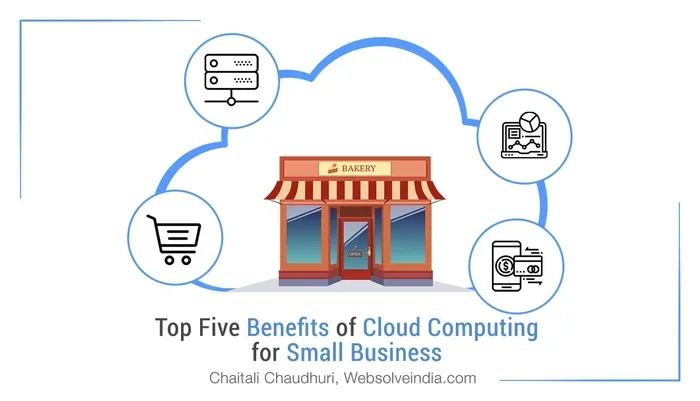
- Cost Savings: Cloud migration for small business eliminates the need for expensive on-site hardware and IT maintenance.
- Scalability: You can easily grow or shrink your cloud resources based on your current business needs.
- Better Security: Leading cloud providers offer enterprise-grade protection that most small businesses could never afford on their own.
- Remote Work Ready: Cloud tools let your team access files and apps from anywhere with an internet connection.
- Smart Planning Matters: A clear migration strategy prevents downtime, data loss, and unexpected costs.
- Start Small: You do not need to move everything at once. A phased approach reduces risk and confusion.
📑 Table of Contents
- What Is Cloud Migration for Small Business?
- Why Small Businesses Should Migrate to the Cloud
- Types of Cloud Migration Strategies
- How to Plan and Execute Your Cloud Migration
- Common Cloud Migration Challenges and How to Overcome Them
- Best Cloud Platforms for Small Business
- Expert Insights on Cloud Migration Success
- Key Takeaways
- Conclusion
What Is Cloud Migration for Small Business?
At its core, cloud migration is the move from traditional on-site IT to cloud computing. Instead of keeping files and software on a hard drive or a local server in your office, you store and access them over the internet through a cloud provider.
There are three main types of cloud environments you should know about:
- Public Cloud: Resources are shared across many users. Providers like Google Cloud and Microsoft Azure offer powerful tools at low prices. This is the most popular choice for small business IT.
- Private Cloud: Your resources are dedicated to your business only. It offers more control but costs more.
- Hybrid Cloud: A mix of both. You keep sensitive data on a private server while using the public cloud for everyday tasks. Many small businesses prefer this balanced approach.
The goal of cloud migration is simple. You want your business to run faster, safer, and smarter. And the good news is, you do not need to be a tech expert to make it happen.
Why Small Businesses Should Migrate to the Cloud
You might be wondering, “Why should I move my business to the cloud?” The answer is straightforward. Cloud services give small businesses access to tools and capabilities that were once only available to large corporations.
Cost Savings
One of the biggest reasons small businesses choose cloud migration is the cost. On-site servers require hardware purchases, cooling systems, electricity, and a dedicated IT person. Cloud costs, on the other hand, are predictable and scalable. You pay only for what you use, much like a monthly subscription for business software.
Scalability and Flexibility
When your business grows, your IT needs change. With cloud hosting, you can scale up during busy seasons and scale down when things slow off. This scalability means you never overspend on resources you do not need. It is one of the strongest reasons cloud migration for small business makes sense.
Better Data Security
Many small business owners worry about cloud security. But here is the truth: top cloud providers invest billions in protection. They offer encryption, multi-factor authentication, and regular security updates. Most small businesses cannot match that level of defense on their own. Cloud security is not a weakness. It is a major strength.
Supporting Remote Work
Since 2020, remote work has become the norm for many industries. Cloud apps and cloud storage let your team access files from anywhere in the world. Whether your employees work from home, a coffee shop, or a different city, cloud computing keeps everyone connected and productive.
Disaster Recovery and Business Continuity
What happens if your office floods or your laptop gets stolen? Without a backup plan, you could lose everything. Cloud backup and business continuity tools automatically save copies of your data in secure locations. If something goes wrong, you can recover quickly with minimal downtime.
Types of Cloud Migration Strategies
Not all data migration projects look the same. Your approach depends on your goals, budget, and current setup. Here are the most common strategies used in cloud migration for small business.
Lift and Shift
This is the simplest approach. You take your existing applications and move them to the cloud with little or no changes. It is fast and works well for businesses that need a quick migration strategy. However, it does not always take full advantage of cloud infrastructure features.
Replatforming
Also known as “lift, tinker, and shift,” this method involves making small optimizations to your apps before moving them. You get better performance in the cloud without a full rewrite. It is a popular middle ground for small business IT teams.
Refactoring
This is the most thorough approach. You redesign your applications to fully leverage cloud services. It delivers the best long-term results but requires more time and investment. Refactoring is ideal for businesses planning major digital transformation.
Hybrid Migration
Some businesses keep certain systems on-premises while moving others to the cloud. This hybrid cloud approach gives you the best of both worlds. It is especially useful for companies with strict compliance or privacy requirements.
| Strategy | Speed | Cost | Best For |
|---|---|---|---|
| Lift and Shift | Fast | Low | Quick moves with minimal changes |
| Replatforming | Medium | Medium | Better performance without full rebuild |
| Refactoring | Slow | High | Long-term cloud optimization |
| Hybrid Cloud | Varies | Varies | Businesses with mixed needs |
How to Plan and Execute Your Cloud Migration
A successful migration strategy does not happen by accident. It takes careful planning, clear goals, and the right team. Here is a step-by-step roadmap to guide you through cloud migration for small business.
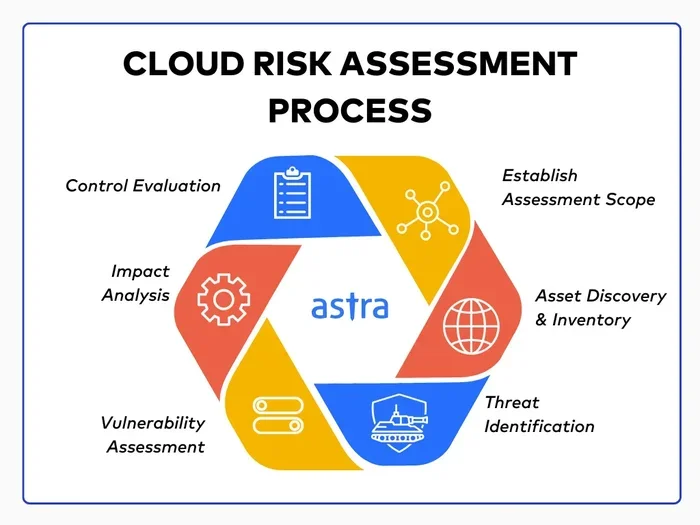
Step 1: Assess Your Current Setup
Before you move anything, take stock of what you have. List all your servers, applications, databases, and file storage locations. Identify which systems are critical to daily operations and which ones are outdated. This audit gives you a clear picture of what needs to move and what can stay behind.
Step 2: Define Your Goals
Why are you migrating? Is it to cut costs? Improve remote access? Enhance cloud security? Write down your top priorities. Clear goals help you choose the right cloud provider and migration strategy.
Step 3: Choose the Right Cloud Provider
Not all providers are the same. Look for a cloud provider that offers strong support, clear pricing, and the features your business needs. Popular choices include Amazon Web Services, Microsoft Azure, and Google Cloud Platform. Each has free tiers and small business plans that make getting started affordable.
Step 4: Start with a Pilot Project
Do not try to move everything at once. Pick one non-critical application or a small set of files and migrate those first. This pilot project lets your team learn the process, spot issues early, and build confidence. Think of it as a practice run before the big move.
Step 5: Train Your Team
Your cloud migration will only succeed if your team knows how to use the new tools. Provide simple training sessions, create quick-reference guides, and encourage questions. When everyone feels comfortable, adoption goes up and problems go down.
Step 6: Monitor and Optimize
After migration, keep an eye on performance and costs. Most cloud platforms offer dashboards that show usage, spending, and security alerts. Use these tools to fine-tune your setup and avoid surprise bills.
Quick Tips for a Smooth Migration
- Back up everything before you start the move.
- Communicate clearly with your team about timelines and expectations.
- Document every step so you can troubleshoot if something goes wrong.
- Set a realistic timeline. Rushing leads to mistakes.
- Test thoroughly before you shut down old systems.
Common Cloud Migration Challenges and How to Overcome Them
Cloud migration for small business is not without its hurdles. Understanding the challenges ahead helps you prepare and avoid common pitfalls.
Data Loss and Downtime
The fear of losing data keeps many business owners from migrating. The key is to have a solid cloud backup plan. Use redundant storage and test your recovery process before you go live. Most providers offer 99.9% uptime guarantees, which means downtime is rare and brief.
Unexpected Costs
Cloud services are pay-as-you-go, which is great. But without monitoring, costs can creep up. Set budget alerts and review your usage weekly during the first few months. Choose a provider with transparent pricing and no hidden fees.
Compatibility Issues
Some older business software may not work well in a cloud environment. Before migrating, check compatibility and ask your provider about integration options. In some cases, a simple update or replacement solves the problem.
Resistance to Change
People naturally resist change, especially when it involves new tools and workflows. Address this head-on by explaining the benefits clearly. Show your team how cloud apps make their daily tasks easier. When people see the value, they embrace the change.
Vendor Lock-In
Switching providers later can be difficult if your systems are deeply tied to one platform. To avoid this, use open standards and portable formats wherever possible. Keep your data exportable so you are never stuck.
Common Mistakes to Avoid
- Skipping the assessment phase. You cannot plan what you do not understand.
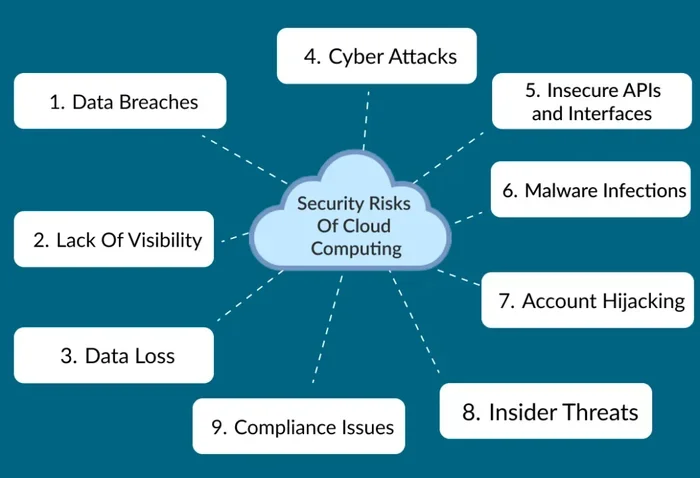
- Ignoring security settings. Misconfigured access controls are a top cause of data breaches.
- Moving everything at once. A phased approach is safer and less stressful.
- Forgetting to train staff. New tools fail when no one knows how to use them.
- Neglecting ongoing management. Cloud systems need regular check-ins, not just a one-time setup.
Best Cloud Platforms for Small Business
Choosing the right cloud provider is one of the most important decisions you will make. Here is a quick look at the top options for cloud migration for small business.
Amazon Web Services (AWS) is the largest cloud platform in the world. It offers over 200 services, from storage to machine learning. AWS has a free tier for the first 12 months, which is perfect for small businesses testing the waters. However, its pricing can get complex, and the dashboard can feel overwhelming for beginners.
Microsoft Azure is a strong choice, especially if your business already uses Microsoft 365 or Windows. Azure integrates seamlessly with familiar tools, which reduces the learning curve. It also offers excellent hybrid cloud options for businesses that want to keep some systems on-site.
Google Cloud Platform (GCP) stands out for its data analytics and machine learning tools. GCP is known for strong performance and competitive pricing. It is a great fit for small businesses that rely heavily on data analysis or run web-based applications.
When comparing platforms, consider these factors:
- Pricing structure and hidden fees
- Ease of use and available tutorials
- Security features and compliance certifications
- Customer support quality and response times
- Scalability as your business grows
- Integration with your existing tools
Most providers offer free trials or demos. Take advantage of these to test the platform before committing. The best cloud provider for your business is the one that fits your budget, your team’s skills, and your long-term goals.
Expert Insights on Cloud Migration Success
Digital transformation is not just about technology. It is about changing the way your business thinks and operates. Experts in cloud migration for small business agree on a few key principles.
“The biggest mistake we see is treating migration as a one-time project,” says a seasoned cloud migration consultant. “It is actually an ongoing process. Businesses that succeed are the ones that continuously monitor, optimize, and adapt.”
Another expert in small business IT adds, “Start with a clear problem you want to solve. Do not migrate just because everyone else is doing it. When you have a specific goal, every decision becomes easier.”
These insights highlight a simple truth. Cloud migration works best when it is driven by real business needs, not trends. Focus on what will make your operations smoother, your data safer, and your team more productive.
Key Takeaways
- Cloud migration for small business saves money by replacing expensive on-site hardware with affordable, pay-as-you-go cloud services.
- Scalability lets you adjust resources up or down based on demand, so you never overspend.
- Cloud security from top providers exceeds what most small businesses can afford on their own.
- Remote work becomes seamless when your files and apps live in the cloud.
- Business continuity and cloud backup protect your data from disasters and unexpected events.
- A phased approach reduces risk. Start with a pilot project and expand gradually.
- Choosing the right cloud provider depends on your budget, tools, and long-term goals.
Conclusion
Cloud migration for small business is no longer a luxury reserved for big corporations. It is a practical, affordable, and powerful way to level the playing field. From cost savings to better security, the benefits are clear and compelling.
The journey starts with a single step. Assess your current setup, define your goals, pick the right strategy, and start small. With careful planning and the right cloud provider, your migration can be smooth, fast, and rewarding.
Do not let fear of change hold your business back. The cloud is ready for you. Take the leap, and watch your small business thrive in a smarter, more connected world.
Frequently Asked Questions
What is cloud migration for small business?
Cloud migration for small business is the process of moving your data, applications, and IT systems from local servers to cloud-based platforms. It allows you to store, access, and manage your business resources over the internet instead of on physical hardware in your office.
How much does cloud migration cost for a small business?
The cost varies based on your size, the amount of data, and the provider you choose. Many cloud providers offer free tiers or low-cost starter plans. Most small businesses spend between $50 and $500 per month on cloud services, which is far less than maintaining on-site servers.
Is cloud migration safe for small businesses?
Yes, cloud security is generally very strong. Leading providers invest heavily in encryption, access controls, and regular audits. In most cases, your data is safer in the cloud than on a local server that lacks professional protection and updates.
How long does cloud migration take?
The timeline depends on the size of your migration and the strategy you choose. A simple lift and shift might take a few weeks, while a full digital transformation could take several months. Starting with a pilot project helps you gauge the timeline for your specific situation.
What is the best cloud platform for small business?
There is no single best platform. Amazon Web Services, Microsoft Azure, and Google Cloud Platform all offer strong options. The right choice depends on your budget, existing tools, technical skills, and long-term goals. Most providers offer free trials so you can test before you commit.
Can I migrate my business to the cloud without IT expertise?
Absolutely. Many cloud providers offer guided migration tools, tutorials, and customer support specifically designed for small businesses. You can also hire a freelance cloud migration consultant for a one-time setup. Starting small and learning as you go is a perfectly valid approach.