Cloud Computing Solutions for Small Business Growth
Cloud computing solutions for small business offer affordable, scalable tools that help entrepreneurs grow without heavy IT costs. This guide covers everything from cloud storage and software to security and migration tips. You will learn how to choose the right cloud computing solutions for small business and avoid common pitfalls.
Running a small business means wearing many hats. You handle sales, manage finances, lead your team, and keep customers happy. On top of all that, you need reliable technology that grows with you. That is where cloud computing solutions for small business come in. They take the pressure off your IT needs and let you focus on what matters most: growing your business.
Whether you are just starting out or looking to scale up, the right cloud setup can change everything. It saves money, boosts teamwork, and keeps your data safe. In this guide, we will walk you through everything you need to know about small business cloud services. You will learn the types available, the benefits, and how to pick the best fit for your company.
Key Takeaways
- Affordable Scaling: Cloud solutions let small businesses grow without expensive hardware.
- Flexible Options: From SaaS to hybrid models, there is a cloud fit for every budget.
- Better Security: Top providers offer enterprise-grade protection for your data.
- Easy Remote Work: Cloud tools enable teams to collaborate from anywhere.
- Smart Migration: Follow a step-by-step plan to move to the cloud smoothly.
- Cost Savings: Pay only for what you use and avoid upfront IT expenses.
📑 Table of Contents
- What Are Cloud Computing Solutions for Small Business?
- Why Cloud Computing Matters for Small Business Growth
- Types of Cloud Computing Solutions
- Benefits of Cloud Computing Solutions for Small Business
- How to Choose the Right Cloud Solution for Your Business
- Common Mistakes Small Businesses Make with Cloud Computing
- Expert Tips for Getting Started with Cloud Computing
- Conclusion
What Are Cloud Computing Solutions for Small Business?
At its core, cloud computing means storing and accessing data and programs over the internet instead of your computer’s hard drive. Think of it like renting a tool instead of buying it. You pay for what you use, and the provider handles all the maintenance.
For small businesses, this means no more expensive servers sitting in a closet. No more IT headaches. Your cloud-based software lives online, and you can reach it from any device with an internet connection. This is why cloud computing for startups has become so popular in recent years.
How Does It Work?
When you use a cloud service, your data goes to a secure data center managed by a provider. That provider takes care of backups, updates, and security. You simply log in and access your files or apps. It is that simple.
Most cloud computing providers offer different plans based on your needs. A small bakery might only need basic storage, while an online store might need powerful tools to handle orders and inventory. The beauty is that you can always upgrade as your needs grow.
Why Cloud Computing Matters for Small Business Growth
Small businesses face unique challenges. Limited budgets, small teams, and the need to compete with bigger companies. Cloud computing benefits directly address these challenges. They level the playing field and give small businesses access to tools that used to be available only to large corporations.
Here is why cloud computing solutions for small business are a game-changer for growth:
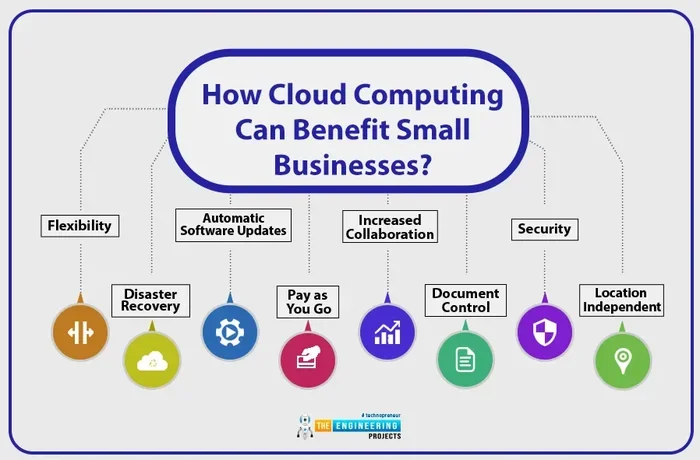
- Lower upfront costs: No need to buy expensive servers or equipment.
- Scalability: Add or remove resources as your business changes.
- Remote access: Your team can work from anywhere, anytime.
- Automatic updates: The provider handles all software updates.
- Disaster recovery: Your data stays safe even if something goes wrong locally.
When you invest in business cloud solutions, you are investing in flexibility. Your business can adapt quickly to new opportunities or unexpected challenges. That kind of agility is hard to achieve with traditional IT setups.
Real-World Impact
Think about a small marketing agency with five team members. Without cloud tools, they might need a dedicated office server, a person to manage it, and expensive software licenses. With cloud solutions, they use online project management tools, shared drives, and video conferencing apps. Everyone stays connected, and the costs drop dramatically.
This is the power of cloud computing solutions for small business. It removes barriers and lets small companies compete smarter, not harder.
Types of Cloud Computing Solutions
Not all cloud services are the same. Understanding the different types helps you make the right choice. Here are the main categories of cloud-based software and infrastructure options available to small businesses.
Software as a Service (SaaS)
SaaS is the most popular type of cloud service for small businesses. It means you access software over the internet, usually through a web browser. You do not install anything on your computer. Popular examples include Google Workspace, Microsoft 365, and Salesforce.
SaaS for small business is incredibly convenient. You pay a monthly or yearly subscription, and the provider handles everything else. It is perfect for email, customer relationship management, accounting, and more.
Infrastructure as a Service (IaaS)
IaaS gives you virtual computing resources over the internet. Think virtual servers, storage, and networking. You build your own environment on top of the provider’s infrastructure. This option works well for businesses that need more control but do not want to manage physical hardware.
Providers like Amazon Web Services (AWS), Microsoft Azure, and Google Cloud offer IaaS plans. They can be more complex than SaaS, but they offer great cloud infrastructure flexibility.
Platform as a Service (PaaS)
PaaS provides a platform for developers to build, test, and deploy applications. If your small business has a custom app or website that needs a development environment, PaaS can save time and money. It removes the need to manage underlying hardware and software.
Hybrid Cloud Solutions
A hybrid approach combines public cloud services with private cloud or on-premises infrastructure. Some businesses keep sensitive data in-house while using the public cloud for less critical tasks. This hybrid cloud solutions model offers the best of both worlds: control and flexibility.
Comparison Table
| Type | Best For | Cost Level | Complexity |
|---|---|---|---|
| SaaS | Everyday business tools | Low | Easy |
| IaaS | Custom infrastructure needs | Medium | Moderate |
| PaaS | App development | Medium | Moderate |
| Hybrid | Mixed security needs | Medium-High | Complex |
Most small businesses start with SaaS because it is the easiest and most affordable way to get started with cloud computing solutions for small business. As your needs grow, you can explore IaaS or hybrid options.
Benefits of Cloud Computing Solutions for Small Business
The advantages of moving to the cloud go far beyond just saving money. Let us look at the key benefits that make cloud computing solutions for small business so valuable.
Cost Savings
One of the biggest draws of cloud computing is the cost. Traditional IT setups require large upfront investments in hardware, software, and maintenance. Cloud services operate on a pay-as-you-go model. You only pay for the storage, users, and features you actually use.
This is a huge relief for small business owners watching their budgets. You avoid the cost of hiring a full-time IT staff or buying expensive equipment. Over time, the savings add up significantly.
Scalability and Flexibility
Your business needs will change over time. Maybe you hire more staff during the holiday season. Or perhaps you launch a new product line that requires more storage. With cloud computing solutions for small business, you can scale up or down in minutes.
No more overpaying for resources you do not need or scrambling when demand spikes. The cloud adjusts with you. This scalability cloud feature is one of the main reasons small businesses choose cloud services.
Enhanced Collaboration
Modern teams do not always work in the same office. Cloud tools make collaboration seamless. Team members can share files, edit documents together in real time, and communicate through integrated messaging platforms.
Tools like Google Drive, Slack, and Zoom all run in the cloud. They keep everyone connected, whether they are in the office, working from home, or traveling for business. This is especially important for remote work tools and distributed teams.
Security and Data Protection
Many small business owners worry about cloud security. They think keeping data on-site feels safer. But the truth is, reputable cloud providers invest heavily in security measures that most small businesses could never afford on their own.
Top providers offer encryption, multi-factor authentication, regular backups, and 24/7 monitoring. They have dedicated security teams watching over your data around the clock. When it comes to cloud backup solutions, the cloud is often safer than a local hard drive that could fail or be stolen.
Automatic Updates and Maintenance
Software updates can be a hassle. They take time and sometimes cause downtime. With cloud services, updates happen automatically in the background. You always have access to the latest features and security patches without lifting a finger.
This means your team spends less time dealing with IT issues and more time focusing on core business activities. It is one of the most underrated cloud computing benefits for busy entrepreneurs.
Disaster Recovery
Every business faces risks. Fires, floods, power outages, or hardware failures can wipe out local data in an instant. Cloud computing solves this problem. Your data is stored in multiple secure locations, so it stays safe even if something happens at your office.
Recovery times are much faster with cloud-based disaster recovery plans. You can get back up and running quickly, minimizing downtime and lost revenue.
How to Choose the Right Cloud Solution for Your Business
With so many options available, picking the right cloud computing solutions for small business can feel overwhelming. But it does not have to be. Follow these steps to find the best fit.
Step 1: Identify Your Business Needs
Start by asking yourself what you need the cloud for. Do you need more storage? Better collaboration tools? A customer management system? Write down your priorities. This clarity will guide your decision.
Think about your current pain points. Are your files scattered across different devices? Is your team struggling to stay organized? Your answers will point you toward the right type of cloud-based software.
Step 2: Set a Budget
Cloud services come in a wide range of prices. Some are free or very cheap for basic plans. Others cost more but offer advanced features. Set a realistic budget before you start comparing options.
Remember that the cheapest option is not always the best. Look at the value you get for the price. Consider features, storage limits, user numbers, and support quality.
Step 3: Research Providers
Not all cloud computing providers are created equal. Look for providers with a solid reputation, strong security, and good customer support. Read reviews from other small business owners. Ask for recommendations from your network.
Some well-known providers include Google Cloud, Microsoft Azure, AWS, and Dropbox Business. Each has different strengths, so compare them based on your specific needs.
Step 4: Test Before You Commit
Most providers offer free trials or basic free plans. Take advantage of these. Test the tools with your team. See how they work in your daily workflow. This hands-on experience is invaluable before making a long-term commitment.
Step 5: Plan Your Migration
Moving your data to the cloud is called cloud migration. It is important to plan this carefully. Start by backing up everything. Then move data in stages rather than all at once. This reduces the risk of data loss and gives your team time to adjust.
A smooth cloud migration plan makes the whole process much less stressful. Take it step by step, and do not rush.
Quick Tips for Choosing a Cloud Provider
- Check if the provider offers 24/7 customer support.
- Make sure they comply with industry regulations relevant to your business.
- Look for easy integration with tools you already use.
- Read the fine print on data ownership and privacy.
- Ask about future upgrade paths as your business grows.
Common Mistakes Small Businesses Make with Cloud Computing
Moving to the cloud is exciting, but mistakes can happen. Avoiding these common pitfalls will save you time, money, and frustration.
Skipping the Research
Too many business owners pick the first cloud service they see. Do not do this. Take time to compare options, read reviews, and understand what each plan includes. A little research goes a long way in finding the right cloud computing solutions for small business.
Ignoring Security
Even though cloud providers handle much of the security, you still have a role. Use strong passwords, enable multi-factor authentication, and train your team on safe practices. Ignoring security can lead to data breaches that damage your reputation and cost you customers.
Overlooking Integration
Your cloud tools should work well with your existing systems. If your new cloud platform does not integrate with your accounting software or CRM, you will create extra work instead of reducing it. Always check compatibility before committing.
Not Training Your Team
The best cloud tools are useless if your team does not know how to use them. Invest time in training. Make sure everyone understands the basics of cloud storage for small business and how to access shared files safely.
Underestimating Costs
Pay-as-you-go sounds affordable, but costs can add up if you are not careful. Monitor your usage regularly. Set alerts for when you approach your plan limits. Being mindful of cloud computing cost helps you stay on budget.
Expert Tips for Getting Started with Cloud Computing
Ready to make the move? Here are some expert-backed tips to ensure a smooth start with cloud computing solutions for small business.
Start Small and Grow
You do not need to move everything to the cloud on day one. Start with one tool or one area of your business. Maybe it is cloud email or shared document storage. Once you and your team are comfortable, expand to other tools. This gradual approach reduces risk and lets you learn as you go.
Prioritize Data Backup
Even though cloud providers backup your data, it is wise to have your own backup plan too. Use a separate cloud service or external drive for critical files. This extra layer of protection gives you peace of mind.
Embrace Automation
Cloud tools offer powerful automation features. You can automate backups, invoicing, email responses, and project workflows. Automation saves time and reduces human error. Look for tools that offer automation options to get the most out of your cloud investment.
Keep Learning
The cloud landscape changes fast. New tools, features, and cloud computing trends emerge all the time. Stay informed by reading industry blogs, attending webinars, or joining small business tech communities. Continuous learning helps you make the most of your cloud setup.
Get Feedback from Your Team
Your employees use these tools every day. Ask them what works and what does not. Their feedback can help you optimize your setup and pick better tools in the future. A happy team means a more productive business.
Conclusion
Cloud computing solutions for small business are no longer a luxury. They are a necessity for any company that wants to grow, compete, and thrive in today’s digital world. From cost savings to better collaboration, the benefits are clear and compelling.
Whether you choose SaaS, IaaS, or a hybrid approach, the key is to start with a clear plan. Identify your needs, research providers, test the tools, and train your team. Avoid common mistakes, stay on top of security, and keep learning as technology evolves.
The right cloud computing solutions for small business can transform the way you work. They free up your time, protect your data, and give you the flexibility to scale on your own terms. So take that first step today. Your future business self will thank you.
Start small, stay consistent, and watch your business grow in ways you never thought possible. The cloud is waiting for you.
Frequently Asked Questions
What are the best cloud computing solutions for small business?
The best options depend on your needs, but popular choices include Google Workspace, Microsoft 365, Dropbox Business, and Salesforce. Each offers different features and pricing. Start by identifying what your business needs most, and then compare plans from reputable providers.
How much does cloud computing cost for a small business?
Costs vary widely based on the type of service and the number of users. SaaS plans can start as low as $5 to $15 per user per month. IaaS and more advanced solutions may cost more. Overall, cloud solutions are much more affordable than traditional IT setups.
Is cloud computing safe for small business data?
Yes, when you choose a reputable provider. Top cloud companies invest heavily in encryption, backups, and security monitoring. You should also follow best practices like using strong passwords and enabling multi-factor authentication to keep your data safe.
How long does cloud migration take for a small business?
It depends on the amount of data and the complexity of your setup. Simple migrations can take just a few days. More complex ones might take several weeks. Planning ahead and moving data in stages helps keep the process smooth and stress-free.
Can I switch cloud providers after I start?
Yes, but it can be complicated. That is why it is important to choose wisely from the start. Look for providers that make data export easy and offer good support during transitions. Read the terms carefully before signing up.
Do I need IT expertise to use cloud computing solutions for small business?
Not at all. Most cloud services are designed to be user-friendly. SaaS tools, in particular, require minimal technical knowledge. If you do run into issues, most providers offer customer support and helpful resources to guide you through setup and troubleshooting.