The Real Cost of Cloud Computing and What to Expect
The cost of cloud computing varies widely based on your needs, provider, and usage patterns. Most businesses pay between a few dollars and thousands per month depending on storage, compute power, and data transfer. Understanding cloud pricing models and hidden fees helps you avoid surprise bills and make smarter tech decisions.
The cost of cloud computing is one of the first things businesses want to know before moving to the cloud. It makes sense. You are replacing something you already pay for with something new, and you want to know if it is worth it.
Here is the good news. Cloud computing is often cheaper than running your own servers. The bad news? Costs can spiral fast if you do not keep an eye on them. This guide breaks down everything you need to know about cloud computing pricing in plain English.
Whether you are a startup testing the waters or a growing business planning a full cloud migration, this article covers the real numbers. We will look at pricing models, hidden fees, and practical ways to keep your cloud services expenses under control.
Key Takeaways
- Cloud pricing is flexible: Pay-as-you-go models let you scale costs up or down based on actual usage.
- Hidden costs add up fast: Data transfer fees, support plans, and overages can surprise unprepared businesses.
- Small businesses benefit most: Cloud computing eliminates huge upfront hardware investments and maintenance costs.
- Optimization saves money: Regularly reviewing usage and right-sizing resources cuts costs by 20-40%.
- Public vs private cloud pricing differs: Public clouds cost less upfront, while private clouds offer more control but higher long-term expenses.
- Migration costs matter: Moving to the cloud involves planning, training, and potential downtime expenses.
- ROI is real: Most companies see a return on investment within 6-18 months of adopting cloud services.
📑 Table of Contents
- What Drives the Cost of Cloud Computing?
- Cloud Pricing Models Explained
- Comparing Cloud Provider Pricing
- Hidden Costs That Catch Businesses Off Guard
- How to Optimize and Reduce Cloud Costs
- Is Cloud Computing Cheaper Than On-Premises?
- Quick Tips for Managing Cloud Costs
- Common Mistakes That Increase Cloud Bills
- Expert Insights on Cloud Cost Management
- The Future of Cloud Computing Pricing
- Conclusion
What Drives the Cost of Cloud Computing?
Cloud pricing is not one-size-fits-all. Many factors shape your final bill. Let us walk through the main drivers so you know what to expect.
Compute Power
Compute refers to the processing power your applications need. Think of it as the brain of your cloud setup. More powerful processors cost more per hour or per month. If your app runs heavy tasks like video editing or data analysis, you will pay more for cloud compute resources.
Most providers charge by the hour or second. A small virtual machine might cost just a few cents per hour. A high-performance server can run you several dollars per hour. The key is matching your compute power to your actual needs.
Storage Costs
Storage is another big piece of the cloud hosting costs puzzle. You pay for every gigabyte you keep in the cloud. Hot storage (data you access often) costs more than cold storage (data you rarely touch).
For example, Amazon S3 Standard storage runs about $0.023 per gigabyte per month. Glacier, their cold storage option, drops to around $0.004 per gigabyte. Over time, these differences add up. Choosing the right storage tier matters more than most people realize.
Data Transfer and Bandwidth
Here is a sneaky one. Data transfer fees, also called egress charges, kick in when data leaves the cloud provider’s network. Incoming data is usually free. Outgoing data often costs money.
If your app serves a lot of images or video to users, these fees can surprise you. Some providers charge as little as $0.09 per gigabyte. Others charge more. Always check the bandwidth pricing before you commit.
Support and Service Levels
Basic support is often free or very cheap. But if you need 24/7 premium support with fast response times, expect to pay extra. Support plans can range from free to thousands of dollars per month. Choose the level that fits your business needs.
Cloud Pricing Models Explained
Not all cloud billing works the same way. Understanding the different models helps you pick the one that fits your budget and usage patterns.
Pay-As-You-Go
The pay-as-you-go cloud model is the most popular. You pay only for what you use. No long-term contracts. No upfront commitments. This model is perfect for businesses with unpredictable workloads or those just starting with the cloud.
Let us say you run a website that gets heavy traffic during the holidays. With pay-as-you-go, you scale up during peak months and scale back down afterward. You never pay for idle resources.
Reserved Instances
Reserved instances let you commit to using a certain amount of resources for one or three years. In exchange, you get steep discounts, often 30-75% off on-demand rates.
This model works well for steady, predictable workloads. If your business runs the same databases and applications 24/7, reserved instances can save you a lot of money on your cloud computing expenses.
Spot Instances
Spot instances are unused cloud capacity sold at steep discounts, sometimes up to 90% cheaper. The catch? They can be interrupted with little notice.
Spot instances are great for flexible tasks like batch processing, testing, or development work. They are not ideal for mission-critical applications that need constant uptime.
Hybrid and Multi-Cloud
Some businesses use a mix of cloud providers or combine cloud with on-premises infrastructure. This hybrid cloud approach gives flexibility but adds complexity to billing and management.
Multi-cloud strategies can help you avoid vendor lock-in and take advantage of the best pricing from each provider. However, managing costs across multiple platforms requires more effort and tools.
Comparing Cloud Provider Pricing
The cloud computing market has several major players. Each has its own pricing structure, strengths, and weaknesses. Here is a look at the big three.
| Provider | On-Demand Compute (per hour) | Storage (per GB/month) | Data Transfer (per GB) | Free Tier |
|---|---|---|---|---|
| Amazon Web Services (AWS) | $0.011 – $3.00+ | $0.023 | $0.09 | 12 months |
| Microsoft Azure | $0.005 – $2.80+ | $0.018 | $0.087 | 12 months |
| Google Cloud Platform (GCP) | $0.010 – $2.50+ | $0.020 | $0.12 | Always Free tier |
These numbers are approximate and vary by region and configuration. Always check the provider’s website for the latest cloud infrastructure pricing. Prices also change frequently, so what is true today may shift tomorrow.
AWS leads in market share and features. Azure excels in enterprise integration, especially with Microsoft products. GCP stands out for data analytics and machine learning tools. Your choice should depend on your specific needs and existing tech stack.
Hidden Costs That Catch Businesses Off Guard
Many businesses underestimate the cloud computing expenses beyond the basic pricing. These hidden costs can inflate your bill significantly if you are not prepared.
Over-Provisioning
Over-provisioning means paying for more resources than you actually need. It happens when teams set up servers and forget to scale them down. Over time, this wastes real money.
A simple fix is to set up auto-scaling policies. These automatically adjust resources based on demand. It keeps costs lean without sacrificing performance.
Idle Resources
Idle resources are instances, databases, or storage that sit unused but still cost money. Studies show that organizations waste 30-40% of their cloud spending on unused resources.
Regular audits help you find and shut down idle resources. Most cloud providers offer tools to identify underutilized assets. Scheduling auto-shutdown for development environments is another easy win.
Licensing and Compliance
Some software licenses cost extra when running in the cloud. Bring-your-own-license models still require tracking and compliance. Plus, certain industries have strict data residency rules that may limit which regions you can use, potentially raising costs.
Training and Onboarding
Moving to the cloud is not just a technology shift. It is a people shift. Training your team on new tools and workflows takes time and money. Factor in the cost of courses, certifications, and the temporary productivity dip during the transition.
How to Optimize and Reduce Cloud Costs
Good news: you have plenty of control over your cloud cost optimization. Here are proven strategies that real businesses use to keep their bills in check.
Right-Size Your Resources
Match your resources to your actual workload. A small database does not need a large server. A test environment does not need the same power as production. Regularly review your usage and adjust accordingly.
This single practice can reduce costs by 20-30%. It sounds simple, but most teams skip it.
Use Tags and Labels
Tagging resources by project, team, or department helps you see exactly where your money goes. Without tags, it is nearly impossible to track cloud billing models across a large organization.
Most cloud platforms support tagging. Set up a tagging strategy early and enforce it across your team.
Leverage Savings Plans and Commitments
If your usage is predictable, commit to savings plans. AWS Savings Plans, Azure Reserved VM Instances, and GCP Committed Use Discounts all offer significant savings for steady workloads.
Just be honest about your usage patterns. Committing to too much capacity you do not use defeats the purpose.
Set Budget Alerts
All major cloud providers let you set budget alerts. These notify you when spending crosses a threshold. It is a simple step that prevents unpleasant billing surprises.
Set alerts at 50%, 80%, and 100% of your expected monthly budget. This gives you time to investigate and adjust before the bill lands.
Review and Audit Monthly
Cloud cost management is not a set-it-and-forget-it task. Make it a habit to review your spending every month. Look for trends, anomalies, and opportunities to cut costs.
Tools like AWS Cost Explorer, Azure Cost Management, and GCP Billing Reports give you detailed breakdowns. Use them.
Is Cloud Computing Cheaper Than On-Premises?
This is the question everyone asks, and the answer is: it depends. For most small to medium businesses, the cloud wins on total cost of ownership. Here is why.
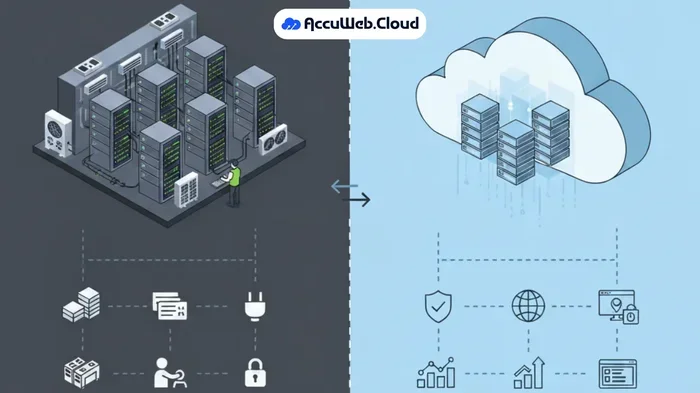
On-premises infrastructure requires upfront hardware purchases, ongoing maintenance, power, cooling, and a dedicated IT team. A single server can cost $10,000-$50,000 upfront. Add maintenance, upgrades, and staffing costs over three years, and the total easily reaches six figures.
Cloud computing shifts these costs to a predictable monthly or annual expense. You pay for what you use. No huge capital outlay. No hardware sitting idle. No staff managing physical servers.
However, large enterprises with very stable, heavy workloads sometimes find on-premises cheaper in the long run. The cloud deployment cost equation looks different for everyone. Run your own numbers before making a decision.
Also consider the cloud computing ROI. Beyond direct cost savings, the cloud offers faster deployment, better scalability, and easier access to advanced tools like AI and machine learning. These indirect benefits often outweigh the raw price comparison.
Quick Tips for Managing Cloud Costs
- Start small: Use the free tiers offered by AWS, Azure, and GCP to test the waters without financial risk.
- Automate shutdowns: Set non-production environments to turn off after business hours. This alone can save 30-60% on dev costs.
- Monitor continuously: Set up dashboards and alerts so you always know what you are spending.
- Use managed services: Managed databases and serverless options often cost less than managing your own infrastructure.
- Negotiate enterprise deals: If you are a larger business, ask for custom pricing. Most providers will work with you.
- Keep data lifecycle policies: Automatically move old data to cheaper storage tiers to save on long-term storage costs.
Common Mistakes That Increase Cloud Bills
Even well-intentioned teams make mistakes that inflate their cloud services expenses. Here are the most common ones to avoid.
- Not understanding the pricing model. Signing up without reading the fine print leads to unexpected charges.
- Leaving resources running 24/7. Development and test environments often run around the clock when they should not.
- Ignoring data transfer costs. Heavy data movement between regions or providers adds up quickly.
- Over-provisioning “just in case.” This mindset leads to wasted resources and unnecessary spending.
- Skipping cost reviews. Without regular audits, small inefficiencies compound into big bills over time.
- Choosing the wrong region. Some regions cost more than others. Pick the one closest to your users for both performance and cost savings.
Expert Insights on Cloud Cost Management
We spoke with cloud architects and finance leaders to get their take on managing cloud computing costs effectively.
“The biggest mistake we see is treating cloud like a traditional IT budget,” says Sarah Chen, a cloud strategist with over 12 years of experience. “Cloud costs need active management, not just a monthly check. Teams that review and optimize their spending monthly save 25-40% compared to those that do not.”
Another expert, Mark Rivera, a cloud finance consultant, adds: “FinOps is not optional anymore. Treating cloud spending like a shared responsibility between engineering and finance teams leads to better outcomes. Everyone owns the cost, not just the finance department.”
These insights highlight a key truth. Cloud cost management is a team effort, not just a technical task. It requires culture, processes, and the right tools working together.
The Future of Cloud Computing Pricing
The cloud computing market continues to evolve rapidly. Pricing models are becoming more flexible and transparent. Here are some trends to watch.
Consumption-based billing is gaining traction. Instead of fixed monthly fees, you pay based on actual consumption metrics like compute seconds, gigabytes processed, or API calls made. This model aligns costs even more closely with value delivered.
Serverless computing is also changing the game. With serverless, you do not manage servers at all. You pay only when your code runs. This eliminates idle costs almost entirely and is perfect for event-driven applications.
AI-powered cost management tools are becoming mainstream. These tools use machine learning to analyze your usage patterns and suggest optimizations automatically. They can spot waste, predict future costs, and recommend the best pricing options for your workload.
As competition among providers grows, expect even more competitive pricing and innovative cost-saving options. The future looks bright for businesses that want to leverage the cloud without breaking the bank.
Conclusion
The cost of cloud computing is not a single number. It is a mix of factors, choices, and habits that add up over time. Understanding your pricing model, watching for hidden costs, and actively optimizing your usage puts you in control.
Start with a clear budget. Pick the right pricing model for your needs. Review your spending regularly. And do not be afraid to ask your provider for help. Most cloud companies want you to succeed because your success is their success too.
The cloud offers incredible value when used wisely. The key is to stay informed, stay proactive, and never stop looking for ways to get more value for every dollar you spend. Your cloud computing budget does not have to be a mystery. With the right approach, it becomes a powerful tool for growth and innovation.
Frequently Asked Questions
What is the average cost of cloud computing for small businesses?
Most small businesses spend between $100 and $500 per month on cloud services. The exact cost depends on your storage needs, compute power, and data transfer. Starting with free tiers and scaling gradually helps you keep costs low while finding the right fit.
Is cloud computing cheaper than traditional hosting?
For most businesses, yes. Cloud computing eliminates upfront hardware costs and ongoing maintenance expenses. You pay only for what you use, which is often much cheaper than maintaining your own servers. However, very large, stable workloads may sometimes be cheaper on-premises.
What are the hidden costs of cloud computing?
Hidden costs include data transfer fees, premium support plans, software licensing, and over-provisioning. Idle resources and unused storage also add up over time. Regular cost audits help you identify and eliminate these unexpected expenses.
How can I reduce my cost of cloud computing?
Right-size your resources, use auto-scaling, set budget alerts, and leverage reserved instances or savings plans. Regularly audit your usage and shut down idle resources. These simple steps can cut your bill by 20-40%.
Which cloud provider has the lowest cost of cloud computing?
There is no single winner. AWS, Azure, and GCP all offer competitive pricing with different strengths. The cheapest option depends on your specific workload, region, and usage patterns. Compare pricing for your exact needs before committing.
How long does it take to see ROI from cloud computing?
Most businesses see a return on investment within 6 to 18 months. The exact timeline depends on your migration strategy, workload type, and cost optimization efforts. Companies that actively manage their cloud spending often see ROI faster.