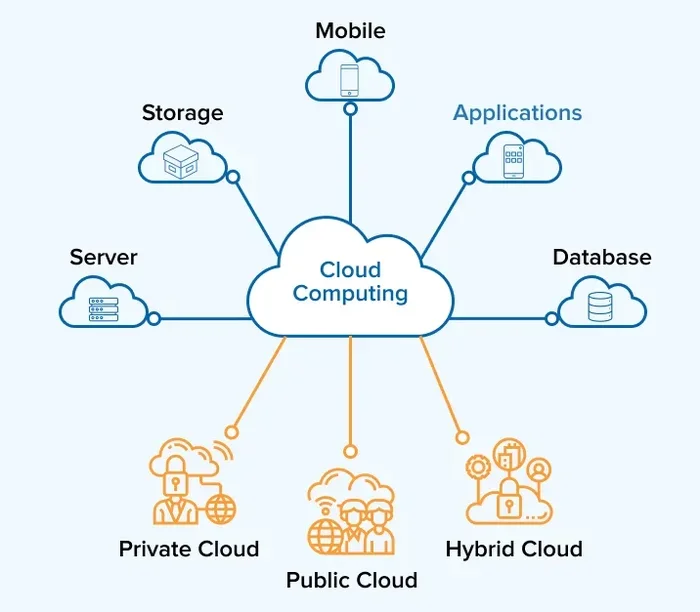
Keep Your Data Safe With Data Protection in Cloud Computing
Data protection in cloud computing is how you keep your files, apps, and sensitive info safe when stored online. It uses encryption, access controls, and backup systems to stop data loss and breaches. Whether you use cloud storage for work or personal files, understanding these protections helps you stay ahead of threats. This guide covers everything from cloud security basics to real-world tips you can use today. You will learn how to choose the right tools and avoid the most common mistakes.
You store photos, documents, and important files in the cloud every day. But have you ever stopped to think about how safe that data really is? Data protection in cloud computing is the practice of keeping your digital information secure while it lives on remote servers. It covers everything from encryption and access controls to backup plans and legal compliance. Without proper measures, your sensitive files could fall into the wrong hands.
The good news is that protecting your cloud data is not as hard as it sounds. With the right knowledge and a few simple habits, you can dramatically reduce your risk. This guide walks you through the essentials of cloud data protection in plain, easy-to-follow language. By the end, you will know exactly what steps to take to keep your information safe and sound.
Key Takeaways
- Encryption is the foundation: It scrambles your data so only authorized users can read it.
- Multi-factor authentication adds a critical layer: It stops unauthorized access even if passwords are compromised.
- Regular backups prevent permanent data loss: A solid backup strategy is non-negotiable in any cloud setup.
- Compliance regulations protect your rights: GDPR, HIPAA, and other laws set the standard for how your data should be handled.
- Choosing the right cloud provider matters: Not all providers offer the same level of cloud security and data protection features.
- Human error is the biggest risk: Training and clear policies reduce the chance of accidental data exposure.
📑 Table of Contents
- What Is Data Protection in Cloud Computing?
- How Cloud Data Protection Works
- Types of Cloud Services and Their Security Needs
- Compliance and Regulatory Requirements
- Common Mistakes That Put Cloud Data at Risk
- Expert Tips to Strengthen Your Cloud Data Protection
- How to Choose a Cloud Provider with Strong Data Protection
- Conclusion
What Is Data Protection in Cloud Computing?
Data protection in cloud computing refers to the strategies, tools, and policies used to safeguard digital information stored on cloud platforms. When you upload a file to Google Drive, Dropbox, or Microsoft OneDrive, it lives on servers owned by your cloud provider. Your data is not sitting on your desk or in your house anymore. It travels across the internet and rests in large data centers around the world.
This shift brings convenience, but it also creates new risks. Hackers, insider threats, and accidental deletions can all compromise your files. That is why cloud security and data protection go hand in hand. Protection means making sure your data stays private, accurate, and available whenever you need it.
Why Cloud Data Protection Matters
Every day, millions of people rely on cloud services. Businesses store customer records, financial data, and intellectual property online. A single data breach can expose millions of people to identity theft and fraud. For individuals, losing access to cherished photos or important documents can be devastating.
Data protection in cloud computing helps prevent these worst-case scenarios. It ensures that even if something goes wrong, your files remain safe and recoverable. Think of it as an insurance policy for your digital life. The more you understand it, the better prepared you are.
How Cloud Data Protection Works
Cloud providers use multiple layers of protection to keep your data secure. Each layer addresses a different type of threat. Let us break down the core components that make cloud security effective.
Encryption: The First Line of Defense
Data encryption is the process of converting your files into unreadable code. Only someone with the right encryption key can decode and access the information. When your data is encrypted, even if a hacker intercepts it, they cannot make sense of it.
There are two main types of encryption used in cloud environments:
- Encryption at rest: This protects files while they sit on cloud servers. Your data is scrambled on the disk, so unauthorized users cannot read it.
- Encryption in transit: This protects data while it moves between your device and the cloud. It ensures that nobody can eavesdrop on your files during upload or download.
Most reputable cloud providers offer both types by default. However, you should always verify this before trusting a platform with sensitive information. Look for end-to-end encryption for the highest level of cloud storage safety.
Access Control and Identity Management
Not everyone should have access to your data. Access control determines who can view, edit, or delete files in the cloud. Identity and access management (IAM) systems verify your identity before granting permissions.
Here are the key access control methods used in data protection in cloud computing:
- Role-based access control (RBAC): Users are given permissions based on their job role. A team member might only view files, while an admin can edit or delete them.
- Multi-factor authentication (MFA): This requires two or more verification steps, like a password plus a code sent to your phone. MFA blocks most unauthorized login attempts.
- Zero trust security: This model assumes no user or device is trustworthy by default. Every access request is verified, even from inside the network.
Using strong access controls is one of the simplest ways to boost your cloud security. It keeps unwanted eyes away from your most sensitive files.
Data Backup and Recovery
Accidents happen. You might accidentally delete an important file, or a server crash could wipe out your data. This is where cloud backup becomes essential. A solid backup strategy ensures that your files can be restored quickly after an incident.
Most cloud platforms offer automatic backup features. You can also set up version history, which keeps older copies of your files safe. This means you can roll back to a previous version if something goes wrong. Data loss prevention tools add another layer by monitoring for unusual activity or accidental sharing.
Quick Tip: Always follow the 3-2-1 backup rule. Keep three copies of your data, on two different types of storage, with one copy stored offsite or in the cloud.
Types of Cloud Services and Their Security Needs
Not all cloud services are the same. Different models offer different levels of control and security. Understanding these differences helps you choose the right setup for your needs.
Software as a Service (SaaS)
SaaS includes apps like Google Workspace, Microsoft 365, and Salesforce. The provider manages everything, from servers to security updates. Your job is to manage access and use strong passwords. SaaS security focuses on protecting user accounts and data within the application.
Infrastructure as a Service (IaaS)
IaaS providers like Amazon Web Services and Microsoft Azure give you virtual servers and storage. You control the operating system and applications. This means you share responsibility for data protection in cloud computing with the provider. You must configure firewalls, manage encryption, and set access rules yourself.
Platform as a Service (PaaS)
PaaS offers a development environment in the cloud. Providers handle the underlying infrastructure, but you manage your applications and data. PaaS security involves securing your code, APIs, and data pipelines. It is a middle ground between SaaS and IaaS in terms of your control and responsibility.
| Service Type | Provider Manages | You Manage | Security Focus |
|---|---|---|---|
| SaaS | Everything | User access and passwords | Account security, app-level permissions |
| PaaS | Infrastructure and platform | Applications and data | Code security, API protection |
| IaaS | Physical servers and networking | OS, apps, data, and configurations | Firewall rules, encryption, access control |
Compliance and Regulatory Requirements
Governments around the world have created rules to protect personal data. These compliance regulations set standards for how organizations must handle information in the cloud. Failing to meet these requirements can result in heavy fines and legal trouble.
Key Regulations You Should Know
- GDPR (General Data Protection Regulation): This European law gives individuals control over their personal data. Any company handling EU citizens’ data must comply, regardless of where it is based.
- HIPAA (Health Insurance Portability and Accountability Act): This US law protects medical information. Healthcare providers and their cloud partners must follow strict data privacy rules.
- CCPA (California Consumer Privacy Act): This law gives California residents the right to know what data is collected and to request its deletion.
- SOC 2: This is an auditing standard for cloud providers. It verifies that a provider has strong controls for security and data handling.
When choosing a cloud provider, always check their compliance certifications. A provider that meets these standards has been audited and proven to follow strict data protection in cloud computing practices. This gives you peace of mind and keeps you on the right side of the law.
Common Mistakes That Put Cloud Data at Risk
Even with strong tools in place, simple mistakes can undermine your cloud security. Here are the most common errors people make when protecting their data.
Using Weak or Reused Passwords
This is the number one way accounts get compromised. A weak password is easy to guess, and reusing passwords means one breach can unlock multiple accounts. Always use long, unique passwords for every cloud service.
Ignoring Software Updates
Cloud providers and apps release updates to fix security holes. Skipping updates leaves your system vulnerable to known threats. Turn on automatic updates whenever possible.
Over-Sharing Files and Links
It is easy to set a shared link to “anyone with the link can view.” But this means anyone who gets the link can access your file. Always double-check sharing settings before sending files to others.
Not Monitoring Account Activity
Most cloud platforms let you view login history and active sessions. If you notice unfamiliar activity, change your password immediately and review your access logs. Ignoring this can allow intruders to stay hidden for weeks.
Expert Tips to Strengthen Your Cloud Data Protection
Security experts recommend going beyond the basics to truly protect your data in the cloud. Here are proven strategies that make a real difference.
1. Implement a Zero Trust Security Model
Zero trust assumes that threats can come from both outside and inside your network. Every user and device must be verified before accessing data. This approach dramatically reduces the chance of unauthorized access. Many organizations now treat zero trust as the gold standard for cloud security.
2. Use Data Loss Prevention Tools
Data loss prevention (DLP) tools monitor your cloud environment for risky behavior. They can detect when sensitive files are shared publicly or downloaded in large amounts. Setting up DLP alerts gives you an early warning system for potential breaches.
3. Conduct Regular Security Audits
Even the best security setup needs regular checkups. Schedule audits to review access permissions, encryption settings, and compliance status. These audits help you catch weak spots before attackers do. Treat security as an ongoing process, not a one-time setup.
4. Train Your Team on Cloud Safety
Human error causes most data breaches. Regular training helps your team recognize phishing emails, use strong passwords, and follow sharing best practices. A well-informed team is your strongest defense against data breaches in the cloud.
How to Choose a Cloud Provider with Strong Data Protection
Not all cloud providers are created equal. Some invest heavily in data protection in cloud computing, while others cut corners. Here is what to look for when evaluating a provider.
- Encryption standards: Ask what encryption methods they use and whether you can manage your own keys.
- Compliance certifications: Look for GDPR, HIPAA, SOC 2, and ISO 27001 certifications.
- Uptime guarantees: A reliable provider offers at least 99.9% uptime, ensuring your data is always accessible.
- Backup and recovery options: Check how often backups run and how quickly you can restore data.
- Transparency: A trustworthy provider clearly explains their security practices in plain language.
Do your research before committing to a provider. Read reviews, check independent security ratings, and test their customer support. The right provider becomes a true partner in keeping your data safe.
Conclusion
Data protection in cloud computing is not optional. It is a necessity for anyone who stores files, runs apps, or manages customer information online. From encryption and access controls to backup strategies and compliance, every layer plays a vital role in keeping your data secure. The threats are real, but the solutions are within reach.
Start by reviewing your current cloud setup. Enable multi-factor authentication, check your sharing permissions, and set up automatic backups. Choose a provider that takes cloud security seriously and meets recognized compliance standards. Small steps today can prevent major problems tomorrow.
Your data is valuable. Treat it that way. With the right knowledge and tools, you can enjoy all the benefits of the cloud without putting your information at risk. Stay proactive, stay informed, and keep your data safe.
Frequently Asked Questions
What is data protection in cloud computing?
Data protection in cloud computing refers to the practices, tools, and policies used to keep digital information secure when stored on cloud platforms. It includes encryption, access controls, backup systems, and compliance with regulations like GDPR and HIPAA. The goal is to prevent data loss, unauthorized access, and breaches while keeping your files available and private.
How does encryption protect my cloud data?
Encryption converts your files into unreadable code that only authorized users can decode. Data encryption works both when your files are stored on cloud servers and when they travel between your device and the cloud. This means even if a hacker intercepts your data, they cannot read it without the encryption key. It is one of the most effective cloud security measures available.
What is the difference between cloud security and data protection?
Cloud security is the broader practice of protecting cloud systems, networks, and data from threats. Data protection in cloud computing focuses specifically on safeguarding the information itself. Data protection includes encryption, backup, recovery, and compliance. While they overlap, data protection is a subset of cloud security that deals directly with keeping your files safe and accessible.
Can I lose my data in the cloud?
Yes, data loss can happen in the cloud due to accidental deletion, server failures, cyberattacks, or provider outages. This is why a solid cloud backup strategy is essential. Using automatic backups, version history, and the 3-2-1 backup rule greatly reduces the risk of permanent data loss. Always verify that your provider offers reliable recovery options.
How do I know if my cloud provider is secure?
Look for key indicators like encryption at rest and in transit, multi-factor authentication, compliance certifications (GDPR, HIPAA, SOC 2), and transparent security policies. Check independent security ratings and read reviews from other users. A trustworthy provider will clearly explain their data protection in cloud computing practices and make it easy for you to verify them.
What is zero trust security in cloud computing?
Zero trust is a security model that assumes no user or device is trustworthy by default. Every access request is verified, regardless of whether it comes from inside or outside the network. This approach is especially effective for cloud security because it limits the damage of compromised credentials. Many experts consider zero trust a best practice for protecting sensitive data in the cloud.