What Is Dbaas in Cloud Computing and Why It Matters
Dbaas in cloud computing simplifies how you manage databases by moving them to the cloud. It removes the need for physical hardware and manual database administration tasks. You get automatic scalability, cost savings, and strong data security. This guide will show you why dbaas in cloud computing is essential for modern businesses.
Running a database used to mean a lot of headaches. You had to buy expensive servers, install complex software, and fix things when they broke. Today, that old way of working is changing fast. Dbaas in cloud computing offers a much simpler and smarter way to handle your data. It takes away the heavy lifting of database administration so your team can focus on what really matters.
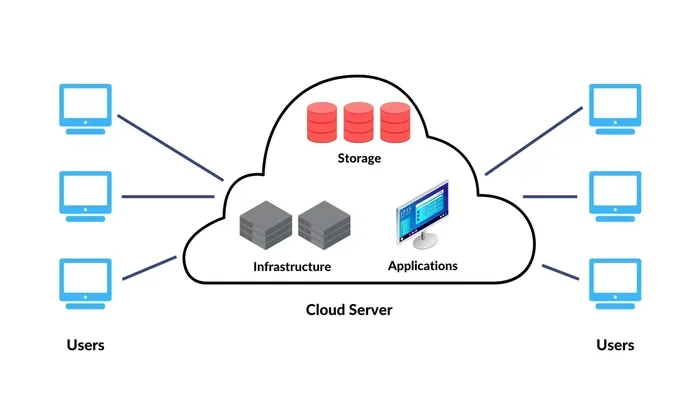
So, what is dbaas in cloud computing exactly? It stands for Database as a Service. Instead of managing your own physical servers, you rent database tools from a cloud provider. This approach lets you focus on building your app, not the underlying infrastructure management. Whether you use sql for structured data or nosql for flexible data, dbaas in cloud computing makes it easy to store and access your information safely. You just connect to your database through the internet, and the provider handles the rest.
Many companies are switching to this model because it saves time and money. You do not need a huge team just to keep databases running and healthy. In this post, we will break down everything you need to know. We will look at the core benefits, key features, and common pitfalls. By the end, you will see why dbaas in cloud computing is a game changer for modern businesses of all sizes.
Key Takeaways
- Point 1: Dbaas in cloud computing eliminates the need for physical hardware and manual database administration tasks.
- Point 2: You get instant scalability and cost savings by paying only for the resources you use.
- Point 3: Automated backups and built-in disaster recovery keep your data safe and secure.
- Point 4: Look for high uptime, support for both SQL and NoSQL, and strong monitoring tools.
- Point 5: Avoid common mistakes like vendor lock-in and skipping migration test runs.
📑 Table of Contents
Understanding Dbaas in Cloud Computing
Let us dive into the basics. When you hear the term dbaas in cloud computing, it refers to a managed database service. Cloud providers host the database for you on their powerful servers. They handle all the routine database administration tasks. This frees up your internal IT team to work on bigger, more strategic goals. You get access to a fully functional database without the burden of hardware management.
What Does Dbaas Stand For?
Dbaas stands for Database as a Service. It is a cloud computing model where a provider delivers database infrastructure management without the need for physical hardware on your end. You access your data over the internet using a web browser or an API. The provider handles updates, patches, and daily maintenance. This means your database performance stays high without your constant oversight or manual tuning. You simply request more space or power when you need it, and the system adjusts automatically.
How It Differs From Traditional Databases
Traditional databases require you to buy and maintain your own servers. You must install the software yourself and apply security patches regularly. If a server fails, you are the one who has to fix it, often at 3 AM on a weekend. With dbaas in cloud computing, the cloud provider takes care of all of this behind the scenes. You simply pay for the storage and computing power you use. This shift from owning physical hardware to renting digital services is huge for modern IT teams. It removes the guesswork and the manual toil from your daily routine.
| Feature | Traditional Database | Dbaas in Cloud Computing |
|---|---|---|
| Setup Time | Weeks or months to procure hardware | Minutes or hours to provision a new instance |
| Maintenance | Your team handles all updates and patches | Handled automatically by the cloud provider |
| Scaling | Requires buying and installing new hardware | Click a button to scale up or down instantly |
| Cost Structure | High upfront capital expenses | Pay-as-you-go operating expenses |
| Disaster Recovery | Complex and expensive to build yourself | Built-in automated backups and failover |
Core Benefits of Choosing Dbaas
There are many compelling reasons to switch to dbaas in cloud computing. Companies love the flexibility and ease it provides. Here are the top benefits you will enjoy when you make the switch to a managed solution.
Scalability and Elastic Growth
One of the biggest advantages is scalability. Your data needs change all the time. During the holiday season, traffic might spike dramatically. With dbaas in cloud computing, you can scale up your resources instantly to handle the load. When the rush is over, you scale back down just as easily. This database optimization ensures you never pay for capacity you do not need. It gives you the elasticity to grow at your own pace without any upfront investment in new machines.
Significant Cost Savings
Running your own database servers costs a lot of money. You pay for the hardware, the electricity to run it, and the cooling to keep it from overheating. You also pay for a team of experts to manage it all. Dbaas in cloud computing removes these heavy it overhead costs. You switch to a model where you only pay for what you use. This cost savings is perfect for startups and small businesses that need to stretch every dollar. You can also avoid the cost of hiring specialized database administrators for routine tasks.
Automated Backups and Fast Recovery
Data loss is a nightmare scenario for any business. Losing customer information can ruin your reputation and hurt your bottom line. With dbaas in cloud computing, automated backups happen automatically and regularly. The provider keeps secure copies of your data in different geographic locations. If something goes wrong, you can restore your database in just a few minutes. This level of data security and recovery speed is very hard to match with traditional on-premise setups. You sleep better knowing your data is safe and recoverable.
Easier Database Migration
Moving your existing data to a new system can be scary. Dbaas in cloud computing makes database migration much easier. Many providers offer tools that help you move your data with minimal downtime. You do not have to write complex scripts or hire expensive consultants. The cloud provider guides you through the process step by step. This makes transitioning from an old system to a new managed service much less risky. Your team can focus on the actual data move rather than the technical setup.
Key Features to Look For
Not all dbaas offerings are the same. When choosing a provider, you need to know what features matter most. Here are the essential capabilities that make dbaas in cloud computing truly valuable for your business operations.
High Availability and Reliable Uptime
Your database needs to be available 24 hours a day, 7 days a week. Downtime means lost sales and unhappy customers. Good dbaas in cloud computing platforms promise high uptime guarantees, often 99.9 percent or higher. They use redundant systems spread across multiple data centers. If one server goes down, another takes over instantly without you even noticing. This ensures your app stays online and your users stay happy. You never have to worry about a single point of failure taking your business offline.
Support for Multiple Data Types
Modern applications use many different kinds of data. Some need structured sql databases for strict relationships and transactions. Others work better with flexible nosql options for fast, unstructured storage. The best dbaas in cloud computing providers offer support for both. This database migration flexibility lets you choose the right tool for each specific job. You can even run both types side by side in the same cloud environment. This versatility is a huge advantage for modern app developers.
Built-In Database Monitoring Tools
You need to know how your database is performing at all times. Top dbaas in cloud computing platforms include built-in monitoring dashboards. These tools show you real-time metrics like query speed and resource usage. You can set up alerts to tell you if something goes wrong before your users notice. This visibility helps you catch problems early. It is a big part of keeping your database performance at its best without hiring a full-time team to watch the screens.
Automated Patching and Updates
Database software needs regular updates to stay secure and fast. In a traditional setup, applying these patches can be stressful and time-consuming. With dbaas in cloud computing, the provider handles all the database administration tasks related to patching. They schedule updates during low-traffic periods to minimize disruption. This keeps your system secure and optimized without any effort from your side. You always run the latest, most secure version of your database engine.
Common Mistakes to Avoid
Switching to dbaas is usually a smooth process, but mistakes can happen. Avoiding these common pitfalls will save you time, money, and frustration during your transition.
Ignoring Vendor Lock-In Risks
When you use dbaas in cloud computing, you rely heavily on your chosen provider. Some platforms use proprietary tools or unique APIs that are hard to replicate elsewhere. This can make it very hard to switch providers later on. To avoid this, choose providers that support open standards and common database engines like MySQL or PostgreSQL. Keeping your options open ensures you are never trapped by a single vendor and can move freely if needed.
Overlooking Security Configurations
While the provider handles the hardware and network security, you are still responsible for access control. A common mistake is using default settings that are too open. Always set up strong passwords and limit who can access your database from the internet. Enable encryption for data at rest and in transit. Taking these steps protects your data security and keeps your sensitive information safe from unauthorized users. Security is a shared responsibility in the cloud.
Skipping the Migration Test Run
Moving your existing data to a new service takes careful planning. You cannot just copy and paste a massive production database without a test. Poor database migration planning can cause unexpected downtime and data loss. Always test the migration process in a staging environment first. This ensures a smooth transition to dbaas in cloud computing and helps you spot any hidden issues early. Practice makes perfect, especially when moving critical business data.
Ignoring Network Latency
Even with a managed service, your app needs to talk to the database quickly. A common oversight is placing the database too far from your users. This causes network latency, which slows down your application. Choose a cloud region that is geographically close to your main user base. This simple step keeps your database performance fast and your users happy. Good infrastructure management includes choosing the right data center location.
Expert Insights and Quick Tips
Want to get the most out of your managed database? Follow these practical tips from industry experts to ensure success and avoid common traps.
Quick Tips for Success
- Monitor your usage daily: Keep an eye on your database performance metrics to catch issues early before they grow.
- Set auto-scaling limits: This prevents surprise bills during unexpected traffic spikes or sudden viral moments.
- Use read replicas: They offload read traffic from your main database and improve speed for your end users.
- Enable encryption always: Turn on data encryption for strong data security and to meet compliance requirements.
- Review access logs weekly: Check who is accessing your database and when to spot any unusual activity.
- Right-size your instance: Do not over-provision resources. Match your database size to your actual workload needs.
What the Experts Say
According to industry leaders, the future of data management is entirely cloud-native. Dbaas in cloud computing is not just a passing trend; it is now the standard for modern IT. Experts say that teams who adopt managed services innovate much faster. They spend less time on serverless database maintenance and more time building features users love. The shift to the cloud is here to stay, and dbaas in cloud computing is at the heart of this digital transformation. Companies that embrace this model gain a real competitive edge.
Conclusion
Dbaas in cloud computing has completely changed the way we handle data. It removes the complexity and headaches of traditional database management. You get speed, flexibility, and peace of mind all in one package. Whether you are a small startup or a large enterprise, this model delivers real and measurable value. You save money, boost database performance, and keep your critical data safe and sound. Now is the perfect time to explore your options. Make the switch to dbaas in cloud computing and watch your business grow.
Frequently Asked Questions
What is dbaas in cloud computing?
Dbaas stands for Database as a Service. It is a cloud computing model where a provider hosts and manages your database for you. You access your data over the internet, and the provider handles all the routine maintenance tasks.
How does dbaas in cloud computing save money?
You only pay for the storage and computing power you use. This removes the need to buy expensive hardware or hire a large IT team. It turns big upfront costs into small, predictable monthly bills.
Is dbaas in cloud computing secure?
Yes, reputable providers invest heavily in data security. They offer automated backups, encryption, and strict access controls. However, you must also configure your own security settings properly to keep your data fully protected.
Can I migrate my existing database to dbaas?
Yes, most cloud providers offer migration tools to help you move your data. The process is usually much faster than setting up a traditional database. You should always test the migration in a staging environment first to ensure a smooth transition.
What is the difference between SQL and NoSQL in dbaas?
SQL databases store structured data in tables with strict relationships. NoSQL databases handle flexible, unstructured data for faster access. The best dbaas in cloud computing platforms support both types so you can choose what fits your app.
What should I look for in a dbaas provider?
Look for high uptime guarantees, automated backups, and strong data security features. You should also check if they support auto-scaling and offer monitoring tools. These features ensure your database runs smoothly and reliably.