Hidden Costs of Cloud Computing That Will Surprise You
Many businesses underestimate the hidden costs of cloud computing when moving to the cloud. From data transfer fees to vendor lock-in, these surprise expenses can drain your budget fast. This guide exposes the real costs most companies overlook. You will learn how to spot hidden cloud charges and save money. Cloud cost optimization starts with knowing what you are actually paying for.
The cloud promised simplicity. Lower upfront costs. Pay-as-you-go pricing. No massive server rooms to manage. And for a while, many businesses believed it lived up to the hype. But over time, something unexpected happened. The bills kept climbing. Companies started wondering where all the money was going.
The truth is that hidden costs of cloud computing are real and widespread. They hide in data transfer fees, licensing agreements, support tiers, and exit contracts. Most businesses do not discover these costs until they are already deep in the red. That is exactly why this guide exists.
In this article, we will pull back the curtain on the cloud computing expenses that catch companies off guard. You will learn about surprise charges, common mistakes, and practical ways to take control of your cloud budget. Whether you are just starting your cloud migration or already deep into one, this guide has something valuable for you.
Key Takeaways
- Data egress fees can quietly spike your monthly cloud bill.
- Vendor lock-in makes switching providers expensive and risky.
- Cloud licensing and support costs add up faster than expected.
- Exit and migration fees are often hidden in fine print.
- Security and compliance costs are frequently overlooked in cloud budgets.
- Cloud cost management tools help you track and reduce surprise charges.
- Scaling up can be costly if you do not monitor usage carefully.
📑 Table of Contents
- What Are the Hidden Costs of Cloud Computing?
- Cloud Vendor Lock-In and Exit Costs
- Security and Compliance Costs
- Scalability Costs That Add Up
- Downtime and Performance Costs
- Multi-Cloud and Hybrid Cloud Expenses
- How to Take Control of Your Cloud Costs
- Common Mistakes That Increase Cloud Costs
- Expert Insights on Managing Cloud Costs
- Final Thoughts
What Are the Hidden Costs of Cloud Computing?
When people think about cloud infrastructure costs, they usually picture the monthly subscription fee. That is the number everyone sees. But that number only tells part of the story. The real costs go far deeper, and they show up in places most people do not expect.
Hidden cloud charges come from many directions. Some are built into the pricing model itself. Others appear when you try to scale, migrate, or secure your data. Understanding these costs is the first step toward cloud cost optimization. Let us break them down one by one.
Data Transfer and Egress Fees
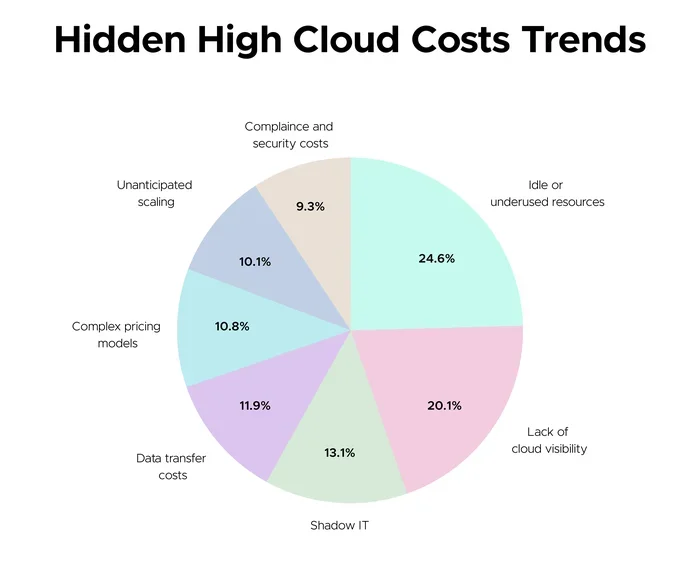
One of the biggest surprises is data transfer fees. Cloud providers make it cheap to move data into their systems. Ingress is usually free. But moving data out? That is where the charges kick in. This is called egress, and it adds up quickly.
If you run a high-traffic website or stream large files, your egress costs can skyrocket. A company that transfers just a few terabytes of data per month can easily see an extra few hundred dollars. For larger operations, this number can reach thousands per month.
Here is a quick example. Imagine your business runs a popular app. Users download content daily. The cloud provider charges for every gigabyte that leaves their network. Over a year, those small per-gigabyte fees compound into a massive bill. Many businesses do not notice until the invoice arrives.
Licensing and Software Costs
Another area where cloud billing surprises hide is licensing. Not all software licenses work the same way in the cloud. Some require you to pay per user. Others charge based on usage or the number of cores your application uses.
Many companies migrate their existing software to the cloud without checking whether their current licenses apply. The result is unexpected fees. You might end up paying for both your on-premises license and a new cloud license for the same software.
Before you move anything to the cloud, review every license agreement. Ask your vendor about cloud-specific pricing. Sometimes, a different licensing model can save you a lot of money.
Cloud Support and Managed Services
Most cloud providers offer multiple support tiers. The basic tier is often free or very cheap. But when something goes wrong, the free support is rarely enough. Businesses quickly find themselves upgrading to premium support plans.
Cloud support costs vary widely. Basic plans might cost a few dollars per month. Enterprise support can run into thousands. The difference is response time, dedicated account managers, and 24/7 phone access.
Here is something many people miss. Managed services, like database hosting or managed Kubernetes clusters, often come with their own fees. These are separate from your base compute costs. Over time, these add-ons can double or even triple your monthly bill.
Cloud Vendor Lock-In and Exit Costs
Cloud vendor lock-in is one of the most underestimated risks in cloud computing. Once you build your systems around a specific provider, switching becomes painful and expensive. Your data, your architecture, and your team’s skills all become tied to that platform.
But the real cost hit comes when you try to leave. Cloud exit fees are often buried in the fine print of service agreements. Some providers charge for early termination. Others make data extraction slow and costly. You might pay egress fees, migration fees, and downtime costs all at once.
Consider this scenario. A company spends two years building its entire infrastructure on one cloud platform. Then they decide to switch. The migration process takes months. During that time, the business pays for both the old and new environment. The total cost of switching can easily exceed the savings they expected from the original move.
How to Avoid Vendor Lock-In
There are practical steps you can take to reduce lock-in risk. Here are some tips:
- Use open-source tools and standards whenever possible.
- Avoid proprietary services that have no equivalent elsewhere.
- Design your applications to be portable across platforms.
- Regularly review your contracts for exit clauses and penalties.
- Consider a multi-cloud strategy to spread your risk.
These steps do not eliminate lock-in entirely. But they give you more flexibility and control over your cloud computing hidden fees down the road.
Security and Compliance Costs
Security is a major area where cloud migration costs go beyond what most people budget for. Cloud providers offer strong security tools, but many of them come at an extra cost. Encryption, identity management, and threat detection are often add-ons, not free features.
Compliance is another hidden expense. If your business operates in healthcare, finance, or any regulated industry, you need to meet strict data protection standards. Achieving compliance in the cloud often requires additional tools, audits, and expert consultants. These costs add up fast.
Many companies also overlook the cost of training. Your team needs to understand how to secure data in the cloud. Without proper training, you risk costly breaches and compliance violations. That is a hidden cost that hits your bottom line in a big way.
Common Security-Related Cloud Expenses
- Cloud security tools like firewalls, intrusion detection, and endpoint protection.
- Compliance audits and certification renewals.
- Data backup and disaster recovery services.
- Security consultant fees for setup and ongoing reviews.
- Employee training on cloud security best practices.
These costs are not optional. They are essential for protecting your business. But they are often left out of initial cloud budgets, which leads to unpleasant surprises later.
Scalability Costs That Add Up
Cloud scalability costs are a double-edged sword. The cloud is designed to scale up when you need more power and scale down when you do not. In theory, this saves money. In practice, it does not always work that way.
The problem is over-provisioning. Many businesses allocate more resources than they actually need. They do this to be safe. But those extra resources keep costing money, even when they sit idle. Over weeks and months, this waste adds up significantly.
On the other side, under-provisioning can also hurt you. If your application suddenly gets a spike in traffic and you have not set up auto-scaling properly, you either lose customers or pay emergency rates for on-demand resources. Both scenarios are expensive.
The Scaling Trap
Here is a quick comparison of common scaling mistakes:
| Mistake | What Happens | Cost Impact |
|---|---|---|
| Over-provisioning | You pay for resources you do not use | Wasted spend every month |
| Under-provisioning | Performance drops during traffic spikes | Lost revenue and emergency fees |
| No auto-scaling | Resources stay at peak levels all the time | Consistently high bills |
| No monitoring | You do not know what is costing you | Uncontrolled spending over time |
The key is to monitor your usage closely. Use cloud cost management tools to track where your money goes. Set up alerts for unusual spending patterns. And review your resource allocation regularly to make sure you are not paying for what you do not need.
Downtime and Performance Costs
Cloud downtime is rare, but it is not impossible. When it happens, the costs can be enormous. Every minute your application is down is a minute of lost revenue. For e-commerce sites, even a few minutes of downtime can mean thousands of dollars in lost sales.
But the costs go beyond direct revenue loss. Downtime damages your reputation. Customers lose trust. They go to your competitors. That long-term brand damage is hard to measure but very real. Some studies show that even short outages can reduce customer loyalty significantly.
Cloud downtime costs also include the engineering hours spent on recovery. Your team works overtime to fix the problem. That means diverted resources from other projects. And if you do not have proper backup systems in place, data loss can create even bigger problems down the line.
Quick Tips to Minimize Downtime Costs
- Choose a cloud provider with a strong uptime guarantee in their service level agreements.
- Set up multi-region deployments for critical applications.
- Use automated monitoring and alerting tools.
- Create and regularly test disaster recovery plans.
- Invest in redundancy for your most important services.
These steps require investment upfront. But they pay for themselves many times over by preventing costly outages. Think of them as insurance for your cloud infrastructure costs.
Multi-Cloud and Hybrid Cloud Expenses
More companies are adopting a multi-cloud strategy. They use more than one cloud provider to avoid lock-in and get the best features from each platform. But this approach comes with its own set of hidden costs.
Managing multiple cloud environments is complex. You need expertise in each platform. You need separate monitoring and billing tools. And you often pay for data transfer between different cloud providers. These inter-cloud data transfer fees can be significant.
Hybrid cloud setups, which combine on-premises infrastructure with cloud services, add another layer of complexity. You maintain physical servers while also paying for cloud resources. The integration costs between the two environments can be substantial. Networking, security, and data synchronization all require investment.
If you are considering a multi-cloud or hybrid approach, make sure you budget for these additional expenses. The flexibility is worth it, but only if you account for the full picture of cloud computing hidden fees.
How to Take Control of Your Cloud Costs
Now that you know where the hidden costs hide, let us talk about what you can do about it. Cloud cost optimization is not about spending less. It is about spending smarter. Here are actionable steps you can take today.
1. Audit Your Cloud Bill Regularly
Set a schedule to review your cloud bill every month. Look for line items you do not recognize. Check for services you are paying for but not using. Most cloud providers offer detailed billing dashboards. Use them.
2. Use Cost Management Tools
Both major cloud providers offer native cost management tools. AWS Cost Explorer, Azure Cost Management, and Google Cloud Billing are all free to use. These tools help you visualize your spending and identify waste.
3. Right-Size Your Resources
Match your resources to your actual needs. If a server is running at 10% capacity most of the time, downsize it. Many cloud providers offer rightsizing recommendations. Take advantage of them.
4. Set Budget Alerts
Most cloud platforms let you set budget alerts. You choose a spending threshold, and the platform notifies you when you approach or exceed it. This simple step can prevent bill shock.
5. Negotiate and Review Contracts
Do not accept the first pricing plan you see. Cloud providers often have room for negotiation, especially for larger workloads. Commit to longer-term contracts for better rates. And always read the fine print for hidden fees.
6. Train Your Team
Your team plays a huge role in controlling costs. When developers understand how cloud pricing works, they make better decisions about architecture and resource allocation. Invest in training and create a culture of cost awareness.
Common Mistakes That Increase Cloud Costs
Even with the best intentions, businesses make mistakes that inflate their cloud computing expenses. Here are the most common ones to avoid:
- Ignoring idle resources. Unused servers, storage, and databases keep costing money. Shut them down or delete them.
- Not using reserved instances. For predictable workloads, reserved instances can save 30-70% compared to on-demand pricing.
- Overlooking data transfer costs. Egress fees are one of the biggest hidden costs. Monitor your data movement closely.
- Choosing the wrong pricing model. On-demand is flexible but expensive for long-term workloads. Spot instances and savings plans can save a lot.
- No cost accountability. When no one owns the cloud budget, costs spiral. Assign cost owners and track spending by team or project.
Avoiding these mistakes alone can save your business thousands of dollars per year. It is not about cutting corners. It is about being intentional with your cloud spending.
Expert Insights on Managing Cloud Costs
“Most businesses focus on the upfront savings of the cloud and forget about the ongoing costs. The real value comes from continuous optimization,” says a cloud cost management expert at a leading consultancy firm.
“The hidden costs of cloud computing are not really hidden. They are just ignored. Companies that review their bills and track usage closely avoid most of these surprises,” adds another industry veteran.
The message is clear. Cloud computing is a powerful tool, but it requires active management. The savings are real, but they do not happen automatically. You need to stay involved, stay informed, and stay in control.
Final Thoughts
The hidden costs of cloud computing are real, but they are manageable. The key is awareness. When you understand where the costs come from, you can plan for them, avoid them, or reduce them significantly.
Start with a thorough audit of your current cloud spending. Identify the areas where you are overpaying. Then take the practical steps outlined in this guide. Use cost management tools, right-size your resources, and train your team. These actions will put you in control of your cloud infrastructure costs.
The cloud is not a set-it-and-forget-it solution. It is a powerful platform that rewards attention and care. The businesses that treat it that way are the ones that get the real value. Cloud cost optimization is not a one-time task. It is an ongoing practice. And the payoff is worth it.
Take action today. Review your next cloud bill with fresh eyes. Look for the costs you did not expect. Then make a plan to address them. Your future self and your bottom line will thank you.
Frequently Asked Questions
What are the most common hidden costs of cloud computing?
The most common hidden costs include data egress fees, licensing costs, premium support plans, exit and migration fees, and security and compliance expenses. These charges often appear after the initial migration and can significantly increase your total cloud spending over time.
How can I reduce my cloud computing expenses?
You can reduce expenses by auditing your bill regularly, right-sizing your resources, using reserved instances for predictable workloads, setting budget alerts, and training your team on cost-efficient cloud practices. Continuous monitoring is the key to long-term savings.
What is cloud vendor lock-in and why is it expensive?
Cloud vendor lock-in happens when your systems become so dependent on one provider that switching to another becomes difficult and costly. The expense comes from data migration fees, downtime during the switch, and the need to re-architect your applications for a new platform.
Are data transfer fees really that significant?
Yes, data transfer fees can be surprisingly high, especially for businesses that transfer large amounts of data out of the cloud regularly. These egress fees are often overlooked during planning and can add hundreds or thousands of dollars to your monthly bill.
What should I look for in a cloud service level agreement?
Look for uptime guarantees, support response times, data security commitments, and exit clauses. Pay close attention to penalties for downtime and any fees associated with terminating the contract early. These details reveal a lot about the true cost of the service.
Is multi-cloud always more expensive?
Not always, but it can be. Multi-cloud setups add complexity and often involve inter-cloud data transfer fees. However, they also reduce lock-in risk and can provide better performance and pricing by leveraging the strengths of different providers. The key is to plan and budget for the additional management costs.
=== CONCLUSION ===
The hidden costs of cloud computing do not have to catch you off guard. With the right knowledge and a proactive approach, you can avoid the most common pitfalls. From data transfer fees to vendor lock-in, every hidden cost has a solution. Start by understanding your current spending, set up proper monitoring, and make cost optimization a regular part of your operations. The cloud offers incredible value, but only when you manage it wisely. Take control of your cloud computing expenses today and enjoy the savings tomorrow.