IBM Cloud Pak for Business Automation A Complete Guide
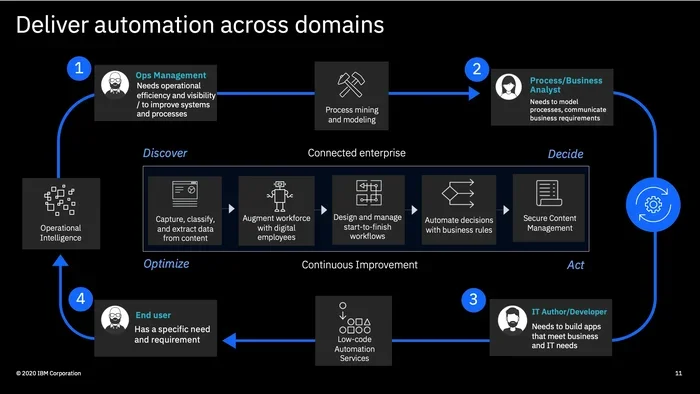
IBM Cloud Pak for Business Automation is a powerful, cloud-native platform that helps businesses automate complex workflows, streamline operations, and drive digital transformation. It combines robotic process automation, process mining, and decision optimization in one integrated suite. This guide covers everything you need to know about IBM Cloud Pak for Business Automation, from core features to real-world implementation tips.
Businesses today face a lot of pressure. They need to move faster, cut costs, and deliver better customer experiences. IBM Cloud Pak for Business Automation is designed to help with exactly these challenges. It is a complete automation platform that brings together several powerful tools in one place. If you have been looking for a way to streamline your business operations, this platform might be exactly what you need.
In this guide, we will walk you through everything you need to know about IBM Cloud Pak for Business Automation. We will cover its core features, who it is best for, how to get started, and how it compares to other automation solutions. By the end, you will have a clear picture of whether this platform fits your organization’s goals.
Key Takeaways
- All-in-One Platform: IBM Cloud Pak for Business Automation brings together RPA, process mining, and decision management in a single integrated solution.
- Cloud-Native Design: Built on containerized architecture using Kubernetes, it runs seamlessly across hybrid and multi-cloud environments.
- Enterprise-Grade Security: The platform includes robust security features, compliance tools, and governance capabilities for large organizations.
- Scalable Automation: Whether you are a small team or a global enterprise, IBM Cloud Pak for Business Automation scales to meet your needs.
- Faster Time to Value: Pre-built automation content and templates help teams deploy solutions quickly without starting from scratch.
- Smart Decision Making: Built-in decision optimization and business rules engines help automate complex judgment-based processes.
📑 Table of Contents
- What Is IBM Cloud Pak for Business Automation?
- Key Features of IBM Cloud Pak for Business Automation
- Who Benefits from IBM Cloud Pak for Business Automation?
- How to Get Started with IBM Cloud Pak for Business Automation
- IBM Cloud Pak for Business Automation vs. Other Automation Tools
- Pricing and Licensing Overview
- Best Practices for Implementing IBM Cloud Pak for Business Automation
- Conclusion
What Is IBM Cloud Pak for Business Automation?
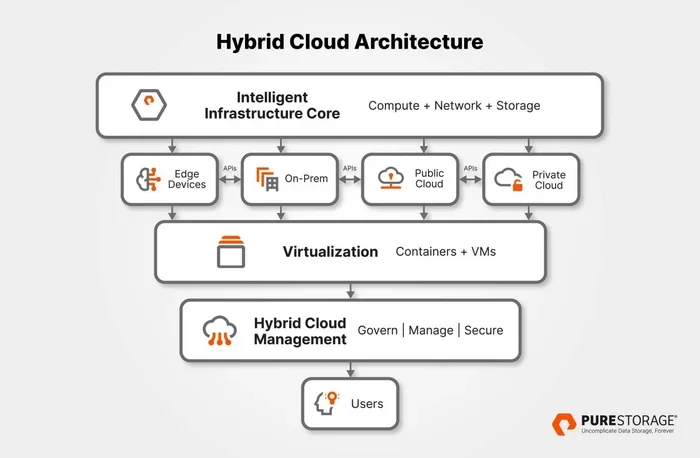
IBM Cloud Pak for Business Automation is a unified software platform built for enterprise automation. It runs on IBM Cloud and supports hybrid and multi-cloud deployments. The platform combines several automation technologies into one integrated environment.
At its core, it includes robotic process automation, process mining, and decision optimization. These components work together to help organizations automate both simple and complex workflows. The platform is built using cloud-native architecture, which means it uses containers and Kubernetes for flexibility and scalability.
Why Automation Matters for Modern Businesses
Automation is no longer a luxury. It has become a necessity for companies that want to stay competitive. Manual processes are slow, error-prone, and expensive. With IBM Cloud Pak for Business Automation, businesses can replace repetitive tasks with intelligent, automated workflows.
For example, think about invoice processing. A company might receive hundreds of invoices every day. Without automation, employees must manually enter data, check for errors, and approve payments. With this platform, those tasks can be automated end to end. The result is faster processing, fewer mistakes, and lower operational costs.
Key Features of IBM Cloud Pak for Business Automation
The platform offers a rich set of features designed to handle automation at every level. Let us explore the most important ones.
Robotic Process Automation
RPA is one of the standout features of IBM Cloud Pak for Business Automation. It allows you to build software robots that mimic human actions on digital systems. These robots can log into applications, copy data between systems, fill out forms, and much more.
The RPA component supports both attended and unattended automation. Attended automation works alongside human employees, while unattended automation runs tasks in the background without any human intervention. This flexibility makes it suitable for a wide range of use cases.
Process Mining
Process mining gives you deep visibility into how your business processes actually work. Instead of relying on guesses or outdated documentation, you can see real data about how tasks are performed. The platform analyzes event logs from your systems and maps out actual process flows.
This feature is incredibly useful for identifying bottlenecks, redundancies, and inefficiencies. Once you see where problems exist, you can use IBM Cloud Pak for Business Automation to redesign and optimize those processes.
Decision Optimization and Business Rules
Many business decisions involve complex rules and conditions. The decision optimization engine in this platform helps automate those decisions. You can define business rules, set up decision tables, and let the system make consistent, data-driven choices.
For instance, a loan approval process involves many variables. Credit score, income level, debt ratio, and employment history all play a role. The decision optimization feature can automate this evaluation, ensuring every application is assessed fairly and quickly.
Integration and Connectivity
IBM Cloud Pak for Business Automation connects easily with existing systems. It supports a wide range of APIs, databases, and enterprise applications. Whether you use SAP, Oracle, Salesforce, or custom-built systems, the platform can integrate with them.
This connectivity is essential because automation only works when systems can talk to each other. The platform ensures that data flows smoothly between different applications, eliminating manual data transfers and reducing errors.
Pre-Built Automation Content
One of the fastest ways to get value from IBM Cloud Pak for Business Automation is through pre-built automation content. The platform comes with ready-to-use templates, automation patterns, and accelerators for common business processes.
These pre-built assets save significant time during implementation. Instead of building everything from scratch, your team can start with proven templates and customize them to fit your specific needs. This approach speeds up deployment and reduces development costs.
Who Benefits from IBM Cloud Pak for Business Automation?
IBM Cloud Pak for Business Automation serves a wide range of industries and use cases. Let us look at some of the key beneficiaries.
Enterprise Operations Teams
Large organizations often struggle with complex, multi-step processes. Operations teams manage everything from supply chain logistics to employee onboarding. The automation platform helps these teams eliminate manual work, reduce cycle times, and improve accuracy.
For example, an enterprise might use the platform to automate its procure-to-pay process. This involves creating purchase orders, receiving goods, matching invoices, and processing payments. Automating this entire flow saves time and ensures compliance with company policies.
IT Departments
IT teams benefit from IBM Cloud Pak for Business Automation in several ways. They can automate routine maintenance tasks, monitor system health, and manage user access requests. The platform also supports infrastructure automation, which helps IT teams manage cloud resources more efficiently.
When IT operations are automated, teams can focus on strategic initiatives instead of putting out fires. This leads to better system reliability and faster response times.
Financial Services and Insurance
The financial sector deals with massive amounts of data and strict regulatory requirements. IBM Cloud Pak for Business Automation helps financial institutions automate compliance checks, fraud detection, and claims processing. Insurance companies use it to streamline policy administration and customer onboarding.
The platform’s decision optimization engine is particularly valuable in these industries. It ensures that automated decisions follow regulatory guidelines and business policies consistently.
Healthcare Organizations
Healthcare providers handle complex workflows involving patient records, insurance claims, and billing. Automation helps reduce administrative burden and lets healthcare professionals focus on patient care. The platform can automate appointment scheduling, claims submission, and medical record management.
Because healthcare data is sensitive, the platform’s security and compliance features are especially important. IBM Cloud Pak for Business Automation supports HIPAA compliance and other healthcare regulations, giving organizations peace of mind.
How to Get Started with IBM Cloud Pak for Business Automation
Getting started with IBM Cloud Pak for Business Automation is straightforward. Here is a practical roadmap to follow.
Step 1: Define Your Automation Goals
Before you start using the platform, clearly define what you want to achieve. Are you trying to reduce processing time? Cut operational costs? Improve accuracy? Having specific goals will guide your automation strategy and help you measure success.
Write down the processes you want to automate. Prioritize them based on impact and complexity. Start with high-value, low-complexity processes to build momentum and demonstrate quick wins.
Step 2: Set Up Your Environment
IBM Cloud Pak for Business Automation runs on Kubernetes-based infrastructure. You can deploy it on IBM Cloud, on-premises, or in other cloud environments. Choose the deployment model that best fits your organization’s infrastructure and security requirements.
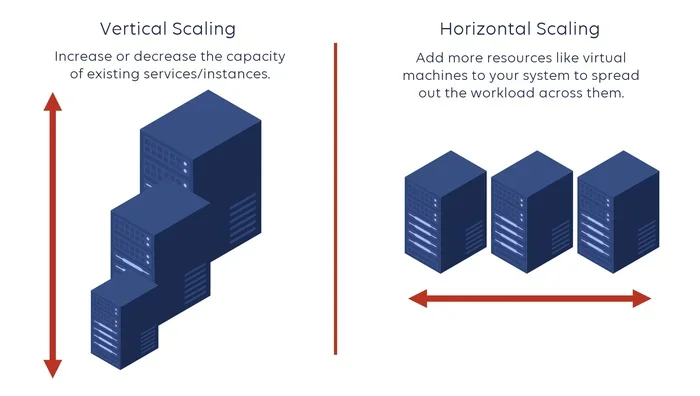
The platform supports both cloud and hybrid deployments. This flexibility means you can start small and scale up as your automation needs grow. Make sure your team has the necessary technical skills to manage the Kubernetes environment.
Step 3: Build Your First Automation
Once your environment is ready, start building your first automation workflow. Use the platform’s visual drag-and-drop tools to design your process. You do not need to be a developer to create basic automations.
For more complex workflows, involve your development team. They can use the platform’s APIs and SDKs to build custom integrations and advanced logic. The key is to start small, test thoroughly, and iterate based on feedback.
Step 4: Monitor and Optimize
After deploying your automations, use the platform’s monitoring tools to track performance. Process mining helps you identify areas for improvement. Regularly review your automated workflows and optimize them for better efficiency.
Automation is not a set-it-and-forget-it solution. It requires ongoing attention and refinement. The monitoring and analytics features in IBM Cloud Pak for Business Automation make this optimization process much easier.
IBM Cloud Pak for Business Automation vs. Other Automation Tools
There are many automation platforms on the market. How does IBM Cloud Pak for Business Automation compare? Let us look at some key differences.
| Feature | IBM Cloud Pak for Business Automation | Typical RPA Tools |
|---|---|---|
| Platform Scope | Full-suite automation (RPA, process mining, decision optimization) | Usually focused on RPA only |
| Deployment | Hybrid and multi-cloud with Kubernetes | Varies by vendor |
| Enterprise Integration | Deep integration with IBM and third-party systems | Limited integration options |
| Pre-Built Content | Extensive library of automation accelerators | Fewer pre-built templates |
| Scalability | Designed for large-scale enterprise deployments | Better suited for small to mid-size deployments |
| Decision Intelligence | Built-in decision optimization and business rules | Usually requires separate tools |
The main advantage of IBM Cloud Pak for Business Automation is its comprehensive approach. Instead of stitching together multiple tools, you get a unified platform that covers the entire automation lifecycle. This reduces complexity and makes it easier to manage your automation programs.
Pricing and Licensing Overview
Pricing for IBM Cloud Pak for Business Automation depends on several factors. These include the number of users, deployment model, and specific features you need. IBM typically offers subscription-based licensing for its cloud products.
For enterprises, IBM provides custom pricing based on the scale of deployment. Small and mid-sized businesses may find the platform more accessible through IBM Cloud Lite or trial programs. It is always a good idea to contact IBM sales for a personalized quote that reflects your specific needs.
Keep in mind that the total cost of ownership includes not just licensing fees but also implementation, training, and ongoing maintenance. However, the efficiency gains and cost savings from automation often far outweigh these initial investments.
Best Practices for Implementing IBM Cloud Pak for Business Automation
Implementing automation successfully requires more than just installing software. Here are some best practices to ensure a smooth rollout.
Start with a Clear Automation Strategy
Do not automate everything at once. Start with a clear strategy that identifies which processes will benefit most from automation. Focus on processes that are rule-based, repetitive, and high-volume. These are the best candidates for IBM Cloud Pak for Business Automation.
Involve stakeholders from different departments early in the process. Their input will help you identify the right processes and ensure buy-in across the organization.
Invest in Training and Change Management
Technology alone does not guarantee success. People need to understand how to use the platform and why automation matters. Invest in training programs for your team. Make sure they understand the benefits and feel comfortable working with automated workflows.
Change management is equally important. Some employees may worry that automation will replace their jobs. Address these concerns openly and emphasize that automation frees people to focus on higher-value work.
Measure and Communicate Results
Track key performance indicators before and after implementing automation. Metrics like processing time, error rates, and cost savings tell a compelling story. Share these results with your team and leadership to build support for future automation initiatives.
Use the analytics and reporting features in IBM Cloud Pak for Business Automation to generate these insights. Data-driven results make it easier to justify further investment in automation.
Conclusion
IBM Cloud Pak for Business Automation is a powerful, comprehensive platform that helps businesses automate complex workflows and transform their operations. From robotic process automation to process mining and decision optimization, it offers a complete suite of tools in a single, cloud-native package.
Whether you are an enterprise operations team, an IT department, or a financial services organization, this platform has something valuable to offer. Its flexibility, scalability, and rich feature set make it a strong choice for organizations serious about digital transformation.
If you are ready to explore automation for your business, IBM Cloud Pak for Business Automation is definitely worth considering. Start small, measure your results, and scale up as you see the benefits unfold. The future of business operations is automated, and this platform gives you the tools to get there.
Frequently Asked Questions
What is IBM Cloud Pak for Business Automation used for?
IBM Cloud Pak for Business Automation is used to automate business processes across organizations. It combines robotic process automation, process mining, and decision optimization to help companies streamline operations, reduce manual work, and improve efficiency.
Is IBM Cloud Pak for Business Automation suitable for small businesses?
Yes, the platform can benefit small businesses, though it is primarily designed for enterprise use. Small teams can start with specific automation workflows and scale up as their needs grow. IBM offers flexible licensing options that can accommodate smaller organizations.
What industries can benefit from IBM Cloud Pak for Business Automation?
Many industries benefit from this platform, including financial services, healthcare, insurance, manufacturing, and retail. Any organization that deals with repetitive, rule-based processes can use IBM Cloud Pak for Business Automation to improve efficiency and reduce errors.
Does IBM Cloud Pak for Business Automation support hybrid cloud deployments?
Yes, the platform fully supports hybrid and multi-cloud deployments. It runs on Kubernetes infrastructure, which allows it to operate seamlessly across on-premises data centers and multiple cloud environments. This flexibility is one of its key advantages for large enterprises.
How long does it take to implement IBM Cloud Pak for Business Automation?
Implementation time varies depending on the complexity of your automation goals and your organization’s existing infrastructure. Simple automations can be deployed within weeks, while larger enterprise implementations may take several months. Using pre-built automation content can significantly speed up the process.
What skills does my team need to use IBM Cloud Pak for Business Automation?
The platform is designed to be user-friendly for both technical and non-technical users. Business analysts can use visual tools to design workflows, while developers can leverage APIs and SDKs for advanced customization. Basic knowledge of cloud platforms and Kubernetes is helpful but not required for all users.