how to set up cloud computing for your small business
Setting up cloud computing for your small business is easier than you think. This guide walks you through choosing the right provider, migrating your data securely, and keeping costs low. You will learn practical steps to make the cloud transition smooth and rewarding for your growing team.
Running a small business means wearing many hats. You handle sales, manage finances, lead a team, and still find time to keep the tech running. One of the smartest moves you can make is moving to the cloud. But how do you actually get started? That is exactly what this guide covers.
If you have been wondering about how to set up cloud computing for your small business, you are in the right place. This article breaks everything down into simple, actionable steps. You do not need to be a tech expert. You just need a clear plan and the willingness to learn. By the end, you will know exactly what to do, what tools to pick, and how to avoid common pitfalls.
The cloud gives small businesses the same powerful tools that large companies use. It levels the playing field. Whether you run a team of five or fifty, the cloud can help you work smarter, not harder. Let us dive in.
Key Takeaways
- Cloud computing saves money: You avoid costly hardware and pay only for what you use.
- Choose the right provider: Compare options like AWS, Google Cloud, and Microsoft Azure before committing.
- Security comes first: Use strong passwords, two-factor authentication, and encryption from day one.
- Start small and scale up: Begin with basic tools like email and storage, then expand as your team grows.
- Training matters: Help your team adopt cloud tools smoothly with simple onboarding and clear guidance.
- Backup your data: Always have a cloud backup plan to prevent data loss during migration or outages.
📑 Table of Contents
- Understanding Cloud Computing for Small Business
- Choosing the Right Cloud Provider
- Step-by-Step Guide to Set Up Cloud Computing
- Cloud Security Best Practices for Small Business
- Managing Cloud Costs and Scaling Your Setup
- Common Mistakes to Avoid When Setting Up Cloud Computing
- Expert Tips for a Smooth Cloud Transition
- Conclusion
Understanding Cloud Computing for Small Business
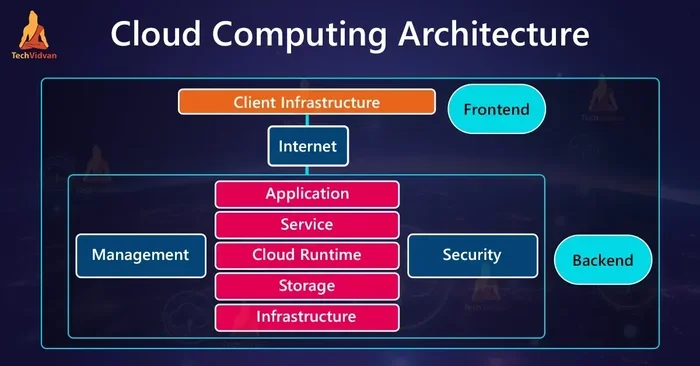
Before you jump into setup, it helps to understand what cloud computing actually means. In simple terms, the cloud is a network of remote servers that store and manage data over the internet. Instead of keeping files on a local hard drive or office server, you access everything online.
There are three main types of cloud services you should know about:
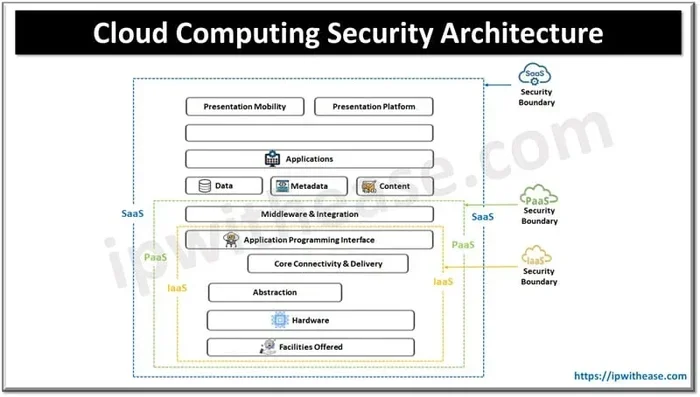
- Software as a Service (SaaS): This is the most common type for small businesses. Examples include Google Workspace, Microsoft 365, and Slack. You use software through your browser without installing anything.
- Infrastructure as a Service (IaaS): This gives you virtual servers, storage, and networking. Amazon Web Services and Microsoft Azure offer IaaS. It is more flexible but requires some technical knowledge.
- Platform as a Service (PaaS): This lets developers build apps without managing the underlying infrastructure. It is less common for non-tech small businesses but useful if you have a custom app idea.
Most small businesses start with SaaS because it is the easiest to use. You pay a monthly fee, and the provider handles all the maintenance. As your needs grow, you can explore IaaS or PaaS options. The beauty of cloud computing is that you start small and grow at your own pace.
Why Small Businesses Need the Cloud
The benefits of moving to the cloud go far beyond just storing files online. Here is why so many small businesses are making the switch:
- Cost savings: You eliminate the need for expensive servers and IT equipment. No more huge upfront hardware purchases.
- Flexibility: Your team can work from anywhere with an internet connection. This supports remote work and hybrid schedules.
- Scalability: Need more storage or users next month? Just upgrade your plan. No long-term contracts or expensive hardware changes.
- Automatic updates: Your cloud provider handles software updates and security patches. You always have the latest features.
- Disaster recovery: Cloud-based backup means your data is safe even if your office faces a fire, flood, or theft.
These benefits make cloud migration one of the best investments a small business can make. It is not just a trend. It is a practical way to stay competitive.
Choosing the Right Cloud Provider
Not all cloud providers are the same. Picking the right one is a big decision that affects your daily operations. You want a provider that is reliable, affordable, and easy to use.
Here are the top providers to consider for your cloud computing setup:
Google Workspace (formerly G Suite)
Google Workspace is a popular choice for small businesses. It includes Gmail, Google Drive, Docs, Sheets, and Google Meet. The interface is clean and familiar. Pricing starts around $6 per user per month. It works well for teams that collaborate on documents and spreadsheets daily.
Microsoft 365
If your team already uses Microsoft tools, this is a natural fit. Microsoft 365 includes Word, Excel, PowerPoint, Outlook, and Teams. Plans start at $6 per user per month. It is a strong choice for businesses that need desktop-quality apps in the cloud.
Amazon Web Services (AWS)
AWS is the largest cloud provider in the world. It offers powerful IaaS and PaaS options. However, it can be complex for beginners. AWS is best for businesses with specific technical needs or those planning to build custom applications.
Dropbox Business
Dropbox Business focuses on file storage and sharing. It is simple to set up and use. Pricing starts at $15 per user per month. It is ideal for businesses that need a straightforward cloud storage solution without the bells and whistles of full office suites.
How to Compare Providers
When evaluating cloud hosting for small business, consider these factors:
- Price per user: Calculate your total cost based on your team size.
- Storage limits: Make sure the plan gives you enough space for your files and backups.
- Security features: Look for encryption, two-factor authentication, and compliance certifications.
- Ease of use: The platform should be intuitive enough for non-technical team members.
- Customer support: Check if they offer live chat, phone support, or a helpful knowledge base.
Take your time with this decision. The right provider makes your entire cloud adoption journey much smoother.
Step-by-Step Guide to Set Up Cloud Computing
Now for the part you have been waiting for. Here is a clear, step-by-step process for how to set up cloud computing for your small business. Follow these steps in order, and you will have a solid cloud foundation in no time.
Step 1: Assess Your Current Needs
Before you sign up for any service, take stock of what you need. Ask yourself these questions:
- How many employees will use cloud tools?
- What types of files and data do you need to store?
- Do you need email hosting, document collaboration, or both?
- What is your current budget for cloud services?
- Do you have any compliance requirements, like HIPAA or GDPR?
Write down your answers. This list becomes your roadmap. It prevents you from paying for features you do not need.
Step 2: Choose Your Cloud Plan
Based on your needs assessment, pick a provider and plan. Most providers offer a free trial or a basic tier. Use this to test the platform before committing. Start with a basic plan and upgrade later as your business grows. This approach keeps your initial cloud setup cost low.
Step 3: Set Up User Accounts
Once you have your plan, create accounts for your team. Most providers let you add users through an admin dashboard. Set up each user with a unique email address and strong password. Assign roles and permissions based on each person’s job responsibilities.
Step 4: Migrate Your Data
Data migration is the process of moving your files from local storage to the cloud. Here is how to do it safely:
- Sort your files and delete anything you no longer need.
- Organize remaining files into clear folders.
- Use the provider’s upload tool or desktop app to transfer files.
- Verify that all files uploaded correctly.
- Set up automatic sync so new files save to the cloud automatically.
Do not try to migrate everything in one day. Spread it out over a week or two to avoid overwhelming your team. A gradual cloud migration reduces the risk of errors.
Step 5: Train Your Team
The best cloud setup means nothing if your team does not know how to use it. Schedule a short training session for everyone. Walk them through the basics: logging in, uploading files, sharing documents, and using collaboration tools. Keep it simple and hands-on. Most providers also offer free tutorials and help centers.
Step 6: Set Up Backups and Security
Security is critical. Here are the essential steps to protect your cloud-based data:
- Enable two-factor authentication on every account.
- Use strong, unique passwords for each user.
- Turn on encryption for sensitive files.
- Set up automatic backups to a second cloud provider as a safety net.
- Review access permissions regularly to make sure only the right people can see sensitive files.
These steps take less than an hour but provide peace of mind for months and years to come.
Cloud Security Best Practices for Small Business
Security is one of the biggest concerns for small business owners. You might wonder, “Is the cloud safe?” The answer is yes, but only if you take the right precautions. Cloud providers invest heavily in security. However, you also play a key role in protecting your data.
Common Cloud Security Threats
Understanding the risks helps you prepare for them. The most common threats include:
- Phishing attacks: Hackers send fake emails to trick employees into sharing login credentials.
- Weak passwords: Simple or reused passwords make it easy for attackers to gain access.
- Unauthorized sharing: Files shared with the wrong people can lead to data leaks.
- Unpatched software: Outdated apps can have vulnerabilities that hackers exploit.
How to Protect Your Cloud Environment
Follow these cloud security tips to keep your business safe:
- Require two-factor authentication for every user account. This adds a second layer of protection beyond just a password.
- Use a password manager to generate and store strong passwords for your team.
- Limit file sharing permissions. Only share files with people who truly need access.
- Enable logging and monitoring. Most cloud platforms let you track who accessed what and when.
- Keep your devices updated. Install operating system and browser updates promptly.
- Create a simple security policy document that all employees sign. This sets clear expectations.
Think of cloud security as a shared responsibility. Your provider handles the infrastructure, but you handle the day-to-day habits that keep data safe.
Managing Cloud Costs and Scaling Your Setup
One of the biggest advantages of the cloud is cost control. You pay for what you use, which is a huge benefit for small businesses watching their budgets. But costs can creep up if you are not careful.
Tips to Keep Cloud Costs Low
- Audit your usage monthly: Check which tools and storage tiers you are actually using. Cancel anything you do not need.
- Choose the right storage tier: Most providers offer hot storage (faster, pricier) and cold storage (slower, cheaper). Use cold storage for files you rarely access.
- Set user limits: Only add users who truly need access. Remove accounts for former employees immediately.
- Take advantage of free tiers: Many providers offer free plans with limited features. Use these for testing and small teams.
- Watch for hidden fees: Some providers charge extra for data transfer, support, or advanced features. Read the fine print.
When and How to Scale Up
As your business grows, your cloud needs will change. Scaling up should feel natural, not stressful. Here is how to do it right:
- Monitor your usage trends. Look for patterns in storage growth and user demand.
- Plan upgrades during slow periods. Avoid making changes right before a busy season.
- Communicate with your team. Let them know about new features or plan changes.
- Review your provider’s pricing tiers regularly. Better plans may become available as your business grows.
Cloud scalability is one of the main reasons small businesses choose the cloud. You start with a basic plan and expand as your needs evolve. This flexibility is a game-changer.
Common Mistakes to Avoid When Setting Up Cloud Computing
Even with the best intentions, small business owners make mistakes during cloud setup. Learning from others’ errors saves you time, money, and frustration.
Mistake 1: Skipping the Research Phase
Some businesses pick a provider based on a friend’s recommendation without doing their own homework. Every business has different needs. What works for one company may not work for yours. Always compare at least three providers before deciding.
Mistake 2: Ignoring Security from Day One
It is tempting to focus on features and pricing while overlooking security. Do not make this mistake. Set up two-factor authentication, strong passwords, and access controls before you migrate any data. Security should be part of your cloud computing setup from the very beginning.
Mistake 3: Trying to Do Everything at Once
Migrating all your files, apps, and workflows in a single weekend is a recipe for disaster. Spread the process out. Start with email and file storage, then add collaboration tools, then move to more advanced services. A phased approach reduces risk and confusion.
Mistake 4: Forgetting to Train Your Team
New tools only work if people actually use them correctly. Skipping training leads to frustration, low adoption, and potential security risks. Invest time in onboarding. It pays off in the long run.
Mistake 5: Not Having a Backup Plan
Even the most reliable cloud providers experience outages. Always have a backup strategy. Consider using a second cloud provider for critical data. This redundancy keeps your business running even during unexpected disruptions.
Avoiding these mistakes puts you ahead of most small businesses. It shows that you are approaching cloud adoption with the seriousness it deserves.
Expert Tips for a Smooth Cloud Transition
Transitioning to the cloud is a journey, not a one-time event. These expert insights help you make the most of your cloud computing for small business experience:
- Start with the tools your team uses daily. Email, file storage, and communication apps deliver the fastest return on investment.
- Document your cloud setup. Keep a simple record of which provider you use, what plan you are on, and who has admin access. This saves time during troubleshooting.
- Leverage integrations. Most cloud platforms connect with popular business tools. Use these integrations to streamline workflows and reduce manual tasks.
- Review your setup quarterly. Technology changes fast. Regular reviews ensure your setup stays aligned with your business goals.
- Ask for help when needed. Many providers offer onboarding support for new customers. Do not hesitate to use these resources.
These tips come from years of helping small businesses make the digital shift. They work because they focus on simplicity and practicality.
Conclusion
How to set up cloud computing for your small business does not have to be complicated. You now have a clear roadmap to follow. Start by understanding your needs, choose the right provider, and set up your accounts step by step. Focus on security from day one. Keep costs under control by monitoring your usage. And always invest in training your team.
The cloud is not just a technology trend. It is a practical tool that helps small businesses compete, grow, and thrive. Whether you are a solo entrepreneur or a growing team, the right cloud setup gives you the flexibility and power you need. Take the first step today. Your future self will thank you.
Remember, every successful cloud journey starts with a single step. Make that step now, and watch your small business reach new heights.
Frequently Asked Questions
What is the best cloud provider for a small business?
The best provider depends on your specific needs. Google Workspace and Microsoft 365 are top choices for most small businesses because they are user-friendly and affordable. AWS is better for businesses with advanced technical requirements. Compare at least three providers before making your decision.
How much does it cost to set up cloud computing for a small business?
Costs vary based on the provider and plan. Most small businesses spend between $10 and $50 per user per month. Basic plans for Google Workspace and Microsoft 365 start around $6 per user. Factor in any additional storage or feature upgrades when budgeting.
Is cloud computing safe for small businesses?
Yes, cloud computing is safe when you follow best practices. Enable two-factor authentication, use strong passwords, and encrypt sensitive files. Choose a reputable provider with strong security certifications. Security is a shared responsibility between you and your provider.
How long does it take to migrate to the cloud?
The timeline depends on the size of your business and the amount of data you need to migrate. Small businesses with basic needs can complete the migration in one to two weeks. Larger businesses with more complex setups may take a month or longer. A phased approach works best.
Do I need IT expertise to set up cloud computing?
Not for basic setups. Most cloud providers offer intuitive interfaces and guided setup wizards. You can get started without any IT background. However, having someone on your team who understands basic tech concepts helps, especially for security and troubleshooting.
Can I switch cloud providers after I set up?
Yes, you can switch providers, but it requires careful planning. Export your data from the current provider and import it into the new one. Look for providers that offer free data migration tools. Plan the switch during a slow period to minimize disruption to your team.
=== SEO TITLE ===
How to Set Up Cloud Computing for Your Small Business
=== META TITLE ===
How to Set Up Cloud Computing for Your Small Business
=== URL SLUG ===
how-to-set-up-cloud-computing-for-your-small-business
=== LSI KEYWORDS ===
cloud hosting for small business, cloud migration, cloud storage solutions, cloud computing benefits, small business cloud services, cloud security, cloud cost savings, SaaS for small business, IaaS cloud services, PaaS solutions, cloud backup, remote work cloud tools, cloud scalability, business cloud transition, cloud computing setup, cloud provider comparison, cloud infrastructure, cloud adoption, digital transformation, cloud-based software