Sap Business One in the Cloud Everything You Need to Know
SAP Business One in the cloud is a powerful cloud ERP solution designed for small and mid-sized businesses. It delivers real-time analytics, automated workflows, and remote access without heavy IT costs. This guide covers everything from cloud deployment to migration tips and pricing. You will learn why thousands of companies trust SAP Business One to run their daily operations.
Key Takeaways
- Cloud ERP Simplifies Operations: SAP Business One in the cloud streamlines business processes and removes the need for complex on-site servers.
- Cost Savings Are Significant: Subscription-based pricing eliminates large upfront hardware and maintenance expenses.
- Remote Access Is a Game Changer: Teams can manage operations from anywhere with an internet connection.
- Scalability Grows With Your Business: The cloud model adapts easily as your company adds users or locations.
- Data Security Is Strong: SAP provides enterprise-grade protection for your sensitive business data.
- Migration Is Straightforward: Moving from on-premise to the cloud follows a clear, supported process.
- Real-Time Insights Drive Decisions: Built-in analytics help you make faster, smarter business choices.
📑 Table of Contents
- What Is SAP Business One in the Cloud?
- Key Benefits of SAP Business One Cloud
- How SAP Business One Cloud Works
- Who Should Use SAP Business One in the Cloud?
- SAP Business One Cloud vs. On-Premise
- How to Get Started with SAP Business One Cloud
- Common Mistakes to Avoid When Moving to the Cloud
- Expert Insights on Cloud ERP for Small Business
- Conclusion
What Is SAP Business One in the Cloud?
SAP Business One in the cloud is a cloud-based ERP system built specifically for small and mid-sized businesses. It brings together finance, sales, purchasing, inventory, and manufacturing into one unified platform. Instead of installing software on local servers, you access everything through a web browser.
This cloud business management tool runs on SAP HANA, which is an in-memory database. That means data processes incredibly fast. You get instant updates across all departments without waiting for batch jobs or manual syncing.
The cloud version is fully maintained by SAP and its hosting partners. Updates, security patches, and backups happen automatically. You do not need a dedicated IT team to keep the system running smoothly. This makes it ideal for growing companies that want enterprise-level tools without enterprise-level complexity.
How Does Cloud Deployment Work for SAP Business One?
Cloud deployment means your ERP software lives on remote servers managed by SAP or a certified hosting partner. You simply log in through a secure web portal. There is no software to install on individual computers. All data is stored in the cloud and protected with encryption.
Most providers offer a subscription-based ERP model. You pay a monthly or annual fee per user. This predictable cost makes budgeting much easier for small business owners. You also avoid the surprise expenses that come with maintaining physical servers.
Key Benefits of SAP Business One Cloud
Switching to SAP Business One in the cloud offers real advantages for modern businesses. Let us look at the most important benefits that drive so many companies to make the move.
Lower IT Costs and Less Maintenance
Traditional on-premise systems require expensive hardware, ongoing maintenance, and skilled IT staff. Cloud hosting removes all of that burden. The provider handles server maintenance, security updates, and system backups. Your team can focus on running the business instead of managing servers.
With a subscription model, you convert large capital expenses into manageable monthly costs. This cost savings is one of the biggest reasons small businesses choose the cloud route. You also eliminate the need for a dedicated server room and cooling systems.
Anytime, Anywhere Access
Remote access is one of the strongest selling points of cloud ERP. Your sales team can check inventory levels while visiting a client. Your finance manager can approve invoices from home. Your warehouse supervisor can update stock counts from a mobile device on the floor.
This flexibility became even more important after the shift to remote and hybrid work. SAP Business One in the cloud ensures your team stays connected and productive no matter where they are. All they need is a stable internet connection and a web browser.
Scalability That Grows With You
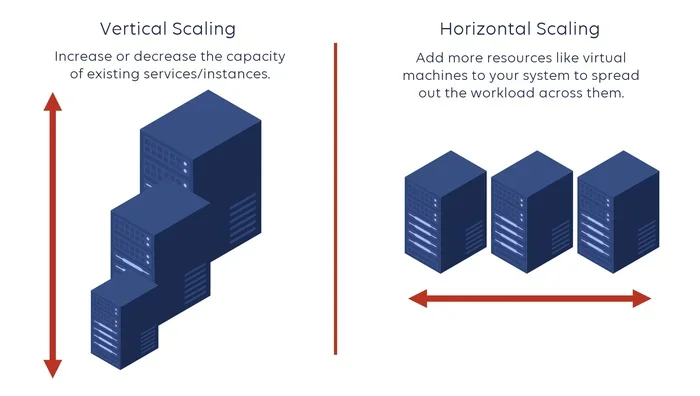
As your business expands, your ERP needs to keep up. Cloud scalability lets you add users, modules, and locations without major infrastructure changes. You simply adjust your subscription plan to match your current needs.
This is especially valuable for seasonal businesses or companies entering new markets. You can scale up during peak periods and scale back when demand drops. Traditional on-premise systems simply cannot offer this level of flexibility.
Real-Time Analytics and Reporting
Real-time analytics give you a clear picture of your business at any moment. With SAP Business One in the cloud, dashboards update instantly. You can track sales performance, cash flow, inventory levels, and customer trends without running complex reports.
Decision-makers get the information they need when they need it. This speed leads to better choices and faster responses to market changes. The built-in business intelligence tools turn raw data into actionable insights.
How SAP Business One Cloud Works
Understanding how SAP Business One in the cloud operates helps you make a confident decision. The system is built on a modern architecture that prioritizes speed, security, and ease of use.
The Role of SAP HANA
At the heart of this system is SAP HANA, an in-memory database engine. Instead of reading data from disk, HANA processes information directly in memory. This dramatically speeds up transactions and report generation.
For small businesses, this means near-instant responses even when handling large datasets. You can run complex queries during peak hours without slowdowns. The performance advantage is one reason why cloud ERP systems have become so popular in recent years.
Core Modules and Features
SAP Business One covers all the essential functions of running a business. Here are the core modules you get access to in the cloud version:
- Finance and Accounting: General ledger, accounts payable, accounts receivable, and bank reconciliation.
- Sales and Customer Management: Order entry, pricing, quotes, and customer relationship tracking.
- Purchasing and Inventory: Purchase orders, goods receipt, inventory tracking, and replenishment.
- Manufacturing: Bill of materials, production orders, and capacity planning.
- Reporting and Analytics: Custom reports, KPI dashboards, and ad-hoc querying.
Each module integrates seamlessly with the others. When a sales order is entered, inventory levels update automatically. When an invoice is paid, the financial records reflect the change instantly. This automated workflow eliminates manual data entry and reduces errors.
Integration Capabilities
Cloud business management works best when it connects with other tools your team uses daily. SAP Business One in the cloud supports integrations with popular platforms like Microsoft Office, Salesforce, and various e-commerce solutions.
You can also connect with third-party apps through the SAP Business One Store. These add-ons extend functionality for specific industries or use cases. The open API makes it easy for developers to build custom integrations tailored to your business needs.
Who Should Use SAP Business One in the Cloud?
SAP Business One in the cloud is designed for small and mid-sized businesses across many industries. Let us look at who benefits most from this solution.
Small Businesses Looking to Grow
If you are a small business owner managing operations with spreadsheets and disconnected tools, cloud ERP can be a game changer. SAP Business One gives you a single source of truth for all your business data. It professionalizes your operations without the complexity and cost of larger enterprise systems.
Companies with Remote or Distributed Teams
Businesses with employees working from multiple locations benefit greatly from cloud deployment. Whether your team is spread across cities or countries, everyone accesses the same up-to-date information. This consistency reduces miscommunication and improves collaboration.
Retailers and Distributors
Retailers and distributors need real-time visibility into inventory and sales. SAP Business One cloud helps manage purchase orders, track stock levels, and analyze sales trends. The automated workflows ensure reordering happens at the right time, preventing stockouts and overstock situations.
Manufacturers Needing Streamlined Operations
Manufacturers benefit from built-in production planning and bill-of-materials management. The cloud version handles work orders, routing, and capacity planning efficiently. You get better control over production schedules and raw material costs.
SAP Business One Cloud vs. On-Premise
Choosing between cloud ERP and on-premise deployment is one of the most important decisions you will make. Here is a side-by-side comparison to help you decide.
| Feature | SAP Business One Cloud | SAP Business One On-Premise |
|---|---|---|
| Deployment | Hosted on remote servers | Installed on local servers |
| Upfront Cost | Low subscription fee | High license and hardware cost |
| IT Maintenance | Handled by provider | Managed by your IT team |
| Access | Anywhere with internet | Office or VPN only |
| Updates | Automatic | Manual |
| Scalability | Easy and fast | Requires hardware upgrades |
| Data Security | Enterprise-grade cloud security | Depends on your infrastructure |
| Implementation Time | Faster | Longer |
For most small and mid-sized businesses, the cloud version offers a better return on investment. Lower costs, faster setup, and easier maintenance make it the preferred choice. However, companies with strict data residency requirements or unique regulatory needs may prefer the on-premise option.
How to Get Started with SAP Business One Cloud
Starting with SAP Business One in the cloud is simpler than you might think. Here is a practical roadmap to guide you through the process.
Step 1: Assess Your Business Needs
Start by listing the challenges you want to solve. Are you struggling with disconnected financial data? Do you need better inventory control? Identify your top priorities before you talk to any vendor. This clarity helps you choose the right modules and avoid paying for features you do not need.
Step 2: Choose a Hosting Partner
SAP works with certified hosting partners who manage the cloud infrastructure. You can choose a partner based on location, pricing, and support quality. A good partner will guide you through setup, migration, and training. Look for partners with strong reviews and experience in your industry.
Step 3: Plan Your Data Migration
If you are moving from an existing system, cloud migration requires careful planning. Start by cleaning up your current data. Remove duplicates, correct errors, and organize records. SAP and your hosting partner will help map your data to the new system and test the migration before going live.
Step 4: Train Your Team
Even the best ERP software is only as good as the people using it. Invest time in training sessions for all users. SAP offers built-in training resources and documentation. Make sure your team understands how the new system improves their daily workflow.
Step 5: Go Live and Monitor
Launch the system in phases if possible. Start with core modules like finance and sales, then add manufacturing or advanced analytics later. Monitor performance closely during the first weeks and gather feedback from users. This iterative approach reduces risk and helps you adjust quickly.
Quick Tips for a Smooth Cloud Transition
- Start with a pilot group before rolling out to the entire company.
- Back up all data before migration begins.
- Set clear expectations with your team about the change.
- Choose a go-live date during a low-activity period.
- Keep your IT partner available for the first 30 days after launch.
Common Mistakes to Avoid When Moving to the Cloud
Even with a solid plan, companies sometimes stumble during cloud migration. Here are the most common mistakes and how to avoid them.
- Skipping the data cleanup phase: Migrating messy data creates bigger problems later. Clean your data first.
- Underestimating training needs: Users who are not properly trained will resist the new system. Invest in thorough training.
- Choosing the wrong hosting partner: Not all partners are equal. Research their reputation and support capabilities.
- Ignoring change management: People need to understand why the change is happening. Communicate the benefits clearly.
- Trying to migrate everything at once: A phased approach reduces risk and allows your team to adapt gradually.
Expert Insights on Cloud ERP for Small Business
Industry experts consistently highlight the strategic value of cloud ERP for small and mid-sized businesses. According to leading analysts, cloud deployment is no longer a trend but a standard expectation for modern operations.
The shift toward subscription-based ERP has democratized access to powerful business tools. Small businesses that were once priced out of enterprise-grade software can now compete at a higher level. SAP Business One in the cloud levels the playing field by giving smaller companies the same operational intelligence that large enterprises enjoy.
Experts also emphasize the importance of choosing a trusted SAP partner for implementation. The partner ecosystem provides local support, industry expertise, and ongoing optimization services. This partnership model ensures your cloud business management investment delivers long-term value.
Key Takeaways
- Cloud ERP reduces IT overhead and eliminates the need for expensive on-site infrastructure.
- Real-time data access empowers faster and better business decisions.
- Scalability and flexibility make cloud the ideal choice for growing companies.
- Data security in the cloud often exceeds what most businesses can achieve on their own.
- A phased migration approach minimizes disruption and risk.
Conclusion
SAP Business One in the cloud is a smart choice for any small or mid-sized business looking to modernize its operations. The combination of lower costs, remote access, real-time analytics, and automatic updates makes it a compelling option. You get enterprise-grade capabilities without the enterprise-grade price tag.
Whether you are moving from an on-premise system or starting fresh, the cloud version of SAP Business One delivers flexibility and power. The key is to plan your migration carefully, choose the right partner, and invest in training your team. With the right approach, cloud ERP transforms the way you run your business.
Take the first step today. Explore your options, talk to a certified SAP partner, and see how SAP Business One in the cloud can bring your operations into the modern era.
Frequently Asked Questions
What is SAP Business One in the cloud?
SAP Business One in the cloud is a cloud-based ERP system designed for small and mid-sized businesses. It runs on SAP HANA and provides access to finance, sales, inventory, and reporting tools through a web browser. The software is hosted remotely, so you do not need local servers or heavy IT maintenance.
How much does SAP Business One cloud cost?
Pricing follows a subscription model based on the number of users. Costs vary depending on the modules you choose and your hosting partner. Overall, cloud deployment is significantly less expensive upfront compared to on-premise solutions because you avoid hardware and infrastructure costs.
Is my data secure in SAP Business One cloud?
Yes. SAP uses enterprise-grade encryption and security protocols to protect your data in the cloud. Hosting partners maintain strict compliance standards and perform regular security audits. Most companies find that cloud security measures exceed what they could implement on their own local servers.
How long does it take to migrate to SAP Business One cloud?
Migration timelines vary based on the size and complexity of your business. A small company with clean data can typically migrate within a few weeks. Larger organizations with more complex setups may need two to three months. Working with an experienced SAP partner helps keep the process on track.
Can I access SAP Business One cloud from my mobile device?
Yes. The cloud version is accessible from any device with a web browser and internet connection. SAP also offers mobile apps that provide a streamlined experience for on-the-go users. You can check inventory, approve orders, and view reports from your phone or tablet.
What is the difference between SAP Business One cloud and on-premise?
The main difference is where the software and data are hosted. Cloud versions run on remote servers managed by SAP or a hosting partner, while on-premise versions run on local servers you own and maintain. Cloud offers lower upfront costs, automatic updates, and anywhere access, while on-premise gives you full control over your infrastructure.