Security Concerns in Cloud Computing and How to Fix Them
Security concerns in cloud computing are real and growing as more businesses move their data online. From data breaches to unauthorized access, the risks can be costly if ignored. The good news is that most of these problems have clear, actionable solutions. This guide breaks down the biggest threats and shows you exactly how to fix them. By the end, you will know how to build a secure cloud setup that keeps your data safe.
Key Takeaways
- Data breaches remain the top threat, but encryption and access controls can stop them.
- Unauthorized access is prevented with multi-factor authentication and identity management.
- The shared responsibility model means both you and your cloud provider share the duty of keeping data safe.
- Compliance with regulations like GDPR and HIPAA is essential for avoiding fines.
- Zero trust security models are the gold standard for protecting cloud environments.
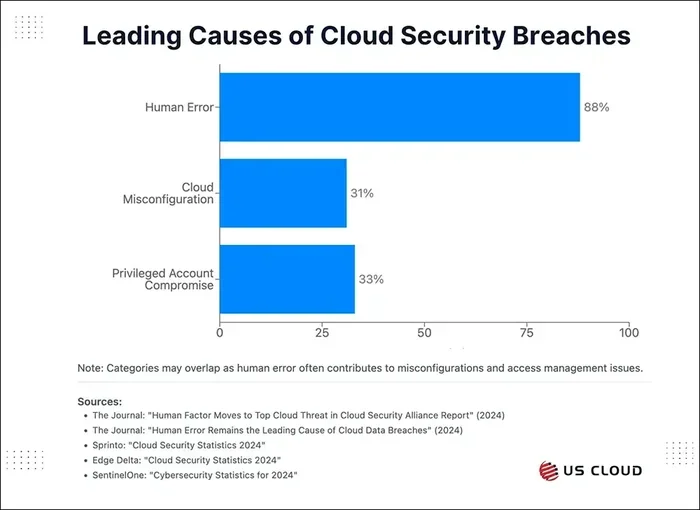
- Regular security awareness training for employees reduces human error, which causes most cloud incidents.
- Backups and disaster recovery plans protect against data loss from outages or attacks.
📑 Table of Contents
What Are the Security Concerns in Cloud Computing?
Cloud computing has changed the way businesses work. Companies store files, run apps, and serve customers through the cloud every day. But with all that convenience comes real risk. Security concerns in cloud computing are not just theoretical. They happen every day to companies of all sizes.
When you move your data to the cloud, you are trusting someone else’s servers. That means you lose some direct control. Hackers know this. They target cloud systems because they often hold huge amounts of valuable data in one place. A single breach can expose millions of records at once.
The most common cloud security problems include data breaches, unauthorized access, and data loss. Some issues come from outside attackers. Others come from mistakes made by employees or misconfigured settings. Understanding these risks is the first step toward fixing them.
Cloud providers like Amazon Web Services, Microsoft Azure, and Google Cloud invest billions in protection. But no system is perfect. Your job is to understand what can go wrong and take steps to prevent it. This article will walk you through the biggest threats and show you exactly how to address each one.
Let us start by looking at the most common cyber threats that target cloud environments. Knowing your enemy is half the battle.
Common Cloud Security Threats You Should Know
Data Breaches
A data breach happens when someone gains access to sensitive information without permission. This is the biggest fear for most businesses using the cloud. Stolen data can include customer names, credit card numbers, and trade secrets.
Breaches happen for many reasons. Weak passwords are one of the top causes. Misconfigured storage buckets are another. In 2023, a major cloud provider accidentally exposed millions of files because of a simple setup error. The data was publicly accessible for weeks before anyone noticed.
The damage from a breach goes beyond lost data. Companies face legal fines, lost customer trust, and damaged reputations. Recovery costs can reach millions of dollars. This is why data encryption is so important. When data is encrypted, even if someone steals it, they cannot read it without the key.
Unauthorized Access
Unauthorized access means someone gets into your cloud system who should not be there. This can happen in several ways. Stolen login credentials are the most common. Phishing attacks trick employees into giving away their passwords. Once a hacker has a valid login, they can move through the system like a regular user.
Another cause is poor identity access management. When too many people have access to sensitive data, the risk grows. A junior employee should not need the same access as a senior executive. Limiting permissions based on roles is a simple but powerful fix.
Insider Threats
Not all threats come from outside. Insider threats are a major concern in cloud environments. These can be malicious employees who intentionally steal data. More often, they are careless workers who accidentally expose information. Sending a confidential file to the wrong email address is an example.
Insider threats are hard to detect because the person already has access. Monitoring user activity and setting up alerts for unusual behavior helps a lot. If someone suddenly downloads thousands of files at 3 AM, that is a red flag worth investigating.
Insecure APIs
Cloud services use APIs (Application Programming Interfaces) to communicate with each other. APIs make it easy to connect different tools and automate tasks. But if an API is not properly secured, it becomes an open door for attackers.
Hackers can exploit weak APIs to bypass authentication and access your data. This is a common problem during cloud migration projects. Companies rush to move systems to the cloud without properly securing the connections between them. Taking time to review API security before migration can save you from serious problems later.
Data Loss and Outages
Data loss can happen for many reasons. Natural disasters can destroy physical servers. Cyberattacks like ransomware can lock or delete your files. Even simple human errors, like accidentally deleting a database, can cause major problems.
Cloud outages also pose a risk. When a cloud provider goes down, your business goes down with it. This is why having a disaster recovery plan is essential. Regular backups stored in multiple locations ensure you can recover quickly from any incident.
How to Fix Cloud Security Issues
Now that you know the main threats, let us talk about solutions. Fixing security concerns in cloud computing does not have to be complicated. Most fixes start with basic practices that any business can implement.
Use Strong Encryption
Data encryption is the single most effective way to protect information in the cloud. Encryption scrambles your data so that only authorized users can read it. You should encrypt data both at rest (stored data) and in transit (data being moved).
Most cloud providers offer built-in encryption tools. AWS, Azure, and Google Cloud all provide encryption by default for stored data. Make sure this feature is turned on and that you manage your encryption keys carefully. If you lose the keys, you lose access to your data.
Implement Multi-Factor Authentication
Multi-factor authentication (MFA) adds an extra layer of protection beyond just a password. With MFA, users must confirm their identity using a second method, like a code sent to their phone. Even if a hacker steals a password, they still cannot get in without the second factor.
Enabling MFA should be mandatory for all cloud accounts, especially those with admin access. Many cloud security breaches happen because MFA was not turned on. It is a simple step that makes a huge difference.
Apply the Principle of Least Privilege
The principle of least privilege means giving users only the access they need to do their jobs. No one should have more access than necessary. This limits the damage if an account is compromised.
Review access permissions regularly. Remove access for former employees immediately. Audit who has access to sensitive data and adjust as roles change. This is one of the easiest security controls to implement and one of the most effective.
Monitor and Log Activity
You cannot protect what you cannot see. Monitoring and logging all activity in your cloud environment helps you detect threats early. Most cloud platforms offer tools to track user actions, login attempts, and changes to configurations.
Set up alerts for suspicious activity. For example, log in attempts from unusual locations or large data downloads should trigger immediate notifications. The faster you catch a problem, the less damage it can cause.
Conduct Regular Security Audits
A security audit is a thorough review of your cloud setup and practices. It checks for vulnerabilities, misconfigurations, and gaps in your protection. Regular audits help you stay ahead of new threats.
You can hire external security firms to conduct independent audits. They will test your systems from an attacker’s perspective and report findings. Use their recommendations to strengthen your defenses. Treat audits as an ongoing process, not a one-time event.
The Shared Responsibility Model Explained
One of the most misunderstood concepts in cloud computing is the shared responsibility model. Many people assume that their cloud provider handles all security. That is not true. The provider secures the infrastructure, but you are responsible for securing what you put in the cloud.
Think of it like renting an apartment. The landlord is responsible for the building’s structure and locks. But you are responsible for locking your door and not leaving windows open. The same logic applies to cloud security.
Your cloud provider handles:
- Physical security of data centers
- Network infrastructure protection
- Hardware maintenance and updates
You are responsible for:
- Managing user access and passwords
- Encrypting your data
- Configuring security settings correctly
- Monitoring for suspicious activity
When companies misunderstand this model, gaps appear. They assume the provider handles everything and neglect their own duties. This is one of the biggest causes of cloud computing risks. Understanding your side of the responsibility makes a huge difference in keeping your data safe.
Best Practices for a Secure Cloud Setup
Building a secure cloud environment takes planning and ongoing effort. Here are the best practices every business should follow.
1. Choose the Right Cloud Provider
Not all cloud providers are created equal. Look for providers with strong security certifications like SOC 2, ISO 27001, and HIPAA compliance. Read their security documentation carefully. Ask questions about how they protect data and what happens in a breach.
The provider you choose should also offer strong security controls and transparency. You want a partner who takes security seriously and communicates clearly about their practices.
2. Train Your Employees
Human error causes the majority of cloud security incidents. A single mistake by an employee can open the door to a breach. This is why security awareness training is so important.
Train your team on how to spot phishing emails, create strong passwords, and follow data handling procedures. Make security training a regular part of onboarding and ongoing professional development. When your employees understand the risks, they become your strongest line of defense.
3. Back Up Your Data Regularly
Regular backups are your safety net. If data is lost due to an attack, outage, or accident, backups let you restore it quickly. Follow the 3-2-1 rule: keep three copies of your data, on two different types of media, with one copy stored offsite.
Test your backups regularly to make sure they work. A backup you cannot restore is useless. Automate the backup process so it happens consistently without relying on someone to remember.
4. Adopt a Zero Trust Approach
Zero trust is a security model that assumes no one, inside or outside the network, should be trusted by default. Every access request is verified, every time. This approach is becoming the standard for cloud security.
With zero trust, even if someone gets past one layer of defense, they still face more checks at every step. This makes it extremely difficult for attackers to move through your system. Implementing zero trust takes time, but the protection it provides is well worth the effort.
5. Keep Software Updated
Outdated software is one of the easiest ways for attackers to get in. Cloud providers and third-party tools release updates that patch known vulnerabilities. If you do not install these updates, you leave your system exposed.
Enable automatic updates whenever possible. For systems that require manual updates, set a regular schedule and stick to it. This small habit can prevent many serious security incidents.
Final Thoughts
Security concerns in cloud computing are real, but they are manageable. The key is to take a proactive approach. Do not wait for a breach to happen before you start taking security seriously. Every business that uses the cloud needs a solid security plan.
Start with the basics. Enable encryption, turn on multi-factor authentication, and limit access based on roles. Train your team, monitor your systems, and conduct regular audits. These steps will protect you from the vast majority of threats.
Remember that security is not a one-time fix. It is an ongoing process. New threats emerge constantly, and your defenses need to evolve with them. Stay informed, stay vigilant, and keep improving your cloud security posture. Your data is worth protecting, and with the right approach, you can use the cloud safely and confidently.
Frequently Asked Questions
What are the biggest security concerns in cloud computing?
The biggest concerns include data breaches, unauthorized access, insider threats, insecure APIs, and data loss. Each of these risks can lead to serious financial and reputational damage if not properly addressed with strong cloud security measures.
How can I protect my data in the cloud?
You can protect your data by using strong encryption, enabling multi-factor authentication, and applying the principle of least privilege. Regular backups and ongoing security monitoring also play a critical role in keeping your information safe from cyber threats.
Is cloud computing safe for sensitive data?
Yes, when proper security measures are in place. Cloud providers invest heavily in protection, but you must also do your part. Encrypt sensitive data, control access carefully, and choose a provider with strong compliance certifications to ensure your data privacy is maintained.
What is the shared responsibility model in cloud security?
The shared responsibility model means your cloud provider secures the infrastructure, while you are responsible for protecting your data and configurations. Understanding this division is essential for avoiding gaps that lead to unauthorized access and other security problems.
How often should I conduct cloud security audits?
You should conduct security audits at least once a year, with additional reviews after major changes to your cloud setup. Regular audits help you catch misconfigurations and vulnerabilities before attackers can exploit them and cause data loss.
What is zero trust security in cloud computing?
Zero trust is a security model that verifies every access request, regardless of where it comes from. It assumes no user or device is trustworthy by default. This approach is one of the most effective ways to address security concerns in cloud computing and prevent breaches.