Understanding the Three Basic Components of Cloud Computing
The three basic components of cloud computing are Infrastructure as a Service (IaaS), Platform as a Service (PaaS), and Software as a Service (SaaS). Each cloud computing component serves a unique purpose, from managing raw servers to delivering ready-to-use applications. Understanding these cloud service models helps businesses choose the right solutions for their needs. This guide breaks down each layer with real-world examples and practical tips.
Cloud computing has transformed the way businesses and individuals use technology. Instead of owning physical servers and data centers, you can now access powerful computing resources over the internet. The three basic components of cloud computing form the foundation of this revolutionary shift. These components — IaaS, PaaS, and SaaS — each serve a distinct role in delivering technology services.
If you have ever used Google Docs, streamed a movie on Netflix, or stored photos on iCloud, you have already benefited from cloud computing. But understanding what happens behind the scenes can help you make smarter technology decisions. This guide walks you through each of the cloud computing components in simple, clear terms.
Key Takeaways
- IaaS gives you virtualized computing resources like servers and storage over the internet.
- PaaS provides a platform for developers to build, test, and deploy applications without managing infrastructure.
- SaaS delivers fully functional software applications through the browser, requiring no installation.
- The three basic components of cloud computing form a layered model that covers all computing needs.
- Choosing the right cloud service model depends on your business goals, technical expertise, and budget.
- Most businesses use a hybrid approach, combining multiple cloud components for maximum flexibility.
📑 Table of Contents
- What Are the Three Basic Components of Cloud Computing?
- Infrastructure as a Service (IaaS)
- Platform as a Service (PaaS)
- Software as a Service (SaaS)
- How the Three Components Work Together
- Choosing the Right Cloud Component for Your Needs
- Common Mistakes When Choosing Cloud Components
- Key Takeaways
- Conclusion
What Are the Three Basic Components of Cloud Computing?
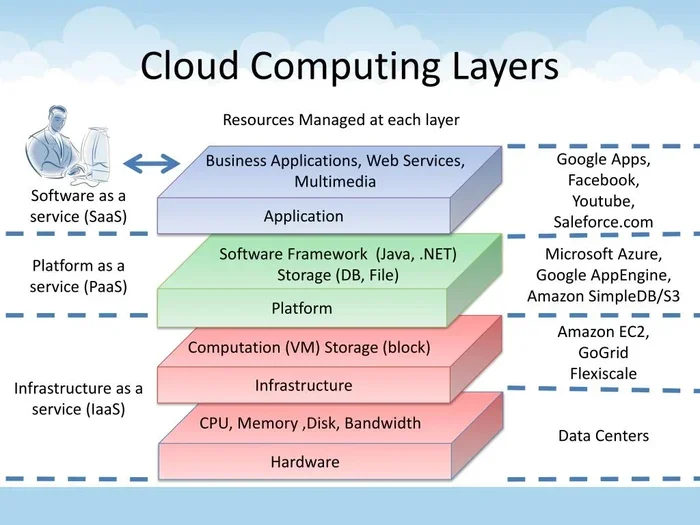
The three basic components of cloud computing are often referred to as the cloud service delivery models. They are Infrastructure as a Service, Platform as a Service, and Software as a Service. Together, these three layers cover everything from raw hardware to finished software applications.
Think of them like a restaurant. IaaS is the kitchen with all the appliances. PaaS is the prep station where chefs cook meals. SaaS is the finished dish served to your table. Each layer builds on the one below it, creating a complete experience for the user.
These cloud service models are not competing with each other. They complement each other. Many organizations use all three in different parts of their operations. Let us dive deeper into each one.
Why Understanding These Components Matters
Knowing how the three basic components of cloud computing work helps you choose the right services for your needs. If you are a business owner, you might need a fully managed software solution. If you are a developer, you might want a platform to build apps without worrying about servers. And if you are an IT team, you might need raw infrastructure to create custom solutions.
Understanding these models also helps you control costs. Cloud computing operates on a pay-as-you-go model, which means you only pay for what you use. But without knowing which component fits your needs, you might end up paying for something you do not need.
Infrastructure as a Service (IaaS)
Infrastructure as a Service is the most fundamental layer of the three basic components of cloud computing. IaaS provides virtualized computing resources over the internet. This includes servers, storage, networks, and operating systems. Instead of buying physical hardware, you rent these resources from a cloud provider.
IaaS gives you the most control. You manage the operating system, middleware, and applications. The provider manages the physical hardware, networking, and virtualization layer. This model is ideal for IT teams who want flexibility without the cost of maintaining physical data centers.
How IaaS Works
When you use IaaS, the provider hosts your virtual machines on their physical servers. You access these machines remotely through the internet. You can scale up or down based on demand. Need more storage on Monday? Just add it. Need less on Friday? Scale back.
This elastic computing capability is one of the biggest advantages of IaaS. You do not have to over-provision resources for peak times. You simply adjust as needed.
Popular IaaS Providers
Several major companies offer IaaS solutions. Here are some of the most well-known providers:
- Amazon Web Services (AWS) — The market leader with services like EC2 and S3.
- Microsoft Azure — A strong choice for businesses already using Microsoft products.
- Google Cloud Platform (GCP) — Known for its data analytics and machine learning tools.
- IBM Cloud — Popular in enterprise environments with strong security features.
Real-World IaaS Examples
Many companies rely on IaaS for their day-to-day operations. A startup might use AWS to host its website without buying any physical servers. A media company might use Google Cloud Storage to store and stream millions of video files. An e-commerce business might use Azure to handle traffic spikes during holiday sales seasons.
IaaS use cases also include hosting development and testing environments, backup and disaster recovery, and big data analysis. The flexibility of IaaS makes it a go-to choice for organizations that need control over their infrastructure.
Quick Tip
When evaluating IaaS providers, compare pricing models carefully. Some charge by the hour, while others offer monthly rates. Also check for hidden costs like data transfer fees, which can add up quickly.
Platform as a Service (PaaS)
Platform as a Service sits in the middle of the three basic components of cloud computing. PaaS provides a complete development environment on the cloud. It includes tools, libraries, and frameworks that developers need to build, test, and deploy applications. Unlike IaaS, you do not need to manage the underlying infrastructure.
PaaS is designed for developers. It removes the burden of setting up servers, configuring networks, and managing operating systems. Instead, developers can focus entirely on writing code and building applications. This cloud-based development approach speeds up the software development lifecycle significantly.
How PaaS Works
When you use PaaS, the provider gives you access to a platform that includes operating systems, programming languages, databases, and web servers. You upload your code, and the platform handles everything else. It manages scaling, updates, and maintenance automatically.
This means developers can build applications faster. They do not spend time configuring servers or fixing infrastructure issues. They simply write code and deploy it.
Popular PaaS Providers
Here are some widely used PaaS platforms in the industry:
- Heroku — Known for its simplicity and ease of use for small to medium projects.
- Google App Engine — Offers strong integration with other Google Cloud services.
- Microsoft Azure App Service — A great choice for .NET and Windows-based applications.
- Red Hat OpenShift — Popular for container-based application development.
When to Use PaaS
PaaS works best for development teams that want to focus on building applications without managing infrastructure. It is also ideal for projects that require rapid development and deployment. Startups often choose PaaS because it reduces the need for a large IT team.
However, PaaS does come with some limitations. You are tied to the provider’s platform and tools. Switching providers later can be challenging. This vendor lock-in is something to consider before committing to a PaaS solution.
PaaS vs. IaaS: Key Differences
While both IaaS and PaaS are part of the cloud computing components, they serve different purposes. IaaS gives you raw infrastructure. PaaS gives you a ready-made development platform. The table below highlights the main differences:
| Feature | IaaS | PaaS |
|---|---|---|
| Control Level | High — you manage OS and apps | Medium — you manage apps only |
| Target Users | IT teams and system admins | Developers |
| Scalability | Manual or auto-scaling | Automatic scaling |
| Management Responsibility | You manage most layers | Provider manages infrastructure |
| Flexibility | Very flexible | Moderate flexibility |
Software as a Service (SaaS)
Software as a Service is the top layer of the three basic components of cloud computing. SaaS delivers fully functional software applications over the internet. Users access these applications through a web browser, without needing to install anything on their devices.
SaaS is the most commonly used cloud service model. If you have used Gmail, Dropbox, Salesforce, or Slack, you have used SaaS. These applications run entirely in the cloud. The provider handles all maintenance, updates, and security.
How SaaS Works
SaaS applications are hosted on remote servers by the provider. Users access them through a web browser or a lightweight application. The provider manages everything — servers, storage, networking, middleware, and the application itself.
Users simply log in and start using the software. There is no installation process. There are no updates to manage. This on-demand software model makes SaaS incredibly convenient for end users.
Popular SaaS Applications
SaaS has become the dominant model for business software. Here are some of the most widely used SaaS products:
- Salesforce — A leading customer relationship management (CRM) platform.
- Microsoft 365 — Includes Word, Excel, PowerPoint, and more, all cloud-based.
- Google Workspace — Gmail, Google Docs, Sheets, and Slides in one suite.
- Zoom — Video conferencing software used worldwide for meetings.
- Slack — A team communication and collaboration platform.
Benefits of SaaS
SaaS offers several advantages for businesses of all sizes. First, it eliminates the need for IT teams to install and maintain software on every device. Second, it provides automatic updates, so users always have the latest features and security patches.
Third, SaaS is highly scalable. A small business can start with a few user licenses and grow to thousands without changing the underlying software. Fourth, SaaS is cost-effective. There is no need to invest in expensive hardware or software licenses upfront.
Expert Insight
According to industry analysts, the global SaaS market is expected to exceed $700 billion by 2030. This rapid growth reflects the increasing demand for cloud-based software solutions that are accessible, affordable, and easy to use.
Common SaaS Challenges
Despite its benefits, SaaS is not without drawbacks. Data security is a top concern. When you use SaaS, your data lives on the provider’s servers. You must trust that the provider has strong security measures in place.
Customization can also be limited. Since SaaS applications are standardized, you may not be able to tailor every feature to your exact needs. Finally, vendor lock-in is a real risk. Switching from one SaaS platform to another can be time-consuming and expensive.
How the Three Components Work Together
The three basic components of cloud computing do not exist in isolation. They work together to create a complete cloud ecosystem. A single application might use all three layers at the same time.
For example, imagine a company building an online shopping platform. The development team uses PaaS to build and test the application. The application runs on IaaS infrastructure provided by a cloud host. The final product is delivered to customers as a SaaS application they can access through their browsers.
This layered approach gives businesses maximum flexibility. They can mix and match components based on their specific needs. A large enterprise might run its own IaaS infrastructure while using SaaS for email and CRM. A small startup might rely entirely on SaaS and PaaS to minimize upfront costs.
The Cloud Stack Explained
The cloud stack is a useful way to visualize how these components relate to each other. At the bottom sits IaaS — the foundation. On top of that sits PaaS — the development layer. At the very top sits SaaS — the user-facing layer. Each layer depends on the one below it.
This cloud architecture model ensures that each layer focuses on its specific role. Infrastructure providers handle hardware. Platform providers handle development tools. Software providers handle the end-user experience. The result is a streamlined, efficient technology ecosystem.
Choosing the Right Cloud Component for Your Needs
Selecting the right cloud service model depends on several factors. Your technical expertise, business goals, budget, and timeline all play a role. Here is a simple guide to help you decide.
Choose IaaS If
- You need full control over your infrastructure.
- You have an in-house IT team with technical expertise.
- You want to migrate existing applications to the cloud with minimal changes.
- You need high customization and flexibility.
Choose PaaS If
- You are a development team building new applications.
- You want to focus on coding without managing servers.
- You need a fast development and deployment pipeline.
- You want to reduce infrastructure management costs.
Choose SaaS If
- You need ready-to-use software with minimal setup.
- You have a small team with limited IT resources.
- You want predictable, subscription-based costs.
- You need software that works across multiple devices and locations.
Quick Tip
Many businesses start with SaaS for everyday tools like email and project management. They then adopt PaaS for development and IaaS for specialized infrastructure needs. This gradual cloud adoption approach minimizes risk and lets you learn as you go.
Common Mistakes When Choosing Cloud Components
Even with a clear understanding of the three basic components of cloud computing, mistakes can happen. Here are some common pitfalls to avoid:
- Choosing based on price alone. The cheapest option is not always the best. Consider features, support, and long-term costs.
- Ignoring security requirements. Not all providers offer the same level of security. Review their compliance certifications and data protection policies.
- Overlooking scalability needs. Your cloud solution should grow with your business. Choose providers that offer easy scaling options.
- Neglecting integration. Make sure the cloud component you choose works well with your existing tools and systems.
- Forgetting about data portability. Ensure you can move your data if you ever need to switch providers.
Avoiding these mistakes saves time, money, and frustration in the long run. Take the time to evaluate your options thoroughly before committing to a cloud deployment strategy.
Key Takeaways
- IaaS gives you virtualized computing resources like servers and storage over the internet, offering maximum control and flexibility.
- PaaS provides a ready-made development environment, allowing developers to focus on building applications without managing infrastructure.
- SaaS delivers fully functional software applications through the browser, making it the easiest and most accessible cloud model.
- The three basic components of cloud computing work together as a layered stack, each building on the one below it.
- Choosing the right cloud service model depends on your technical needs, budget, and business goals.
- Most organizations benefit from using a combination of all three components for different parts of their operations.
Conclusion
The three basic components of cloud computing — IaaS, PaaS, and SaaS — form the backbone of modern technology. Each component serves a unique purpose, and together they cover the full spectrum of computing needs. Whether you need raw infrastructure, a development platform, or a ready-to-use application, there is a cloud model that fits.
Understanding these cloud computing basics empowers you to make informed decisions. You can choose the right services, avoid common pitfalls, and build a technology strategy that supports your goals. The cloud is not just a trend — it is the foundation of modern computing. And mastering its core components is the first step toward unlocking its full potential.
Start by assessing your current needs. Identify which components would add the most value to your operations. Then explore providers and platforms that align with your goals. The world of cloud computing is vast, but with a solid understanding of its basics, you can navigate it with confidence.
Frequently Asked Questions
What are the three basic components of cloud computing?
The three basic components of cloud computing are Infrastructure as a Service (IaaS), Platform as a Service (PaaS), and Software as a Service (SaaS). Each component serves a different purpose, from providing raw computing resources to delivering finished software applications.
Which cloud component is best for small businesses?
SaaS is often the best choice for small businesses because it requires no technical expertise or infrastructure management. Popular SaaS tools like Google Workspace and Salesforce offer affordable subscription plans that scale as your business grows.
Can a business use more than one cloud component at the same time?
Absolutely. Many businesses use a hybrid cloud approach, combining IaaS, PaaS, and SaaS for different purposes. For example, they might use SaaS for email, PaaS for app development, and IaaS for hosting custom databases.
How do IaaS, PaaS, and SaaS differ from each other?
IaaS provides raw infrastructure like servers and storage. PaaS offers a development platform for building applications. SaaS delivers fully functional software that users access through a browser. The level of user control decreases as you move from IaaS to SaaS.
Is cloud computing secure?
Reputable cloud providers invest heavily in security measures, including encryption, access controls, and compliance certifications. However, security is a shared responsibility. Users must also follow best practices like using strong passwords and enabling multi-factor authentication to keep their cloud services safe.
What is the pay-as-you-go model in cloud computing?
The pay-as-you-go model means you only pay for the cloud resources you actually use. This is one of the biggest advantages of cloud computing. It eliminates the need for large upfront investments in hardware and allows businesses to scale costs based on demand.