Virtual Desktop Infrastructure in Cloud Computing Explained
Virtual desktop infrastructure in cloud computing lets businesses deliver desktops from the cloud to any device. It simplifies IT management, boosts security, and supports remote work effortlessly. This guide breaks down how VDI works, its benefits, challenges, and real-world use cases. You will learn why companies are shifting to cloud-hosted desktops in a big way. Read on to see if VDI is the right move for your organization.
Virtual desktop infrastructure in cloud computing has transformed the way organizations think about workstations. Instead of installing software and storing data on individual machines, companies now stream desktops from powerful servers in the cloud. This shift brings flexibility, security, and efficiency to teams everywhere.
If you have ever wondered how businesses manage hundreds or even thousands of desktops without a single physical tower on every desk, the answer is VDI. It is one of the most impactful technologies in modern IT. And with remote work growing every year, its importance only keeps rising.
In this article, we will explore everything you need to know. You will learn how virtual desktop infrastructure works, why cloud computing makes it possible, and what real benefits it delivers. We will also look at challenges, best practices, and expert tips to help you make informed decisions.
Key Takeaways
- VDI delivers full desktops from the cloud: Users access a complete desktop environment from any device, anywhere in the world.
- Cloud computing powers VDI at scale: Cloud resources handle processing, storage, and rendering without heavy local hardware.
- Security improves dramatically: Data stays centralized in the cloud, reducing the risk of breaches on endpoint devices.
- Cost savings come from reduced hardware needs: Thin clients replace expensive workstations, lowering both capital and operational expenses.
- Remote and hybrid work becomes seamless: Employees get their personalized desktop experience on any device they choose.
- Scalability is a major advantage: Businesses can add or remove desktops instantly based on demand.
- Proper planning prevents common pitfalls: Network bandwidth, user density, and resource allocation need careful attention before deployment.
📑 Table of Contents
- What Is Virtual Desktop Infrastructure in Cloud Computing?
- Why Businesses Are Adopting Virtual Desktop Infrastructure
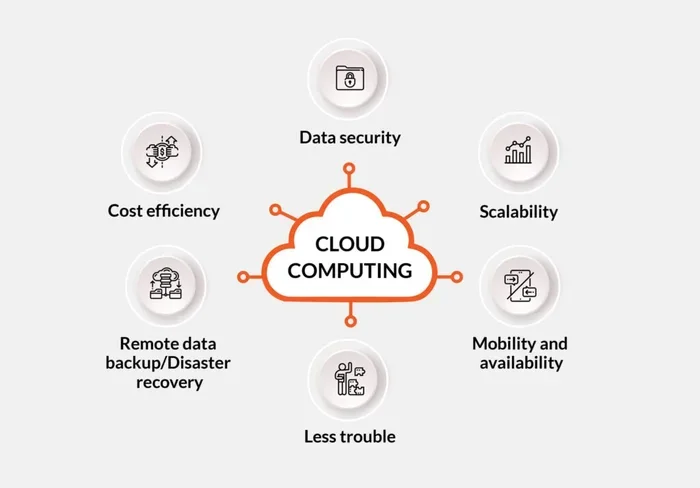
- Key Benefits of Virtual Desktop Infrastructure in Cloud Computing
- Challenges and Common Mistakes to Avoid
- Popular VDI Platforms and Cloud Providers
- Expert Tips for a Successful VDI Deployment
- Quick Tips for Getting the Most Out of VDI
- Conclusion
What Is Virtual Desktop Infrastructure in Cloud Computing?
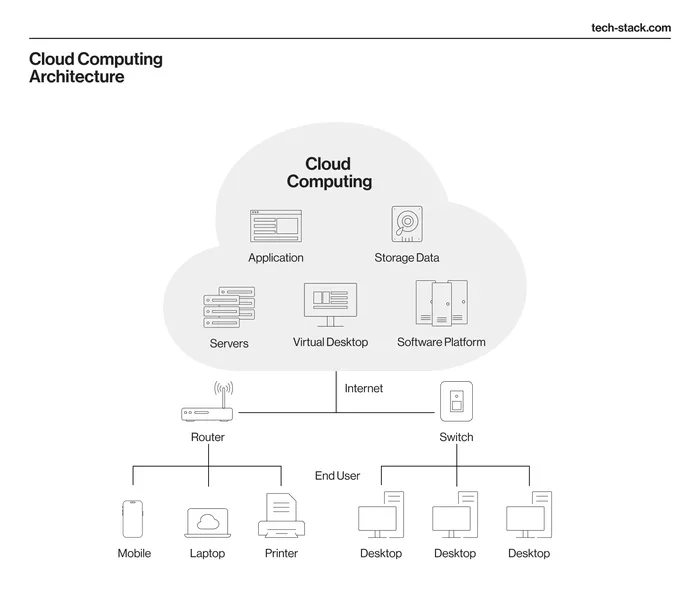
Virtual desktop infrastructure in cloud computing refers to hosting desktop environments on remote servers and delivering them to users over a network. Instead of running Windows or Linux on a local machine, the operating system lives inside a virtual machine in a data center. The user sees and interacts with it as if it were running locally on their device.
The cloud provides the computing power, storage, and networking needed to run these virtual desktops. Users access them through a thin client, a laptop, a tablet, or even a smartphone. All the heavy lifting happens in the cloud, not on the endpoint device.
How Does VDI Work?
VDI uses a hypervisor to create multiple virtual machines on a central server. Each virtual machine runs its own operating system and applications. When a user logs in, the system assigns them a virtual desktop. The user interacts with it through a remote display protocol that sends screen images to their device and sends keyboard and mouse inputs back to the server.
This process happens in milliseconds. The experience feels smooth and responsive, even though the actual computing takes place miles away in a cloud data center. Popular platforms like VMware Horizon, Citrix Virtual Apps and Desktops, and Microsoft Azure Virtual Desktop make this possible.
VDI vs. Traditional Desktops
Traditional desktops run everything on local hardware. The computer’s processor, memory, and storage handle all tasks. Virtual desktop infrastructure moves all of that to the cloud. Here is a quick comparison:
- Traditional desktops: Each machine runs independently. Updates, security patches, and software installs happen one device at a time.
- VDI in cloud: A single image serves many users. IT teams push updates once, and every user gets the latest version instantly.
This difference alone explains why so many organizations are making the switch. Centralized management saves time, reduces errors, and keeps everything consistent.
Why Businesses Are Adopting Virtual Desktop Infrastructure
The shift toward virtual desktop infrastructure in cloud computing is not a trend. It is a strategic move driven by real business needs. Let us look at the main reasons companies are making this transition.
Supporting Remote and Hybrid Work
The pandemic changed how we work. Many employees now split their time between home and the office. Virtual desktops make this easy. A worker logs in from home, gets their full desktop environment, and picks up right where they left off. No VPN setup headaches. No data syncing issues. Everything lives in the cloud.
Workforce mobility has become a top priority for organizations. VDI supports it naturally. Employees can work from any location, on any device, without compromising access to company resources.
Strengthening Security
Data breaches are a growing concern. When desktops live on individual machines, each one becomes a potential attack surface. With VDI, data never leaves the data center. It stays centralized and protected behind enterprise-grade security layers.
Many VDI deployments include zero trust security models. This means every access request is verified, every session is monitored, and every user gets only the permissions they need. The result is a much tighter security posture compared to traditional setups.
Reducing Hardware Costs
Running powerful workstations for every employee is expensive. Virtual desktops shift the cost to the cloud. Organizations can use thin clients or repurpose older machines as endpoints. The cloud handles the processing power.
Cost savings come from several directions:
- Lower hardware purchase costs for endpoint devices
- Reduced energy consumption in the office
- Simplified IT support and maintenance
- Longer lifespan for existing devices
Over time, these savings add up significantly, especially for large teams.
Key Benefits of Virtual Desktop Infrastructure in Cloud Computing
The advantages of VDI go beyond what we have touched on. Let us dig deeper into the specific benefits that make cloud-based virtual desktops so attractive.
Centralized Management
IT teams no longer need to visit each desk to install software or fix issues. With centralized management, they control all desktops from a single dashboard. They can provision new desktops in minutes, push updates across the fleet, and monitor performance in real time.
This approach drastically reduces the workload for IT staff. It also ensures every user has the same experience and the same tools. Consistency is one of the biggest wins for organizations of any size.
Scalability and Flexibility
Cloud computing gives VDI unmatched scalability. Need 50 extra desktops for a seasonal project? Spin them up in the cloud. Project ends? Shut them down and stop paying for them. This elastic resource allocation means you only pay for what you use.
Traditional IT infrastructure requires buying servers months in advance. Virtual desktop infrastructure in cloud computing removes that bottleneck entirely. Scaling up or down becomes a simple configuration change.
Disaster Recovery and Business Continuity
When a local machine fails, the user loses everything. With VDI, the desktop lives in the cloud. If an endpoint device breaks, the user simply logs in from another device and continues working. Nothing is lost. Nothing is interrupted.
Cloud providers also offer built-in disaster recovery. Data is replicated across multiple geographic locations. Even if an entire data center goes down, virtual desktops can fail over to another site automatically. This level of resilience is hard to achieve with traditional desktops.
Improved Performance and User Experience
Modern VDI platforms use advanced protocols to deliver a smooth user experience. Features like adaptive bandwidth, multimedia redirection, and GPU acceleration ensure that even graphics-heavy applications run well. Users can run video editing software, 3D modeling tools, and data-intensive applications without lag.
Many providers also offer persistent desktops, where each user gets a personalized environment with their own files and settings. Non-persistent desktops, on the other hand, reset to a clean state each session. Both models have their place depending on the use case.
Challenges and Common Mistakes to Avoid
Virtual desktop infrastructure is powerful, but it is not without challenges. Understanding these pitfalls helps organizations plan better and avoid costly mistakes.
Network Bandwidth and Latency
VDI depends entirely on network connectivity. If the internet connection is slow or unstable, the user experience suffers. Screen lag, input delay, and dropped sessions become real problems.
Organizations should assess their network capacity before deploying VDI. A dedicated connection or quality of service (QoS) policies can prioritize VDI traffic. Using cloud regions close to the user base also helps reduce latency.
Underestimating Resource Requirements
Every virtual desktop consumes CPU, memory, and storage in the cloud. Planning for resource allocation is critical. Underestimating demand leads to slow performance and frustrated users. Overestimating leads to wasted spending.
A good practice is to start with a pilot group. Monitor usage patterns, measure resource consumption, and scale accordingly. Most cloud providers offer tools to track these metrics in real time.
Ignoring User Density Planning
Not all users need the same amount of resources. A developer running complex builds needs more CPU and RAM than an administrative assistant checking emails. Grouping users by workload type and assigning appropriate desktop pools prevents resource contention.
Common Mistakes
- Skipping proof-of-concept testing before full rollout
- Choosing the wrong cloud provider or virtualization platform
- Neglecting to train users on the new desktop experience
- Overlooking printing and peripheral support in VDI environments
- Failing to plan for license costs (Microsoft, Citrix, etc.)
Avoiding these mistakes saves time, money, and frustration during and after deployment.
Popular VDI Platforms and Cloud Providers
Choosing the right platform is a big decision. Several major players offer virtual desktop infrastructure solutions, each with its own strengths.
Microsoft Azure Virtual Desktop
Azure Virtual Desktop integrates deeply with Microsoft 365 and Windows ecosystems. It is a popular choice for organizations already using Azure or Microsoft services. It supports multi-session Windows 10 and 11, which means more users per server and better cost efficiency.
VMware Horizon Cloud
VMware Horizon has been a leader in desktop virtualization for years. Its cloud version runs on AWS, Azure, and Google Cloud. It offers strong management tools, advanced security features, and excellent support for persistent desktops.
Citrix Cloud
Citrix Virtual Apps and Desktops is known for its high-performance remote display protocol. It works well in low-bandwidth environments and supports a wide range of endpoint devices. Many enterprises with complex IT environments prefer Citrix for its flexibility.
Amazon WorkSpaces
Amazon WorkSpaces is a simple, pay-as-you-go VDI service. It is ideal for smaller organizations or teams that want a quick start without complex setup. It runs on AWS infrastructure and scales easily as needs grow.
| Platform | Best For | Key Strength |
|---|---|---|
| Azure Virtual Desktop | Microsoft ecosystem users | Seamless integration with M365 |
| VMware Horizon | Large enterprises | Advanced management and security |
| Citrix Cloud | Complex IT environments | High performance on low bandwidth |
| Amazon WorkSpaces | Small to mid-size teams | Simple pay-as-you-go model |
Expert Tips for a Successful VDI Deployment
Getting virtual desktop infrastructure right takes planning. Here are expert tips that make a real difference.
Start Small and Scale Gradually
Do not try to migrate your entire organization on day one. Start with a pilot group of 20 to 50 users. Test performance, gather feedback, and identify issues early. Once the pilot proves successful, expand in phases.
Choose the Right Cloud Region
Latency kills the VDI experience. Always choose a cloud region close to where your users are located. If your team is spread across continents, consider deploying in multiple regions for the best performance.
Invest in Endpoint Device Strategy
While VDI works on almost any device, not all devices deliver the same experience. Invest in reliable thin clients or ensure existing machines meet minimum specifications. A good endpoint strategy prevents support headaches down the road.
Monitor and Optimize Continuously
VDI is not a set-it-and-forget-it solution. Use monitoring tools to track user sessions, resource usage, and performance metrics. Regular optimization keeps costs under control and ensures a smooth experience for everyone.
Plan for Licensing
Virtual desktop infrastructure often requires additional licenses for operating systems, applications, and the VDI platform itself. Factor these costs into your budget from the beginning. Unexpected licensing fees can derail an otherwise successful project.
Quick Tips for Getting the Most Out of VDI
- Use persistent desktops for power users who need custom configurations
- Use non-persistent desktops for task workers who need a clean slate each session
- Enable multi-factor authentication for all VDI access
- Set up automated backups for user data stored in the cloud
- Use GPU-accelerated virtual desktops for design and engineering teams
- Leverage cloud cost management tools to track spending per user
- Train users on basic troubleshooting to reduce IT ticket volume
Conclusion
Virtual desktop infrastructure in cloud computing is more than a technology trend. It is a fundamental shift in how organizations deliver and manage desktop environments. The benefits are clear: centralized management, stronger security, lower costs, and unmatched flexibility for modern workforces.
Every organization has different needs, but the core value of VDI remains the same. It puts the desktop in the cloud, where it is secure, scalable, and accessible from anywhere. As cloud computing continues to evolve, virtual desktop infrastructure will only become more powerful and more essential.
If you are considering adopting VDI, start with a clear plan. Understand your user needs, choose the right platform, and invest in proper network infrastructure. The results will speak for themselves. Your team will work more securely, more efficiently, and with greater freedom than ever before.
Frequently Asked Questions
What is virtual desktop infrastructure in cloud computing?
Virtual desktop infrastructure in cloud computing means hosting desktop operating systems on remote servers and delivering them to users over the internet. Users access a full desktop environment from any device, while all computing happens in the cloud. This approach eliminates the need for powerful local hardware and centralizes IT management.
How does VDI differ from remote desktop services?
Remote desktop services typically give users access to a single shared session on a server. VDI, on the other hand, provides each user with their own dedicated virtual machine. This isolation improves performance, security, and customization options for each user.
What are the main benefits of using VDI?
The main benefits include centralized IT management, enhanced security through data centralization, support for remote and hybrid work, reduced hardware costs, and easy scalability. Organizations also gain better disaster recovery capabilities since desktops live in the cloud.
What devices can be used to access a virtual desktop?
Users can access virtual desktops from almost any internet-connected device. This includes laptops, tablets, smartphones, thin clients, and even older computers. The cloud handles all the processing, so the endpoint device does not need to be powerful.
Is virtual desktop infrastructure expensive to implement?
The upfront cost depends on the size of your organization and the platform you choose. However, VDI often leads to significant long-term savings. Companies spend less on physical hardware, IT support, and maintenance. Cloud-based VDI also offers a pay-as-you-go model that keeps costs predictable.
What industries benefit most from VDI?
Healthcare, finance, education, and call centers see the biggest benefits. These industries handle sensitive data, require strict compliance, and often have large teams that need consistent desktop environments. VDI helps them meet security standards while supporting flexible work arrangements.
=== CONCLUSION ===
Virtual desktop infrastructure in cloud computing is a game-changer for modern businesses. It delivers desktops from the cloud, making work more secure, flexible, and cost-effective. Whether you are a small team or a large enterprise, VDI offers a path to better IT management and workforce mobility.
The key is to start with a clear understanding of your needs, choose the right platform, and plan carefully for network and resource requirements. With the right approach, virtual desktop infrastructure can transform how your team works every single day. Take the first step today and explore what cloud-based desktops can do for your organization.