Which of These Best Describes Cloud Computing Explained
Cloud computing delivers computing services over the internet, including storage, servers, databases, and software. It lets users access resources on demand without managing physical hardware. The right answer to “which of these best describes cloud computing” is on-demand, internet-based computing that scales with your needs.
If you have ever wondered which of these best describes cloud computing, you are not alone. The term gets thrown around a lot, but many people still find it confusing. This guide breaks it all down in simple, everyday language. You will walk away with a clear understanding of what cloud computing really is and why it powers so much of our digital lives.
Whether you are a small business owner, a student, or just someone curious about technology, this article has you covered. We will explore the core idea, the different types, real-world examples, and common myths. No jargon. No fluff. Just straightforward answers that actually help.
Key Takeaways
- Cloud computing means accessing services over the internet instead of on your local computer.
- It works on a pay-as-you-go model, so you only pay for what you use.
- The three main types are IaaS, PaaS, and SaaS, each serving different needs.
- Cloud computing offers scalability, cost savings, and easy remote access.
- Major cloud providers include AWS, Microsoft Azure, and Google Cloud.
- Cloud security is a shared responsibility between the provider and the user.
- Understanding cloud computing basics helps you make smarter tech decisions.
📑 Table of Contents
- So, Which of These Best Describes Cloud Computing?
- How Cloud Computing Actually Works
- The Three Main Types of Cloud Computing
- Why Cloud Computing Matters
- Common Cloud Computing Myths
- How to Choose the Right Cloud Provider
- Quick Tips for Getting Started with Cloud Computing
- The Future of Cloud Computing
- Final Thoughts
So, Which of These Best Describes Cloud Computing?
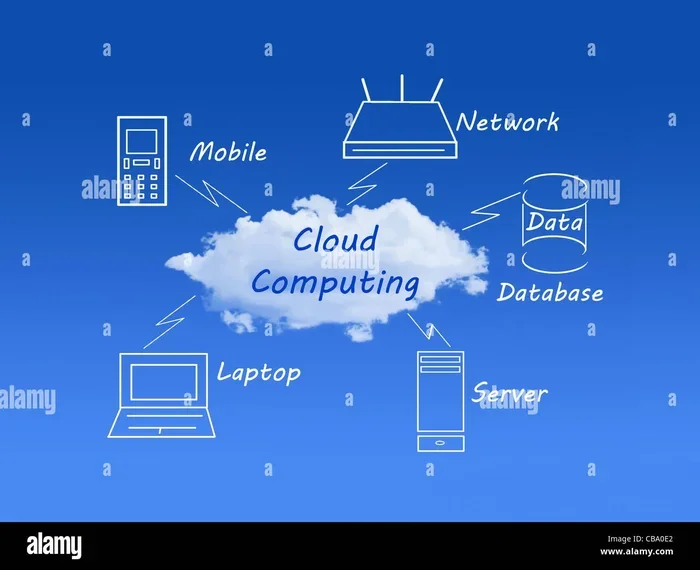
The simplest answer to “which of these best describes cloud computing” is this: cloud computing is the delivery of computing services over the internet. These services include things like storage, servers, databases, networking, and software. Instead of owning and maintaining physical hardware, you rent access to these resources from a cloud provider.
Think of it like electricity. You do not build your own power plant to turn on a light. You plug into the grid and pay for what you use. Cloud computing works the same way. You access computing power, storage, or software through the internet, and you pay only for what you consume.
Here are a few ways to think about it:
- On-demand resources: You get computing power whenever you need it.
- Internet-based: Everything happens over the web, not on your local machine.
- Scalable: You can use more or less depending on your current needs.
- Pay-as-you-go: You pay for actual usage, not for idle capacity.
So when someone asks “which of these best describes cloud computing,” the answer always circles back to these core ideas. It is flexible, accessible, and cost-effective.
How Cloud Computing Actually Works
Now that you know the basic answer, let us look under the hood. Understanding how cloud computing works helps you trust it and use it better.
The Role of Remote Servers
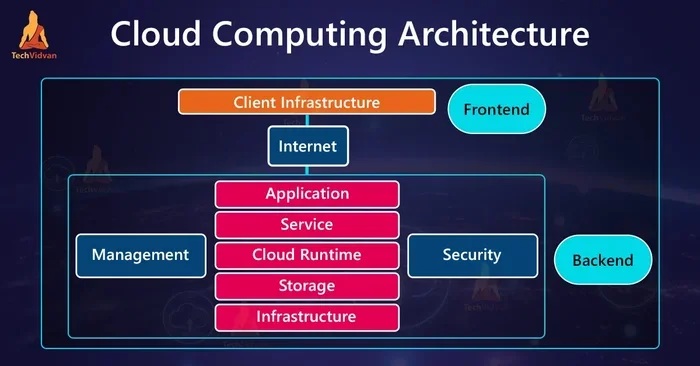
At the heart of cloud computing are remote servers. These are powerful computers housed in massive data centers around the world. When you save a file to the cloud or run an app online, your request travels over the internet to one of these servers. The server processes your request and sends the result back to you.
You do not see these servers. You do not touch them. But they are doing the heavy lifting for you. This is what makes cloud computing so seamless.
Virtualization Technology
Cloud providers use something called virtualization. This is a technology that creates virtual versions of physical hardware. One physical server can be split into many virtual servers. Each virtual server can run its own operating system and applications.
This is a game-changer. It means cloud providers can use their hardware much more efficiently. They can serve thousands of customers from a single physical machine. And you get reliable, isolated resources without owning any physical equipment.
Data Centers and Networks
Cloud providers operate huge data centers. These facilities contain thousands of servers connected by high-speed networks. The data centers are designed for redundancy, meaning if one server fails, another takes over instantly. This is why cloud services are so reliable.
The network connecting you to these data centers is the internet. Your cloud experience depends on your internet connection speed and stability. A fast, stable connection makes everything feel instant and smooth.
The Three Main Types of Cloud Computing
Not all cloud services are the same. They fall into three main categories. Knowing these helps you understand where cloud computing fits in different scenarios.
Infrastructure as a Service (IaaS)
IaaS gives you the most control. You rent fundamental computing resources like virtual machines, storage, and networking. You manage the operating system, applications, and data. The provider manages the physical hardware and data center.
This is ideal for IT teams who want flexibility without buying physical servers. Popular IaaS providers include Amazon Web Services (AWS), Microsoft Azure, and Google Cloud Platform.
Platform as a Service (PaaS)
PaaS goes a step further. It provides a platform for developing, testing, and deploying applications. You focus on writing code. The provider handles the underlying infrastructure, operating systems, and middleware.
Developers love PaaS because it speeds up the development process. You do not worry about server setup or maintenance. You just build and deploy your application.
Software as a Service (SaaS)
SaaS is the most consumer-friendly type. You access a fully functional application over the internet. The provider manages everything — servers, storage, security, updates. You just log in and use the software.
Examples of SaaS you probably use every day:
- Google Workspace (Gmail, Docs, Sheets)
- Microsoft 365 (Word, Excel, PowerPoint online)
- Salesforce (customer relationship management)
- Netflix and Spotify (streaming services)
When people ask “which of these best describes cloud computing,” SaaS is often the most relatable example because it touches our daily lives directly.
Why Cloud Computing Matters
Cloud computing has transformed how businesses and individuals use technology. Here is why it matters so much today.
Cost Savings
One of the biggest advantages of cloud technology is cost savings. You do not need to buy expensive servers or maintain a data center. You pay a monthly or usage-based fee instead. This shifts a large capital expense into a predictable operating expense.
Small businesses especially benefit from this. They get access to enterprise-grade technology without the enterprise-grade price tag.
Scalability and Flexibility
Need more storage or computing power during a busy season? Cloud scalable infrastructure lets you scale up instantly. Need less during the slow months? Scale down just as easily.
This flexibility is something traditional on-premises setups simply cannot match. You are never paying for idle resources.
Accessibility and Remote Work
Cloud computing enables remote access from anywhere in the world. As long as you have an internet connection, you can access your files, applications, and tools. This is why remote work and hybrid work models have become so practical.
Teams can collaborate in real time on documents, projects, and dashboards. Geography is no longer a barrier to productivity.
Disaster Recovery and Backup
Storing data in the cloud provides a natural disaster recovery solution. Your data is replicated across multiple data centers. If one location goes down, your data is safe in another.
This is far more reliable than keeping all your backups on a single physical device that could be lost, stolen, or damaged.
Common Cloud Computing Myths
There are several misconceptions about cloud computing that keep people from fully embracing it. Let us clear a few of them up.
“The Cloud Is Not Secure”
Security is a top concern for many people. The truth is that major cloud providers invest billions in cloud security measures. They employ dedicated security teams, advanced encryption, and constant monitoring. In many cases, cloud security is stronger than what a single organization could achieve on its own.
That said, security is a shared responsibility. You still need to use strong passwords, enable two-factor authentication, and manage access properly.
“Cloud Computing Is Only for Big Companies”
This is far from true. Cloud computing is incredibly valuable for small businesses and even individuals. Many cloud services offer free tiers or very low-cost entry points. A solo entrepreneur can use cloud tools to run a professional business without a large IT budget.
“You Lose Control of Your Data”
You retain ownership of your data in the cloud. You control who has access to it and how it is used. The cloud provider does not have the right to use your data for their own purposes. Always read the terms of service to understand the details.
How to Choose the Right Cloud Provider
Not all cloud providers are created equal. Here are some factors to consider when making your choice.
- Pricing model: Look for transparent pay-as-you-go pricing with no hidden fees.
- Service uptime: Choose providers with strong service level agreements (SLAs) guaranteeing high availability.
- Security certifications: Look for industry-standard certifications like SOC 2, ISO 27001, and HIPAA compliance.
- Global reach: If you serve international customers, pick a provider with data centers in your target regions.
- Support quality: Check what support tiers are available and their response times.
- Ecosystem and integrations: A rich ecosystem of tools and services makes your cloud experience more powerful.
Take your time to compare options. Most providers offer free trials or free tiers so you can test the waters before committing.
Quick Tips for Getting Started with Cloud Computing
Ready to dip your toes into cloud computing? Here are some practical tips to get started smoothly.
- Start small. Try a free tier or low-cost service first. Get comfortable with the basics before scaling up.
- Learn the fundamentals. Understand the difference between IaaS, PaaS, and SaaS. This knowledge will guide your decisions.
- Set up billing alerts. Cloud services are pay-as-you-go. Without alerts, unexpected charges can sneak up on you.
- Back up your data. Even though the cloud is reliable, always maintain a backup strategy. Follow the 3-2-1 rule.
- Use strong authentication. Enable multi-factor authentication on all your cloud accounts. It is one of the simplest security steps you can take.
- Explore tutorials and certifications. Most cloud providers offer free learning resources. AWS, Azure, and Google Cloud all have excellent training platforms.
These tips will help you build confidence and avoid common pitfalls as you begin your cloud journey.
The Future of Cloud Computing
The cloud is not slowing down. Cloud technology continues to evolve rapidly. Here are some trends shaping the future.
- Serverless computing: You focus purely on writing code. The provider handles all server management automatically.
- Edge computing: Processing moves closer to the user for faster response times and lower latency.
- Multi-cloud strategies: Companies use services from multiple providers to avoid vendor lock-in and optimize costs.
- AI and machine learning integration: Cloud providers are embedding powerful AI tools into their platforms, making advanced technology accessible to everyone.
- Hybrid cloud: Many organizations combine public cloud services with private cloud infrastructure for greater control and flexibility.
The answer to “which of these best describes cloud computing” will continue to evolve as the technology advances. But the core principles — on-demand, internet-based, scalable, and cost-effective — will remain the same.
Final Thoughts
So, which of these best describes cloud computing? Cloud computing is the delivery of on-demand computing services over the internet. It replaces the need for local hardware with flexible, scalable, and cost-effective resources accessed remotely.
Whether it is IaaS, PaaS, or SaaS, the cloud touches almost every aspect of modern technology. From streaming movies to running global businesses, cloud computing makes it all possible.
The best part is that you do not need to be a tech expert to benefit from it. Start small, explore the options, and build your knowledge over time. The cloud is waiting for you.
Frequently Asked Questions
What is the simplest way to describe cloud computing?
The simplest way to describe cloud computing is accessing computing services like storage, servers, and software over the internet instead of on your own computer. You rent these resources from a provider and pay only for what you use.
Which of these best describes cloud computing: local storage or internet-based services?
The correct answer is internet-based services. Cloud computing relies on remote servers accessed through the internet, not on local storage or physical hardware that you own and maintain yourself.
Is cloud computing safe for personal use?
Yes, cloud computing is generally very safe for personal use. Major providers invest heavily in security measures like encryption, multi-factor authentication, and regular audits. You can further protect your data by using strong passwords and enabling two-factor authentication.
What are some everyday examples of cloud computing?
Everyday examples include Gmail, Google Drive, Netflix, Spotify, and Microsoft 365. All of these services run on remote servers and are accessed through the internet, making them perfect examples of cloud technology in action.
How much does cloud computing cost?
Costs vary widely depending on the service and usage. Many cloud providers offer free tiers with limited resources. Pay-as-you-go pricing means you only pay for what you actually consume, which makes it budget-friendly for most users and businesses.
Can I switch cloud providers after I start using one?
Yes, you can switch providers, but it requires planning. Data migration can be complex, so it is best to choose a provider carefully from the start. Look for providers that support open standards and make data export easy to avoid getting locked in.
=== CONCLUSION ===
Understanding which of these best describes cloud computing opens the door to smarter technology choices. Cloud computing is internet-based, on-demand, scalable, and cost-effective. It has reshaped how we store data, run applications, and collaborate across distances. Whether you are exploring SaaS tools for personal use or evaluating IaaS for a growing business, the cloud offers something for everyone. Start with the basics, keep learning, and you will find that the cloud is one of the most powerful tools available today.