Understanding Virtualization Architecture in Cloud Computing
Virtualization architecture in cloud computing is the foundation that makes modern cloud services possible. It allows multiple virtual machines to run on a single physical server, boosting efficiency and cutting costs. Understanding this architecture helps businesses scale faster and manage resources smarter. In this guide, we break down every major component, type, and benefit in plain language. Whether you are a beginner or a tech professional, you will find practical insights here.
Virtualization architecture in cloud computing has changed the way businesses run their IT operations. Instead of buying one server for each application, companies now run dozens of virtual environments on a single physical machine. This shift saves money, boosts performance, and makes scaling much easier.
If you have ever wondered what powers the cloud, the answer starts with virtualization. It is the invisible engine behind every cloud service you use, from streaming platforms to business software. In this article, we will walk through the entire architecture, explain how it works, and share practical tips you can use right away.
Whether you are a student, a developer, or a business owner, this guide will help you understand why virtualization architecture in cloud computing matters so much today. Let us dive in and explore this fascinating topic together.
Key Takeaways
- Virtualization architecture in cloud computing separates physical hardware from software, enabling multiple virtual environments on one machine.
- The hypervisor is the core component that creates and manages virtual machines efficiently.
- There are several types of virtualization, including server, network, storage, and desktop virtualization.
- Virtualization improves resource utilization, reduces hardware costs, and enhances disaster recovery.
- Containerization and bare-metal virtualization are two modern approaches gaining popularity in cloud environments.
- Common challenges include performance overhead and security concerns, but proper planning solves most of them.
- Choosing the right virtualization strategy depends on your workload, budget, and scalability needs.
📑 Table of Contents
- What Is Virtualization Architecture in Cloud Computing?
- Key Components of Virtualization Architecture
- Types of Virtualization in Cloud Architecture
- How Virtualization Architecture Powers Cloud Computing
- Benefits of Virtualization Architecture
- Common Challenges and How to Overcome Them
- Virtualization vs. Containerization: What Is the Difference?
- Choosing the Right Virtualization Strategy
- Conclusion
What Is Virtualization Architecture in Cloud Computing?
Virtualization architecture in cloud computing refers to the layered structure that creates, manages, and runs virtual versions of computing resources. These resources include servers, storage devices, networks, and even desktops. Instead of relying entirely on physical hardware, virtualization software abstracts the hardware layer and lets multiple virtual environments share the same physical machine.
Think of it like an apartment building. One physical building houses many separate apartments. Each apartment has its own residents, its own rules, and its own space. Similarly, one physical server can host many virtual machines, each running its own operating system and applications. This is the core idea behind virtualization architecture.
The cloud relies heavily on this model. When you use services like AWS, Google Cloud, or Microsoft Azure, you are actually using virtualized resources. The provider owns the physical hardware, but virtualization allows them to divide it among thousands of customers efficiently. This is why cloud computing is so flexible and cost-effective.
How Virtualization Works in Practice
At its simplest, virtualization works by inserting a software layer between the physical hardware and the operating systems. This layer is called a hypervisor. The hypervisor takes control of the physical resources, such as CPU, memory, and storage, and then assigns portions of those resources to each virtual machine.
Each virtual machine believes it has its own dedicated hardware. It runs its own operating system and applications, completely unaware that it is sharing physical resources with other virtual machines. This isolation is one of the most powerful features of virtualization architecture in cloud computing.
For example, imagine a single physical server with 64 GB of RAM and 16 CPU cores. Through virtualization, you could create five virtual machines, each with 10 GB of RAM and 3 CPU cores. The remaining resources stay available for overhead and burst capacity. This kind of flexibility is what makes cloud infrastructure so powerful.
Key Components of Virtualization Architecture
The virtualization architecture in cloud computing is made up of several important components. Each one plays a specific role in making the whole system work. Let us look at the most critical pieces.
The Hypervisor
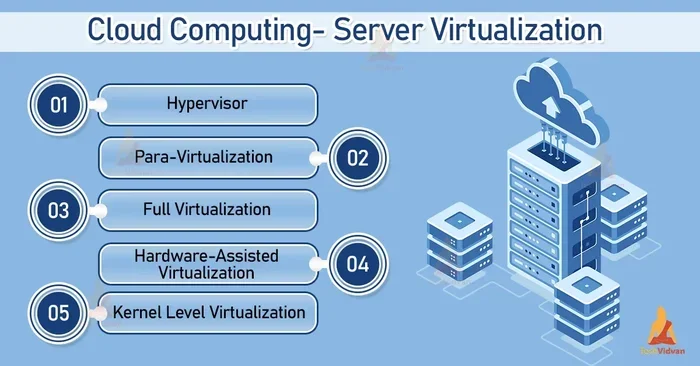
The hypervisor is the heart of any virtualization setup. It is a piece of software that sits directly on the hardware or on top of an operating system and creates virtual machines. The hypervisor allocates CPU, memory, and storage to each virtual machine as needed.
There are two main types of hypervisors:
- Type 1 (Bare-Metal): This hypervisor runs directly on the physical hardware. It does not need a host operating system. VMware ESXi and Microsoft Hyper-V are popular examples.
- Type 2 (Hosted): This hypervisor runs on top of an existing operating system. Oracle VirtualBox and VMware Workstation are common examples.
Type 1 hypervisors are more common in cloud environments because they offer better performance and lower overhead. They are a key reason why virtualization architecture in cloud computing delivers such strong results.
Virtual Machines
A virtual machine is a software-based computer that runs inside a physical machine. It has its own virtual CPU, memory, hard drive, and network interface. You can install any operating system on a virtual machine, just like you would on a physical computer.
Virtual machines are the building blocks of cloud infrastructure. Every time you launch a cloud server, you are actually starting a virtual machine. Cloud providers use advanced virtualization software to manage thousands of these machines simultaneously.
Virtual Networking
Virtualization is not just about compute resources. Virtual networking creates software-based networks that connect virtual machines to each other and to the outside world. Virtual switches, virtual routers, and virtual firewalls all operate within the virtualization layer.
This means you can set up complex network topologies without touching any physical cables. Network virtualization makes it easy to isolate traffic, set up private networks, and configure security rules, all through software.
Virtual Storage
Virtual storage pools together physical storage devices from multiple servers into a single shared storage system. Virtual machines access this storage as if it were local disks, but the data actually lives on a centralized storage infrastructure.
This approach brings several advantages. It makes backups faster, improves data availability, and simplifies storage management. Virtual storage is a critical part of virtualization architecture in cloud computing because it ensures that data remains accessible even if a physical server fails.
Types of Virtualization in Cloud Architecture
Not all virtualization is the same. Different types serve different purposes within the cloud. Understanding these types helps you choose the right approach for your specific needs.
Server Virtualization
Server virtualization is the most common type. It involves dividing a single physical server into multiple virtual servers. Each virtual server runs its own operating system and applications independently.
This is the backbone of cloud computing. Most cloud providers use server virtualization to offer virtual private servers and elastic compute services. It allows them to pack many workloads onto fewer physical machines, which saves space, power, and cooling costs.
Network Virtualization
Network virtualization abstracts the physical network into software-defined virtual networks. It lets administrators create, modify, and manage networks entirely through software, without changing any physical hardware.
This type of virtualization is essential for multi-tenant cloud environments. It allows different customers to have isolated network segments that look and behave like dedicated physical networks. Popular tools for network virtualization include VMware NSX and Open vSwitch.
Storage Virtualization
Storage virtualization combines physical storage from multiple devices into a single virtual storage pool. This pool is managed centrally and presented to virtual machines as logical volumes.
Cloud providers rely heavily on storage virtualization to deliver scalable and reliable storage services. When you use cloud storage like Amazon S3 or Azure Blob Storage, you are tapping into a virtualized storage infrastructure that spans thousands of physical disks across multiple data centers.
Desktop Virtualization
Desktop virtualization separates the desktop environment from the physical device. Users can access a full desktop running on a remote server from any device, including laptops, tablets, and thin clients.
This is especially useful for remote work and call centers. Companies can manage all desktops from a central location, apply updates once, and ensure consistent security policies across the entire organization.
Application Virtualization
Application virtualization wraps software applications in a virtual layer so they run independently of the underlying operating system. This means applications can run on different OS environments without conflicts.
Tools like Docker and Microsoft App-V use application virtualization principles. While Docker is more closely associated with containerization, the concept shares roots with traditional application virtualization in cloud computing.
How Virtualization Architecture Powers Cloud Computing
Now that you know the components and types, let us look at how virtualization architecture in cloud computing actually powers real-world cloud services.
Resource Pooling and Multi-Tenancy
One of the biggest advantages of virtualization is resource pooling. Cloud providers take thousands of physical servers and combine their resources into a massive shared pool. Multiple customers, called tenants, draw from this pool as needed.
This model is called multi-tenancy. Each tenant gets a portion of the pooled resources, isolated from other tenants. Virtualization ensures that one tenant’s workload does not interfere with another’s. This is how cloud providers can offer affordable services to millions of customers simultaneously.
Elastic Scaling
Elastic scaling is the ability to increase or decrease computing resources on demand. Virtualization makes this possible because virtual machines can be created, cloned, or deleted in minutes.
During peak traffic hours, a website can automatically spin up additional virtual machines to handle the load. When traffic drops, those extra machines are shut down. This dynamic scaling would be impossible without virtualization architecture in cloud computing. It is one of the main reasons businesses love the cloud.
Disaster Recovery and High Availability
Virtualization also strengthens disaster recovery and high availability. Because virtual machines are software-based, they can be easily backed up, migrated, or restarted on different physical hardware.
If a physical server crashes, its virtual machines can be automatically restarted on another healthy server. This failover happens in seconds, often without any downtime. Cloud providers build entire disaster recovery strategies around virtualization, giving customers peace of mind.
Benefits of Virtualization Architecture
Virtualization offers many advantages for businesses of all sizes. Here are the most important benefits you should know about.
- Cost Savings: Virtualization reduces the number of physical servers you need. Fewer servers mean lower hardware costs, less electricity, and reduced cooling expenses.
- Better Resource Utilization: Physical servers often run at only 10 to 20 percent capacity. Virtualization pushes that number up to 60 to 80 percent, making every dollar count.
- Faster Deployment: Setting up a new virtual machine takes minutes, not days or weeks. Developers can spin up test environments instantly.
- Improved Disaster Recovery: Virtual machines are easy to back up and restore. Many cloud platforms offer built-in recovery tools powered by virtualization.
- Greater Flexibility: You can run Windows, Linux, or any other operating system on the same physical hardware. Virtualization removes OS compatibility barriers.
- Simplified Management: Centralized management tools let administrators monitor and control hundreds of virtual machines from a single dashboard.
Common Challenges and How to Overcome Them
Virtualization is powerful, but it is not without challenges. Understanding these issues helps you plan better and avoid common pitfalls.
Performance Overhead
Every layer of virtualization adds a small amount of overhead. The hypervisor must translate virtual resource requests into physical ones. In most cases, this overhead is negligible. But for extremely performance-sensitive workloads, it can become a bottleneck.
Tip: Use bare-metal virtualization (Type 1 hypervisor) for the best performance. Also, allocate resources carefully and avoid over-provisioning. Monitoring tools can help you spot performance issues early.
Security Concerns
Because multiple virtual machines share the same physical hardware, there is always a concern about isolation. A security breach in one virtual machine could potentially affect others. This is known as a hypervisor escape.
While hypervisor escapes are rare, they do happen. To stay safe, keep your hypervisor and virtualization software up to date. Use strong access controls, encrypt virtual machine storage, and segment your virtual networks properly. Good security practices go a long way in any virtualization architecture in cloud computing setup.
Complexity
Managing a virtualized environment can get complex quickly. As the number of virtual machines grows, so does the need for proper networking, storage management, and monitoring.
Tip: Use a centralized management platform. Tools like VMware vCenter, Microsoft System Center, or open-source alternatives like Proxmox VE simplify day-to-day operations. Establish clear naming conventions and documentation practices from the start.
Virtualization vs. Containerization: What Is the Difference?
You have probably heard of containerization as an alternative to traditional virtualization. While both serve similar goals, they work in very different ways.
Virtualization creates full virtual machines, each with its own operating system. This provides strong isolation and flexibility but comes with more overhead.
Containerization, popularized by Docker and Kubernetes, shares the host operating system kernel. Containers are lighter, faster to start, and use fewer resources. However, they offer less isolation than full virtual machines.
In modern cloud environments, many organizations use both together. They run virtual machines for strong isolation and containers for lightweight, fast-deploying applications. Understanding both approaches gives you a complete picture of virtualization architecture in cloud computing.
Choosing the Right Virtualization Strategy
Not every workload is the same. Choosing the right virtualization strategy depends on several factors, including your budget, performance needs, and long-term goals.
Here are some quick tips to help you decide:
- Evaluate your workloads. Identify which applications need strong isolation and which ones can run in containers.
- Consider your budget. Bare-metal hypervisors may require more upfront investment but offer better long-term performance.
- Plan for scalability. Choose a virtualization platform that supports elastic scaling and easy migration.
- Think about management. Pick tools that simplify monitoring, backup, and day-to-day administration.
- Stay updated. The virtualization landscape changes fast. Keep learning about new features, security patches, and best practices.
By taking a thoughtful approach, you can build a virtualization setup that meets your current needs and grows with your business. The right strategy makes virtualization architecture in cloud computing a true competitive advantage.
Conclusion
Virtualization architecture in cloud computing is the invisible foundation that makes modern cloud services possible. From the hypervisor to virtual machines, virtual networks, and virtual storage, every component works together to deliver flexibility, efficiency, and scale.
Understanding how this architecture works gives you a huge advantage, whether you are building a cloud infrastructure for your business or just trying to make sense of the technology behind the services you use every day. The benefits are clear: lower costs, better resource utilization, faster deployment, and stronger disaster recovery.
Like any technology, virtualization comes with challenges. Performance overhead, security concerns, and management complexity are real issues. But with the right planning, tools, and practices, you can overcome them and build a robust, scalable cloud environment.
Start small if you need to. Experiment with a virtual machine or two. Explore different hypervisors and virtualization types. The more you learn about virtualization architecture in cloud computing, the more confident you will become in leveraging its full power.
The cloud is here to stay, and virtualization is the engine that drives it. Embrace it, explore it, and use it to take your IT capabilities to the next level.
Frequently Asked Questions
What is virtualization architecture in cloud computing?
Virtualization architecture in cloud computing refers to the layered structure that creates and manages virtual versions of computing resources like servers, storage, and networks. It uses a hypervisor to abstract physical hardware and allow multiple virtual machines to share the same physical machine efficiently.
Why is virtualization important in cloud computing?
Virtualization is the backbone of cloud computing. It enables resource pooling, multi-tenancy, and elastic scaling. Without virtualization, cloud providers would not be able to serve millions of customers efficiently from shared physical infrastructure.
What are the main types of virtualization?
The main types include server virtualization, network virtualization, storage virtualization, desktop virtualization, and application virtualization. Each type serves a specific purpose and plays a unique role in the overall cloud infrastructure.
What is a hypervisor?
A hypervisor is software that creates and manages virtual machines. It sits between the physical hardware and the virtual environments, allocating CPU, memory, and storage resources to each virtual machine as needed.
How does virtualization improve disaster recovery?
Virtualization makes disaster recovery faster and simpler because virtual machines are software-based. They can be backed up, cloned, and restored on different physical hardware in minutes, minimizing downtime and data loss.
What is the difference between virtualization and containerization?
Virtualization creates full virtual machines with their own operating systems, while containerization shares the host OS kernel and runs applications in isolated containers. Containers are lighter and faster, but virtualization provides stronger isolation and flexibility.