Article on Cloud Computing Security Tips and Best Practices
Cloud computing security is essential for every business that stores data online. This article covers cloud computing security tips, best practices, and real-world strategies to keep your cloud environment safe. You will learn how to prevent data breaches, manage access, and build a strong cloud computing security plan from scratch. Whether you are a beginner or a seasoned IT pro, these insights will help you stay protected.
Cloud computing has changed the way businesses store, manage, and process data. Almost every company today relies on the cloud in some form. But with this shift comes a big responsibility: keeping that data safe. Cloud computing security is not just an IT concern. It is a business priority that affects your reputation, your customers, and your bottom line.
In this article, you will find practical cloud computing security tips and best practices you can apply right away. We will break down complex topics into simple, actionable steps. You do not need to be a security expert to understand or implement these strategies. Let us dive in and explore how to protect your cloud environment the right way.
Key Takeaways
- Strong access control is the foundation: Use multi-factor authentication and strict identity management to lock down your cloud.
- Encryption protects your data at every stage: Encrypt data in transit and at rest to prevent unauthorized access.
- Regular audits keep you compliant: Conduct frequent security assessments to catch vulnerabilities early.
- Employee training reduces human error: Most breaches happen because of simple mistakes your team can avoid with proper training.
- A clear incident response plan saves time: Knowing what to do during a breach limits damage and speeds up recovery.
- Zero trust is the modern approach: Never assume anything is safe inside or outside your network.
📑 Table of Contents
- What Is Cloud Computing Security?
- Why Cloud Computing Security Matters
- Cloud Computing Security Tips You Can Start Today
- Best Practices for Cloud Computing Security
- Common Cloud Computing Security Mistakes to Avoid
- Building a Strong Cloud Computing Security Strategy
- Cloud Computing Security: Quick Comparison of Key Approaches
- Expert Insights on Cloud Computing Security
- Final Thoughts on Cloud Computing Security
What Is Cloud Computing Security?
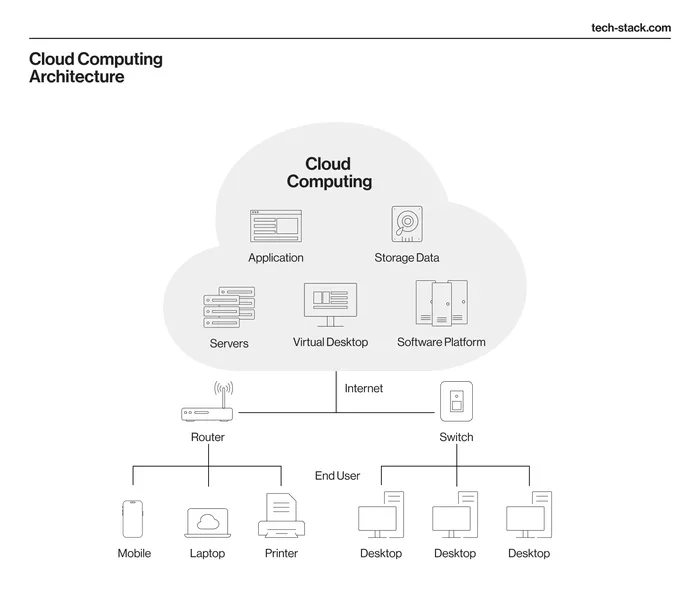
Cloud computing security refers to the set of policies, technologies, and controls designed to protect data, applications, and infrastructure hosted in the cloud. Think of it as a digital shield around everything you store online. It covers many areas, from network protection to user access control.
The goal of cloud computing security is simple: keep unauthorized people out and keep your data safe. This includes protecting data at rest (stored data) and data in transit (data being moved). It also involves monitoring for threats and responding quickly when something goes wrong.
Why Cloud Computing Security Is Different
Traditional security focuses on a fixed perimeter, like a wall around a building. Cloud computing security works differently. Your data lives across multiple servers, data centers, and regions. You do not physically control the infrastructure. This means you must rely on shared responsibility models and strong digital controls instead of physical ones.
Understanding this difference is the first step toward better protection. Once you grasp how cloud environments work, you can make smarter decisions about your cloud computing security strategy.
Why Cloud Computing Security Matters
Data breaches cost businesses millions of dollars every year. A single incident can destroy customer trust and damage your brand permanently. Cloud computing security helps you avoid these costly outcomes.
Here are some reasons why cloud computing security deserves your attention:
- Data protection: Your customers trust you with their personal information. Losing that data is a serious breach of trust.
- Regulatory compliance: Laws like GDPR, HIPAA, and PCI-DSS require you to protect sensitive data. Failing to comply can result in heavy fines.
- Business continuity: A security incident can shut down your operations. Strong cloud computing security keeps your business running.
- Competitive advantage: Customers prefer businesses that take data protection seriously. Good security builds loyalty.
The stakes are high, but the good news is that you can take concrete steps to reduce risk. The next sections will show you exactly how.
Cloud Computing Security Tips You Can Start Today
You do not need a massive budget or a team of experts to improve your cloud computing security. Small, consistent actions make a big difference. Here are some tips you can implement starting right now.
Tip 1: Enable Multi-Factor Authentication
Multi-factor authentication (MFA) adds an extra layer of protection beyond just a password. Even if someone steals your login credentials, MFA stops them from getting in. Most cloud platforms offer built-in MFA options. Turn it on for every user account, especially those with admin access.
This is one of the simplest yet most effective cloud computing security measures available. It takes just a few minutes to set up but can prevent the majority of unauthorized access attempts.
Tip 2: Encrypt Your Data
Encryption scrambles your data so that only authorized users can read it. Use encryption for data both at rest and in transit. Most major cloud providers offer built-in encryption tools. Take advantage of them.
When evaluating cloud computing security options, always check whether encryption is included and what standards they use. Look for AES-256 encryption, which is the current industry standard.
Tip 3: Conduct Regular Security Audits
A security audit reviews your cloud setup and identifies weaknesses. Schedule these audits at least once every quarter. During an audit, check your access logs, review user permissions, and scan for vulnerabilities.
Regular audits are a core part of any cloud computing security plan. They help you catch problems before attackers do.
Tip 4: Train Your Employees
Human error causes a huge number of security breaches. A single click on a phishing email can compromise your entire cloud environment. Security awareness training teaches your team to recognize threats and respond correctly.
Make cloud computing security training part of your onboarding process. Repeat it regularly with refresher courses. Keep the content practical and relevant to your team’s daily work.
Tip 5: Backup Your Data Regularly
Backups are your safety net. If a breach or system failure occurs, recent backups allow you to restore data quickly. Follow the 3-2-1 rule: keep three copies of your data, on two different storage types, with one copy stored offsite.
Many cloud platforms offer automated backup features. Use them to simplify your cloud computing security routine and ensure nothing gets missed.
Best Practices for Cloud Computing Security
Beyond the quick tips, there are deeper practices that strengthen your overall cloud computing security posture. These best practices form the backbone of a robust security framework.
Implement Identity and Access Management
Identity and access management (IAM) controls who can access your cloud resources and what they can do with them. Follow the principle of least privilege. This means giving users only the minimum access they need to do their jobs.
Review access permissions regularly. Remove access for employees who leave the company. This simple practice prevents many insider threats and reduces your attack surface significantly.
Adopt a Zero Trust Approach
Zero trust is a security model that assumes no one is trustworthy by default, even users inside your network. Every access request gets verified, every time. This approach has become a gold standard in cloud computing security.
To implement zero trust, you need strong authentication, continuous monitoring, and granular access controls. It requires effort upfront but pays off enormously in long-term protection.
Monitor and Log Everything
Continuous monitoring lets you detect suspicious activity in real time. Set up logging for all cloud resources and applications. Review these logs regularly to spot unusual patterns.
Many cloud platforms offer built-in monitoring tools. Combine these with third-party security information and event management (SIEM) solutions for a more complete picture of your cloud computing security health.
Secure Your APIs
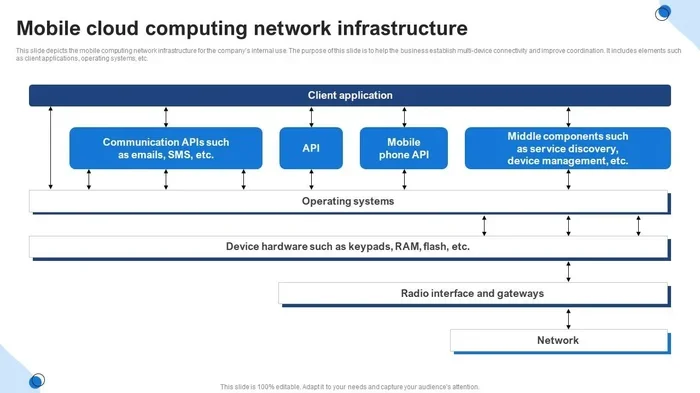
Application programming interfaces (APIs) are the bridges that connect your cloud services. If your APIs are not secure, attackers can use them to access your data. Use strong authentication for all API calls, limit the data exposed through APIs, and keep them updated.
API security is a critical but often overlooked part of cloud computing security. Take the time to audit your APIs and fix any vulnerabilities you find.
Keep Your Systems Updated
Software updates often include patches for known security vulnerabilities. Delaying updates leaves your cloud environment exposed. Enable automatic updates wherever possible. For systems that require manual updates, set a regular schedule and stick to it.
Staying current with patches is one of the easiest ways to maintain strong cloud computing security. It closes the doors that attackers love to walk through.
Common Cloud Computing Security Mistakes to Avoid
Even well-intentioned teams make mistakes when securing their cloud environments. Knowing what to avoid is just as important as knowing what to do.
Mistake 1: Ignoring Configuration Settings
Misconfigured cloud settings are one of the leading causes of data breaches. Default settings are often not secure. Always review and customize your configuration for each cloud service you use.
Mistake 2: Overlooking Shadow IT
Shadow IT refers to cloud services and apps used by employees without IT department approval. These unapproved tools create blind spots in your cloud computing security. Conduct regular scans to identify shadow IT and bring unauthorized tools under control.
Mistake 3: Neglecting Incident Response Planning
Many businesses assume breaches will never happen to them. When a breach occurs, the lack of a plan causes chaos and delays. Create a clear incident response plan that outlines roles, communication steps, and recovery procedures.
Regularly test your incident response plan through simulations. This preparation can dramatically reduce the damage when a real incident occurs.
Mistake 4: Using Weak Passwords
Weak passwords are an open invitation to attackers. Enforce strong password policies across your organization. Require a mix of uppercase letters, lowercase letters, numbers, and special characters. Consider using a password manager to help employees maintain strong, unique passwords for every account.
Building a Strong Cloud Computing Security Strategy
A solid cloud computing security strategy is not built overnight. It requires planning, commitment, and ongoing effort. Here is a framework to guide you.
Step 1: Assess Your Current Security Posture
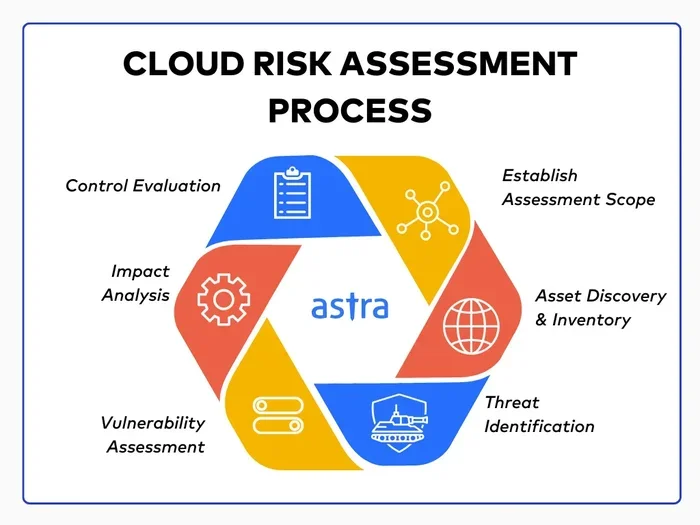
Start by understanding where you stand. Identify your cloud assets, map your data flows, and evaluate your current controls. This assessment gives you a clear picture of your strengths and weaknesses.
Step 2: Define Your Security Goals
What do you want to achieve with your cloud computing security strategy? Common goals include reducing breach risk, meeting compliance requirements, and improving response times. Write these goals down and make them measurable.
Step 3: Choose the Right Tools
Select security tools that fit your needs and budget. Look for solutions that offer threat detection, access control, encryption, and compliance monitoring. Many providers offer integrated suites that cover multiple security needs in one platform.
Step 4: Implement and Train
Deploy your security tools and train your team on how to use them. Security is only effective when people understand and follow the processes. Invest in ongoing education and make security part of your company culture.
Step 5: Review and Improve
Security is not a set-it-and-forget-it task. Regularly review your strategy, update your tools, and adapt to new threats. The threat landscape evolves constantly, and your cloud computing security approach should evolve with it.
Cloud Computing Security: Quick Comparison of Key Approaches
Different approaches to cloud computing security offer different levels of protection and complexity. Here is a quick comparison to help you understand your options.
- Basic Security: Includes firewalls, antivirus software, and standard access controls. Good for small businesses with limited budgets. Provides baseline protection against common threats.
- Advanced Security: Adds encryption, MFA, continuous monitoring, and regular audits. Suitable for businesses handling sensitive data. Offers significantly stronger protection.
- Enterprise Zero Trust: Combines all advanced measures with strict identity verification, micro-segmentation, and AI-driven threat detection. Best for large organizations with complex cloud environments. Provides the highest level of protection.
Choose the approach that matches your business size, budget, and risk level. You can always start with basic measures and scale up as your needs grow.
Expert Insights on Cloud Computing Security
Security professionals emphasize that cloud computing security is not a one-time project. It is an ongoing process. Here are some expert perspectives that can guide your approach.
Start with the basics and build from there. Many businesses get overwhelmed by the complexity of cloud security. Experts recommend mastering the fundamentals first, such as strong passwords, MFA, and encryption. These basics block the majority of common attacks.
Embrace automation. Manual security processes are slow and error-prone. Automated tools can detect threats faster, apply patches more quickly, and reduce the workload on your team. Automation is a force multiplier for cloud computing security.
Stay informed about new threats. The cybersecurity landscape changes constantly. New vulnerabilities and attack techniques emerge regularly. Follow trusted security news sources, attend webinars, and participate in industry forums to stay ahead of threats.
Final Thoughts on Cloud Computing Security
Cloud computing security is not optional. It is a fundamental requirement for any business that uses the cloud. The tips and best practices in this article give you a strong starting point. From enabling MFA to building a zero trust strategy, each step you take strengthens your defenses.
Remember that no system is 100% secure. But with the right approach, you can reduce risk to an acceptable level and protect your business from the most common threats. Start small, stay consistent, and keep learning. Your cloud computing security journey is ongoing, and every action you take moves you closer to a safer, more resilient cloud environment.
Take what you have learned here and apply it today. Your future self, your customers, and your business will thank you. Cloud computing security is an investment that pays dividends in trust, compliance, and peace of mind.
Frequently Asked Questions
What is cloud computing security and why does it matter?
Cloud computing security refers to the practices and tools used to protect data, applications, and infrastructure hosted in the cloud. It matters because cloud environments store sensitive information that, if compromised, can lead to data breaches, financial losses, and reputational damage. Every business using the cloud needs a solid security strategy.
What are the biggest threats to cloud computing security?
The biggest threats include data breaches, misconfigured cloud settings, phishing attacks, insider threats, and unsecured APIs. Human error plays a role in most incidents. Regular training and strong access controls can significantly reduce these risks and strengthen your cloud computing security posture.
How can small businesses improve their cloud computing security?
Small businesses can start by enabling multi-factor authentication, encrypting sensitive data, conducting regular security audits, and training employees on basic security practices. These steps are affordable and highly effective. Building a strong foundation early prevents costly problems down the road.
What is the shared responsibility model in cloud computing security?
The shared responsibility model means that both the cloud provider and the customer share security duties. The provider secures the infrastructure, while the customer is responsible for protecting their data, access controls, and configurations. Understanding this model is essential for effective cloud computing security planning.
How often should I review my cloud computing security setup?
You should review your security setup at least every quarter. Conduct formal audits, update your policies, and test your incident response plan regularly. The threat landscape changes constantly, so ongoing review keeps your cloud computing security measures effective and current.
Is cloud computing security expensive to implement?
Not necessarily. Many basic security measures, such as enabling MFA, using strong passwords, and conducting employee training, cost little to nothing. More advanced tools may require investment, but starting small and scaling up over time makes cloud computing security accessible for businesses of all sizes.
=== CONCLUSION ===
Cloud computing security is a journey, not a destination. The tips and best practices covered in this article give you a clear roadmap to protect your cloud environment. Start with the basics, build strong habits, and continuously improve your approach. Every step you take strengthens your defenses and builds trust with your customers. Take action today and make cloud computing security a priority in your business.