Must Know Facts About Cloud Computing and Cyber Security
Cloud computing and cyber security go hand in hand in today’s digital world. As more businesses move to the cloud, protecting sensitive data becomes more important than ever. This guide covers the top facts, common threats, and best practices you need to know. You will learn how to defend your cloud environment with simple, proven strategies. Read on to take control of your cloud safety today.
Cloud computing has changed the way we work, store data, and run businesses. Instead of keeping everything on physical servers in your office, the cloud lets you access files and applications from anywhere. But this shift brings a big question: how safe is your data really?
Cloud computing and cyber security are two sides of the same coin. You cannot have one without the other. Every time you upload a file, run an app, or store customer info online, you need strong security measures in place. Without them, your data is at risk of being stolen, leaked, or held for ransom.
Many people think the cloud is inherently safe. That is a dangerous myth. The cloud is only as secure as the practices you put around it. Your cloud provider handles some security tasks, but you also carry a big responsibility. Understanding this shared model is the first step toward staying safe.
Before you dive deeper, make sure you understand the legal side of using cloud services. Always review the Terms And Conditions of any cloud platform you use. These agreements outline what your provider does to protect your data and what your responsibilities are.
Key Takeaways
- Cloud security requires a shared effort between you and your cloud provider.
- Encryption and multi-factor authentication are essential for protecting data in the cloud.
- Common cyber threats include phishing, ransomware, misconfigurations, and data breaches.
- Regular vulnerability assessments help you find and fix weaknesses before attackers do.
- Compliance with standards like GDPR and HIPAA keeps your data legal and safe.
- Zero trust security is the new gold standard for protecting cloud environments.
📑 Table of Contents
- What Is Cloud Computing and Why Does It Matter?
- How Cyber Security Protects Your Cloud Data
- Common Cloud Security Threats You Should Know
- Best Practices for Securing Your Cloud Environment
- Shared Responsibility: You and Your Cloud Provider
- The Future of Cloud Computing and Cyber Security
- Common Mistakes to Avoid
- Expert Insights
- Conclusion
What Is Cloud Computing and Why Does It Matter?
Cloud computing means using remote servers hosted on the internet to store, manage, and process data. Instead of relying on your own hard drives or local servers, you access these resources through the web. This approach offers flexibility, scalability, and cost savings.
How Cloud Computing Works
Think of the cloud like a giant storage facility. Instead of keeping your belongings in your house, you rent space in a secure warehouse. The warehouse operator (your cloud provider) keeps the building safe. But you still decide who gets keys to your specific storage unit.
Here are the main types of cloud services:
- IaaS (Infrastructure as a Service): You rent virtual servers, storage, and networks. Examples include Amazon Web Services and Microsoft Azure.
- PaaS (Platform as a Service): You build and run apps without managing the underlying hardware. Google App Engine is a popular example.
- SaaS (Software as a Service): You use ready-made apps hosted in the cloud. Gmail and Salesforce are great examples.
Why Cloud Adoption Is Growing Fast
Businesses of all sizes are moving to the cloud. Why? It saves money on hardware. It allows teams to work from anywhere. And it scales easily when your needs change. But with these benefits come real risks. That is why cloud computing and cyber security must always be discussed together.
How Cyber Security Protects Your Cloud Data
Cyber security in the cloud involves a set of practices, tools, and policies designed to protect your data, applications, and infrastructure. It is not just one tool you buy. It is a complete approach that covers every layer of your cloud setup.
Key Security Layers in the Cloud
Good cloud security works like an onion. It has many layers, each protecting your data from a different angle.
- Network Security: Firewalls and traffic monitoring keep unauthorized users out of your cloud environment.
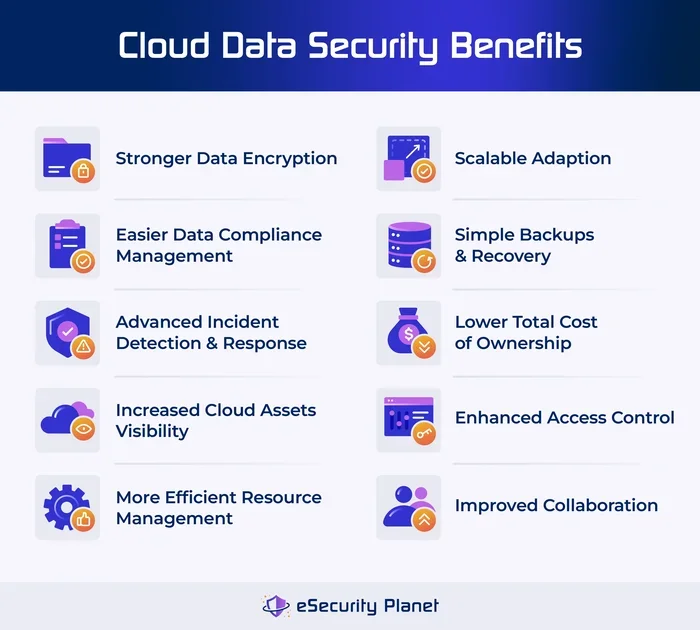
- Data Encryption: This scrambles your data so only authorized people can read it. Both at-rest and in-transit encryption are critical.
- Identity and Access Management: This controls who can access what. Multi-factor authentication adds an extra layer of protection beyond just passwords.
- Threat Detection: Tools that monitor for unusual activity and alert you to potential attacks in real time.
Common Cloud Security Tools
Many tools help you secure your cloud environment. Here are some of the most popular ones:
- Cloud Access Security Brokers (CASBs): These sit between your users and the cloud to enforce security policies.
- Security Information and Event Management (SIEM): These tools collect and analyze security alerts from across your cloud setup.
- Endpoint Protection Platforms: These secure the devices that connect to your cloud resources.
Using the right tools matters. But tools alone are not enough. You also need clear policies and trained employees. Security is a team effort, not just a software purchase.
Common Cloud Security Threats You Should Know
Understanding the threats is half the battle. Here are the most common dangers that target cloud environments today.
Phishing Attacks
Phishing remains one of the top threats in cloud computing and cyber security. Attackers send fake emails that trick users into revealing login credentials. Once they have your credentials, they can access your cloud accounts and steal sensitive data.
Ransomware
Ransomware locks your files and demands payment to release them. Cloud environments are not immune. In fact, ransomware attacks on cloud systems have grown sharply in recent years. The best defense is regular backups and strong access controls.
Misconfigurations
This is one of the biggest causes of cloud data breaches. A simple mistake, like leaving a storage bucket publicly accessible, can expose thousands of files. Misconfigurations happen when settings are not set up correctly or are left at default values.
Data Breaches
A data breach occurs when unauthorized parties access your sensitive information. Breaches can happen through weak passwords, unpatched software, or insider threats. The fallout can include financial loss, legal trouble, and serious damage to your reputation.
Insider Threats
Not all threats come from outside. Sometimes, employees or contractors with access to your cloud systems cause harm. This can be intentional or accidental. Limiting access to only what people need is a smart way to reduce this risk.
Best Practices for Securing Your Cloud Environment
Now that you know the threats, let us look at how to fight back. These best practices will help you build a strong cloud security foundation.
1. Use Strong Multi-Factor Authentication
Passwords alone are not enough. Multi-factor authentication (MFA) requires users to verify their identity in two or more ways. This could be a password plus a code sent to their phone. MFA blocks the majority of unauthorized access attempts.
2. Encrypt Everything
Encrypt your data both when it is stored and when it is being transferred. Even if attackers intercept your data, encryption makes it unreadable without the decryption key. Most cloud providers offer built-in encryption tools. Use them.
3. Conduct Regular Vulnerability Assessments
A vulnerability assessment scans your cloud environment for weak spots. Think of it like a health check for your security. Run these assessments at least once a quarter. Fix any issues you find immediately.
4. Implement the Principle of Least Privilege
This means giving users only the access they need to do their jobs. If someone does not need access to a certain file or system, do not give it to them. This limits the damage if an account is compromised.
5. Keep Software Updated
Outdated software is one of the easiest ways for attackers to break in. Enable automatic updates whenever possible. Patch known vulnerabilities as soon as they are discovered.
6. Train Your Team
Your employees are your first line of defense. Regular security training helps them spot phishing emails, use strong passwords, and follow safe practices. Make security training a part of your company culture.
Quick Tips for Everyday Cloud Safety
- Use a password manager to create and store unique passwords for every cloud account.
- Turn on logging and monitoring so you can track who accesses what.
- Back up your data regularly and test your restores.
- Review user access permissions every month.
- Never share login credentials through email or chat.
Shared Responsibility: You and Your Cloud Provider
One of the most misunderstood ideas in cloud security is the shared responsibility model. Many people believe their cloud provider handles all security. That is not true. Security is a shared duty.
What Your Cloud Provider Handles
Your provider is responsible for the security of the cloud itself. This includes the physical servers, the data centers, and the core infrastructure. They make sure the platform runs safely and reliably.
What You Are Responsible For
You are responsible for securing what you put in the cloud. This includes your data, your applications, your access controls, and your configurations. If you leave a door open, it is your problem, not your provider’s.
Always read and understand the Terms And Conditions of your cloud service. These documents spell out exactly where the provider’s responsibility ends and yours begins. Knowing this boundary is essential for avoiding costly security gaps.
Comparison: Provider vs. Customer Security Duties
| Security Area | Cloud Provider | Customer (You) |
|---|---|---|
| Physical data center security | Yes | No |
| Network infrastructure | Yes | No |
| Data encryption | Partial | Yes |
| Access controls and user management | No | Yes |
| Application security | No | Yes |
| Compliance and legal obligations | Partial | Yes |
Understanding this table can save you from false confidence. The more you take ownership of your side, the safer your cloud environment will be.
The Future of Cloud Computing and Cyber Security
The cloud is evolving fast, and so are the threats. Staying ahead means keeping an eye on what is coming next.
Zero Trust Security
Zero trust is a security model that assumes no one is trustworthy by default. Every user, device, and connection must be verified every time they try to access a resource. This approach is becoming the standard for modern cloud environments.
AI-Powered Threat Detection
Artificial intelligence is changing how we detect and respond to threats. AI can analyze massive amounts of data and spot patterns that humans would miss. It helps identify attacks faster and reduces response times.
Cloud-Native Security Tools
As more businesses move to the cloud, security tools are being built specifically for cloud environments. These tools are designed to work natively with cloud platforms, making them faster and more effective than older, on-premise solutions.
Growing Compliance Requirements
Governments around the world are tightening data protection laws. Regulations like GDPR in Europe and CCPA in California require businesses to take data security seriously. Staying compliant is not optional anymore. It is a legal and business necessity.
The future belongs to businesses that treat cloud computing and cyber security as a single, integrated strategy. The companies that invest in security today will be the ones that thrive tomorrow.
Common Mistakes to Avoid
Even well-meaning businesses make mistakes when it comes to cloud security. Here are the most common ones to watch out for.
- Assuming the cloud provider handles everything. Remember the shared responsibility model. Your provider secures the platform, but you secure your data.
- Using weak or reused passwords. This is still one of the leading causes of breaches. Use strong, unique passwords for every account.
- Ignoring software updates. Outdated systems are easy targets. Enable automatic updates and patch regularly.
- Not backing up your data. If a ransomware attack hits, your backup is your lifeline. Test your backups regularly.
- Skipping security training. Your team is your biggest vulnerability or your strongest defense. Invest in training.
Expert Insights
Security experts agree on a few key points when it comes to protecting cloud environments. First, start with a clear security plan. Do not wait until a breach happens to take action. Second, adopt a defense-in-depth approach. Layer multiple security measures so that if one fails, others are still in place. Third, stay informed. The threat landscape changes constantly, and your security practices must evolve with it.
Many experts also recommend conducting regular penetration testing. This is when ethical hackers try to break into your system to find weaknesses. It gives you a real-world view of your security posture and helps you fix gaps before real attackers do.
Conclusion
Cloud computing and cyber security are deeply connected. You cannot enjoy the benefits of the cloud without taking security seriously. The threats are real, but the solutions are within your reach. By understanding the risks, following best practices, and taking ownership of your shared responsibility, you can build a cloud environment that is both powerful and safe.
Start today. Review your current security setup. Enable multi-factor authentication. Encrypt your data. Train your team. Every step you take makes your cloud safer. The time to act is now. Your data depends on it.
Frequently Asked Questions
What is the biggest threat to cloud security?
Misconfigurations and phishing attacks are among the top threats. Many breaches happen because of simple setup errors or employees falling for fake emails. Staying vigilant and training your team can reduce these risks significantly.
Is my data safe in the cloud?
It can be, but only if you take the right steps. Encryption, strong access controls, and regular monitoring all play a role. No system is 100% risk-free, but good practices make your data much safer.
What is the shared responsibility model in cloud security?
This model means your cloud provider secures the infrastructure, while you secure your own data, applications, and access. Both parties have clear duties. Understanding where your responsibility starts and ends is key to staying safe.
How can small businesses improve their cloud security?
Start with the basics. Use multi-factor authentication, encrypt your data, and train your employees. You do not need a huge budget. Consistent, practical steps make a big difference over time.
What should I look for when choosing a cloud provider?
Look for providers with strong encryption, compliance certifications, and transparent security policies. Check their track record for handling breaches. Always review their Terms And Conditions before signing up.
How often should I review my cloud security settings?
At least once a month. Cyber threats evolve quickly, and your settings should keep up. Regular reviews help you catch misconfigurations and weak access controls before they become problems.
=== CONCLUSION ===
Cloud computing and cyber security must go hand in hand. The cloud offers incredible benefits, but it also brings real risks. By understanding the threats, following best practices, and taking ownership of your security, you can use the cloud with confidence. Start implementing these tips today and build a safer digital future for your business.