Understanding Cloud Computing Service Delivery Models
Cloud computing service delivery models define how businesses access and use computing resources over the internet. The three main types are IaaS, PaaS, and SaaS, each offering different levels of control and management. Understanding these models helps you choose the right fit for your goals. This guide breaks down each model with real-world examples and practical tips. By the end, you will know exactly which model works best for your situation.
Key Takeaways
- IaaS gives you full control: You manage the applications and data while the provider handles the hardware and networking.
- PaaS speeds up development: Developers build apps without worrying about managing servers or infrastructure.
- SaaS is ready to use: You access fully built software through a browser with zero setup or maintenance.
- Each model suits different needs: IaaS is flexible, PaaS is developer-friendly, and SaaS is ideal for everyday business tools.
- Cost savings are a major benefit: All three models use a pay-as-you-go approach that reduces upfront spending.
- Security varies by model: The more you manage, the more responsibility you carry for protecting your data.
- Hybrid approaches work well: Many businesses combine models to get the best of each world.
📑 Table of Contents
- What Are Cloud Computing Service Delivery Models?
- IaaS: The Foundation of Cloud Services
- PaaS: Building Applications in the Cloud
- SaaS: Software Delivered Over the Internet
- Comparing IaaS, PaaS, and SaaS Side by Side
- How to Choose the Right Cloud Service Delivery Model
- The Future of Cloud Computing Service Delivery Models
- Common Mistakes to Avoid
- Conclusion
What Are Cloud Computing Service Delivery Models?
Cloud computing service delivery models are the ways companies provide and consume computing resources over the internet. Instead of buying and maintaining physical servers, businesses rent computing power, storage, and software from cloud providers. This shift has changed how organizations of all sizes operate.
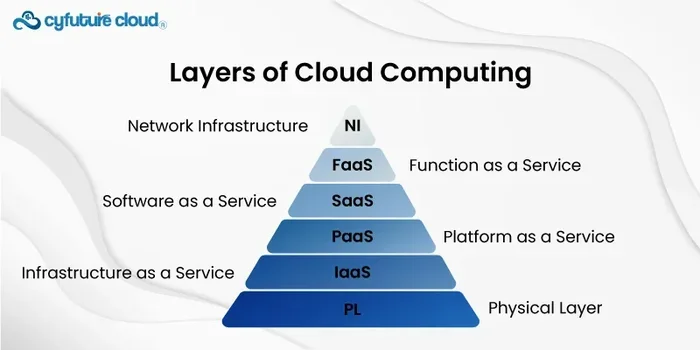
The three primary cloud computing service delivery models are IaaS, PaaS, and SaaS. Each model offers a different level of control, flexibility, and management responsibility. Think of them as layers on a cake. The bottom layer gives you the most control, while the top layer is the most hands-off.
These models exist because different businesses have different needs. A startup building a new app has very different requirements than a large company running accounting software. Understanding each model helps you make smarter technology decisions.
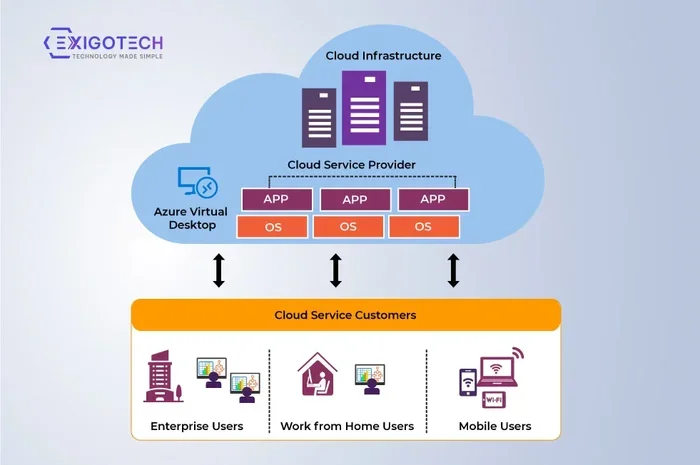
The beauty of cloud service models is that they all run on the same underlying cloud infrastructure. The difference lies in what you manage and what the provider handles. This concept is called the “shared responsibility model,” and it is key to understanding cloud computing.
Let us dive into each model and see how they work in real life.
IaaS: The Foundation of Cloud Services
Infrastructure as a Service, or IaaS, is the most flexible cloud service delivery model. It gives you virtualized computing resources over the internet. You get virtual machines, storage, networks, and operating systems. The provider owns the physical hardware, but you control everything else.
How IaaS Works
With IaaS, the cloud provider manages the physical data centers, servers, and networking equipment. You manage the operating system, middleware, runtime, data, and applications. This is a lot of control, which means you also carry more responsibility.
Here is what a typical IaaS setup looks like:
- Virtual machines that you configure with your preferred operating system
- Storage blocks and object storage for your data
- Virtual networks where you control firewalls and routing
- Load balancers to distribute traffic across your applications
Real-World Examples of IaaS
Amazon Web Services (AWS) offers EC2 instances, which are virtual servers you can spin up in minutes. Microsoft Azure provides virtual machines with various sizes and configurations. Google Cloud Platform gives you Compute Engine for running workloads on demand.
These services follow a pay-as-you-go pricing model. You pay only for the hours or minutes you use the resources. This makes IaaS perfect for businesses that need scalability and elastic computing without large upfront investments.
Who Should Use IaaS?
IaaS works best for system administrators, DevOps teams, and companies that need full control over their environment. It is also ideal for organizations that want to migrate existing applications to the cloud without rewriting them. If you need custom configurations and deep technical control, IaaS is your go-to model.
One thing to keep in mind: managing IaaS resources requires technical expertise. You need to handle security patches, updates, and configuration management yourself.
PaaS: Building Applications in the Cloud
Platform as a Service, or PaaS, sits in the middle of the cloud service delivery models spectrum. It provides a platform that lets developers build, test, and deploy applications without managing the underlying infrastructure. The provider handles servers, storage, networking, and operating systems.
How PaaS Works
With PaaS, you focus entirely on writing code and building applications. The provider takes care of infrastructure management, including maintenance, updates, and scaling. This lets developers move faster and focus on creating features instead of managing servers.
Here is what a PaaS environment typically includes:
- Development frameworks and tools for building applications
- Database management systems built into the platform
- Middleware that connects different parts of your application
- Built-in scaling that adjusts resources based on demand
Real-World Examples of PaaS
Heroku is a popular PaaS that lets developers deploy applications with simple git commands. Google App Engine allows you to build and host web applications without managing servers. Microsoft Azure App Service provides a platform for building web apps, mobile backends, and APIs.
PaaS is a favorite among startups and development teams because it reduces the time to market. You do not need to worry about server configuration or infrastructure maintenance. You just write your code and deploy it.
Who Should Use PaaS?
PaaS is ideal for software developers and development teams who want to focus on coding. It is also great for companies that need to build custom applications quickly. If your team does not have dedicated infrastructure engineers, PaaS removes that burden entirely.
The trade-off is less control. You are limited to the tools, languages, and frameworks that the platform supports. But for most development teams, this is a fair trade-off for faster delivery and lower operational overhead.
SaaS: Software Delivered Over the Internet
Software as a Service, or SaaS, is the most complete cloud computing service delivery model. It delivers fully functional software applications over the internet, usually through a web browser. You do not need to install, configure, or maintain anything. The provider handles everything.
How SaaS Works
With SaaS, the provider manages all layers of the stack. This includes the physical hardware, virtualization, operating system, middleware, runtime, data, and the application itself. All you need is an internet connection and a device to access the software.
SaaS applications typically work like this:
- You sign up for an account through a web browser
- You log in and start using the software immediately
- The provider handles updates, security patches, and maintenance
- You pay a subscription fee, usually monthly or annually
Real-World Examples of SaaS
Google Workspace (formerly G Suite) includes Gmail, Docs, Sheets, and Slides, all accessible from your browser. Salesforce is a leading CRM platform that runs entirely in the cloud. Microsoft 365 gives you access to Word, Excel, and PowerPoint through the web or desktop apps.
Other popular SaaS examples include Slack for team communication, Zoom for video meetings, and Dropbox for cloud storage. Almost every modern business uses at least one SaaS application daily.
Who Should Use SaaS?
SaaS is perfect for businesses that want ready-to-use software without any technical hassle. It is ideal for small businesses, teams, and enterprises that need tools for communication, project management, customer relationship management, or accounting. You get professional software immediately, with no installation or maintenance required.
The main limitation is customization. SaaS applications are designed for the masses, so deep customization can be difficult. You also depend on the provider for uptime and security.
Comparing IaaS, PaaS, and SaaS Side by Side
Understanding the differences between the three cloud computing service delivery models is essential for making the right choice. Each model offers a different balance of control, flexibility, and management responsibility.
Here is a quick comparison of the three models:
- IaaS gives you the most control. You manage applications, data, runtime, and middleware. The provider handles virtualization, servers, storage, and networking.
- PaaS offers a middle ground. You manage applications and data only. The provider handles everything below that, including the operating system and runtime.
- SaaS requires the least effort. You only manage your data and user access. The provider handles everything else from infrastructure to the application itself.
The right choice depends on your technical expertise, business goals, and budget. Let us look at some key factors to consider.
Control and Customization
IaaS offers the highest level of control. You can configure everything from the operating system to the network settings. PaaS gives you moderate control focused on application development. SaaS offers the least control since the application is fully managed by the provider.
Cost and Pricing
All three models use pay-as-you-go pricing, which means you only pay for what you use. IaaS can become expensive if you do not monitor resource usage carefully. PaaS pricing is usually based on usage and application runtime. SaaS costs are typically fixed monthly or annual subscription fees per user.
Security and Responsibility
Security responsibility shifts depending on the model. With IaaS, you are responsible for securing your applications and data. With PaaS, the provider handles infrastructure security, but you still manage application-level security. With SaaS, the provider takes on the most security responsibility, but you must manage user access and data permissions.
Scalability
All three models offer excellent scalability. IaaS lets you scale compute and storage resources up or down. PaaS automatically scales your applications based on traffic. SaaS scales effortlessly since the provider manages all the underlying resources.
How to Choose the Right Cloud Service Delivery Model
Choosing the right cloud computing service delivery model depends on several factors. There is no one-size-fits-all answer. The best approach is to evaluate your specific needs and match them to the right model.
Step 1: Assess Your Technical Expertise
Do you have a team of skilled system administrators and DevOps engineers? IaaS might be the right fit. Do you have developers but no infrastructure team? PaaS could be your best bet. Do you need software for business operations without any technical setup? SaaS is the clear winner.
Step 2: Define Your Business Goals
Are you building a new application from scratch? PaaS will help you move fast. Do you need to migrate existing workloads to the cloud? IaaS gives you the control to replicate your current environment. Are you looking for ready-made tools for your team? SaaS delivers immediate value with zero setup.
Step 3: Consider Your Budget
All three models reduce upfront costs compared to on-premises infrastructure. However, long-term costs can vary. IaaS requires more labor for management and maintenance. PaaS reduces labor but may have higher per-use costs. SaaS has predictable subscription costs but limited ability to optimize spending.
Step 4: Evaluate Security and Compliance Needs
If your industry has strict compliance requirements, you need to understand where the responsibility lies. With IaaS, you control security at every level. With SaaS, you must trust the provider to meet compliance standards. Always review the provider’s security certifications and compliance reports.
Quick Tips for Choosing
- Start small and test one model before committing fully
- Consider a hybrid approach that uses multiple models together
- Evaluate the provider’s reputation for uptime and support
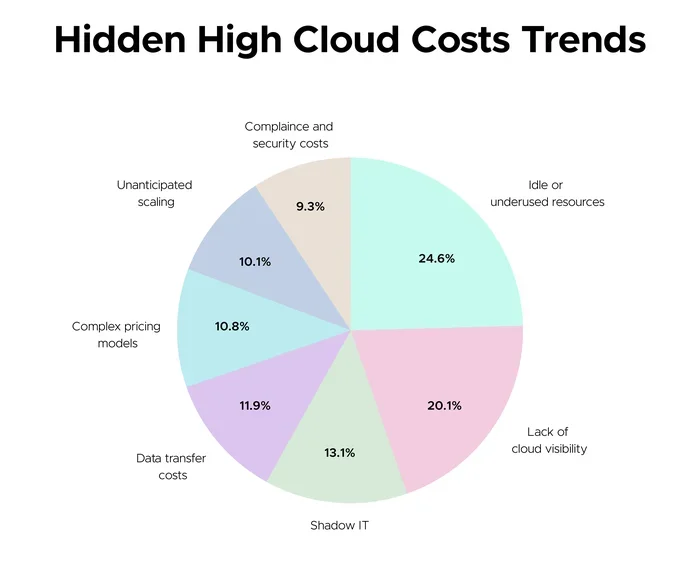
- Review the total cost of ownership, including hidden costs
- Plan for cloud migration if you are moving from on-premises systems
The Future of Cloud Computing Service Delivery Models
The cloud computing landscape continues to evolve rapidly. New models and variations are emerging that build on the foundation of IaaS, PaaS, and SaaS. Understanding these trends helps you stay ahead of the curve.
Serverless Computing
Serverless computing is a newer approach that blurs the lines between IaaS and PaaS. With serverless, you write code and the provider manages all the infrastructure automatically. You pay only for the compute time you consume, down to the millisecond. AWS Lambda and Google Cloud Functions are popular serverless platforms.
Multi-Cloud and Hybrid Cloud
Many businesses now adopt a multi-cloud strategy, using services from multiple cloud providers. Others use a hybrid cloud approach that combines public cloud resources with private cloud infrastructure. These approaches give businesses more flexibility and help avoid vendor lock-in.
Edge Computing
Edge computing brings computing resources closer to the end user. This reduces latency and improves performance for applications that need real-time responses. As IoT devices grow, edge computing will play a bigger role in cloud service models.
The core models of IaaS, PaaS, and SaaS will remain relevant. But the way businesses combine and extend these models will continue to evolve. Staying informed helps you make better decisions today and plan for tomorrow.
Common Mistakes to Avoid
When choosing a cloud service delivery model, many businesses make avoidable mistakes. Here are a few to watch out for:
- Choosing a model without evaluating your needs: Do not pick a model just because it is popular. Assess your team’s skills, budget, and goals first.
- Ignoring the shared responsibility model: Understand exactly what the provider manages and what you are responsible for. This prevents security gaps.
- Underestimating costs: Pay-as-you-go pricing can spiral if you do not monitor usage. Set up billing alerts and cost controls.
- Locking into one provider: Consider portability. Choose models and tools that make it easier to switch providers if needed.
- Neglecting training: Your team needs to understand the model you choose. Invest in training and documentation to get the most value.
Avoiding these mistakes saves time, money, and headaches in the long run.
Conclusion
Cloud computing service delivery models have transformed how businesses use technology. Whether you choose IaaS for maximum control, PaaS for faster development, or SaaS for ready-to-use software, each model offers distinct advantages. The key is understanding what each model provides and matching it to your specific needs.
Start by evaluating your team’s skills and your business goals. Consider the cost, security, and scalability implications of each model. Do not be afraid to experiment with different approaches. Many successful businesses use a combination of models to get the best results.
The cloud landscape will keep evolving, but the fundamentals of IaaS, PaaS, and SaaS will remain the building blocks of modern computing. With this knowledge, you are well-equipped to make confident technology decisions that drive your business forward.
Frequently Asked Questions
What is the difference between IaaS, PaaS, and SaaS?
IaaS provides virtualized infrastructure like servers and storage that you manage yourself. PaaS gives you a platform for building applications without managing infrastructure. SaaS delivers fully functional software applications that you access through a browser with no management needed.
Which cloud service delivery model is the most cost-effective?
It depends on your needs. SaaS usually has the lowest upfront cost and predictable pricing. IaaS offers the most flexibility but requires more technical management. PaaS reduces development time, which can lower overall costs for application projects.
Can I use more than one cloud service delivery model at the same time?
Yes, many businesses use a combination of models. For example, a company might use IaaS for its databases, PaaS for application development, and SaaS for email and collaboration tools. This is called a multi-model cloud strategy and it is very common.
Is cloud computing safe for sensitive business data?
Yes, when implemented correctly. All major cloud providers invest heavily in security. However, your responsibility varies by model. With IaaS, you manage most security. With SaaS, the provider handles most of it. Always review security features and compliance certifications before choosing a provider.
Do I need technical skills to use IaaS?
Yes, IaaS requires technical knowledge. You need to manage operating systems, networking, and security configurations. If your team lacks these skills, PaaS or SaaS might be a better fit. Both options reduce the technical burden significantly.
How does pay-as-you-go pricing work in cloud service models?
Pay-as-you-go means you only pay for the resources you actually use. With IaaS, you pay for compute hours and storage used. With PaaS, you pay for application runtime and usage. With SaaS, you typically pay a fixed subscription fee per user per month.