What Is Meant by Backing Up Files Through Cloud Computing
Backing up files through cloud computing means storing copies of your important data on remote servers accessed via the internet. Instead of relying on USB drives or external hard drives, your files live safely in the cloud, ready to be restored anytime. This approach offers automatic scheduling, strong security, and easy access from any device. Whether you are a student, freelancer, or business owner, understanding cloud backup helps you avoid the heartbreak of losing irreplaceable files.
Have you ever lost an important document because your computer crashed? Or maybe your phone slipped into a puddle and all your photos disappeared. It happens to the best of us. That is exactly why backing up files through cloud computing has become so popular. In simple terms, it means saving copies of your files on internet-based servers instead of just keeping them on your device. Think of it as a safety net that catches your data before it falls into the void.
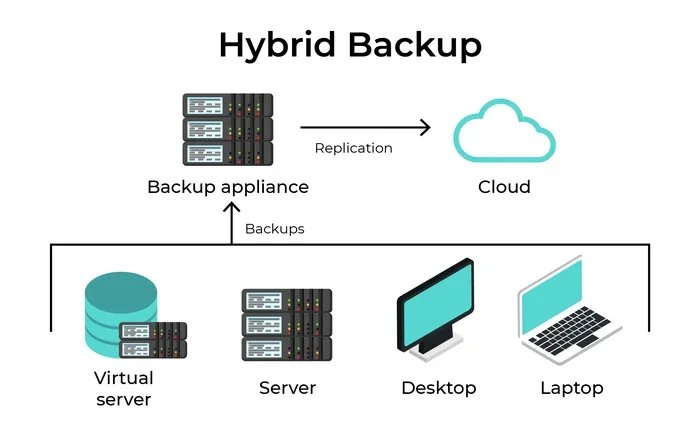
The idea behind cloud backup is straightforward. You upload your files to a secure remote server. This server is managed by a cloud provider. From that point on, your data is stored safely offsite. You can access it from any phone, tablet, or computer with an internet connection. This method has replaced the old way of saving everything on a single hard drive. Today, millions of people trust cloud-based storage to protect their most important files.
Key Takeaways
- Cloud backup stores your files on remote servers, making them accessible from anywhere with an internet connection.
- Automatic backups save time and eliminate the risk of forgetting to protect your data.
- Cloud computing backup uses encryption and redundancy to keep your files safe from loss or damage.
- You can restore lost or deleted files quickly, often with just a few clicks.
- Cloud backup is cost-effective compared to buying and maintaining physical storage devices.
- File synchronization ensures your latest versions are always available across all your devices.
- Understanding cloud backup basics empowers you to choose the right service for your needs.
📑 Table of Contents
- What Does Backing Up Files Through Cloud Computing Mean?
- How Cloud Backup Protects Your Data
- Benefits of Backing Up Files Through Cloud Computing
- Common Mistakes People Make with Cloud Backup
- Tips for Getting the Most Out of Cloud Backup
- How to Choose the Right Cloud Backup Service
- The Future of Cloud Backup
- Conclusion
What Does Backing Up Files Through Cloud Computing Mean?
Let us break this down in plain language. When you back up files through cloud computing, you are creating duplicate copies of your data. These copies live on servers owned by a cloud company. Those servers are located in large data centers around the world. Your files are not sitting on your desk or in your pocket. They are floating safely in the cloud, protected by the provider.
How the Process Works
The process is simpler than most people think. First, you choose a cloud backup service. Popular options include Google Drive, Dropbox, and Microsoft OneDrive. Next, you install the app or software on your device. Then, you select which files you want to protect. The service uploads those files to its servers over the internet. Once uploaded, the files are stored securely.
Most services offer automatic backup features. This means your files get copied without you lifting a finger. You set a schedule or let the app work in the background. Every time you change a file, the file synchronization process updates the cloud copy. Your local and cloud versions stay in sync. This is one of the biggest reasons people love cloud storage backup.
Why People Choose Cloud Backup Over Traditional Methods
Traditional backup methods have their limits. USB flash drives can break. External hard drives can fail. CDs and DVDs degrade over time. With cloud computing backup, none of these problems matter. Your files are stored in multiple locations. This is called cloud redundancy. Even if one server goes down, your data is still safe on another server.
Another huge advantage is access. You can reach your backed-up files from any device, anywhere in the world. You do not need to carry a physical drive around. You just log in and download what you need. This level of convenience is why so many people have switched to online backup solutions.
How Cloud Backup Protects Your Data
One of the biggest concerns people have is security. They wonder, “Is my data really safe in the cloud?” The answer is yes, when you choose a reputable provider. Cloud computing companies invest heavily in protecting your information. They use advanced data protection methods to keep your files safe.
Encryption: Your First Line of Defense
Most cloud backup services use encryption. Encryption scrambles your files into unreadable code. Only you and the authorized recipient can unscramble them. This happens during upload and while your files sit on the server. Some services offer end-to-end encryption. This means not even the provider can read your files. Your data stays private and secure from start to finish.
Redundancy and Disaster Recovery
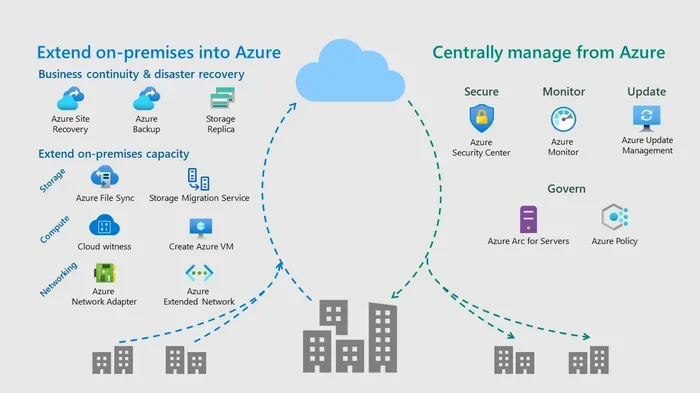
Data redundancy is a key feature of cloud backup. Your files are copied across multiple servers in different locations. If a fire, flood, or power outage hits one data center, your files are still safe on another server. This is called disaster recovery. It is one of the strongest reasons backing up files through cloud computing beats keeping everything on one device.
Imagine your house catches fire. Your laptop burns with it. If you only saved files locally, they are gone forever. But with cloud backup, you simply log in on a new device and download everything. Your photos, documents, and projects are right there. That peace of mind is priceless.
Benefits of Backing Up Files Through Cloud Computing
The advantages of cloud backup go far beyond just keeping your files safe. Let us look at the top benefits that make this approach so appealing.
1. Cost Savings
Buying external hard drives adds up fast. You need to replace them every few years. Cloud backup services, on the other hand, cost just a few dollars per month. Many offer free tiers with enough space for everyday use. For businesses, cloud backup solutions eliminate the need for expensive on-site servers. The savings add up quickly.
2. Easy File Recovery
Accidentally deleted a file? No problem. Most cloud backup services keep previous versions of your files. You can restore them with just a few clicks. Some services even let you recover files deleted weeks or months ago. This backup and restore feature is a lifesaver when mistakes happen.
3. Collaboration Made Simple
Cloud backup is not just about safety. It also makes sharing and working together easier. You can share files with friends, family, or coworkers. Multiple people can edit the same document at the same time. Changes sync instantly. This is why cloud-based storage has become essential for remote teams and students working on group projects.
4. Scalability
As your storage needs grow, cloud backup grows with you. You can upgrade your plan with a few clicks. You do not need to buy a new hard drive or USB stick. This scalability makes cloud backup perfect for people and businesses alike.
Common Mistakes People Make with Cloud Backup
Even though cloud backup is simple, people still make avoidable mistakes. Here are a few pitfalls to watch out for.
Relying on Only One Backup Method
Never put all your eggs in one basket. Even if you use cloud storage backup, keep a local copy of your most important files. A 3-2-1 backup strategy works wonders. Keep three copies of your data. Store them on two different types of media. Keep one copy offsite, like in the cloud. This approach gives you the best protection.
Ignoring Backup Schedules
Some people set up cloud backup and then forget about it. They assume everything is backing up automatically. But settings can change. Apps can crash. Always check your backup schedule regularly. Make sure your files are being updated as expected. A quick check every week takes just a few minutes.
Choosing the Wrong Service
Not all cloud backup services are the same. Some offer more storage space. Some provide better security features. Before you commit, compare your options. Look at pricing, storage limits, encryption standards, and user reviews. Pick a service that fits your needs and budget.
Tips for Getting the Most Out of Cloud Backup
Want to make sure your cloud computing backup experience is smooth and reliable? Follow these practical tips.
Start Small and Build Up
Do not try to back up everything at once. Start with your most important files. Documents, photos, and work projects should come first. Once you are comfortable, add more files to your backup routine. This keeps things manageable and prevents overwhelm.
Use Strong Passwords and Two-Factor Authentication
Your cloud account holds your most valuable digital possessions. Protect it with a strong, unique password. Enable two-factor authentication whenever possible. This adds an extra layer of secure backup that keeps hackers out of your account.
Check Your Internet Speed
Uploading large files to the cloud takes time and a good connection. If your internet is slow, schedule backups for off-peak hours. Many cloud backup services let you set backup times. Use this feature to avoid slowing down your internet during work hours.
Review and Clean Up Regularly
Over time, your cloud storage can get cluttered. Old files, duplicates, and unnecessary documents take up space. Review your backup folder every month. Delete what you no longer need. This keeps your storage organized and your backup running efficiently.
How to Choose the Right Cloud Backup Service
With so many options available, picking the right cloud backup service can feel overwhelming. Here are a few things to consider.
- Storage Space: Make sure the plan offers enough room for your files. Free tiers usually give you 2 to 15 GB. Paid plans can offer terabytes of space.
- Security Features: Look for end-to-end encryption, two-factor authentication, and compliance with data protection regulations.
- Ease of Use: The app should be simple to set up and navigate. You should not need a tech degree to back up your files.
- File Synchronization: Choose a service that syncs files automatically across all your devices.
- Price: Compare monthly and yearly plans. Some services offer discounts for longer commitments.
- Customer Support: Good support matters when something goes wrong. Look for services with responsive help teams.
When you compare these factors side by side, the right choice becomes clear. Backing up files through cloud computing is only as good as the service you choose. Take your time, read reviews, and pick the one that fits your life best.
The Future of Cloud Backup
Cloud computing is evolving fast. New technologies are making backup even more reliable and efficient. Artificial intelligence is being used to predict when files might be at risk. Machine learning helps detect unusual activity on your account. These smart features add another layer of data loss prevention.
Edge computing is also changing the game. It brings backup processing closer to your device. This means faster uploads and quicker file recovery. As internet speeds improve worldwide, online backup will become even more seamless. The future of cloud storage backup looks incredibly bright.
Data loss prevention is becoming a bigger priority for individuals and businesses alike. Governments around the world are introducing stricter data protection laws. Cloud providers are stepping up their security game to meet these demands. This means your files are getting safer every year. Investing in cloud backup now is one of the smartest digital decisions you can make.
Conclusion
Backing up files through cloud computing is one of the simplest and most effective ways to protect your digital life. It keeps your files safe, accessible, and easy to recover. Whether you are backing up family photos or critical business documents, cloud backup gives you the peace of mind you deserve. The process is affordable, automatic, and incredibly reliable.
Do not wait until it is too late. Set up your cloud backup today. Start with your most important files. Build the habit of regular backups. Your future self will thank you when disaster strikes and your data is still right where you left it. Embrace the power of the cloud and keep your files safe for years to come.
Frequently Asked Questions
What is the difference between cloud backup and cloud storage?
Cloud backup focuses on creating copies of your files for safekeeping and recovery. Cloud storage is more about accessing and sharing files across devices. Many services offer both features, but their primary purposes are different. Think of backup as your safety net and storage as your digital workspace.
Is backing up files through cloud computing safe?
Yes, it is very safe when you use a reputable provider. Cloud backup services use encryption, redundancy, and strict security protocols. Your files are stored in secure data centers with physical and digital protection. Always choose a service with strong reviews and proven security standards.
How much does cloud backup cost?
Many cloud backup services offer free plans with limited storage. Paid plans typically range from a few dollars to around ten dollars per month. The cost depends on how much space you need and which features you choose. For most people, the free tier is more than enough for everyday use.
Can I back up my entire computer to the cloud?
Yes, you can. Many cloud backup services offer full system backup options. This includes your operating system, applications, and all your files. Keep in mind that large backups take more time and storage space. A strong internet connection makes the process much smoother.
What happens if I cancel my cloud backup subscription?
Most providers give you a grace period to download your files. After that, your data may be deleted from their servers. It is important to export or download your files before canceling. Always read the cancellation policy of your cloud backup service before making any changes.
How often should I back up my files to the cloud?
Daily backups are ideal for most users. If you create or edit files often, set your automatic backup to run every day. For less frequent users, a weekly backup schedule works well. The key is consistency. Regular backups ensure you never lose more than a day’s worth of work.