Secure Cloud Computing Benefits Risks and Controls Guide
Secure cloud computing delivers flexibility, scalability, and cost savings while introducing real risks like data breaches and compliance gaps. This guide breaks down the key benefits, common threats, and essential controls you need to stay safe. You will also learn practical tips to strengthen your cloud security posture and make smarter decisions.
Key Takeaways
- Secure cloud computing offers major benefits including cost savings, scalability, and improved collaboration.
- Risks like data breaches and compliance failures are real but manageable with the right controls.
- Strong access management and encryption form the backbone of any secure cloud setup.
- Regular security audits and monitoring help you catch threats before they cause damage.
- Choosing the right cloud model (public, private, or hybrid) shapes your security approach.
- Following frameworks like GDPR and HIPAA keeps you compliant and builds trust.
- Reviewing your cloud service agreement is essential to understand shared responsibility.
📑 Table of Contents
- Secure Cloud Computing Benefits Risks and Controls Guide
- What Is Secure Cloud Computing?
- Key Benefits of Secure Cloud Computing
- Risks of Cloud Computing You Must Know
- Essential Controls for Secure Cloud Computing
- Best Practices for a Secure Cloud Setup
- Common Mistakes to Avoid
- Expert Insights on Cloud Security
- Conclusion
Secure Cloud Computing Benefits Risks and Controls Guide
Cloud computing has changed the way businesses operate. You no longer need massive on-site servers to run your operations. Instead, you can store data and run applications over the internet. This shift brings incredible advantages, but it also comes with real dangers. That is why secure cloud computing matters so much today.
When you move your workloads to the cloud, you gain speed and flexibility. But you also open the door to new threats. Hackers love cloud environments because they hold valuable data. The good news? You can reduce those risks. With the right cloud security controls, you can enjoy the benefits without the fear. This guide covers everything you need to know about secure cloud computing benefits risks and controls.
We will walk you through the top advantages, the biggest risks, and the controls that actually work. You will learn how to protect your data, stay compliant, and build a cloud strategy you can trust. Whether you are a small business or a large enterprise, this guide has something for you.
What Is Secure Cloud Computing?
Cloud computing means using remote servers hosted on the internet to store, manage, and process data. Instead of relying on a local hard drive or on-premises server, you access resources online. Secure cloud computing adds layers of protection to keep that data safe from unauthorized access, theft, and loss.
Think of it like renting a storage unit. You do not own the building, but you control what goes inside. The provider keeps the building safe. You control who gets the key. This shared responsibility model is at the heart of cloud security. You and your provider each handle different parts of the cloud service agreement.
Types of Cloud Models
Not all clouds are the same. Understanding the different models helps you choose the right one for your security needs.
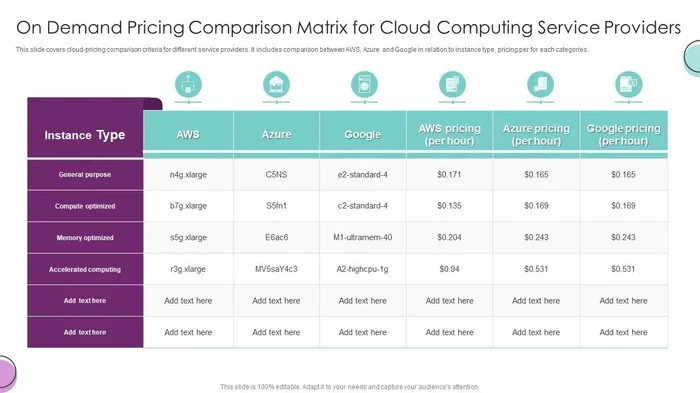
- Public Cloud: Resources are shared across multiple users. Providers like AWS, Google Cloud, and Azure offer these services. They are cost-effective but require strong access management on your end.
- Private Cloud: Dedicated resources for a single organization. These offer more control and better data protection but cost more.
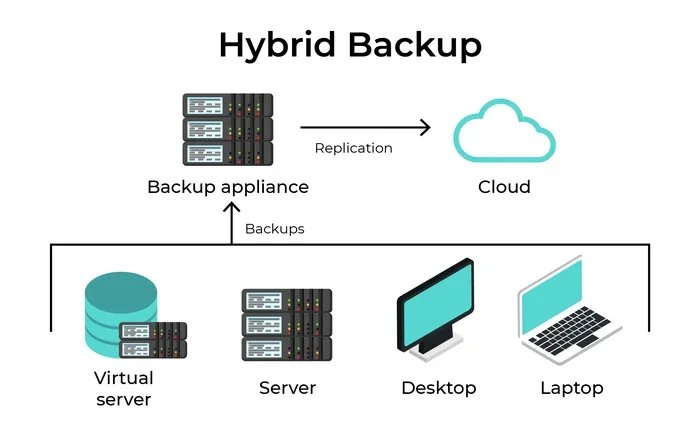
- Hybrid Cloud: Combines public and private clouds. You get flexibility and security in one setup. Sensitive data stays private while less critical workloads run on the public side.
Key Benefits of Secure Cloud Computing
The advantages of moving to a secure cloud environment go far beyond just saving money. Let us look at the biggest benefits that make cloud computing so appealing.
Cost Savings and Efficiency
Running your own data center is expensive. You pay for hardware, electricity, cooling, and a team to maintain it. Cloud computing eliminates most of those costs. You pay only for what you use. This pay-as-you-go model helps businesses of all sizes scale without breaking the bank.
Plus, cloud providers handle maintenance and updates. You do not need a large IT team just to keep servers running. This frees up your budget for growth and innovation.
Scalability and Flexibility
Need more storage or computing power during a busy season? Cloud makes it easy to scale up. And when demand drops, you scale back down. This elastic scalability is one of the biggest reasons companies choose the cloud.
You can also deploy new applications faster. Instead of waiting weeks for hardware setup, you can launch a new service in minutes. This speed gives you a real competitive edge.
Improved Collaboration and Accessibility
Cloud tools let your team work from anywhere. Employees can access files, apps, and dashboards from any device with internet access. This boosts productivity and supports remote and hybrid work models.
Real-time collaboration becomes seamless. Multiple team members can edit documents simultaneously. Projects move faster when everyone stays connected.
Disaster Recovery and Business Continuity
Data loss can be devastating. Natural disasters, hardware failures, and cyberattacks can wipe out critical information. Cloud providers offer robust cloud backup and disaster recovery solutions. Your data gets replicated across multiple locations.
This means even if one server goes down, your data stays safe. Recovery times are much faster compared to traditional setups. You keep your business running even during unexpected events.
Risks of Cloud Computing You Must Know
Cloud computing brings great rewards, but it also introduces risks you cannot ignore. Understanding these dangers is the first step toward protecting your business.
Data Breaches and Unauthorized Access
A data breach is the biggest fear for any business using the cloud. When sensitive information is exposed, the consequences can be severe. Financial loss, reputational damage, and legal penalties all come into play.
Hackers target cloud environments because they store massive amounts of valuable data. Weak passwords, misconfigured settings, and poor identity and access management make these systems vulnerable. A single mistake can open the door to a major breach.
Compliance and Regulatory Challenges
Different industries have strict rules about how data is stored and handled. Healthcare, finance, and government sectors face heavy regulations. If your cloud setup does not meet these requirements, you could face fines and legal trouble.
Regulatory compliance is not optional. You must ensure your provider meets standards like GDPR, HIPAA, and SOC 2. Reviewing your terms and conditions carefully helps you understand exactly what your provider is responsible for and what falls on your shoulders.
Many businesses overlook this step and end up in violation of laws they did not even know applied to them. Always read the fine print and ask your provider for compliance documentation.
Data Loss and Downtime
Even the best cloud providers can experience outages. When the cloud goes down, your business stops. Downtime means lost revenue, frustrated customers, and damaged trust.
Data loss is another serious concern. Accidental deletion, corruption, or provider failures can result in permanent loss of critical information. This is why having a solid cloud backup strategy is non-negotiable.
Shared Technology Vulnerabilities
In a public cloud, you share infrastructure with other users. While providers isolate your data, vulnerabilities in the shared system can affect everyone. These are called multi-tenant risks. A flaw in one tenant’s environment could potentially spread to others.
Insider Threats
Not all threats come from outside. Employees, contractors, or even the cloud provider’s staff can pose risks. Malicious insiders or careless actions can lead to data exposure. This is why strong access controls and monitoring are essential.
Essential Controls for Secure Cloud Computing
Now that you know the risks, let us talk about the controls that keep your cloud environment safe. These are not optional extras. They are the foundation of any strong cloud security strategy.
Data Encryption
Data encryption is one of the most effective controls you can implement. It scrambles your data so that only authorized users can read it. You should encrypt data both at rest and in transit.
At rest means data stored on servers is encrypted. In transit means data moving between systems is protected. Most reputable cloud providers offer built-in encryption tools. Make sure you turn them on and manage your encryption keys properly.
Multi-Factor Authentication (MFA)
Passwords alone are not enough. Multi-factor authentication adds an extra layer of security. Users must verify their identity using two or more methods. This could be a password plus a code sent to their phone.
MFA dramatically reduces the risk of unauthorized access. Even if a hacker steals a password, they still cannot get in without the second factor. Enable MFA for every user account in your cloud environment.
Identity and Access Management (IAM)
Identity and access management controls who can do what in your cloud environment. You assign roles and permissions based on the principle of least privilege. This means each user gets only the access they need to do their job.
Regularly review and update these permissions. Remove access for former employees immediately. This simple practice prevents many security incidents.
Security Monitoring and Threat Detection
You cannot protect what you cannot see. Security monitoring tools watch your cloud environment 24/7. They detect unusual activity, suspicious logins, and potential threats in real time.
Many cloud providers offer built-in monitoring services. You can also use third-party tools for more advanced threat detection. Set up alerts so your team responds quickly to any warning signs.
Regular Security Audits
A security audit evaluates your cloud setup for weaknesses. It checks your configurations, access controls, and compliance status. Regular audits help you find and fix problems before attackers exploit them.
Schedule audits at least once a quarter. Also conduct audits after any major changes to your cloud environment. This keeps your security posture strong and up to date.
Cloud Governance and Policies
Cloud governance means setting clear rules for how your team uses cloud resources. It covers everything from data classification to user behavior. Strong governance reduces the chance of accidental exposure or misuse.
Create a cloud security policy that everyone follows. Train your employees regularly. Make sure they understand the risks and their role in keeping the cloud safe.
Best Practices for a Secure Cloud Setup
Beyond the core controls, following best practices helps you stay ahead of threats. Here are proven strategies that work.
- Choose the right cloud provider. Look for providers with strong security certifications, transparent practices, and a solid track record. Compare their cloud service agreement terms carefully.
- Implement a zero trust approach. Trust no one and verify everything. Every user, device, and connection must be authenticated and authorized before accessing resources.
- Keep software updated. Outdated software has known vulnerabilities. Enable automatic updates whenever possible.
- Backup your data regularly. Follow the 3-2-1 rule. Keep three copies of your data on two different media types, with one copy offsite.
- Train your team. Human error causes many security incidents. Regular training helps your employees recognize phishing, social engineering, and other common threats.
- Review your terms and conditions with your cloud provider to ensure you fully understand your responsibilities and the provider’s obligations.
Common Mistakes to Avoid
Even well-intentioned businesses make cloud security mistakes. Here are the most common ones and how to avoid them.
- Ignoring misconfigurations: A single misconfigured setting can expose your entire cloud environment. Always double-check your configurations before going live.
- Skipping security audits: If you do not check, you do not know what is wrong. Make audits a regular habit.
- Overlooking the shared responsibility model: Your provider handles some security tasks, but many fall on you. Understand exactly what you are responsible for.
- Using weak passwords: Simple passwords are easy targets. Enforce strong password policies across your organization.
- Not planning for the worst: Without a disaster recovery plan, any outage or breach can be catastrophic. Prepare before you need to.
Expert Insights on Cloud Security
Security experts agree that cloud computing is the future. But the future must be built on a foundation of strong security. Leading professionals emphasize that cloud security is not a one-time setup. It is an ongoing process.
Experts recommend starting with a thorough risk assessment before moving any data to the cloud. Identify what is most valuable and most vulnerable. Then build your controls around those specific risks. This targeted approach is far more effective than trying to protect everything equally.
Another expert tip: do not wait for a breach to improve your security. The best organizations are always proactive. They stay ahead of threats by continuously updating their practices, testing their defenses, and educating their teams.
Conclusion
Secure cloud computing offers incredible benefits for businesses of every size. You get cost savings, scalability, and flexibility that on-premises setups simply cannot match. But those benefits come with real risks that you must manage carefully.
The risks are not reasons to avoid the cloud. They are reasons to prepare. By understanding the dangers and implementing strong cloud security controls, you can confidently enjoy everything the cloud has to offer. Encryption, MFA, IAM, monitoring, and regular audits form a powerful defense against threats.
Start by reviewing your current setup. Identify gaps and address them one by one. Follow the best practices outlined in this guide. And always remember that cloud security is a shared responsibility. Work closely with your provider, train your team, and stay vigilant. With the right approach, you can build a cloud environment that is both powerful and safe.
Take action today. Your data, your business, and your customers deserve the protection that comes with secure cloud computing.
Frequently Asked Questions
What are the main benefits of secure cloud computing?
Secure cloud computing offers cost savings, scalability, improved collaboration, and strong disaster recovery. You pay only for what you use, scale resources on demand, and work from anywhere. These benefits make it an ideal choice for businesses of all sizes.
What are the biggest risks of cloud computing?
The main risks include data breaches, compliance violations, data loss, and downtime. Shared technology vulnerabilities and insider threats also pose serious concerns. However, these risks can be significantly reduced with proper controls and regular monitoring.
How can I improve my cloud security?
Start by enabling encryption, multi-factor authentication, and strong access management. Conduct regular security audits and keep your software updated. Training your team on security best practices is also one of the most effective steps you can take.
What is the shared responsibility model in cloud computing?
The shared responsibility model means your cloud provider handles some security tasks while you handle others. The provider typically secures the infrastructure, but you are responsible for data protection, access controls, and compliance. Always review your terms and conditions to understand exactly where responsibilities are divided.
Why is regulatory compliance important in the cloud?
Regulatory compliance ensures your data handling meets legal and industry standards. Non-compliance can result in heavy fines, legal action, and reputational damage. Regulations like GDPR and HIPAA set strict rules for how sensitive data must be stored and protected in any cloud environment.
How often should I conduct cloud security audits?
You should conduct security audits at least once every quarter. Also schedule audits after any major changes to your cloud setup. Regular audits help you catch vulnerabilities early and maintain a strong security posture over time.
=== URL SLUG ===
secure-cloud-computing-benefits-risks-controls-guide
=== SEO TITLE ===
Secure Cloud Computing Benefits Risks and Controls Guide
=== META TITLE ===
Secure Cloud Computing Benefits Risks and Controls Guide
=== META DESCRIPTION ===
Discover the benefits, risks, and controls of secure cloud computing. Learn how to protect your data, stay compliant, and build a safer cloud strategy today.