Understanding AWS Cloud Computing Pricing for Beginners
AWS cloud computing pricing can feel confusing at first, but it doesn’t have to be. This guide breaks down how AWS charges for its services, from on-demand pricing to savings plans, so beginners can make smart choices. You will learn how to estimate costs, avoid common billing surprises, and use free tools to keep your AWS bill under control.
If you have ever wondered how much it costs to run something on Amazon Web Services, you are not alone. AWS cloud computing pricing is one of the first things beginners try to understand. The good news is that AWS is designed to be flexible and affordable. But without a clear picture, costs can spiral fast.
This guide walks you through everything you need to know about AWS pricing for beginners. You will learn how AWS charges for its services, what the different pricing models mean, and how to keep your bill low. By the end, you will feel confident navigating Amazon Web Services cost structures like a pro.
Key Takeaways
- Pay-as-you-go is the foundation: AWS charges you only for what you use, with no long-term contracts required.
- Multiple pricing models exist: On-demand, reserved instances, and savings plans each serve different needs and budgets.
- AWS offers a generous free tier: New users get access to select services at no cost for 12 months.
- Hidden costs can add up: Data transfer and storage fees often surprise beginners who don’t plan ahead.
- AWS provides free cost tools: The AWS Pricing Calculator and AWS Cost Explorer help you forecast and track spending.
- Spot instances save big: You can access unused AWS capacity at steep discounts if your workloads are flexible.
- Regular reviews matter: Monitoring your AWS bill monthly helps you catch waste and optimize spending over time.
📑 Table of Contents
- What Is AWS Cloud Computing Pricing?
- How AWS Charges for Its Services
- Breaking Down the Main Cost Components
- AWS Free Tier: A Great Way to Start
- How to Estimate Your AWS Costs
- Common Mistakes That Increase AWS Bills
- Expert Tips to Lower Your AWS Costs
- Comparison: AWS Pricing Models at a Glance
- How AWS Billing Works
- Final Thoughts on AWS Cloud Computing Pricing
What Is AWS Cloud Computing Pricing?
AWS cloud computing pricing refers to how Amazon charges customers for using its cloud platform. Instead of buying expensive servers, you rent computing power, storage, and other resources by the hour or the second. This model is called pay-as-you-go, and it is at the heart of how AWS works.
Think of it like a utility bill. You only pay for what you consume. Need more power? You scale up. Need less? You scale down. This flexibility is why millions of businesses, from startups to Fortune 500 companies, choose AWS.
Why Pricing Matters for Beginners
When you are just starting out, understanding cloud hosting costs helps you avoid unpleasant surprises. Many beginners launch a project without checking the price tags. Then they get a bill that shocks them. Learning the basics early saves you money and stress.
Here are a few reasons why getting a handle on pricing matters right away:
- Budget control: You can set spending limits and stick to them.
- Better planning: You choose the right services for your needs.
- No wasted money: You avoid paying for resources you do not use.
- Smarter scaling: You grow your usage as your project grows.
How AWS Charges for Its Services
AWS does not use one single pricing model. Instead, it uses several different approaches depending on the service. Let us break down the main ways AWS charges its users.
On-Demand Pricing
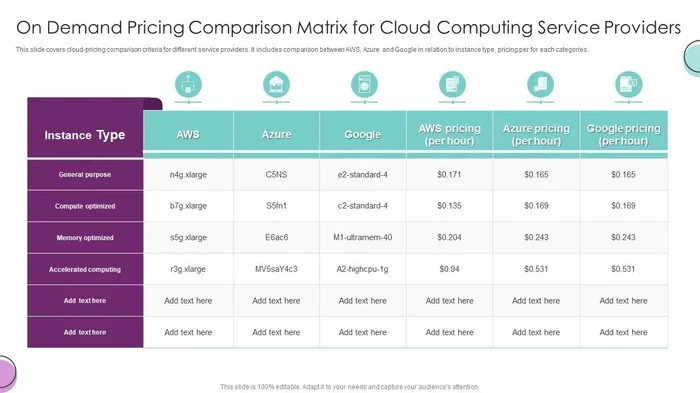
On-demand pricing is the simplest model. You pay for compute capacity by the second or hour with no long-term commitment. This is perfect for beginners who want flexibility. If you run a test server for two hours, you pay for two hours.
The downside is that on-demand rates are higher than other models. If you know you will use a service for months, you may want to explore cheaper options.
Reserved Instances
Reserved instances let you commit to using AWS for one or three years. In return, you get a big discount compared to on-demand rates. This model works well for steady workloads, like a website that runs 24/7.
There are two types of reserved instances:
- Standard Reserved Instances: Offer the deepest discounts but are less flexible.
- Convertible Reserved Instances: Let you change instance types during the term.
Savings Plans
AWS savings plans are a newer alternative to reserved instances. You commit to a consistent amount of usage over one or three years. In return, AWS gives you lower rates. Savings plans are more flexible because they apply across different instance families and regions.
If you want predictable costs without being locked into specific instance types, savings plans are worth considering.
Spot Instances
Spot instances let you bid on unused AWS capacity. These instances can cost up to 90% less than on-demand prices. The catch is that AWS can interrupt your spot instance with little notice if someone else needs the capacity.
Spot instances are great for fault-tolerant workloads, like batch processing, testing, and big data analysis. Beginners should use them carefully and only for tasks that can handle interruptions.
Breaking Down the Main Cost Components
Understanding AWS cloud computing pricing means knowing what drives the bill. Several components add up to your total cost. Let us look at each one closely.
Compute Costs
Compute is usually the biggest part of your AWS bill. It covers virtual machines, also known as EC2 instances. The cost depends on the instance type, region, and pricing model you choose.
For example, a small EC2 instance in the US East region might cost around $0.0116 per hour on-demand. That is less than 30 dollars a month. But larger instances with more CPU and memory can cost hundreds of dollars per month.
Storage Costs
AWS offers several storage options, and each has its own price. The most common is Amazon S3, which stores files in the cloud. S3 pricing depends on the storage class, the amount of data, and how often you access it.
Here is a quick look at common S3 storage classes:
- S3 Standard: For frequently accessed data. Slightly higher cost.
- S3 Intelligent-Tiering: Automatically moves data to the most cost-effective tier.
- S3 Glacier: For archival storage. Very low cost but slow retrieval.
Data Transfer Costs
Data transfer is one of the most overlooked costs in AWS. When data moves in and out of AWS, you pay for it. Data coming into AWS is usually free. But data going out, called egress, costs money.
If your application serves a lot of images or video to users, data transfer fees can add up quickly. Always factor this into your cost estimates.
Other Services
Beyond compute, storage, and data transfer, AWS offers many other services. Databases like Amazon RDS, load balancers, and networking services all come with their own pricing. Each service has its own pricing page, so always check before you start using something new.
AWS Free Tier: A Great Way to Start
One of the best things about AWS is the AWS free tier. New users get access to a limited set of services at no cost for 12 months. This lets you experiment and learn without spending a dime.
The free tier includes:
- 750 hours per month of a t2.micro or t3.micro EC2 instance.
- 5 GB of Amazon S3 standard storage.
- 20 GB of AWS Elastic Block Store per month.
- 1 million free requests per month for AWS Lambda.
Always keep an eye on your usage, even in the free tier. If you accidentally exceed the limits, AWS will start charging you. Setting up billing alerts is a smart move.
Always Set Billing Alarms
This is a quick tip that every beginner should follow. Go to the AWS Billing Console and set up a billing alarm. You can get an email notification if your bill crosses a certain threshold. This simple step can save you from unexpected charges.
How to Estimate Your AWS Costs
Before you launch anything, it helps to estimate what you will pay. AWS offers several free tools that make this easy.
AWS Pricing Calculator
The AWS Pricing Calculator is a web-based tool that lets you build a model of your expected usage. You pick the services, set the quantities, and it gives you a monthly cost estimate. It is one of the best resources for understanding AWS cloud computing pricing before you start.
AWS Cost Explorer
Once you are using AWS, the AWS Cost Explorer tool helps you visualize your spending. You can see which services cost the most, spot trends, and identify areas to cut back. It is a powerful way to stay on top of your Amazon Web Services cost over time.
AWS Trusted Advisor
AWS Trusted Advisor gives you real-time guidance on cost optimization. It checks your account for underutilized resources, idle load balancers, and other areas where you can save money. Think of it as a free consultant for your AWS bill.
Common Mistakes That Increase AWS Bills
Even careful users can make mistakes that drive up costs. Here are some common pitfalls to watch out for.
Leaving Idle Resources Running
The biggest cost killer is leaving resources running when you do not need them. Forgot to shut down an EC2 instance after testing? It keeps running and keeps billing you. Always stop or terminate resources when you are done with them.
Ignoring Data Transfer Fees
Many beginners focus on compute costs and forget about data transfer. If your app serves a lot of content to users outside AWS, egress fees can surprise you. Plan for these costs from the start.
Choosing the Wrong Instance Size
It is tempting to pick the biggest instance for safety. But oversized instances waste money. Use AWS monitoring tools to right-size your instances based on actual usage.
Not Using Tags
Resource tagging helps you track costs by project, team, or environment. Without tags, it is hard to know which part of your application is driving the bill. Get into the habit of tagging everything from day one.
Expert Tips to Lower Your AWS Costs
Saving money on AWS is not just about avoiding mistakes. There are active steps you can take to reduce your bill significantly.
Use Spot Instances for Non-Critical Work
If you have batch jobs or background tasks, spot instances can save you a lot of money. Just make sure your workloads can handle interruptions gracefully.
Leverage Auto Scaling
Auto scaling adjusts the number of instances based on demand. During low-traffic periods, it scales down to save money. During peak times, it scales up to keep performance strong. This ensures you only pay for what you need.
Right-Size Regularly
Make it a habit to review your instance usage every month. You may find that smaller instances work just fine. Over time, right-sizing adds up to real savings.
Use S3 Lifecycle Policies
Set up lifecycle policies to automatically move old data to cheaper storage classes. For example, data older than 30 days can move to S3 Glacier. This keeps your storage costs low without any manual effort.
Comparison: AWS Pricing Models at a Glance
Not sure which pricing model fits your needs? Here is a quick comparison to help you decide.
| Pricing Model | Best For | Cost | Commitment | Flexibility |
|---|---|---|---|---|
| On-Demand | Short-term, unpredictable workloads | Highest | None | Very high |
| Reserved Instances | Steady, predictable workloads | Up to 72% savings | 1 or 3 years | Low to medium |
| Savings Plans | Flexible, consistent usage | Up to 72% savings | 1 or 3 years | High |
| Spot Instances | Fault-tolerant, flexible workloads | Up to 90% savings | None (can be interrupted) | Very high |
Each model has its place. On-demand is perfect for testing and experimentation. Reserved instances and savings plans shine for long-term projects. Spot instances are ideal for cost-sensitive, flexible workloads.
How AWS Billing Works
AWS bills you monthly. Your bill is based on the services you used during the billing cycle. You can view your detailed bill in the AWS Billing Console. Each line item shows the service name, the usage, the rate, and the total charge.
AWS also offers consolidated billing if you have multiple accounts. This lets you combine usage across accounts to reach volume discounts faster. It is a great way to save money if you run several AWS accounts.
Understanding Your AWS Bill
At first glance, an AWS bill can look overwhelming. But once you know what to look for, it becomes much easier to read. Focus on the top-line services that cost the most. Usually, EC2 instances and data transfer dominate the bill. Then drill down into the details to find savings opportunities.
Set a weekly or biweekly reminder to check your bill. This keeps you aware of your spending and helps you catch issues early.
Final Thoughts on AWS Cloud Computing Pricing
AWS cloud computing pricing is designed to be fair, flexible, and transparent. Whether you are running a personal project or a large business, AWS has a pricing model that fits your needs. The key is to understand the options, plan ahead, and keep an eye on your spending.
Start with the free tier to learn the ropes. Use the AWS Pricing Calculator to estimate costs before you launch. Set up billing alarms to stay safe. And regularly review your usage to find savings. With these habits, you will get the most out of AWS without breaking the bank.
Remember, the cloud is powerful, but it rewards those who pay attention. Take control of your AWS cloud computing pricing today, and you will build a strong foundation for whatever you want to create next.
Frequently Asked Questions
What is AWS cloud computing pricing?
AWS cloud computing pricing is how Amazon charges for its cloud services. It uses a pay-as-you-go model where you pay only for the resources you consume. Costs depend on compute, storage, data transfer, and the specific services you use.
Is AWS free for beginners?
Yes, AWS offers a free tier that gives new users access to select services at no cost for 12 months. This includes 750 hours of a t2.micro or t3.micro EC2 instance per month, 5 GB of S3 storage, and more. Always monitor your usage to avoid unexpected charges.
How can I estimate my AWS costs before launching?
Use the AWS Pricing Calculator, a free web tool that lets you build a cost model based on your expected usage. You select services, set quantities, and get a monthly cost estimate. This helps you plan your budget before you start building.
What are reserved instances in AWS?
Reserved instances are a pricing model where you commit to using AWS for one or three years. In return, you receive significant discounts compared to on-demand rates. This model works best for steady, predictable workloads that run continuously.
Why is my AWS bill higher than expected?
Common reasons include leaving idle resources running, ignoring data transfer fees, and choosing oversized instances. Other causes include not using the free tier correctly or forgetting to stop test environments. Regular monitoring and cost reviews help you identify and fix these issues.
What is the difference between savings plans and reserved instances?
Savings plans offer flexibility across instance families and regions, while reserved instances are tied to specific instance types. Both provide significant discounts for committed usage. Savings plans are generally more flexible and easier to manage for most users.
=== CONCLUSION ===
AWS cloud computing pricing does not have to be intimidating. With the right knowledge and a few smart habits, you can use AWS affordably and effectively. From understanding on-demand rates to leveraging the free tier and savings plans, every beginner has the tools to succeed. Start small, monitor your costs, and grow your cloud journey with confidence.