What Is Not a Benefit of Cloud Computing You Need to Know
Not everything about cloud computing is a win. Many people assume the cloud solves every problem, but what is not a benefit of cloud computing matters just as much as the perks. This guide exposes the real downsides, myths, and hidden risks that providers often skip over.
Key Takeaways
- Myth vs. Reality: Many supposed cloud benefits are actually myths that can lead to bad decisions.
- Hidden Costs Add Up: Long-term expenses often outweigh the initial savings people expect.
- Security Is Not Automatic: The cloud does not fix all your security problems on its own.
- Internet Dependency Is Real: Without a solid connection, cloud tools become useless.
- Vendor Lock-In Is a Genuine Risk: Switching providers later can be painful and expensive.
- Not Every Workload Belongs in the Cloud: Some tasks run better on local infrastructure.
📑 Table of Contents
- Introduction: Why Knowing the Downsides Matters
- Common Myths About Cloud Computing Benefits
- The Hidden Costs That Cancel Out Cloud Advantages
- Security and Privacy Concerns People Overlook
- Internet Dependency and Performance Issues
- Vendor Lock-In and Limited Control
- When Cloud Computing Simply Does Not Make Sense
- Conclusion
Introduction: Why Knowing the Downsides Matters
Cloud computing has changed the way businesses and individuals work. It offers flexibility, scalability, and cost savings that traditional setups simply cannot match. But here is the thing most people miss. What is not a benefit of cloud computing can hurt you just as much as the advantages can help you.
Many articles only talk about the good stuff. They gloss over the risks, the hidden costs, and the limitations. That is a problem. If you are thinking about moving to the cloud, you need the full picture. This guide breaks down the real drawbacks and clears up the myths so you can make a smart decision.
Common Myths About Cloud Computing Benefits
Myth 1: The Cloud Is Always Cheaper
People love to say cloud computing saves money. And yes, it can. But it is not a guarantee. Many businesses jump in expecting lower bills, only to get a nasty surprise months later. The truth is, what is not a benefit of cloud computing for cost savings depends heavily on how you use it.
Cloud providers charge for data transfer, storage, and compute time. These costs add up fast. Small businesses with unpredictable workloads often spend more in the cloud than they would on a simple local server. The pricing models are complex, and it is easy to overspend without careful monitoring.
Myth 2: Cloud Means Zero Maintenance
Another big myth is that the cloud removes all maintenance work. That is simply not true. While the provider handles the physical hardware, you still manage your applications, data, and access controls. Cloud maintenance is different from traditional maintenance, but it is not gone.
You still need to update software, manage user permissions, and monitor performance. Think of it like renting an apartment. The landlord fixes the roof, but you still clean, maintain, and handle daily upkeep.
Myth 3: Cloud Scales Infinitely
Scalability is a huge selling point for the cloud. And it is true that cloud platforms can scale up quickly. But there are limits. What is not a benefit of cloud computing is the idea that you can scale forever without constraints.
Providers set quotas and limits. Sudden spikes in traffic can hit rate limits or trigger unexpected costs. Not every application handles elastic scaling well. Some workloads need predictable, steady performance that the cloud cannot always guarantee.
The Hidden Costs That Cancel Out Cloud Advantages
One of the biggest reasons people regret moving to the cloud is hidden costs. The upfront price looks great, but the long-term picture tells a different story. Let us look at the real numbers.
| Cost Factor | Cloud Computing | On-Premises |
|---|---|---|
| Upfront Investment | Low | High |
| Monthly Recurring Costs | Medium to High | Low to Medium |
| Data Transfer Fees | Yes, can be significant | None |
| Staff Training | Required | Minimal |
| Long-Term Total Cost | Often higher over 3-5 years | Predictable and fixed |
As you can see, the cloud cost comparison is not always in favor of the cloud. Many companies discover that long-term cloud expenses exceed their original estimates. The pay-as-you-go model sounds great until your usage grows unexpectedly.
Quick Tips to Avoid Cost Surprises
- Set up billing alerts and spending limits in your cloud console.
- Review your usage reports every week during the first three months.
- Right-size your instances. Do not over-provision resources.
- Consider reserved instances for steady workloads to save money.
- Factor in data egress fees when calculating total costs.
Security and Privacy Concerns People Overlook
Cloud Security Is Shared, Not Fully Managed
Many users believe that cloud security is the provider’s full responsibility. That is one of the most dangerous misunderstandings. Cloud providers secure the infrastructure, but you are responsible for securing your data, applications, and access.
This is called the shared responsibility model. The provider handles the physical servers and network. You handle encryption, identity management, and compliance. If you ignore your part, cloud security risks increase dramatically.
Data Privacy and Compliance Challenges
Where your data lives matters. Different countries have different rules about data storage and transfer. Data sovereignty is a real concern for businesses operating globally. Storing customer data in the wrong region can lead to legal trouble.
Regulatory compliance like GDPR, HIPAA, and SOC 2 requires careful attention in the cloud. Not all cloud providers offer the same compliance certifications. You need to verify that your provider meets your industry requirements before migrating.
Expert Insight
“The biggest security mistake we see is companies assuming the cloud provider handles everything. Security is a shared job. Organizations must take ownership of their data, no matter where it lives.” — Sarah Mitchell, Cloud Security Analyst at TechBridge Solutions
Internet Dependency and Performance Issues
You Need a Reliable Connection
Here is something people forget. What is not a benefit of cloud computing is independence from the internet. The cloud lives on the internet. Without a stable, fast connection, your cloud tools become slow or completely inaccessible.
If your office loses internet, you lose access to everything hosted in the cloud. This is a real risk for businesses in areas with unreliable connectivity. Downtime is not just an inconvenience. It can mean lost revenue and frustrated customers.
Latency and Performance Variability
Cloud performance depends on network conditions. Latency can vary based on your location, the provider’s data center distance, and network congestion. For applications that need real-time responses, this variability is a serious problem.
Cloud latency issues affect video conferencing, online gaming, financial trading, and real-time collaboration tools. If your workload demands consistent, low-latency performance, the cloud may not be the best fit.
Common Mistakes People Make
- Assuming all cloud services have the same performance levels.
- Ignoring bandwidth requirements before migration.
- Not testing applications under real-world network conditions.
- Overlooking the impact of peak usage times on speed.
- Choosing a distant data center without checking latency.
Vendor Lock-In and Limited Control
Once You Move, It Is Hard to Leave
Vendor lock-in is one of the most overlooked risks of cloud computing. Each provider uses its own tools, APIs, and services. When you build your infrastructure around one provider, switching becomes extremely difficult and expensive.
Your team learns one platform. Your applications are optimized for one environment. Moving to a competitor means rewriting code, retraining staff, and paying migration costs. This lack of cloud portability gives you less freedom than a traditional setup.
You Give Up Some Control
In a cloud environment, you do not control everything. The provider decides when to update services, change pricing, or retire features. You are at their mercy for infrastructure decisions like server maintenance windows and hardware upgrades.
Limited customization is another issue. Cloud services offer standardized configurations. If your application needs a very specific setup, the cloud might not support it. You may have to compromise on features or performance.
When Cloud Computing Simply Does Not Make Sense
Not every workload belongs in the cloud. Some applications perform better on local infrastructure. Here are situations where what is not a benefit of cloud computing becomes very clear.
High-performance computing tasks like scientific simulations and massive data processing often run better on dedicated hardware. The cloud adds overhead that can slow things down. The cost of running these workloads in the cloud can also be astronomical.
Highly regulated industries sometimes face restrictions that make cloud adoption difficult. Government agencies, healthcare providers, and financial institutions may have rules that limit where data can be stored. In these cases, on-premises solutions offer more control and compliance certainty.
Small, simple operations might not benefit from the cloud at all. A local business with basic file storage and email does not need a complex cloud setup. The added complexity and cost do not justify the benefits for very small operations.
Quick Tips for Deciding If Cloud Is Right for You
- Evaluate your workload requirements before choosing a deployment model.
- Consider hybrid cloud options if some workloads need local infrastructure.
- Assess your team’s cloud skills before committing to a migration.
- Calculate total cost of ownership over 3 to 5 years.
- Test with a small pilot project before migrating everything.
Expert Insight
“The cloud is not a one-size-fits-all solution. We see companies waste money and time forcing everything into the cloud. A thoughtful hybrid approach often delivers the best results. Know your workloads and choose accordingly.” — James Chen, Infrastructure Architect at CloudOps Group
Conclusion
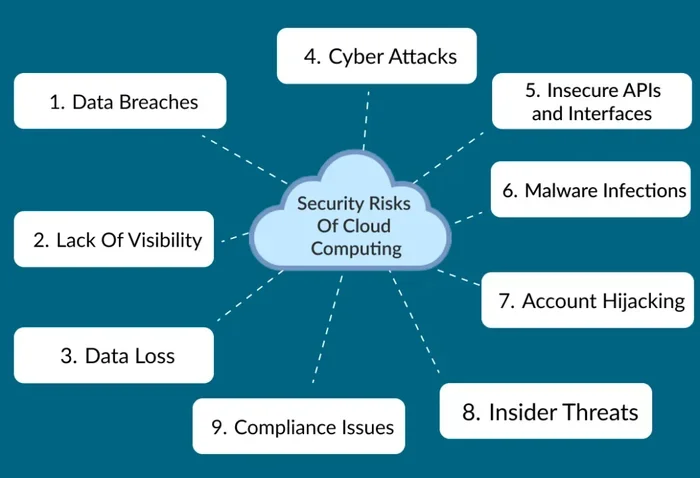
What is not a benefit of cloud computing is a question every decision-maker should ask. The cloud offers incredible advantages, but it is not perfect. Hidden costs, security responsibilities, internet dependency, vendor lock-in, and performance limitations are real concerns that deserve your attention.
Do not let the hype blind you to the risks. Take time to evaluate your specific needs. Test before you commit. Plan for the long term, not just the short-term savings. The cloud is a powerful tool, but only when used wisely and with open eyes.
Understanding the downsides puts you in a much stronger position. You will make better decisions, avoid costly mistakes, and build a cloud strategy that actually works for your business. Knowledge is your best defense against the pitfalls of cloud adoption.
Frequently Asked Questions
Is cloud computing really more expensive in the long run?
It can be. While the upfront costs are lower, ongoing monthly fees, data transfer charges, and hidden costs often add up over time. Many companies find that their total cost of ownership is higher after three to five years compared to on-premises setups. Careful cost monitoring is essential.
Does the cloud completely eliminate security risks?
No. The cloud shifts some security responsibilities to the provider, but you still own your data and access controls. Security is a shared responsibility. Failing to manage your part of the security equation can leave you exposed to breaches and compliance violations.
Can I switch cloud providers easily if I am unhappy?
Not easily. Vendor lock-in is a real challenge. Each provider uses different tools, APIs, and service models. Migrating between providers requires significant time, effort, and expense. This is why choosing the right provider from the start is so important.
What happens if my internet goes down and I use cloud services?
You lose access to your cloud-hosted applications and data until the connection is restored. This makes internet reliability a critical factor. Businesses in areas with unstable connectivity should plan for offline alternatives or consider hybrid cloud setups.
Are there workloads that should never go to the cloud?
Yes. High-performance computing, highly regulated workloads, and applications requiring ultra-low latency often perform better on local infrastructure. Some industries also have legal restrictions on where data can be stored. Always evaluate each workload individually.
How can I avoid surprise cloud bills?
Set up automated billing alerts and spending caps in your cloud console. Review usage reports weekly, especially during the first few months. Right-size your resources and consider reserved pricing for steady workloads to keep costs predictable.