How Can Cloud Computing Help Small Businesses Succeed
Cloud computing transforms how small businesses operate by replacing expensive hardware with flexible, affordable online tools. It helps owners save money, protect data, and let teams collaborate from anywhere. With cloud-based solutions, even the smallest companies can compete with big corporations. This guide covers the real benefits, practical tips, and simple steps to get started today.
Small business owners wear many hats. You handle sales, manage finances, lead your team, and still find time to fix the printer. On top of all that, you need to make smart technology decisions that keep your company competitive.
Here is the good news. Cloud computing has leveled the playing field. It gives small businesses access to the same powerful tools that large corporations use, without the enormous price tag. Whether you run a bakery or a consulting firm, the cloud can change the way you work.
This article breaks down exactly how cloud computing helps small businesses succeed. We will cover cost savings, security, productivity, and practical steps you can take right now. Let us dive in.
Key Takeaways
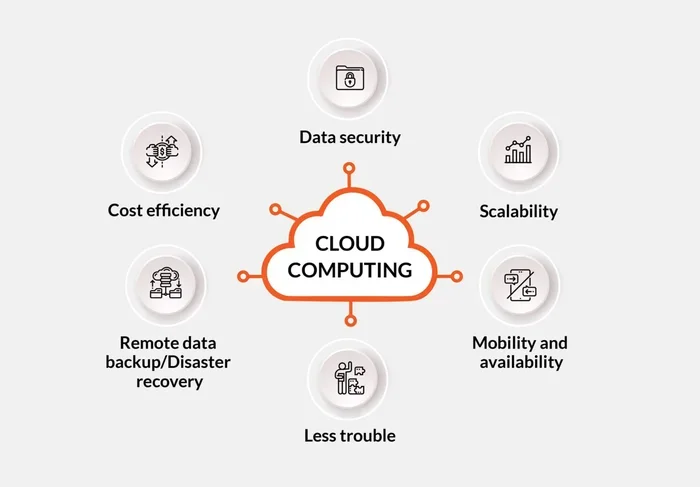
- Cost Savings: Cloud computing eliminates the need for pricey servers and IT staff, letting small businesses pay only for what they use.
- Remote Work Ready: Teams can access files and tools from anywhere, making remote collaboration seamless and productive.
- Built-In Security: Leading cloud providers offer strong data protection, backups, and disaster recovery features.
- Easy Scalability: Small businesses can grow their cloud usage up or down without major investments or downtime.
- Better Productivity: Cloud apps streamline workflows, automate tasks, and keep everyone on the same page.
- Simple to Start: You don’t need tech expertise. Most cloud tools are ready to use within minutes.
📑 Table of Contents
- What Is Cloud Computing and Why Does It Matter for Small Businesses?
- How Cloud Computing Saves Small Businesses Money
- Boosting Productivity and Team Collaboration
- Data Security and Business Continuity
- Scalability: Growing Without Growing Pains
- Getting Started With Cloud Computing: A Simple Roadmap
- The Future of Cloud Computing for Small Businesses
- Conclusion
What Is Cloud Computing and Why Does It Matter for Small Businesses?
Understanding Cloud Computing in Simple Terms
Think of cloud computing like renting a car instead of buying one. You get what you need, when you need it, and you only pay for the time you use it. No huge upfront costs. No maintenance headaches.
Instead of storing files and running software on your own computers or servers, everything lives online. You access it through the internet. This is called cloud-based computing, and it has become the backbone of modern small business operations.
Here is what makes it so powerful. You can use cloud apps for accounting, customer management, file sharing, email, and project tracking. All of these tools run on remote servers managed by companies like Google, Microsoft, and Amazon. You just log in and get to work.
Why Small Businesses Need This Technology Now
The business world has changed fast. More customers shop online. More teams work remotely. More companies rely on digital tools to stay alive. If your business still runs on paper files and old desktop software, you are falling behind.
Cloud computing helps you keep up without breaking the bank. It gives you professional-grade IT infrastructure at a fraction of the cost. You get automatic updates, built-in backups, and access to your data from any device. That is a huge advantage for a small team.
Many small business owners worry that the cloud is too complicated. But today’s cloud computing services are designed for everyday users. You do not need a degree in computer science to get started. Most platforms offer simple setup guides and helpful customer support.
How Cloud Computing Saves Small Businesses Money
The Pay-As-You-Go Model
One of the biggest benefits of cloud computing is the cost savings. Traditional software requires you to buy expensive licenses upfront. You also need powerful computers to run them. And when something breaks, you pay a technician to fix it.
Cloud-based tools work differently. You pay a small monthly or annual subscription. That fee usually includes updates, maintenance, and customer support. There are no surprise repair bills. No hidden costs. Just a predictable expense that fits your budget.
Let us look at a quick comparison.
| Expense | Traditional Setup | Cloud-Based Setup |
|---|---|---|
| Software Licenses | $500-$2,000 upfront | $10-$50/month per user |
| Hardware/Servers | $2,000-$10,000+ | $0 (handled by provider) |
| IT Support | $100-$200/hour | Included in subscription |
| Updates & Maintenance | Manual, time-consuming | Automatic and free |
| Data Backup | Extra cost or DIY | Built-in and automatic |
As you can see, the cloud migration from old systems saves a significant amount of money over time. Small businesses can redirect those savings toward marketing, hiring, or product development.
Reducing IT Staff Costs
When you use cloud computing, you do not need a full-time IT team to manage your servers and software. Your cloud provider handles all of that. They keep the systems running, apply security patches, and monitor performance around the clock.
This is a game-changer for small businesses. Instead of paying a salary to an in-house tech person, you get enterprise-level support for a monthly fee. Your team can focus on serving customers and growing revenue instead of troubleshooting computer problems.
Quick Tip: Track Your Cloud Savings
Keep a simple spreadsheet of what you spend on traditional IT versus your new cloud costs. After three months, you will see exactly how much cloud computing is saving your business. That data helps justify the switch to your team or partners.
Boosting Productivity and Team Collaboration
Working Together From Anywhere
One of the greatest advantages of cloud computing is how it enables teamwork. Your employees can access files, tools, and customer data from any location with an internet connection. Whether they are at the office, working from home, or traveling for a client meeting, everything they need is just a click away.
Collaboration tools like Google Workspace, Microsoft 365, and Slack let multiple people work on the same document at the same time. No more emailing files back and forth. No more version confusion. Everyone sees the latest update in real time.
This kind of operational efficiency was impossible just a decade ago. Now it is standard for businesses of all sizes. Small companies that embrace cloud-based tools often outperform larger competitors because they move faster and adapt quicker.
Automating Repetitive Tasks
Small business owners spend too much time on repetitive work. Invoicing, scheduling, data entry, and reporting eat up hours every week. Cloud apps can automate many of these tasks, freeing you up to focus on what really matters.
For example, cloud-based accounting software can automatically categorize expenses and generate reports. Customer relationship management (CRM) tools can send follow-up emails and remind you about upcoming calls. Project management platforms can assign tasks and track deadlines without any manual effort.
The result is more productivity and less stress. Your team does more in less time, and you make fewer costly mistakes.
Expert Insight: Start With One Tool
Do not try to switch everything to the cloud at once. Pick one area where your team struggles most. Maybe it is file sharing, maybe it is invoicing. Implement a cloud-based solution for that one area first. Once your team sees the benefits, they will be excited to adopt more tools. This gradual approach makes cloud migration much smoother.
Data Security and Business Continuity
Protecting Your Business From Data Loss
Many small business owners worry about data security in the cloud. They think, “If my files are online, can someone steal them?” The truth is the opposite. Most cloud providers invest billions in security measures that no small business could afford on its own.
Cloud-based storage includes automatic backups, encryption, and advanced threat detection. If your office floods or your laptop gets stolen, your data is safe and accessible from another device. This is what professionals call business continuity.
Traditional setups are far more vulnerable. A hard drive crash, a power surge, or a simple accident can destroy files permanently. Without a proper backup system, small businesses can lose everything. Cloud computing eliminates that risk almost entirely.
Meeting Compliance Requirements
If your business handles sensitive customer information, you need to follow strict rules. Cloud providers understand this. They build compliance standards like GDPR, HIPAA, and PCI DSS directly into their platforms.
This means you get enterprise-level security without needing a compliance officer on staff. Your cloud computing services provider handles the heavy lifting, so you can focus on running your business with confidence.
Scalability: Growing Without Growing Pains
Scaling Up or Down With Ease
One of the most underrated benefits of cloud computing is scalability. As a small business, your needs change constantly. Some months you need more storage or more user licenses. Other months, you can scale back.
With cloud computing, you can adjust your plan in minutes. Need five more user accounts for the holiday season? Done. Want to reduce storage after a slow quarter? Easy. You are never locked into a rigid setup that does not fit your current needs.
This flexibility is perfect for growing businesses. You do not need to buy new servers every time you hire someone. You simply add licenses or upgrade your plan. The cloud migration process is smooth, and there is virtually no downtime.
Supporting Remote and Hybrid Teams
The modern workplace looks different than it did five years ago. Many small businesses now have remote workers, freelancers, or hybrid teams. Cloud computing makes this possible by giving everyone access to the same tools and files from any device.
Your team members can work from home, a coffee shop, or a different city. They stay connected through shared calendars, messaging apps, and collaborative documents. This level of remote work flexibility helps you attract top talent, even if you are a small company in a small town.
Getting Started With Cloud Computing: A Simple Roadmap
Step 1: Identify Your Biggest Pain Points
Before you sign up for any cloud services, take a honest look at your current setup. What frustrates you most? Is it slow computers? Lost files? Difficulty collaborating? Start with the problem that hurts your business the most.
Step 2: Research Cloud Providers
There are many cloud computing providers to choose from. Google Workspace, Microsoft 365, Dropbox, and Slack are popular options for small businesses. Compare their features, pricing, and security standards. Look for providers with strong customer reviews and reliable uptime guarantees.
Step 3: Train Your Team
The best cloud-based tools in the world will not help if nobody uses them. Set up short training sessions for your team. Most cloud platforms offer free tutorials and help centers. Encourage your employees to explore the tools at their own pace.
Step 4: Monitor and Optimize
After you switch to cloud computing, keep an eye on how it is working for your business. Are people actually using the tools? Are you seeing the cost savings you expected? Make adjustments as needed. The beauty of the cloud is that you can always change course.
Common Mistakes Small Businesses Make
- Skipping research: Not all cloud providers are the same. Pick the one that fits your specific needs, not the one with the flashiest ads.
- Ignoring security settings: Take five minutes to set up two-factor authentication and strong passwords. It protects your data from unauthorized access.
- Overloading too fast: Trying to move everything to the cloud in one week leads to confusion. Go slow and build momentum.
- Forgetting to train: Your team needs guidance to use new tools effectively. Invest time in onboarding.
The Future of Cloud Computing for Small Businesses
Cloud computing is not just a trend. It is the foundation of modern business. As technology continues to evolve, small businesses that use the cloud will have a clear edge over those that do not. Digital transformation is no longer optional. It is essential for survival and growth.
Emerging technologies like artificial intelligence, automated workflows, and advanced analytics are all built on cloud platforms. By adopting cloud computing now, you position your business to take advantage of these innovations as they develop. You are not just keeping up with the competition. You are setting yourself up for long-term success.
The best part is that you can start small. You do not need a massive budget or a tech team. Pick one tool, solve one problem, and build from there. Every small step toward cloud adoption brings your business closer to its full potential.
Conclusion
Cloud computing gives small businesses the tools, flexibility, and security they need to compete in today’s economy. From cost savings and data protection to improved productivity and scalability, the benefits are real and measurable. You do not need to be a tech expert to make it work. You just need to start.
Take a look at your current setup today. Identify one area where cloud-based tools could make a difference. Make the switch. You will wonder why you did not do it sooner. Your business deserves the same powerful technology that big companies use, and cloud computing makes that possible for you.
Frequently Asked Questions
Is cloud computing safe for small businesses?
Yes, cloud computing is very safe when you choose a reputable provider. Leading platforms use encryption, automatic backups, and advanced security monitoring. In most cases, your data is safer in the cloud than on a local hard drive that could fail or be stolen.
How much does cloud computing cost for a small business?
Costs vary, but most cloud-based tools range from $10 to $50 per user per month. Many providers offer free tiers or trial periods so you can test the service before committing. Overall, cloud computing is far more affordable than maintaining your own servers and IT infrastructure.
Can I switch my business to the cloud without losing data?
Absolutely. Most cloud providers offer data migration tools and support to help you move your files safely. You can also keep your old system running in parallel until you are fully comfortable with the new setup. The cloud migration process is designed to be smooth and low-risk.
What kind of small businesses benefit most from cloud computing?Virtually every type of small business benefits. Retail shops use cloud-based point-of-sale systems. Agencies rely on collaboration tools for remote teams. Restaurants manage inventory online. The advantages of cloud computing apply to any business that wants to save money, work more efficiently, and protect its data.
Do I need technical skills to use cloud tools?
No. Modern cloud computing services are designed for everyday users. The interfaces are intuitive and user-friendly. Most platforms offer step-by-step guides, video tutorials, and responsive customer support. You can be up and running within minutes of signing up.
What happens if my internet goes down?
Most cloud-based tools offer offline modes that let you keep working even without a connection. Your changes sync automatically once the internet returns. For extra peace of mind, you can use a mobile hotspot as a backup. Choosing a reliable internet provider also minimizes downtime.
=== CONCLUSION ===
Cloud computing is one of the smartest investments a small business can make. It cuts costs, boosts productivity, strengthens security, and gives you the flexibility to grow at your own pace. The technology is mature, affordable, and ready for businesses of every size.
Start with one tool. Solve one real problem. Build from there. The journey to a more efficient, more secure, and more profitable business begins with a single step into the cloud. Take that step today, and watch your small business thrive.