Cloud Computing Benefits and Drawbacks You Need to Know
Cloud computing benefits include cost savings, scalability, and remote access, but drawbacks like downtime, vendor lock-in, and security risks exist too. This guide breaks down every major advantage and disadvantage of cloud computing so you can make an informed decision. Whether you are a small business or a large enterprise, understanding both sides of the cloud is essential before you migrate.
Cloud computing has changed the way businesses and individuals store, manage, and process data. Instead of relying on physical servers and hard drives, cloud computing lets you access powerful computing resources over the internet. The shift to the cloud has been massive, and for good reason. But it is not all sunshine and rainbows. There are real cloud computing drawbacks that you need to understand before you dive in.
In this article, we will walk through every major cloud computing benefit and drawback. We will cover cost, scalability, security, performance, and more. By the end, you will have a clear picture of whether cloud solutions are right for you. Let us get started.
Key Takeaways
- Cost Efficiency: Cloud computing eliminates the need for expensive hardware and upfront infrastructure costs.
- Scalability on Demand: You can scale resources up or down based on your real-time needs without any hassle.
- Security Concerns Persist: While cloud providers invest heavily in security, data breaches and compliance risks remain a real drawback.
- Internet Dependency: Without a stable internet connection, cloud services become inaccessible, which can disrupt operations.
- Vendor Lock-In Risk: Switching providers later can be complex and costly, so choosing the right one matters.
- Check the Terms: Always review the terms and conditions before signing up with any cloud provider.
📑 Table of Contents
- What Is Cloud Computing?
- Top Cloud Computing Benefits You Should Know
- Cloud Computing Drawbacks You Need to Consider
- Cloud Computing Benefits vs. Drawbacks: A Comparison
- How to Choose the Right Cloud Solution
- Expert Insights on Cloud Computing
- Common Mistakes to Avoid When Adopting Cloud Computing
- The Future of Cloud Computing
- Final Thoughts
What Is Cloud Computing?
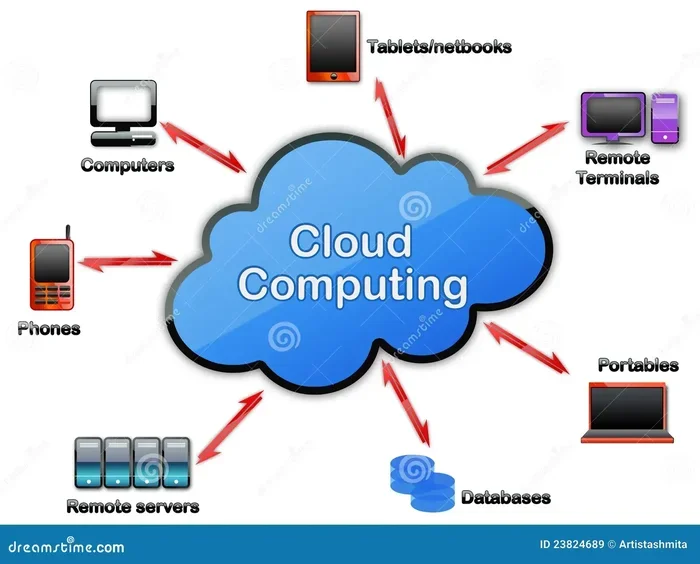
Cloud computing refers to delivering computing services over the internet. These services include storage, processing power, databases, networking, and software. Instead of owning and maintaining physical servers, you rent access to these resources from a cloud provider.
The most common types of cloud computing are public cloud, private cloud, and hybrid cloud. A public cloud shares resources across multiple users. A private cloud dedicates resources to a single organization. A hybrid cloud combines both approaches. Each model has its own strengths and ideal use cases.
Cloud services fall into three main categories: Infrastructure as a Service (IaaS), Platform as a Service (PaaS), and Software as a Service (SaaS). IaaS gives you the raw infrastructure. PaaS provides a development environment. SaaS delivers ready-to-use applications. Understanding these models helps you choose the right cloud computing solutions for your needs.
Top Cloud Computing Benefits You Should Know
1. Significant Cost Savings
One of the biggest cloud computing benefits is cost savings. Traditional IT infrastructure requires a huge upfront investment. You need to buy servers, networking equipment, cooling systems, and more. On top of that, you need staff to maintain everything.
Cloud computing flips this model. You pay only for what you use. This is called a pay-as-you-go model. It turns a large capital expense into a manageable operational expense. Small businesses especially benefit because they do not need to invest in expensive hardware upfront.
Here are some specific ways cloud services save money:
- No hardware purchases: You skip the cost of buying and replacing physical servers.
- Reduced IT staff needs: The provider handles maintenance, updates, and troubleshooting.
- Lower energy costs: Cloud data centers are far more energy-efficient than on-premise setups.
- Pay-as-you-go pricing: You only pay for the resources you actually consume.
Before signing up with any provider, make sure you read the terms and conditions carefully. Some providers have hidden fees that can eat into your savings.
2. Scalability and Flexibility
Scalability is one of the most talked-about cloud computing benefits. With traditional hosting, scaling up means buying more hardware. This process takes weeks or even months. With cloud computing, you can scale resources in minutes.
Need more storage during a busy season? Just increase your allocation. Traffic dropping? Scale back down. This flexibility is a game-changer for businesses with fluctuating demands. You never pay for capacity you do not need.
Cloud hosting also supports automatic scaling. Many providers offer tools that adjust resources based on real-time traffic. This means your applications stay fast and responsive without any manual intervention. For growing businesses, this kind of elasticity is invaluable.
3. Remote Access and Collaboration
Cloud computing enables remote access from anywhere in the world. As long as you have an internet connection, you can reach your files, applications, and data. This has become especially important after the rise of remote work.
Teams can collaborate in real time on cloud-based documents and projects. Multiple people can work on the same file simultaneously. This boosts productivity and reduces the back-and-forth of emailing files back and forth.
For businesses with distributed teams or freelancers, cloud services provide a centralized workspace. Everyone stays connected and up to date. This level of accessibility was nearly impossible with traditional on-premise systems.
4. Automatic Updates and Maintenance
Cloud providers handle all the heavy lifting when it comes to maintenance. They push security patches, software updates, and performance improvements automatically. This means your IT team can focus on strategic tasks instead of routine upkeep.
With on-premise systems, updates can be time-consuming and disruptive. Downtime during maintenance windows can affect productivity. Cloud computing eliminates most of these headaches. The provider ensures your infrastructure stays current and secure with minimal effort on your part.
5. Disaster Recovery and Data Backup
Data loss can be catastrophic for any business. Cloud computing offers robust disaster recovery solutions. Your data is stored in multiple locations, often across different geographic regions. This redundancy means your data stays safe even if one location experiences a failure.
Traditional backup methods like external hard drives or tapes are vulnerable to physical damage, theft, and loss. Cloud-based backup is automatic and continuous. You can restore data quickly in the event of a disaster, minimizing downtime and business disruption.
Cloud Computing Drawbacks You Need to Consider
1. Internet Dependency
The biggest drawback of cloud computing is its reliance on a stable internet connection. If your internet goes down, you lose access to your data and applications. For businesses that operate in areas with unreliable internet, this can be a serious problem.
Even brief outages can disrupt workflows and cause frustration. While most cloud providers offer uptime guarantees of 99.9% or higher, no service is immune to downtime. You need a solid internet connection and a backup plan to mitigate this risk.
2. Security and Privacy Concerns
Storing data on someone else’s servers naturally raises security concerns. While top cloud providers invest billions in security measures, no system is completely immune to breaches. Data breaches at major cloud companies make headlines regularly, and they shake user confidence.
Privacy is another concern. When you store data in the cloud, you are trusting a third party to handle it responsibly. Different countries have different data protection laws, which can complicate compliance. Before migrating to the cloud, review the terms and conditions of any provider to understand how your data is handled, stored, and shared.
3. Vendor Lock-In
Vendor lock-in happens when switching cloud providers becomes difficult and expensive. Each provider has its own tools, APIs, and architecture. Migrating your data and applications from one platform to another can be complex and time-consuming.
This means you may become dependent on a single provider. If they raise their prices or change their service terms, you have limited options. To avoid this, consider using multi-cloud strategies or choosing providers that support open standards and data portability.
4. Limited Control and Customization
When you use cloud services, you do not own the underlying infrastructure. This means your control is limited. The provider manages the hardware, networking, and sometimes even the software stack. You are essentially renting a slice of their infrastructure.
For businesses with highly specific or custom requirements, this lack of control can be frustrating. You may not be able to configure the environment exactly the way you want. Some legacy applications also do not work well in cloud environments, which can limit your migration options.
5. Downtime and Performance Issues
Even the best cloud providers experience downtime. Scheduled maintenance, unexpected outages, or performance degradation can affect your operations. While providers offer service level agreements (SLAs) with uptime guarantees, downtime still happens.
Performance can also vary depending on your location and the provider’s server load. If you are far from the data center, latency can become an issue. For applications that require real-time processing, this can be a significant drawback.
Cloud Computing Benefits vs. Drawbacks: A Comparison
| Factor | Benefits | Drawbacks |
|---|---|---|
| Cost | Lower upfront costs, pay-as-you-go model | Ongoing subscription costs can add up over time |
| Scalability | Scale up or down instantly | Over-scaling can lead to unexpected costs |
| Security | Provider-level security and encryption | Shared responsibility model; breaches still possible |
| Access | Access from anywhere with internet | Requires reliable internet connection |
| Control | Provider handles maintenance and updates | Limited customization and infrastructure control |
| Reliability | Redundant data storage across regions | Downtime and outages can still occur |
How to Choose the Right Cloud Solution
Choosing the right cloud solution depends on your specific needs. Here are some factors to consider before you commit:
- Assess your needs: Understand your storage, computing, and application requirements. Different businesses have different demands.
- Evaluate providers: Compare pricing, features, uptime guarantees, and security certifications across providers.
- Consider compliance: If you handle sensitive data, make sure the provider meets regulatory requirements like GDPR or HIPAA.
- Plan for migration: Think about how you will move your existing data and applications to the cloud. A clear migration plan reduces risk.
- Review the terms: Always read the provider’s terms and conditions before signing up. Understanding the fine print protects you from surprises later.
Taking the time to evaluate your options pays off. The right cloud computing solutions can transform your operations, but the wrong choice can create headaches and unexpected costs.
Expert Insights on Cloud Computing
Industry experts agree that cloud computing is here to stay. The global cloud market continues to grow year after year. Businesses of all sizes are moving to the cloud because the advantages often outweigh the disadvantages.
However, experts also caution against a blind rush to migrate. Not every workload belongs in the cloud. Some applications perform better on-premise, especially those with strict latency requirements or heavy data processing needs. The key is to evaluate each workload individually and choose the right deployment model.
Many experts recommend a hybrid approach. By combining public cloud, private cloud, and on-premise resources, you get the best of both worlds. This strategy gives you flexibility, cost control, and the ability to keep sensitive data on-premise while leveraging the cloud for less critical workloads.
Common Mistakes to Avoid When Adopting Cloud Computing
Many organizations make avoidable mistakes during their cloud journey. Here are some pitfalls to watch out for:
- Ignoring hidden costs: Cloud pricing can be deceptive. Watch out for data egress fees, API call charges, and premium support costs.
- Skipping security audits: Just because data is in the cloud does not mean it is automatically secure. Regular security audits are essential.
- Not training your team: Your staff needs to understand how to use cloud tools effectively. Untrained users can waste resources and create security gaps.
- Overlooking compliance requirements: Different industries have different regulations. Make sure your cloud setup complies with all relevant laws.
- Relying on a single provider: Putting all your eggs in one basket increases your exposure to vendor lock-in and service disruptions.
Avoiding these mistakes sets you up for a smoother and more successful cloud adoption experience.
The Future of Cloud Computing
The future of cloud computing looks bright. New technologies like edge computing, serverless architecture, and artificial intelligence are shaping the next generation of cloud services. These innovations will make cloud computing even more powerful and accessible.
Edge computing, for example, brings processing closer to the user. This reduces latency and improves performance for real-time applications. Serverless computing lets developers focus on code without worrying about infrastructure. Both trends are expanding the possibilities of what cloud computing can do.
As cloud technology evolves, so will the benefits and drawbacks. Staying informed and adaptable is the best strategy for any business looking to leverage the cloud effectively.
Final Thoughts
Cloud computing offers incredible advantages, from cost savings and scalability to remote access and automatic updates. At the same time, it comes with real drawbacks like internet dependency, security concerns, and vendor lock-in. Understanding both sides is the key to making a smart decision.
Take your time to evaluate your options. Consider your business needs, budget, and risk tolerance. The right cloud strategy can give you a competitive edge and set your business up for long-term success. And always remember to review any provider’s terms and conditions before you commit.
The cloud is not a one-size-fits-all solution. But with the right approach, it can be a powerful tool that drives growth, efficiency, and innovation. Start small, learn as you go, and scale at your own pace.
Frequently Asked Questions
What are the main benefits of cloud computing?
The main benefits include cost savings, scalability, remote access, automatic updates, and robust disaster recovery. Cloud computing allows businesses to pay only for what they use and scale resources up or down based on demand.
What are the biggest drawbacks of cloud computing?
The biggest drawbacks include internet dependency, security and privacy concerns, vendor lock-in, limited control, and potential downtime. These risks can be managed with proper planning and by choosing a reputable provider.
Is cloud computing safe for sensitive data?
Cloud computing can be safe if you choose a provider with strong security certifications and encryption. However, you should always review the provider’s terms and conditions and implement your own security measures like multi-factor authentication and data encryption.
How much does cloud computing cost?
Costs vary widely depending on the provider, services used, and usage levels. Most providers offer pay-as-you-go pricing, which means you only pay for the resources you consume. Always watch out for hidden fees like data transfer charges.
Can small businesses benefit from cloud computing?
Absolutely. Small businesses benefit greatly from cloud computing because it eliminates the need for expensive hardware and dedicated IT staff. Cloud services level the playing field, giving small companies access to the same powerful tools as large enterprises.
What is the difference between public, private, and hybrid cloud?
A public cloud shares resources across multiple users and is the most cost-effective. A private cloud dedicates resources to a single organization for greater control and security. A hybrid cloud combines both, giving you flexibility to choose the best option for each workload.
=== CONCLUSION ===
Cloud computing benefits and drawbacks go hand in hand. The technology offers incredible advantages in cost, scalability, and accessibility. But it also comes with real challenges around security, control, and dependency. The best approach is to weigh both sides carefully and choose a strategy that fits your unique needs.
Start by evaluating your current infrastructure and identifying which workloads would benefit most from the cloud. Research providers, compare pricing, and always read the fine print. With the right plan, cloud computing can be a transformative force for your business.