The Complete Guide to the Cloud Computing Cost Model
The cloud computing cost model determines how you pay for cloud services, from pay-as-you-go to reserved instances and beyond. Understanding this model helps businesses control spending, avoid waste, and maximize return on investment. This guide covers every major pricing approach, real-world examples, and actionable strategies you can start using today.
Running a business in the cloud feels like freedom. You scale up. You scale down. You pay for what you use. But here is the thing many people miss. The cloud computing cost model is not as simple as it looks. Behind every bill hides a world of pricing tiers, hidden fees, and tricky terms. If you do not understand how cloud pricing works, you could be wasting hundreds or even thousands of dollars every month.
This guide breaks it all down. You will learn what the cloud computing cost model really means. You will explore the different cloud pricing models available today. You will also discover practical ways to optimize cloud costs and avoid common traps. Whether you are a startup or a growing business, this guide gives you the knowledge to take control of your cloud spending.
We cover everything from pay-as-you-go plans to reserved instances and beyond. You will see real-world examples and actionable tips you can use right away. Let us dive in and make sense of your cloud bill together.
Key Takeaways
- Multiple pricing models exist: pay-as-you-go, reserved instances, and spot pricing each serve different business needs and budgets.
- Cloud billing is usage-based: you pay for compute hours, storage, data transfer, and additional services, which adds up quickly if unchecked.
- Cost optimization is essential: right-sizing resources, tagging, and using cost management tools can reduce waste significantly.
- Hidden costs are real: data egress fees, support tiers, and idle resources often surprise businesses that don’t plan ahead.
- Choosing the right model depends on your workload: steady workloads benefit from reserved pricing, while variable workloads suit on-demand options.
- Regular reviews keep costs low: monitoring and adjusting your cloud usage monthly prevents budget overruns.
📑 Table of Contents
What Is the Cloud Computing Cost Model?
The cloud computing cost model is the framework that determines how cloud providers charge their customers. Instead of buying physical servers and data centers, businesses rent computing resources over the internet. The way you pay for those resources shapes your entire IT budget.
Think of it like a utility bill. You use electricity, and you pay for what you consume. Cloud computing works similarly, but with more variables. Your bill might include charges for compute power, storage space, data transfer, and specialized services like databases or machine learning tools.
Why Understanding the Cost Model Matters
Many businesses move to the cloud without fully understanding the cloud billing structure. They assume it will be cheaper. Sometimes it is. Sometimes it is not. The difference comes down to knowledge. When you understand the cloud computing cost model, you can predict costs, plan budgets, and avoid unpleasant surprises.
Understanding costs also helps you compare providers. AWS, Google Cloud, and Microsoft Azure all have different pricing structures. Some offer better rates for certain workloads. Others shine in specific regions or service categories. Knowing your options gives you real negotiating power.
The Three Main Cloud Pricing Models
Cloud providers offer several ways to charge for their services. Each model has strengths and weaknesses. Your choice depends on your workload, budget, and growth plans. Let us look at the three most common approaches.
On-Demand (Pay-As-You-Go) Pricing
Pay-as-you-go is the most flexible cloud pricing model. You pay for compute resources by the hour or second. There are no long-term contracts. You can scale up or down at any time. This model works well for businesses with unpredictable workloads.
For example, an e-commerce site might see traffic spikes during holiday seasons. With on-demand pricing, they pay for extra capacity only during those peak times. Once the rush ends, they scale back and stop paying for unused resources.
The downside is cost. On-demand rates are typically the highest per-unit price. Over time, businesses that rely entirely on pay-as-you-go can spend more than they would with committed plans.
Reserved Instances and Committed Use
Reserved instances require a one- or three-year commitment. In exchange, providers offer significant discounts, often 30 to 70 percent lower than on-demand rates. This model suits businesses with steady, predictable workloads.
Think of a company that runs a customer relationship management system 24/7. They know exactly how much compute power they need. By committing to a reserved instance, they lock in lower rates and simplify cloud budgeting.
However, reserved instances come with risk. If your workload changes unexpectedly, you may still pay for resources you no longer need. Careful planning is essential before signing any commitment.
Spot Instances and Preemptible Pricing
Spot instances are unused cloud capacity sold at steep discounts, sometimes up to 90 percent off on-demand prices. The catch? Providers can reclaim these resources with short notice. This model works best for fault-tolerant workloads like batch processing, rendering, or testing environments.
A data analytics company might use spot instances to process large datasets overnight. If the spot instance gets interrupted, they simply restart the job later. The savings far outweigh the occasional interruption.
How Cloud Billing Actually Works
Cloud billing can feel like a mystery if you do not know what to look for. Providers break down charges into several categories. Understanding each category helps you read your bill with confidence.
Compute Costs
Compute charges cover the processing power you use. This is usually the largest line item on any cloud bill. Pricing depends on the type of virtual machine, its CPU and memory configuration, and how long it runs. Elastic computing allows you to adjust resources dynamically, which directly impacts your compute costs.
Storage Costs
Storage pricing varies by type. Standard storage costs more than cold or archive storage. The amount of data you store and how often you access it affects the price. Cloud storage costs add up quickly, especially for businesses handling large media files or backups.
Data Transfer Costs
Data transfer, or egress fees, charges you for data leaving the cloud provider’s network. Many businesses are surprised by this cost. Ingress traffic (data coming in) is usually free. But outgoing data transfer can be significant, especially for content delivery or backup operations.
Additional Services
Beyond compute, storage, and transfer, providers charge for add-on services. Databases, load balancers, monitoring tools, and security services all come with their own fees. These ancillary cloud costs can quietly inflate your bill if you are not tracking them.
Cloud Cost Optimization Strategies
Controlling cloud spending requires active management. Cloud providers make it easy to spin up resources, which also makes it easy to overspend. Here are proven strategies to keep costs in check.
Right-Size Your Resources
Many businesses provision more resources than they actually need. This is called over-provisioning. Right-sizing means matching your resource allocation to actual demand. Use monitoring tools to identify underutilized instances and downsize them accordingly.
Use Tagging and Cost Allocation
Cloud cost allocation becomes much easier when you tag resources properly. Tags are labels you attach to cloud resources. They help you track which team, project, or department is using what. Without tags, it is nearly impossible to identify where your money goes.
Leverage Cost Management Tools
All major cloud providers offer built-in cost management tools. AWS Cost Explorer, Google Cloud Billing Reports, and Azure Cost Management all provide detailed spending insights. Third-party tools like CloudHealth, Spot.io, and Vantage offer even deeper analysis and automation.
Implement Auto-Scaling Policies
Auto-scaling adjusts your resources based on real-time demand. During low-traffic periods, auto-scaling reduces capacity and lowers costs. During peak times, it adds resources to maintain performance. This dynamic approach prevents both overspending and underperformance.
Schedule Non-Production Resources
Development and testing environments often run 24/7 when they only need to run during business hours. Scheduling these resources to shut off at night and on weekends can produce significant savings. This simple practice reduces cloud waste without impacting development workflows.
Regularly Review and Audit
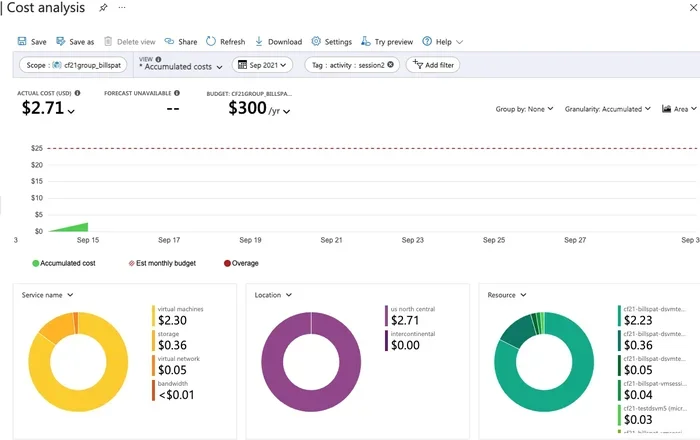
Cloud cost audits should happen at least monthly. Review your billing dashboard. Identify trends. Look for anomalies. Catching unexpected charges early prevents budget overruns and keeps your total cost of ownership manageable.
Quick Tips for Immediate Savings
- Turn off idle resources immediately after testing is complete.
- Use smaller instance types for development and staging environments.
- Enable billing alerts to get notified before costs spike.
- Consider multi-cloud strategies to take advantage of the best pricing from each provider.
- Negotiate enterprise discounts if your usage volume is high enough.
Common Mistakes That Drive Up Cloud Bills
Even experienced teams make mistakes with cloud cost management. Awareness of these pitfalls helps you avoid them.
Ignoring Data Egress Fees
Many businesses focus on compute and storage costs while overlooking data transfer fees. Egress charges can become a major expense, especially for companies serving large amounts of content to end users.
Leaving Resources Unattached
Orphaned resources like unused volumes, forgotten IP addresses, and idle load balancers still cost money. These zombie resources quietly drain your budget without providing any value.
Choosing the Wrong Pricing Model
Not every workload benefits from the same pricing tier. Running a steady database on on-demand instances instead of reserved instances can cost three to five times more over a year. Matching your cloud pricing strategy to your workload pattern is critical.
Not Setting Budgets or Alerts
Without budgets and alerts, costs can spiral unchecked. Setting spending thresholds and receiving notifications when you approach them gives you a safety net against unexpected charges.
Overlooking the Total Cost of Ownership
The total cost of ownership includes more than just the provider bill. It includes migration costs, training, integration, and ongoing management. Businesses that only compare sticker prices often underestimate the full picture.
How to Choose the Right Cost Model for Your Business
Selecting the best cloud computing cost model depends on several factors. There is no one-size-fits-all answer. Here is how to approach the decision.
Assess Your Workload Patterns
Start by analyzing your workload. Is it steady and predictable? Variable and seasonal? Sporadic and unpredictable? Each pattern points to a different pricing approach. Steady workloads benefit from reserved instances. Variable workloads suit on-demand or spot pricing.
Evaluate Your Budget
Consider your budget constraints. If cash flow is tight, pay-as-you-go offers flexibility without upfront commitments. If you can commit to a longer-term plan, reserved instances offer substantial savings.
Consider Growth Projections
Think about where your business is headed. A rapidly growing company needs a flexible cloud pricing strategy that can scale with demand. A stable business can lock in reserved pricing and focus on optimization.
Calculate Your Cloud ROI
Cloud ROI measures the return you get from your cloud investment. It goes beyond cost savings to include agility, speed to market, and innovation capacity. A slightly higher cloud spending number might still deliver strong ROI if it accelerates your business goals.
Compare Providers Side by Side
Use pricing calculators from AWS, Google Cloud, and Microsoft Azure to estimate costs for your specific workload. Compare not just base compute prices but also storage, networking, and support costs. The provider with the lowest compute rate may not offer the best overall value.
The Future of Cloud Cost Management
The cloud computing cost model continues to evolve. Providers are introducing more flexible and transparent pricing options. FinOps practices are becoming standard across organizations of all sizes. Artificial intelligence and machine learning are being applied to predict and optimize costs automatically.
Consumption-based pricing is gaining traction as more businesses seek granular control over their spending. Multi-cloud and hybrid cloud strategies are also on the rise, giving businesses the ability to pick the best pricing from each provider.
Staying informed about these trends helps you stay ahead. The companies that invest in understanding their cloud cost structure today will have a significant advantage tomorrow.
Conclusion
The cloud computing cost model is a powerful but complex system. Understanding how it works gives you the tools to control your spending, avoid waste, and get the most value from your cloud investment. From pay-as-you-go flexibility to reserved instance savings, each pricing approach has its place.
The key is to stay proactive. Regularly review your usage. Optimize your resources. Use the right tools and strategies. Cloud cost optimization is not a one-time task. It is an ongoing practice that pays dividends over time.
Take what you have learned from this guide and apply it to your cloud billing today. Small changes in how you manage resources can lead to significant savings. Your future self and your budget will thank you.
Frequently Asked Questions
What is the cloud computing cost model?
The cloud computing cost model is the framework that determines how cloud providers charge customers for services. It includes pricing for compute, storage, data transfer, and additional services. Understanding this model helps businesses predict and control their cloud spending effectively.
What is the difference between pay-as-you-go and reserved instances?
Pay-as-you-go pricing charges you for resources as you use them with no long-term commitment. Reserved instances require a one- or three-year contract in exchange for significant discounts. Choose pay-as-you-go for flexible workloads and reserved instances for steady, predictable usage.
How can I reduce my cloud computing costs?
You can reduce costs by right-sizing resources, using auto-scaling, implementing tagging for cost allocation, scheduling non-production environments, and leveraging spot instances. Regular audits and billing alerts also help prevent unexpected charges and cloud waste.
What are hidden costs in cloud computing?
Hidden costs include data egress fees, idle or orphaned resources, support tier upgrades, and ancillary services like databases and monitoring tools. Many businesses overlook these charges, which can significantly increase their total cost of ownership beyond the base compute price.
Which cloud pricing model is best for startups?
Startups usually benefit from pay-as-you-go pricing because it offers flexibility without upfront commitments. As the business grows and workloads stabilize, startups can explore reserved instances or committed use discounts to reduce costs further.
What is FinOps and how does it relate to cloud costs?
FinOps is a practice that brings financial accountability to cloud cost management. It involves teams from finance, engineering, and operations working together to optimize spending. FinOps helps businesses get the best value from their cloud investment while maintaining performance and innovation.