Cloud Computing vs Colocation Which Is Right For You
Cloud computing vs colocation is one of the most debated topics in modern IT infrastructure. Cloud hosting offers flexibility and scalability, while colocation gives you direct control over your own hardware in a shared data center. This guide breaks down every key difference so you can make a confident, informed choice for your business.
When it comes to hosting your business data and applications, the decision between cloud computing vs colocation can feel overwhelming. Both options have strengths. Both have weaknesses. And both serve very different types of businesses.
So how do you choose? The answer depends on your budget, your growth plans, your security needs, and how much control you want. In this article, we will walk you through everything you need to know. By the end, you will have a clear picture of which option fits your situation best.
Key Takeaways
- Cloud computing is ideal for businesses that need fast scaling and minimal upfront costs.
- Colocation suits organizations that want full control over their server hardware and data.
- Total cost of ownership varies greatly between the two models over time.
- Security and compliance needs often determine which option works best.
- Hybrid approaches are becoming popular for businesses that want the best of both worlds.
- Scalability is faster and easier with cloud services than with colocation.
- Performance can be superior with colocation when you invest in the right server hardware.
📑 Table of Contents
What Is Cloud Computing?
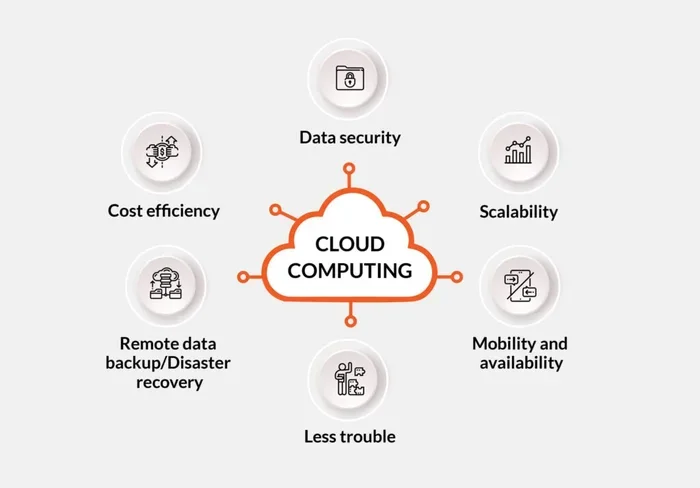
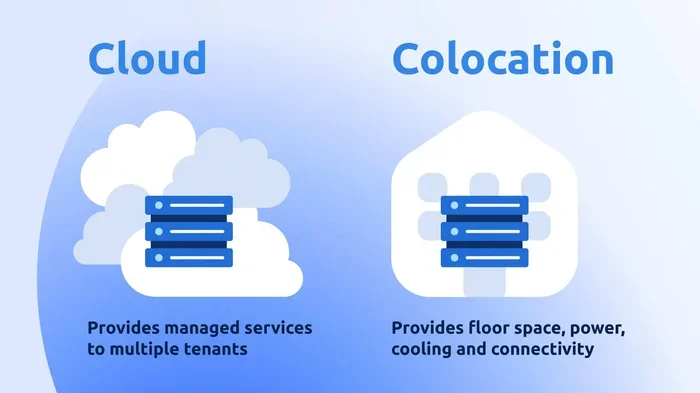
Cloud computing means renting computing resources over the internet instead of owning physical hardware. You use virtual machines, storage, and networking that a provider manages for you. Think of it like renting an apartment. You pay for what you use, and the landlord handles maintenance.
Major cloud providers include Amazon Web Services, Microsoft Azure, and Google Cloud Platform. These platforms offer services like infrastructure as a service, platform as a service, and software as a service. Businesses of all sizes use cloud services to run websites, store data, run applications, and much more.
How Cloud Hosting Works
When you use cloud hosting, your data lives on servers owned by the provider. You access those servers remotely through the internet. The provider handles everything from cooling the data center to replacing failed hardware. You simply log in and manage your virtual resources.
You can spin up a new virtual machine in minutes. You can scale storage up or down with a few clicks. This is why cloud computing is so popular for businesses that experience changing traffic patterns or rapid growth.
What Is Colocation?
Colocation is when you buy your own server hardware and place it inside a shared data center. The facility provides power, cooling, internet bandwidth, and physical security. But you own the equipment. You manage the software. You control everything.
Think of colocation like renting a parking space in a secure garage. You bring your own car. The garage provides the space, security, and electricity. You are responsible for maintaining the vehicle.
How Colocation Facilities Work
A colocation facility, often called a colocation data center, rents out rack space to businesses. You install your server hardware in a secure cage or cabinet. The facility ensures a reliable power supply and strong network connectivity. Most colocation providers also offer managed services, such as monitoring and hands-on support.
Colocation is popular with companies that have strict data security requirements or those that run legacy applications that need dedicated resources. It gives you direct access to your hardware at all times.
Cloud Computing vs Colocation: Key Differences
Understanding the core differences between cloud computing vs colocation helps you make the right call. Let us break down the most important factors.
Cost Structure
Cloud hosting works on a pay-as-you-go model. You pay monthly for the resources you consume. There is no large upfront investment. This makes cloud services attractive for startups and small businesses with limited capital.
Colocation requires a significant upfront purchase of server hardware. You also pay monthly fees for rack space, power, and bandwidth. Over time, colocation can become more cost-effective for businesses with steady, predictable workloads. But the initial investment is much higher.
| Cost Factor | Cloud Computing | Colocation |
|---|---|---|
| Upfront Cost | Low or none | High (server hardware purchase) |
| Monthly Cost | Variable (usage-based) | Fixed (rack, power, bandwidth) |
| Scaling Cost | Pay only for what you use | Requires buying new hardware |
| Maintenance Cost | Covered by provider | Your responsibility |
| Total Cost Over 3 Years | Moderate to high | Moderate for steady workloads |
Control and Customization
With colocation, you have complete control. You choose the processor, the amount of RAM, the storage type, and the operating system. You can customize every setting to match your exact needs. This level of control is hard to match with cloud services.
Cloud computing gives you control over virtual resources. But the underlying hardware belongs to the provider. You cannot physically touch your servers. For most businesses, this does not matter. But for companies with highly specialized workloads, colocation offers advantages that cloud simply cannot match.
Scalability
Scalability is where cloud computing truly shines. Need more storage? Click a button. Need more computing power? Spin up additional virtual machines. This flexibility is a game changer for businesses with fluctuating demand.
Colocation scalability works differently. If you need more power, you must purchase new hardware and install it in the facility. This process takes days or weeks. For this reason, cloud services are often the better choice for businesses that need to scale quickly.
Security and Compliance
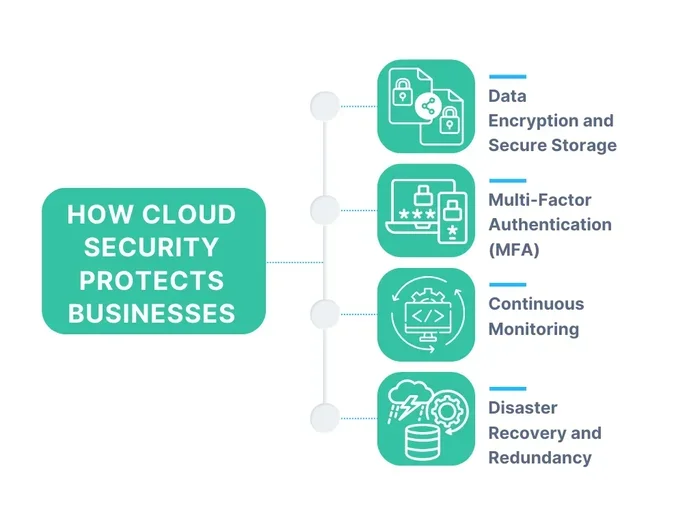
Both options offer strong security. But the approach differs. Cloud providers invest heavily in cybersecurity, encryption, and access controls. They also maintain compliance certifications like SOC 2, HIPAA, and GDPR.
Colocation gives you physical control over your data. You decide who has access to the servers. You manage your own security policies. For industries with strict regulatory requirements, such as healthcare or finance, colocation can provide the level of control that some organizations demand.
Performance
Performance depends on your setup. With colocation, you invest in high-end server hardware. You get dedicated resources. There is no shared environment competing for CPU or memory. This can lead to excellent, consistent performance.
Cloud performance can vary depending on the provider and the instance type you choose. However, major cloud platforms now offer powerful dedicated instances that rival on-premises hardware. For most business applications, cloud performance is more than sufficient.
Pros and Cons of Cloud Computing
Let us look at the advantages and disadvantages of cloud computing in detail.
Pros of Cloud Computing
- Low upfront cost makes it accessible for businesses of all sizes.
- Instant scalability lets you handle traffic spikes with ease.
- No hardware maintenance since the provider handles it all.
- Global reach allows you to deploy resources in multiple regions.
- Automatic updates keep your infrastructure secure and current.
- Pay-as-you-go pricing means you only pay for what you use.
Cons of Cloud Computing
- Ongoing monthly costs can add up over time for large workloads.
- Less control over the underlying hardware and infrastructure.
- Vendor lock-in can make it hard to switch providers later.
- Potential latency if your application is sensitive to network delays.
- Shared resources in some cases may affect performance.
Pros and Cons of Colocation
Now let us examine the benefits and drawbacks of colocation.
Pros of Colocation
- Full hardware control lets you customize every component.
- Predictable costs after the initial hardware investment.
- Physical access to your servers whenever you need it.
- High performance with dedicated, non-shared resources.
- Strong data sovereignty for organizations with compliance needs.
- No recurring hardware fees to the provider beyond facility costs.
Cons of Colocation
- High upfront costs for purchasing server hardware.
- You manage everything including maintenance and replacements.
- Scaling takes time and requires new equipment purchases.
- Physical access may be limited to business hours or require scheduling.
- Power and cooling costs can be significant depending on your setup.
Which Option Is Right for Your Business?
Choosing between cloud computing vs colocation comes down to your specific needs. Let us look at a few scenarios to help you decide.
Choose Cloud Computing If
- You are a startup or small business with limited capital.
- Your workload is unpredictable or changes frequently.
- You need to deploy quickly without managing hardware.
- Your team is small and you want to focus on development, not infrastructure.
- You need global deployment across multiple regions.
Choose Colocation If
- You have strict data security or compliance requirements.
- Your workloads are steady and predictable over the long term.
- You already own server hardware or prefer to control it directly.
- Your application demands dedicated resources and consistent performance.
- You have an experienced IT team that can manage on-premises equipment.
Consider a Hybrid Approach
Many businesses today use a hybrid cloud strategy. They run some workloads in the cloud and keep others in a colocation facility. This approach gives you the flexibility of the cloud and the control of on-premises infrastructure. It is a powerful option for enterprises that need both scalability and security.
For example, you might host your customer-facing application in the cloud for easy scaling. At the same time, you keep sensitive financial data on a dedicated server in a colocation facility. This hybrid setup lets you optimize cost, performance, and security all at once.
Common Mistakes to Avoid
When deciding between cloud computing vs colocation, many businesses make avoidable mistakes. Here are a few to watch out for.
- Ignoring long-term costs. Cloud services seem cheap at first, but costs can balloon over time. Always calculate your total cost of ownership before committing.
- Underestimating bandwidth needs. Colocation facilities charge for data transfer. Cloud providers do too. Understand your bandwidth requirements to avoid surprise bills.
- Choosing based on trends alone. Just because cloud computing is popular does not mean it is the right choice for your business. Evaluate your unique needs first.
- Skipping the security review. Both options can be secure. But you must review the provider’s security practices and compliance certifications carefully.
- Not planning for growth. Choose a solution that can grow with your business. If you expect rapid expansion, cloud services offer the easiest path forward.
Expert Insights
Industry experts often advise businesses to start with cloud computing and gradually evaluate whether colocation makes sense as they mature. This approach lets you test the waters without a major upfront investment.
Many IT leaders also recommend conducting a thorough workload analysis before making the switch. Identify which applications run best in the cloud and which ones benefit from dedicated hardware. This analysis saves time, money, and headaches down the road.
Another expert tip is to negotiate contracts carefully. Whether you choose a cloud provider or a colocation facility, review the terms for scalability, exit fees, and support levels. A good contract protects your business and gives you room to grow.
Key Takeaways
- Cloud computing is ideal for businesses that need fast scaling and minimal upfront costs.
- Colocation suits organizations that want full control over their server hardware and data.
- Total cost of ownership varies greatly between the two models over time.
- Security and compliance needs often determine which option works best.
- Hybrid approaches are becoming popular for businesses that want the best of both worlds.
- Scalability is faster and easier with cloud services than with colocation.
- Performance can be superior with colocation when you invest in the right server hardware.
Final Thoughts
The debate between cloud computing vs colocation is not about which option is better overall. It is about which option is better for your business. Both models have proven track records. Both serve millions of companies around the world. The key is understanding your own needs, budget, and long-term goals.
If you value flexibility and low upfront costs, cloud computing is a fantastic choice. If you need direct control and consistent performance for steady workloads, colocation is hard to beat. And if you are not sure, start small with the cloud. You can always explore colocation later as your business grows.
Take your time. Do your research. And remember, the best hosting solution is the one that aligns with your business objectives. Make the choice that sets you up for long-term success.
Frequently Asked Questions
What is the main difference between cloud computing and colocation?
Cloud computing lets you rent virtual resources from a provider over the internet. Colocation means you own your server hardware and place it in a shared data center. The main difference is ownership and control.
Is colocation cheaper than cloud computing?
It depends on your workload. Colocation can be more cost-effective for steady, predictable workloads over the long term. Cloud computing is usually cheaper for businesses with fluctuating or growing demand because you only pay for what you use.
Can I migrate from colocation to the cloud?
Yes, many businesses migrate from colocation to the cloud as their needs change. The process requires planning and careful execution, but cloud providers offer tools and services to help make the transition smoother.
Which is more secure, cloud or colocation?
Both can be highly secure. Cloud providers offer enterprise-grade security and compliance certifications. Colocation gives you physical control over your data, which some organizations prefer for strict regulatory requirements.
Do I need an IT team for colocation?
Yes, colocation requires you to manage your own server hardware. You need an IT team or at least IT staff capable of handling maintenance, updates, and troubleshooting. Cloud computing reduces this need since the provider handles most infrastructure management.
What is a hybrid cloud setup?
A hybrid cloud setup combines cloud computing with on-premises infrastructure or colocation. Businesses use the cloud for flexible workloads and keep sensitive or steady workloads on dedicated hardware. This approach offers the best of both worlds.