Cloud Computing for Small and Medium Businesses Explained
Cloud computing for small and medium businesses is a game-changer that helps companies cut costs, work remotely, and scale without buying expensive hardware. This guide covers the types of cloud services, real-world benefits, and practical steps to migrate safely. You will learn how to choose the right cloud provider and avoid common pitfalls that hold businesses back.
Key Takeaways
- Cost Savings: Cloud computing eliminates the need for expensive on-site servers and IT maintenance.
- Scalability: SMBs can easily scale up or down based on demand without major investments.
- Remote Work Enablement: Cloud tools let teams collaborate from anywhere with an internet connection.
- Security: Leading cloud providers offer enterprise-grade security that most small businesses could never afford on their own.
- Disaster Recovery: Cloud backup ensures your data stays safe even during hardware failures or natural disasters.
- Ease of Use: Most cloud solutions are plug-and-play, requiring minimal technical expertise to set up.
📑 Table of Contents
- What Is Cloud Computing for Small and Medium Businesses?
- Why Cloud Computing Matters for SMBs
- Types of Cloud Services for SMBs
- Benefits of Cloud Computing for Small and Medium Businesses
- Common Mistakes to Avoid When Moving to the Cloud
- Quick Tips for Getting Started with Cloud Computing
- Final Thoughts on Cloud Computing for Small and Medium Businesses
What Is Cloud Computing for Small and Medium Businesses?
Cloud computing means using remote servers hosted on the internet to store, manage, and process data instead of relying on a local computer or on-site server. For small and medium businesses, this shift is nothing short of revolutionary. Instead of spending thousands of dollars on hardware, companies can rent computing power and storage on a pay-as-you-go basis.
The beauty of cloud computing for small and medium businesses is that it levels the playing field. A small startup can access the same powerful tools and infrastructure as a large corporation. This access to enterprise-grade technology is what makes cloud solutions so attractive for growing companies.
Before cloud computing, businesses had to buy servers, hire IT staff, and maintain physical equipment. That cost a lot of money and took up valuable office space. Today, cloud services handle all of that behind the scenes, so you can focus on running your business instead of managing IT infrastructure.
Before adopting any cloud solution, it is wise to review the terms and conditions of the provider carefully. Understanding the fine print helps you avoid unexpected fees or service limitations down the road.
Why Cloud Computing Matters for SMBs
Cost Efficiency and Lower Overhead
One of the biggest reasons small businesses move to the cloud is cost savings. Traditional IT infrastructure requires a large upfront investment. You need to buy servers, networking equipment, software licenses, and more. On top of that, you must pay IT staff to maintain everything.
With cloud solutions, you pay a monthly or annual subscription instead. There are no massive upfront costs. You only pay for what you use. This model is especially helpful for businesses that are just starting out or that have tight budgets.
- No hardware purchases: Save thousands on servers and equipment.
- No maintenance fees: The provider handles all updates and repairs.
- Predictable expenses: Monthly subscriptions make budgeting much easier.
- No IT staff needed: The provider manages the infrastructure for you.
Scalability That Grows With Your Business
Another major advantage of cloud computing for small and medium businesses is scalability. When your business grows, your IT needs grow too. With traditional setups, scaling up means buying more hardware, which takes time and money.
Cloud services let you add more storage, users, or computing power with just a few clicks. Need more space during the holiday season? Just upgrade your plan temporarily. After the rush, scale back down. This flexibility is something only the cloud can offer.
Many SMBs worry about outgrowing their cloud plan. But the truth is, most providers offer plans that adjust to your needs. You are never locked into a fixed setup. This adaptability makes cloud computing ideal for businesses in any growth phase.
Enabling Remote Work and Collaboration
The recent shift toward remote work has made cloud computing essential. Teams need to access files, applications, and communication tools from anywhere in the world. Cloud platforms make this possible without compromising security or performance.
With cloud-based tools, employees can work from home, a coffee shop, or a different country entirely. They can share documents in real time, hold video meetings, and collaborate on projects seamlessly. This level of flexibility helps businesses attract top talent regardless of location.
Before choosing any cloud platform for remote work, make sure to check the provider’s terms and conditions regarding data access, user limits, and privacy policies. This simple step protects your business from surprises later on.
Types of Cloud Services for SMBs
Not all cloud services are the same. There are three main categories that businesses should understand before making a decision. Each type serves a different purpose and fits different business needs.
Software as a Service (SaaS)
SaaS is the most popular cloud service for small businesses. It gives you access to software applications over the internet. You do not need to install anything on your computer. You simply log in through a web browser and start working.
Common examples of SaaS include email platforms, customer relationship management (CRM) tools, and project management software. Popular SaaS providers include Google Workspace, Microsoft 365, and Salesforce. These tools are affordable, easy to set up, and work well for teams of all sizes.
Infrastructure as a Service (IaaS)
IaaS provides the basic building blocks of computing over the internet. This includes virtual machines, storage, and networking. Businesses use IaaS when they want more control over their IT environment without managing physical hardware.
IaaS is ideal for companies that need custom setups but do not want to invest in physical servers. Providers like Amazon Web Services (AWS), Microsoft Azure, and Google Cloud Platform offer IaaS solutions. While IaaS gives you more flexibility, it does require some technical knowledge to manage effectively.
Platform as a Service (PaaS)
PaaS is designed for developers who want to build and deploy applications without worrying about the underlying infrastructure. It provides a framework and tools that developers can use to create custom software.
For most small businesses, PaaS is less relevant than SaaS or IaaS. However, businesses that develop their own apps or software products can benefit greatly from PaaS. It speeds up development and reduces the cost of building and maintaining applications.
| Service Type | Best For | Examples | Technical Skill Needed |
|---|---|---|---|
| SaaS | Everyday business tools | Google Workspace, Salesforce | Low |
| IaaS | Custom IT infrastructure | AWS, Microsoft Azure | Medium to High |
| PaaS | App development | Heroku, Google App Engine | High |
Benefits of Cloud Computing for Small and Medium Businesses
Automatic Updates and Maintenance
One of the hidden costs of traditional IT is maintenance. Software updates, security patches, and hardware repairs all take time and money. With cloud computing, the provider handles all of this for you.
Updates happen automatically in the background. You always have access to the latest features and security improvements without lifting a finger. This frees up your time and resources to focus on what really matters: growing your business.
Enhanced Data Security
Many SMB owners worry about cloud security. They think, “If my data is not on my own premises, is it safe?” The truth is that leading cloud providers invest billions in security measures. They employ teams of experts and use advanced encryption to protect your data.
Most small businesses cannot afford this level of security on their own. Cloud providers also offer features like multi-factor authentication, regular backups, and compliance certifications. These tools make your data safer than it would be on a local server.
That said, you should always review the terms and conditions of any cloud provider regarding data ownership, breach notifications, and privacy policies. Knowing your rights and responsibilities is the first step toward secure cloud adoption.
Disaster Recovery Made Easy
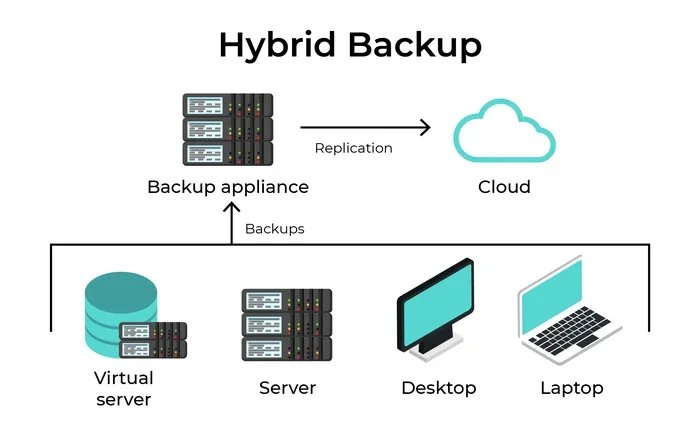
Data loss can be devastating for any business. A hard drive failure, a natural disaster, or even a simple accident can erase critical files. Cloud computing solves this problem with built-in backup and recovery features.
Your data is stored in multiple locations, often across different geographic regions. If one server goes down, your data remains safe and accessible. Recovery time is also much faster compared to traditional backup methods. This means less downtime and less stress for your team.
Competitive Advantage
Cloud computing gives small businesses a real edge over competitors who are still relying on outdated technology. With cloud tools, you can respond to market changes faster, serve customers better, and innovate more quickly.
For example, a small retail business can use cloud-based analytics to understand customer behavior and adjust its marketing strategy in real time. A service-based business can use cloud project management tools to deliver projects more efficiently. These capabilities were once only available to large corporations.
Common Mistakes to Avoid When Moving to the Cloud
Migrating to the cloud is an exciting step, but it is not without risks. Many small businesses make avoidable mistakes that lead to wasted money or data problems. Here are some pitfalls to watch out for.
Choosing the Wrong Provider
Not all cloud providers are created equal. Some offer great features but poor customer support. Others are affordable but lack the security features you need. Before committing, research each provider thoroughly. Read reviews, compare pricing plans, and test their customer service responsiveness.
Ignoring Data Migration Challenges
Moving your existing data to the cloud can be tricky. If you do it without a plan, you risk losing important files or experiencing long periods of downtime. Create a detailed migration strategy before you start. Back up all data first, and consider working with a cloud consultant if your migration is complex.
Underestimating Cloud Costs
While cloud computing is generally more affordable than traditional IT, costs can add up if you are not careful. Some providers charge for data transfer, additional storage, or premium features. Monitor your usage regularly and set budget alerts to avoid surprise bills.
Neglecting Employee Training
Even the best cloud tools are useless if your team does not know how to use them. Invest in training sessions and create simple guides for your employees. Make sure everyone understands how to access files securely and follow best practices for password management.
Quick Tips for Getting Started with Cloud Computing
Ready to make the move? Here are some practical tips to help you get started smoothly.
- Start small: Begin with one or two cloud applications, such as email or file storage. Get comfortable before expanding.
- Assess your needs: Identify which business processes would benefit most from cloud solutions. Focus on areas with the most pain points.
- Set a budget: Determine how much you can spend monthly on cloud services. Stick to your budget and review costs regularly.
- Choose a reputable provider: Look for providers with strong security, good reviews, and responsive support.
- Train your team: Make sure every employee knows how to use the new tools safely and effectively.
- Monitor usage: Keep an eye on your cloud usage to avoid unexpected costs and ensure you are getting the most value.
Final Thoughts on Cloud Computing for Small and Medium Businesses
Cloud computing for small and medium businesses is no longer a luxury or a trend. It is a necessity in today’s digital economy. The benefits are clear: lower costs, greater flexibility, better security, and the ability to scale as your business grows.
Whether you are a startup just getting off the ground or an established SMB looking to modernize, the cloud has something to offer. Start with the basics, choose a trusted provider, and invest in proper training for your team. The transition does not have to be overwhelming. Take it one step at a time, and you will wonder why you did not make the switch sooner.
Remember that every business is different. What works for one company may not work for another. Take the time to evaluate your options, compare providers, and choose the solutions that align with your goals. The right cloud strategy can transform the way you do business and set you up for long-term success.
Before finalizing any cloud agreement, always take a moment to read through the provider’s terms and conditions. Understanding the details protects your business and ensures a smooth, worry-free transition to the cloud.
Frequently Asked Questions
What is cloud computing in simple terms?
Cloud computing means using internet-based servers to store data and run applications instead of relying on your own physical computer or server. It lets you access your files and tools from anywhere with an internet connection, making work more flexible and efficient.
Is cloud computing safe for small businesses?
Yes, cloud computing is generally very safe. Leading providers invest heavily in security measures like encryption, multi-factor authentication, and regular backups. However, you should always choose a reputable provider and follow best practices like using strong passwords and enabling two-factor authentication.
How much does cloud computing cost for small businesses?
Costs vary depending on the provider and the services you need. Many cloud tools offer affordable monthly plans starting from just a few dollars per user. The pay-as-you-go model means you only pay for what you use, which makes budgeting much easier for small businesses.
Can I migrate my existing business data to the cloud?
Absolutely. Most cloud providers offer migration tools and support to help you move your data safely. It is a good idea to back up everything first and create a step-by-step migration plan. If your data is complex, consider working with a cloud consultant to ensure a smooth transition.
What is the difference between public and private cloud?
A public cloud is shared among multiple businesses and managed by a third-party provider. It is more affordable and easier to set up. A private cloud is dedicated to a single organization and offers more control and customization. Private clouds cost more but may be preferred by businesses with strict security or compliance requirements.
Do I need technical skills to use cloud computing?
For most cloud services like SaaS applications, you do not need any technical skills. These tools are designed to be user-friendly and intuitive. However, if you choose IaaS or PaaS solutions, some technical knowledge is helpful. Many providers also offer support and tutorials to get you started.
=== CONCLUSION ===
Cloud computing for small and medium businesses opens the door to affordable, scalable, and secure technology that was once only available to large enterprises. By understanding the different types of cloud services, avoiding common mistakes, and following practical tips, any SMB can make a successful transition to the cloud.
Start small, stay informed, and choose a provider that aligns with your business goals. The cloud is not just about technology. It is about giving your business the tools it needs to thrive in a fast-changing world. Take that first step today, and watch your business grow smarter and stronger.