Cloud Computing On Demand Self Service Explained Simply
Cloud computing on demand self service lets users access computing resources instantly without contacting IT teams. This powerful model gives businesses speed, flexibility, and cost control. You can provision servers, storage, and software with just a few clicks through a self-service portal.
Have you ever wondered how modern companies launch new apps and services so quickly? The answer lies in cloud computing on demand self service. This powerful approach lets anyone with the right permissions grab computing resources whenever they need them. No phone calls. No waiting on IT tickets. Just instant access.
On demand self service is one of the core pillars of cloud computing. It means users can provision resources like servers, storage, and databases on their own through a web portal or API. Think of it like ordering food from an app instead of calling a restaurant and waiting for a human to take your order. The speed difference is enormous.
This model has changed how businesses of all sizes operate. Startups can compete with big companies. Small teams can deliver enterprise-grade infrastructure. And IT departments can focus on strategic work instead of routine tasks. In this guide, we will break down everything you need to know about cloud computing on demand self service in plain, simple language.
Key Takeaways
- Instant Resource Access: On demand self service lets users spin up cloud resources in minutes, not days.
- Cost Efficiency: Pay only for what you use with a pay-as-you-go model that eliminates waste.
- No IT Bottlenecks: Self-service portals remove the need to wait for IT teams to provision resources.
- Scalability Made Easy: Scale resources up or down based on real-time needs effortlessly.
- Broad Cloud Platform Support: Major providers like AWS, Azure, and Google Cloud offer robust self-service tools.
- Governance Matters: Without proper controls, self-service can lead to shadow IT and budget overruns.
📑 Table of Contents
- What Is Cloud Computing On Demand Self Service?
- How On Demand Self Service Works in the Cloud
- Key Benefits of Self-Service Cloud Computing
- Real-World Examples of On-Demand Self Service
- Quick Tips for Using On Demand Self Service Effectively
- Common Mistakes to Avoid with Self-Service Cloud
- Expert Insights on On Demand Self Service
- Comparison: Traditional IT vs. On Demand Self Service
- Conclusion
What Is Cloud Computing On Demand Self Service?
At its core, on demand self service is a cloud computing feature. It allows users to request and manage computing resources automatically. You do not need human intervention from your IT department. The cloud platform handles everything behind the scenes.
This concept is part of the National Institute of Standards and Technology (NIST) definition of cloud computing. NIST identifies five essential characteristics of cloud services. On demand self service sits right at the top of that list. Without it, the cloud as we know it would not exist.
How It Differs from Traditional IT
In traditional IT, getting a new server meant filling out forms. You waited for the IT team to approve your request. Then you waited more while they set up the hardware. This process could take days or even weeks.
With cloud computing on demand self service, the process is completely different. A developer or team member logs into a portal. They choose the resources they need. They click a button. The system provisions everything automatically. This shift from manual to automated is what makes the cloud so powerful.
Key Components of Self-Service Cloud Computing
Several elements make on demand self service work smoothly. Here are the main components:
- Self-Service Portal: A web-based dashboard where users browse and select resources. Think of it as an online store for computing power.
- APIs and Automation: Application programming interfaces let developers integrate resource provisioning into their workflows. This enables automated provisioning at scale.
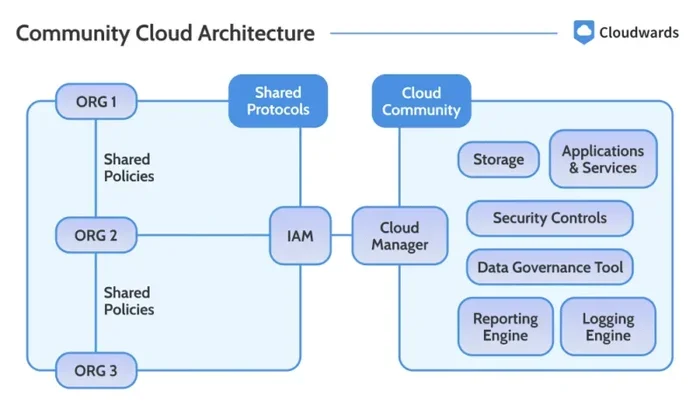
- Identity and Access Management: Security controls ensure only authorized users can access resources. This prevents unauthorized cloud deployment and resource allocation.
- Billing and Metering Systems: These track usage and generate bills based on actual consumption. This supports the pay-as-you-go model.
- Elastic Infrastructure: The underlying cloud infrastructure must be flexible enough to scale resources up or down quickly.
How On Demand Self Service Works in the Cloud
Understanding the mechanics behind on demand self service helps you appreciate its power. The process is simpler than you might think. Let us walk through it step by step.
The User Journey
When a user needs a new virtual machine or database, they follow a straightforward path:
- Log In: The user accesses the self-service portal with their credentials.
- Select Resources: They choose the type of resource needed. This could be a virtual machine, storage bucket, or database instance.
- Configure Settings: They set parameters like CPU, memory, storage size, and region.
- Submit the Request: A single click triggers the provisioning process.
- Instant Provisioning: The cloud platform allocates resources automatically, often in seconds or minutes.
- Start Using: The user can immediately begin working with the new resource.
Behind the Scenes: What the Cloud Provider Does
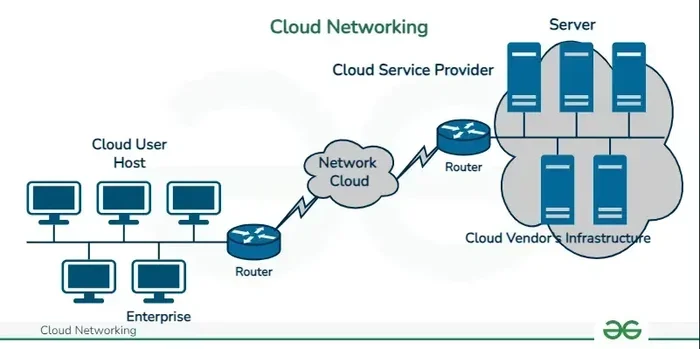
While the user sees a simple interface, a lot happens behind the scenes. The cloud provider’s orchestration engine receives the request. It checks quotas and permissions. It finds available capacity across the cloud platform data centers. Then it provisions the resource and returns access details to the user.
This entire process relies on resource pooling. The provider maintains large pools of shared resources. When a user requests a server, the system pulls from these pools. This is what makes rapid provisioning possible. The resources are already there, waiting to be allocated.
Common Cloud Platforms That Offer Self-Service
Most major cloud services providers support on demand self service. Here is a quick look at the top players:
- Amazon Web Services (AWS): AWS Management Console and APIs offer extensive self-service capabilities. Users can provision EC2 instances, S3 buckets, and more with ease.
- Microsoft Azure: Azure Portal provides a user-friendly interface for cloud infrastructure management. Azure Resource Manager streamlines deployment.
- Google Cloud Platform (GCP): GCP Console and Cloud Shell enable quick resource creation. BigQuery and Compute Engine are popular self-service offerings.
- IBM Cloud: IBM offers self-service options for enterprise workloads, including AI and machine learning tools.
- Oracle Cloud: Oracle Cloud Infrastructure provides self-service provisioning for databases and compute instances.
Key Benefits of Self-Service Cloud Computing
Cloud computing on demand self service delivers real, measurable benefits. Let us explore why so many organizations are adopting this model.
Speed and Agility
Speed is the most obvious advantage. When developers can provision resources instantly, they move faster. They do not wait for IT tickets. They do not wait for hardware orders. This agility translates directly into faster product launches and quicker experimentation.
For example, a marketing team running a holiday campaign can spin up additional servers in minutes. When the campaign ends, they can shut those resources down immediately. No wasted time. No wasted money.
Cost Control and Transparency
The pay-as-you-go model is a game changer for cloud hosting cost management. You only pay for the resources you actually consume. There is no upfront capital expenditure on hardware. There is no paying for idle servers.
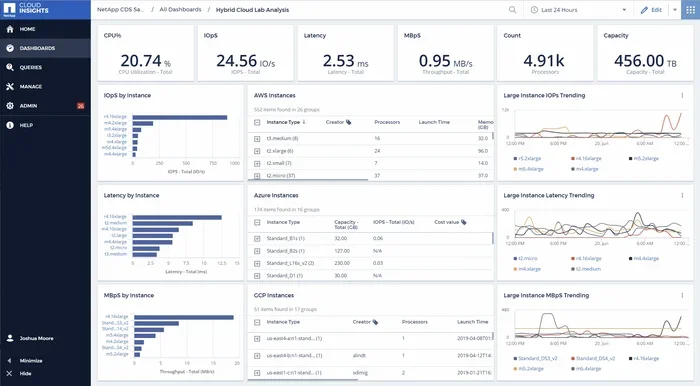
Self-service portals often include cost dashboards. These tools show teams exactly how much they are spending. This transparency encourages responsible resource allocation and helps prevent bill shock.
Reduced IT Bottlenecks
IT teams are often overwhelmed with routine requests. Every developer needing a new server creates a ticket. Every team needing storage creates another one. This creates bottlenecks that slow down the entire organization.
On demand self service removes these bottlenecks. IT teams can focus on strategic initiatives like security, architecture, and innovation. Meanwhile, users get what they need when they need it. It is a win-win situation for everyone involved.
Scalability and Elasticity
Modern applications face unpredictable traffic. A sudden viral post can drive thousands of visitors to your site in minutes. With cloud computing on demand self service, scaling up is as easy as clicking a button. And when traffic drops, you scale back down just as easily.
This elasticity is built into the cloud model. Providers maintain massive data centers with spare capacity. Users tap into this capacity on an as-needed basis. This is far more efficient than maintaining your own data center with peak-capacity hardware.
Empowerment and Innovation
When teams can access resources independently, they feel empowered. They can experiment with new ideas without asking for permission. This fosters a culture of innovation. Developers can test new architectures. Data scientists can spin up powerful virtual machines for analysis. Teams can prototype and iterate rapidly.
This empowerment does not mean a lack of control. With proper governance policies, organizations can balance freedom with accountability. More on that later.
Real-World Examples of On-Demand Self Service
Theory is great, but real examples bring the concept to life. Let us look at how different industries use cloud computing on demand self service in practice.
E-Commerce During Peak Shopping Seasons
Online retailers face massive traffic spikes during holidays like Black Friday and Cyber Monday. With traditional IT, they would need to buy extra servers months in advance. Most of those servers would sit idle for the rest of the year.
With self-service cloud computing, retailers scale up during peak periods and scale down afterward. They provision additional cloud services like load balancers and databases with a few clicks. This approach saves money and ensures a smooth shopping experience for customers.
Startup Product Development
Startups often operate with tiny IT budgets. On demand self service levels the playing field. A small startup team can access the same enterprise-grade infrastructure as a Fortune 500 company. They pay only for what they use. As they grow, they scale seamlessly.
This agility gives startups a competitive edge. They can launch products faster, test ideas cheaply, and respond to market feedback in real time.
DevOps and Continuous Integration
DevOps teams rely heavily on automated cloud deployment. On demand self service is essential for their workflows. When a developer pushes code, automated pipelines spin up test environments, run tests, and tear them down. This entire process happens through self-service APIs and portals.
Without on demand self service, DevOps teams would be constantly bottlenecked by manual provisioning. The speed and reliability of modern software delivery depends on this capability.
Quick Tips for Using On Demand Self Service Effectively
Getting the most from cloud computing on demand self service requires some best practices. Here are quick tips to keep in mind:
- Start Small: Begin with a pilot project. Let one team explore self-service before rolling it out company-wide.
- Set Up Alerts: Configure billing alerts and usage thresholds. This prevents unexpected costs from spiraling out of control.
- Use Templates: Create pre-approved resource templates. This standardizes deployments and reduces configuration errors.
- Tag Everything: Use resource tags to track who is using what. This makes cloud management and cost allocation much easier.
- Train Your Teams: Even though self-service is simple, training helps users make smart choices about resource types and sizes.
- Review Regularly: Schedule periodic reviews of resource usage. Shut down unused instances and right-size over-provisioned ones.
Common Mistakes to Avoid with Self-Service Cloud
While on demand self service is incredibly powerful, it comes with pitfalls. Here are common mistakes organizations make:
Ignoring Governance
Some organizations give users free rein without setting any guardrails. This leads to shadow IT. Teams create resources without IT oversight. Costs explode. Security risks multiply. Governance policies are essential. They define what users can and cannot do. They set spending limits. They enforce security standards.
Over-Provisioning Resources
It is easy to grab more resources than you need. A developer might provision a powerful server for a simple test. This wastes money and creates inefficiency. Teach teams to right-size their resources. Use auto-scaling features. Monitor usage and adjust accordingly.
Neglecting Security
Self-service does not mean security-free. Users must understand cloud security basics. They should know how to configure firewalls, manage access keys, and encrypt data. Security training should be part of any self-service rollout.
Forgetting to Clean Up
Resources that are no longer needed should be decommissioned promptly. Orphaned instances and unused storage buckets add up fast. They cost money and create clutter. Encourage teams to clean up after their projects end. Implement automated cleanup policies where possible.
Expert Insights on On Demand Self Service
Industry experts consistently highlight cloud computing on demand self service as a transformative capability. Here is what thought leaders have to say:
Expert Insight: “On demand self service is the engine that drives cloud agility. Without it, you are just renting someone else’s hardware. With it, you unlock the true power of the cloud.” – Cloud Industry Analyst
Expert Insight: “The biggest mistake we see is organizations adopting self-service without a governance framework. Give teams freedom, but give them guardrails. That balance is what makes self-service work at scale.” – Enterprise Cloud Architect
Expert Insight: “Self-service has democratized infrastructure. Junior developers can now do things that used to require a whole operations team. This has accelerated innovation across every industry.” – DevOps Thought Leader
Comparison: Traditional IT vs. On Demand Self Service
To really understand the value of on demand self service, it helps to compare it directly with traditional IT. Here is a side-by-side look:
- Provisioning Speed: Traditional IT takes days or weeks. Self-service cloud takes minutes or seconds.
- Cost Model: Traditional IT requires upfront capital. Self-service uses a pay-as-you-go operational expense model.
- Scalability: Traditional IT is rigid and slow to scale. Self-service scales elastically with demand.
- IT Dependency: Traditional IT requires constant IT team involvement. Self-service removes that dependency for routine tasks.
- Innovation Speed: Traditional IT slows experimentation. Self-service encourages rapid prototyping and testing.
The comparison makes it clear why so many organizations are moving to cloud computing on demand self service. The benefits are simply too significant to ignore.
Conclusion
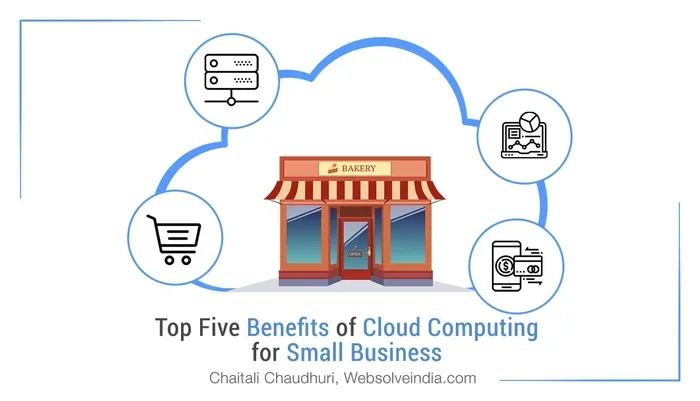
Cloud computing on demand self service has fundamentally changed how organizations access and manage computing resources. It gives users the power to provision infrastructure instantly, without waiting for IT teams. It delivers speed, cost savings, scalability, and empowerment in equal measure.
Whether you are a startup founder, a developer, or an IT leader, understanding on demand self service is essential. It is not just a technical feature. It is a business enabler. It is the foundation of modern cloud strategy.
The key is to adopt it thoughtfully. Set up proper governance. Train your teams. Monitor usage. And always keep the user experience in mind. When done right, on demand self service transforms how your organization operates and competes.
Start small. Learn as you go. And watch as cloud computing on demand self service unlocks new levels of speed, flexibility, and innovation for your team.
Frequently Asked Questions
What exactly is on demand self service in cloud computing?
It is a cloud feature that lets users access and manage computing resources automatically through a portal or API. You do not need to contact IT or wait for manual provisioning. You simply log in, choose what you need, and get it instantly.
How does on demand self service save money?
It follows a pay-as-you-go model. You only pay for the resources you actually use. There is no need to buy expensive hardware upfront. You also avoid paying for idle resources because you can scale down when demand drops.
Is on demand self service the same as public cloud?
Not exactly. On demand self service is a feature available in public, private, and hybrid cloud environments. However, it is most commonly associated with public cloud platforms like AWS, Azure, and Google Cloud. The key idea is automated resource provisioning regardless of the deployment model.
What are the security risks of self-service cloud?
The main risks include unauthorized resource creation, misconfigured security settings, and shadow IT. These risks can be managed with proper governance policies, access controls, and security training. Organizations should implement guardrails that allow freedom while maintaining control.
Can small businesses benefit from on demand self service?
Absolutely. In fact, small businesses often benefit the most. They gain access to enterprise-grade infrastructure without large upfront investments. They can scale as they grow and pay only for what they use. It levels the playing field against larger competitors.
What role do APIs play in on demand self service?
APIs are the backbone of self-service cloud computing. They allow developers to automate resource provisioning programmatically. Instead of clicking through a portal, teams can integrate cloud resource creation directly into their development pipelines and workflows. This enables true automated provisioning at scale.