Which Describes Cloud Computing And How It All Works
Cloud computing is the delivery of computing services over the internet, including storage, software, and servers. It lets you access powerful tools without owning physical hardware, and you only pay for what you use. This guide explains what cloud computing is, how it works, and why it has become essential for modern life.
You hear the term everywhere these days. Cloud computing powers your favorite apps, stores your photos, and even runs entire businesses. But what exactly is it, and how does it all work?
At its core, cloud computing means using remote servers on the internet to store, manage, and process data instead of your own computer or local server. Think of it like renting electricity instead of building your own power plant. You get what you need, when you need it, and you only pay for what you use.
This guide breaks down everything you need to know about cloud computing. You will learn what it is, how it works behind the scenes, the different types of cloud services, and why so many people and businesses are making the switch. Whether you are a curious beginner or someone exploring cloud migration, this article has you covered.
Key Takeaways
- Cloud computing delivers computing resources over the internet instead of relying on local hardware.
- The three main service models are Infrastructure as a Service, Platform as a Service, and Software as a Service.
- Cloud services offer cost savings, scalability, and disaster recovery for businesses of all sizes.
- Cloud storage and cloud platforms power everyday apps like Netflix, Google Drive, and Gmail.
- Avoiding common mistakes like ignoring costs and overlooking cloud security is key to a successful cloud migration.
- Pay-as-you-go pricing makes cloud computing accessible even for small startups and individuals.
- Virtualization and data centers are the behind-the-scenes technology that makes the cloud possible.
📑 Table of Contents
What Is Cloud Computing?
Cloud computing is a model for delivering computing resources over the internet. Instead of owning and maintaining physical hardware, you access services like storage, databases, and software through a cloud provider. This approach is often called on-demand computing because you can scale resources up or down based on your needs.
The idea is simple but powerful. Rather than buying expensive servers and storing data in a closet, you rent access to cloud infrastructure from companies like Amazon Web Services, Microsoft Azure, or Google Cloud. These data centers are massive facilities filled with thousands of virtual servers that handle your requests.
The Simple Definition
In plain terms, cloud computing is the delivery of computing services including servers, storage, databases, networking, software, and analytics over the internet. The user does not manage or control the underlying cloud infrastructure. Instead, the cloud provider handles all of that.
You simply log in, use the services you need, and pay a subscription or usage-based fee. It is similar to how you might stream a movie instead of buying a DVD. You get access without the hassle of owning and maintaining the physical medium.
Why It Matters Today
Cloud computing has transformed how businesses and individuals work. Here are a few reasons why it matters so much today:
- Remote work depends on cloud services to keep teams connected and productive.
- Startups can launch products without huge upfront hardware costs.
- Cloud storage lets people back up photos and important files safely.
- Scalability means businesses can grow without buying new physical equipment.
Almost every modern app and service relies on cloud technology in some way. From Netflix streaming your favorite shows to Slack keeping your team in sync, cloud computing is the invisible engine behind it all.
How Does Cloud Computing Work?
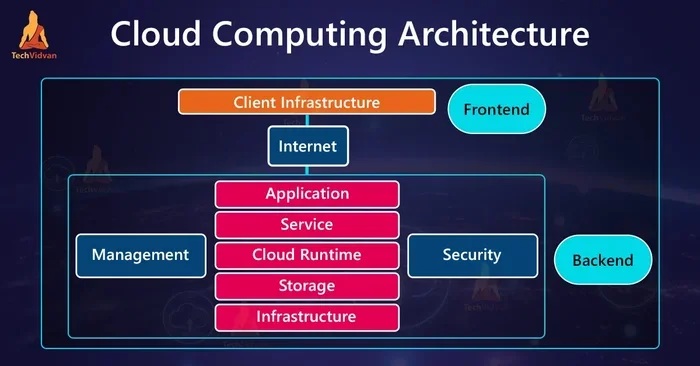
Understanding how cloud computing works is easier than you might think. At a high level, it involves three main components: the front end, the back end, and the network that connects them.
The front end is what you see and interact with. This is your device, whether it is a laptop, phone, or tablet. The back end is where the magic happens. It consists of remote servers, databases, and computers housed in data centers around the world.
The network, usually the internet, connects the front end to the back end. When you open an app or save a file, your device sends a request through the internet. The cloud provider’s servers process that request and send the result back to you. All of this happens in milliseconds.
The Role of Data Centers
Data centers are the backbone of cloud computing. These are large, secure facilities packed with servers that store and process data. A single data center can house tens of thousands of machines running around the clock.
These facilities are designed for redundancy and reliability. If one server fails, another takes over automatically. This is why your files and apps stay available even if hardware issues occur. Virtualization technology allows a single physical server to run multiple virtual servers, making cloud deployment more efficient and cost-effective.
Quick Tips for Understanding the Cloud
Here are some simple tips to help you grasp how cloud computing works in practice:
- Think of the cloud as someone else’s computer that you rent.
- Every time you use Google Drive or iCloud, you are using cloud storage.
- Internet hosting is a basic form of cloud computing that has been around for decades.
- Pay-as-you-go pricing means you never pay for what you do not use.
Once you see cloud computing as a utility, like water or electricity, it becomes much easier to understand. You just turn it on, use it, and pay for what you consume.
Types of Cloud Computing Services
Cloud computing services fall into three main categories. Each one serves a different purpose and caters to different needs. Let us break them down.
IaaS, PaaS, and SaaS Compared
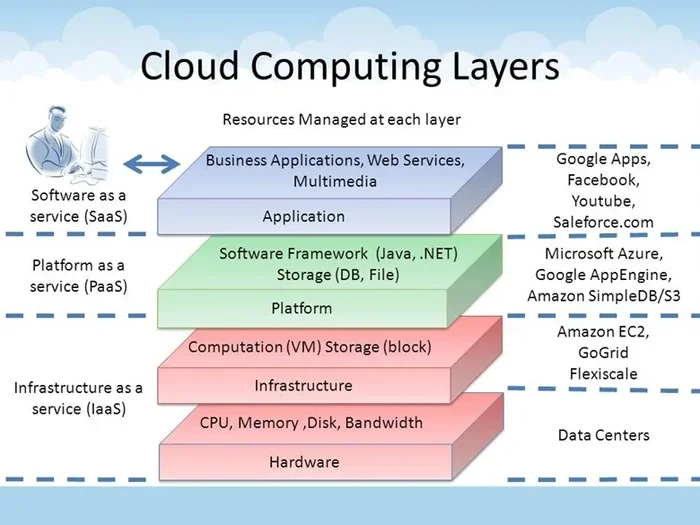
The three core service models of cloud computing are often referred to by their acronyms. Here is a simple comparison to help you understand the differences:
| Service Model | What You Get | Who Manages It | Example |
|---|---|---|---|
| Infrastructure as a Service (IaaS) | Virtual machines, storage, networking | You manage apps and data | Amazon EC2 |
| Platform as a Service (PaaS) | Development tools and runtime environments | Provider manages infrastructure | Google App Engine |
| Software as a Service (SaaS) | Ready-to-use applications | Provider manages everything | Google Workspace |
Infrastructure as a Service (IaaS) gives you the most control. You get raw computing resources and build your own setup. Platform as a Service (PaaS) provides a framework for developers to build apps without worrying about the underlying cloud infrastructure. Software as a Service (SaaS) delivers finished products directly to users, like email or project management tools.
Public, Private, and Hybrid Clouds
Cloud deployment also comes in different flavors. A public cloud is owned and operated by a cloud provider and shared among multiple users. A private cloud is dedicated to a single organization. A hybrid cloud combines both, giving you flexibility and more options for cloud migration.
Most small businesses and individuals use public cloud services because they are affordable and easy to access. Large enterprises often prefer private clouds for greater control and cloud security. The hybrid cloud approach is growing in popularity as organizations want the best of both worlds.
Benefits of Cloud Computing
There are many reasons why cloud computing has become the standard for modern IT. Let us look at the biggest advantages that make it so appealing.
Cost Savings and Scalability
One of the top benefits of cloud computing is cost savings. You do not need to buy expensive hardware or maintain a physical data center. Instead, you pay a monthly fee or a pay-as-you-go rate based on actual usage.
Scalability is another huge advantage. Need more storage or computing power during a busy season? Cloud services let you scale up instantly. When demand drops, you scale back down. This flexibility is something traditional internet hosting simply cannot match.
For startups and small businesses, this is a game-changer. You can compete with larger companies without a massive IT budget. The cloud provider handles all the heavy lifting, so you can focus on growing your business.
Disaster Recovery and Collaboration
Cloud computing also makes disaster recovery much simpler. Your data is stored in multiple locations, so even if one facility goes down, your information stays safe. This level of cloud security and redundancy is something most businesses could never afford to build on their own.
Collaboration improves too. Teams can access files and tools from anywhere in the world. As long as you have an internet connection, you can work just as effectively from home, a coffee shop, or a different country. This is why cloud migration has accelerated so rapidly in recent years.
Expert Insights on Cloud Adoption
“The cloud is not just a technology trend. It is a fundamental shift in how businesses think about IT resources.” Industry analysts consistently note that organizations adopting cloud platforms see faster innovation cycles and improved agility. The key is to start small, test the waters, and gradually expand your cloud deployment as you build confidence.
Experts also recommend choosing a cloud provider that aligns with your long-term goals. Look for strong cloud security features, transparent pricing, and good customer support. Not all cloud services are created equal, so doing your homework before committing pays off in the long run.
Common Cloud Computing Use Cases
Cloud computing is everywhere, and you probably use it more than you realize. Here are some of the most common use cases in everyday life and business.
Everyday Examples You Already Use
You interact with cloud computing every single day, often without even knowing it:
- Streaming services like Netflix and Spotify use cloud platforms to deliver content to millions of users worldwide.
- Cloud storage services like Google Drive and Dropbox keep your files safe and accessible from any device.
- Email services like Gmail and Outlook run on cloud infrastructure and have done so for years.
- Social media platforms rely on cloud computing to store posts, photos, and videos for billions of users.
- Online gaming services use remote servers to process game data and deliver smooth multiplayer experiences.
Business Use Cases
For businesses, cloud computing opens up a world of possibilities:
- Customer relationship management (CRM) tools like Salesforce run entirely in the cloud.
- Data analytics platforms process massive datasets using cloud infrastructure to uncover insights.
- E-commerce stores use cloud services to handle traffic spikes during sales events and holidays.
- Remote teams collaborate using cloud-based tools like Zoom and Microsoft Teams.
- Machine learning and AI workloads run on powerful cloud platforms that would be too expensive to build in-house.
From personal use to enterprise-level operations, cloud computing has become essential. The flexibility and power it offers make it hard to imagine going back to traditional on-premises setups.
Common Mistakes to Avoid with Cloud Computing
While cloud computing offers tremendous benefits, there are some common pitfalls you should watch out for. Avoiding these mistakes will help you get the most out of your cloud services.
- Ignoring costs: Pay-as-you-go pricing can add up if you do not monitor usage. Set up billing alerts and review your cloud services bills regularly to stay on track.
- Overlooking cloud security: Just because your data is in the cloud does not mean it is automatically safe. Use strong passwords, enable two-factor authentication, and encrypt sensitive files.
- Vendor lock-in: Relying too heavily on one cloud provider can make it difficult to switch later. Consider multi-cloud strategies for long-term flexibility and control.
- Skipping the migration plan: Cloud migration should be a carefully planned process. Rushing into it without proper planning can lead to data loss and unexpected downtime.
- Underestimating bandwidth needs: If your team relies heavily on cloud computing, make sure your internet connection can handle the load without slowdowns.
By being aware of these mistakes, you can set yourself up for a smooth and successful experience with cloud computing. A little planning goes a long way.
Conclusion
Cloud computing has fundamentally changed how we store, process, and access information. From cloud storage for personal files to enterprise-grade cloud platforms, the technology touches nearly every part of modern life.
The beauty of cloud computing lies in its simplicity and flexibility. You get powerful cloud services without the burden of managing physical hardware. Whether you are an individual looking for cloud storage or a business exploring cloud migration, the cloud offers a path forward that is cost-effective, scalable, and secure.
Now that you understand what cloud computing is and how it works, you are better equipped to make informed decisions. Start small, explore the different cloud services available, and find the ones that fit your needs. The cloud is not just the future, it is the present, and it is here to stay.
Frequently Asked Questions
What is cloud computing in simple terms?
Cloud computing is the delivery of computing services over the internet. Instead of using your own computer or local server, you access storage, software, and processing power from remote data centers. You pay only for what you use, much like a utility bill.
What are the three main types of cloud computing services?
The three main types are Infrastructure as a Service (IaaS), Platform as a Service (PaaS), and Software as a Service (SaaS). IaaS provides raw computing resources, PaaS offers development tools, and SaaS delivers ready-to-use applications. Each serves a different need depending on your goals.
Is cloud computing safe?
Yes, cloud computing is generally very safe. Reputable cloud providers invest heavily in cloud security, including encryption, firewalls, and redundancy. However, users also play a role by using strong passwords, enabling two-factor authentication, and following best practices for data protection.
How does cloud computing save money?
Cloud computing eliminates the need to buy and maintain expensive hardware. With pay-as-you-go pricing, you only pay for the resources you actually use. This removes large upfront costs and lets small businesses compete with larger companies without a big IT budget.
What is the difference between cloud storage and cloud computing?
Cloud storage is a specific type of cloud computing focused on storing and retrieving files online. Cloud computing is the broader concept that includes storage, processing power, software, and networking services delivered over the internet. Think of cloud storage as one piece of the larger cloud computing puzzle.
Can individuals use cloud computing too?
Absolutely. Individuals use cloud computing every day through services like Google Drive, iCloud, Netflix, and Spotify. These are all powered by cloud platforms that store your data and deliver content over the internet. You do not need to be a business to benefit from the cloud.