Cloud Computing Course Duration Find Out How Long It Takes
The cloud computing course duration varies widely based on your goals, skill level, and the type of program you choose. A beginner-level course can take as little as 4 to 6 weeks, while comprehensive certification programs may last 3 to 6 months. This guide breaks down every timeline so you can plan your cloud computing training with confidence.
Key Takeaways
- Short courses take 4 to 6 weeks: Perfect for beginners who want a quick start in cloud computing.
- Comprehensive programs last 3 to 6 months: These cover deep topics like cloud architecture, security, and deployment.
- Self-paced learning saves time: You can finish faster if you dedicate more hours each week.
- Certification prep adds extra weeks: Factor in study time for exams like AWS or Azure certifications.
- Your background matters: Prior IT experience can shorten your learning curve significantly.
- Free courses are shorter but limited: They give a taste but rarely cover advanced topics in depth.
📑 Table of Contents
- How Long Does a Cloud Computing Course Take?
- Short Cloud Computing Courses for Beginners
- Comprehensive Cloud Training Programs
- Factors That Affect Cloud Course Length
- Choosing the Right Cloud Computing Course
- How to Get the Most From Your Cloud Course
- Cloud Computing Career Outlook After Completing a Course
How Long Does a Cloud Computing Course Take?
If you have been wondering about cloud computing course duration, you are not alone. Thousands of people search for this every month because they want to start a new career or upskill. The honest answer is that there is no single timeline. It depends on many factors that we will explore in this article.
A basic cloud computing fundamentals course can be completed in just a few weeks. But a full cloud computing certification program can take several months. Let us break down the different options so you know exactly what to expect.
Whether you are a complete beginner or an IT professional, understanding the timeline helps you set realistic goals. You will not waste time or feel overwhelmed. Instead, you can pick a pace that fits your life and budget.
Why Timeline Matters for Your Learning
Knowing how long a course takes helps you plan your schedule. You can balance work, family, and study. It also helps you choose the right program. A course that is too long might feel draining. A course that is too short might not teach you enough.
Here is a simple truth: the best cloud training programs match your available time and learning speed. When you find that balance, you stay motivated and actually finish the course.
Short Cloud Computing Courses for Beginners
If you are just starting out, short courses are a great first step. These programs focus on cloud computing basics and give you a solid foundation. Most short courses take between 4 and 6 weeks to complete.
Many platforms offer these courses online. You can study at your own pace from home. Some are even free. Here is what you can expect from a typical beginner program.
What Short Courses Cover
Short online cloud courses usually include these topics:
- Introduction to cloud computing concepts
- Basic understanding of cloud deployment models
- Overview of major cloud platforms like AWS, Azure, and Google Cloud
- Simple hands-on exercises with cloud tools
- Basic cloud computing skills like navigating dashboards
These courses do not go deep into advanced topics. But they give you enough knowledge to decide if a career in cloud is right for you. Think of them as a taste test before committing to a longer program.
Who Should Take Short Courses
Short courses work best for people who want a quick overview. They are ideal for students, career changers, and professionals exploring new fields. If you have zero background in IT, a short course is a low-pressure way to start.
One quick tip: do not expect to land a job after a short course alone. Use it as a stepping stone. Pair it with hands-on practice and a longer program if you want real career results.
Comprehensive Cloud Training Programs
For those who want deep knowledge, comprehensive cloud computing training programs are the way to go. These programs typically run from 3 to 6 months. Some intensive bootcamps can be completed in 8 to 12 weeks if you study full-time.
Comprehensive programs cover everything from basics to advanced topics. They are designed for people who want real job-ready skills. Let us look at what makes these programs different.
What Comprehensive Programs Include
A thorough cloud architect certification program or similar track usually covers:
- Cloud computing fundamentals and core concepts
- Virtualization and how it powers the cloud
- Cloud deployment models: public, private, and hybrid
- Network configuration and storage management
- Cloud security and compliance basics
- Hands-on projects using real cloud platforms
- Exam preparation for industry-recognized certifications
These programs often include labs, quizzes, and real-world projects. You will build actual cloud environments and learn to troubleshoot common problems. This hands-on experience is what sets comprehensive programs apart from short courses.
Full-Time vs. Part-Time Learning
Your schedule plays a big role in how long the course takes. Here is a simple comparison:
| Learning Mode | Typical Duration | Hours Per Week | Best For |
|---|---|---|---|
| Full-Time Bootcamp | 8 to 12 weeks | 30 to 40 hours | People who can dedicate full days |
| Part-Time Program | 3 to 6 months | 10 to 15 hours | Working professionals and students |
| Self-Paced Online | 2 to 6 months | 5 to 20 hours | Flexible learners with busy schedules |
Full-time bootcamps are intense but fast. Part-time programs let you keep your job while learning. Self-paced options give you the most freedom. Pick the one that matches your lifestyle.
Factors That Affect Cloud Course Length
Not all learners follow the same path. Several factors can make a cloud computing course duration shorter or longer. Understanding these helps you set realistic expectations.
Your Prior Experience
If you already work in IT, you will learn faster. You understand networking, operating systems, and basic security concepts. This background knowledge cuts your study time significantly.
On the other hand, if you are starting from scratch, give yourself extra time. Learning new technical concepts takes practice. Be patient with yourself and focus on steady progress.
The Platform and Course Format
Different platforms offer different formats. Video-based courses let you pause and rewind. Live instructor-led classes follow a fixed schedule. Self-paced courses let you move at your own speed. Each format affects how quickly you finish.
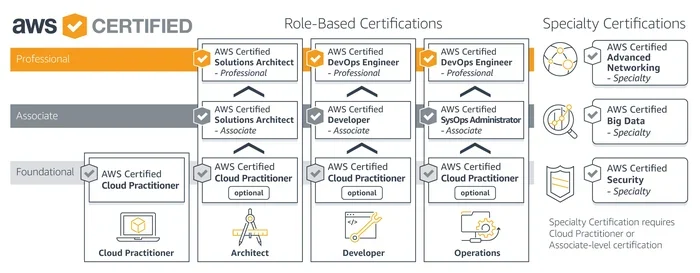
For example, AWS certification course programs on one platform might take 6 weeks, while another platform’s version could take 10 weeks. The content may be similar, but the pacing differs.
Certification Goals
Are you taking the course just to learn, or do you want a certificate? If you aim for a recognized credential, you need extra time for exam prep. Most certification exams require dedicated study beyond the course itself.
Expert insight: Many learners underestimate the time needed for certification prep. Add at least 2 to 4 extra weeks of study before scheduling your exam. This buffer helps you feel confident and ready.
Hands-On Practice Time
Cloud computing is a hands-on field. Reading alone will not make you proficient. You need to spend time building, breaking, and fixing cloud environments. If your course includes labs and projects, it will naturally take longer. But that extra time is worth it.
A good rule of thumb: for every hour of video lectures, spend at least one hour practicing. This ratio builds real cloud computing skills that employers value.
Choosing the Right Cloud Computing Course
With so many options available, picking the right course can feel overwhelming. Use these guidelines to narrow down your choices and find the best fit for your goals.
Define Your Learning Goal First
Before you enroll, ask yourself what you want to achieve. Do you want a general overview? Do you want to earn a specific certification? Or do you want to switch careers entirely?
Your goal determines the course type and duration. A general overview needs a short course. A career switch needs a comprehensive program with certification prep.
Check the Course Curriculum
Look closely at what each course covers. A quality cloud engineering course should include both theory and hands-on practice. Avoid courses that only show videos without any labs or projects.
Here is a quick checklist to use when evaluating courses:
- Does the curriculum cover major cloud platforms?
- Are there hands-on labs and real projects?
- Does it include exam prep if you want a certification?
- Is the content updated for current cloud technologies?
- Are there student reviews or completion rates available?
If a course checks most of these boxes, it is likely a solid choice.
Consider Your Budget and Time
Cost matters. Short courses are usually cheaper, but comprehensive programs offer more value in the long run. Some platforms offer payment plans or financial aid. Look for these options if cost is a concern.
Time matters even more. Pick a course duration that you can actually stick with. A 6-month program you never finish is worth less than a 4-week course you complete fully.
Look for Recognized Certifications
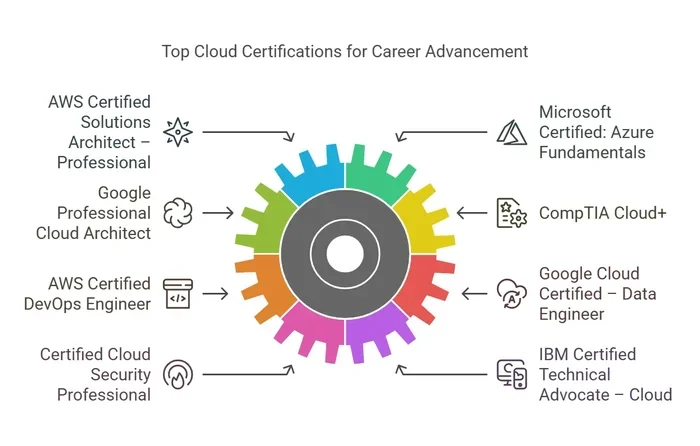
Employers value recognized credentials. Courses that prepare you for AWS certification, Microsoft Azure, or Google Cloud certifications carry more weight on your resume. These programs often take longer but deliver stronger career outcomes.
Common mistake: Do not pick a course solely based on price or duration. A cheap, short course may not teach you what employers need. Invest in quality over speed.
How to Get the Most From Your Cloud Course
Once you pick a course, your effort determines the results. Follow these practical tips to maximize your learning and finish with real confidence.
Set a Consistent Study Schedule
Treat your course like a real commitment. Set aside specific hours each day or week. Consistency beats intensity. Studying one hour every day works better than cramming five hours on a weekend.
Use a calendar or a habit tracker to stay accountable. Even 30 minutes of focused study each day adds up over weeks and months.
Practice Every Single Day
Cloud skills improve with repetition. Log into free tier accounts on AWS, Azure, or Google Cloud. Build small projects. Break things on purpose and then fix them. This kind of practice builds muscle memory.
Quick tip: Create a personal lab environment where you can experiment without fear of breaking anything. This safe space is where real learning happens.
Join a Community of Learners
Learning alone is hard. Join online forums, Discord groups, or study circles. Other learners can answer your questions, share resources, and keep you motivated.
Many cloud training programs include community access. Take advantage of this. Engaging with peers helps you understand concepts faster and retain information longer.
Track Your Progress
Keep a record of what you have learned each week. Note down key concepts, tools, and projects. This log becomes a valuable resource when you prepare for interviews or exams.
Progress tracking also shows you how far you have come. On tough days, looking back at your achievements can reignite your motivation.
Cloud Computing Career Outlook After Completing a Course
Finishing a cloud computing course opens doors to many exciting careers. The demand for cloud professionals continues to grow every year. Companies of all sizes need skilled people to manage their cloud infrastructure.
Common job roles include cloud engineer, cloud architect, DevOps engineer, and cloud security specialist. Salaries for these roles are competitive and often above average for IT positions. Your cloud computing course duration and the certification you earn play a role in how quickly you can land a job.
Keep in mind that a course is just the beginning. Real-world experience, continuous learning, and staying updated with new technologies will define your long-term success in this field.
Final Thoughts on Cloud Computing Course Duration
The cloud computing course duration you choose should match your goals, schedule, and learning style. Short courses give you a quick introduction. Comprehensive programs build deep, job-ready skills. Self-paced options offer flexibility. No single path is better than another. The best path is the one you will actually complete.
Start where you are. Use what you have. And remember that every hour you invest in learning brings you closer to a rewarding career in cloud computing. The cloud industry needs passionate, skilled professionals. With the right course and the right effort, you can become one of them.
Frequently Asked Questions
How long does it take to learn cloud computing from scratch?
For complete beginners, expect to spend 3 to 6 months on a comprehensive program. This timeline includes learning basics, hands-on practice, and exam preparation. Your prior experience in IT can shorten or extend this duration.
Can I complete a cloud computing course in one month?
Yes, but only if you choose a short beginner course and study intensively. A one-month timeline works for overview courses, not for full certification programs. Make sure the course covers the topics you actually need to learn.
Is self-paced learning slower than instructor-led courses?
Not necessarily. Self-paced courses let you move faster through material you already know. You can spend more time on challenging topics. The real difference is discipline. Consistent self-paced learners often finish faster than those in fixed-schedule classes.
Do free cloud courses count toward a career in cloud computing?
Free courses are a great starting point. They teach basics and give you a feel for cloud platforms. However, they usually lack deep hands-on practice and certification prep. Use free courses as a supplement, not a replacement for structured learning.
How does certification exam prep affect the total course duration?
Certification prep adds 2 to 4 weeks to most programs. You need extra time to review exam objectives, take practice tests, and strengthen weak areas. Factor this into your timeline from the very beginning.
What is the best cloud platform to start with for beginners?
AWS and Microsoft Azure are the most popular choices for beginners. Both offer free tiers and extensive learning resources. Google Cloud Platform is also a strong option. Pick one platform, go deep, and learn the core concepts. You can always add more platforms later.