Different Types of Cloud Computing and What They Offer
Different types of cloud computing shape how businesses and individuals store, manage, and access data today. The four main models — public, private, hybrid, and multi-cloud — each bring unique strengths for scalability, security, and cost savings. Whether you are a small startup or a large enterprise, understanding these options helps you make smarter tech decisions. This guide breaks down every model in simple terms so you can choose with confidence.
Cloud computing has changed the way we work, store files, and run applications. Instead of relying on physical servers in a building, you can access powerful computing resources over the internet. But not all cloud setups are the same. There are several different types of cloud computing, and each one serves a different purpose.
If you have ever wondered what the difference is between a public cloud and a private cloud, or why some companies use a mix of both, you are in the right place. This guide walks you through every major cloud model in plain language. You will learn what each type offers, when to use it, and how to pick the best fit for your needs.
The world of cloud computing services can feel overwhelming at first. There are acronyms, deployment models, and service types to keep track of. But once you understand the basics, everything starts to make sense. Let us break it down together.
Key Takeaways
- Public cloud offers affordability and ease of access for most users and businesses.
- Private cloud gives organizations full control over their data and infrastructure.
- Hybrid cloud combines the best of both worlds, balancing cost and security.
- Multi-cloud strategies help avoid vendor lock-in and improve redundancy.
- Choosing the right model depends on your budget, security needs, and growth goals.
- Cloud computing models like IaaS, PaaS, and SaaS determine how you use the cloud.
- Understanding these options early saves time, money, and headaches down the road.
📑 Table of Contents
What Is Cloud Computing?
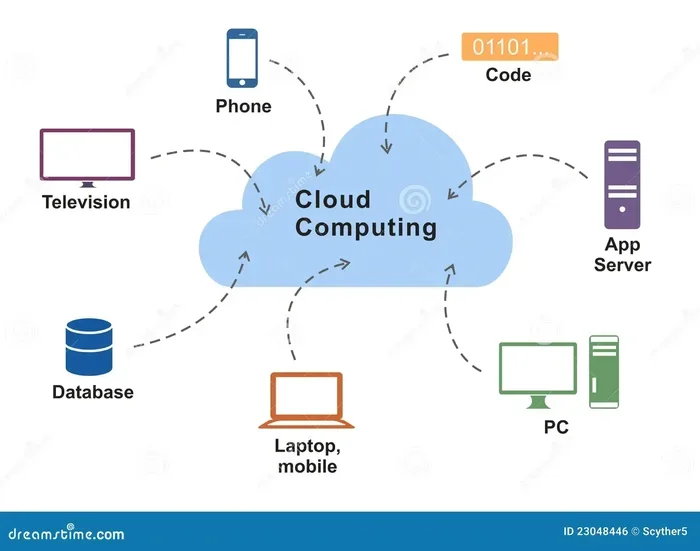
At its core, cloud computing means using remote servers hosted on the internet to store, manage, and process data. You do not need to own or maintain physical hardware. Instead, you rent access to computing resources from a provider. Think of it like renting an apartment instead of building a house.
The cloud computing explained concept is simple. A company owns massive data centers full of servers. You connect to those servers over the internet whenever you need storage, processing power, or software. This setup gives you scalability, meaning you can grow or shrink your resources based on demand.
Before cloud computing became popular, businesses had to buy expensive servers and maintain them on-site. This on-premises infrastructure approach was costly and inflexible. Cloud computing solved those problems by making technology more accessible and affordable for everyone.
The Main Types of Cloud Computing
There are four primary deployment models in the world of cloud computing. Each one has its own strengths and ideal use cases. Let us explore them one by one.
Public Cloud
A public cloud is owned and operated by a third-party provider. Companies like Amazon Web Services, Microsoft Azure, and Google Cloud Platform run these massive networks. You share resources with other users, which keeps costs low.
Public cloud is perfect for small businesses, startups, and individuals who need affordable cloud hosting. You pay only for what you use, which makes budgeting much easier. It also offers excellent scalability, so you can handle sudden traffic spikes without buying new hardware.
Here are some common use cases for public cloud:
- Hosting websites and web applications
- Storing backups and archives
- Running development and testing environments
- Streaming video and audio content
- Big data analytics and machine learning
The main trade-off is reduced control. Since you share the infrastructure, you rely on the provider for security updates and maintenance. For most everyday needs, however, public cloud works beautifully.
Private Cloud
A private cloud is dedicated to a single organization. It can be hosted on-site or by a third-party provider, but the resources are not shared with anyone else. This model gives you maximum control and customization.
Enterprise cloud deployments often lean toward private cloud because of strict security and compliance requirements. Industries like healthcare, finance, and government use private clouds to protect sensitive data. With a private setup, you set the rules for access, security, and performance.
Here are the key advantages of private cloud:
- Full control over your data and infrastructure
- Stronger security and privacy protections
- Customizable to meet specific regulatory needs
- Predictable performance since resources are not shared
The downside is cost. Private cloud requires significant upfront investment in hardware and ongoing maintenance. It also lacks the effortless scalability of public cloud. For this reason, private cloud is usually best for large organizations with specific needs.
Hybrid Cloud
A hybrid cloud combines public and private cloud environments. You get the security of a private cloud and the affordability of a public cloud, all working together. Data and applications can move between the two setups seamlessly.
This model is incredibly flexible. Many organizations use hybrid cloud to handle everyday workloads on the public side while keeping sensitive data on the private side. Cloud migration projects often start with a hybrid approach because it lets businesses transition gradually.
Here are situations where hybrid cloud shines:
- Handling seasonal traffic spikes by bursting into public cloud
- Running legacy applications on private infrastructure
- Storing sensitive data privately while using public cloud for less critical tasks
- Disaster recovery and backup planning
Hybrid cloud does come with complexity. You need to manage two different environments and ensure they communicate properly. But for many businesses, the flexibility and cost savings make it well worth the effort.
Multi-Cloud
Multi-cloud means using services from multiple cloud providers at the same time. For example, you might use AWS for storage and Google Cloud for analytics. This approach helps avoid vendor lock-in, where you become too dependent on one provider.
Multi-cloud also improves cloud security and reliability. If one provider experiences an outage, your workloads can fail over to another provider. This redundancy is a big reason why large enterprises are adopting multi-cloud strategies.
Here are some benefits of a multi-cloud approach:
- Reduced dependency on a single provider
- Access to the best features from each provider
- Improved disaster recovery and business continuity
- Better negotiating power and cost optimization
The challenge with multi-cloud is management. Keeping track of multiple platforms requires skilled teams and the right tools. But with proper planning, multi-cloud can give you unmatched flexibility and resilience.
Cloud Computing Models: IaaS, PaaS, and SaaS
Beyond deployment types, there are also service models that define how you interact with the cloud. The three main ones are IaaS, PaaS, and SaaS. Each one offers a different level of control and convenience.
Infrastructure as a Service (IaaS)
IaaS provides the foundational building blocks of cloud computing. You get virtual machines, storage, and networking resources. You manage the operating system, applications, and data, while the provider handles the physical hardware.
This model is ideal for businesses that want maximum control without the cost of physical servers. It is the closest thing to managing your own cloud infrastructure without the hardware headaches. Startups and development teams love IaaS because it lets them build custom environments quickly.
Platform as a Service (PaaS)
PaaS goes a step further. It provides a complete platform for developing, testing, and deploying applications. You focus on writing code, and the provider manages the underlying infrastructure, operating system, and tools.
PaaS is a great choice for developers who want to ship applications faster. It removes the burden of managing servers and infrastructure. Popular PaaS offerings include Heroku, Google App Engine, and Microsoft Azure App Service.
Software as a Service (SaaS)
SaaS delivers fully finished applications over the internet. You do not need to install anything or manage any infrastructure. You simply log in and use the software. Examples include Gmail, Salesforce, Dropbox, and Microsoft 365.
SaaS is the most popular cloud computing model for everyday users. It is convenient, affordable, and requires zero technical maintenance. For businesses, SaaS tools boost productivity without the need for IT teams to manage software updates or installations.
| Feature | IaaS | PaaS | SaaS |
|---|---|---|---|
| Control Level | High | Medium | Low |
| Management Responsibility | Mostly user | Shared | Mostly provider |
| Best For | IT teams, sysadmins | Developers | End users, businesses |
| Examples | AWS EC2, Azure VMs | Heroku, Google App Engine | Gmail, Salesforce, Dropbox |
How to Choose the Right Cloud Model
Choosing the right cloud solutions depends on several factors. There is no one-size-fits-all answer. Your decision should align with your budget, security requirements, and long-term goals.
Start by asking yourself a few key questions. What is your budget? How much control do you need? What are your security and compliance requirements? Do you expect rapid growth? The answers to these questions will point you toward the right model.
Here are some quick tips to guide your decision:
- Assess your current needs. Look at what you use today and identify gaps.
- Consider your growth plans. Choose a model that can scale with your business.
- Evaluate security requirements. Sensitive data may require private or hybrid cloud.
- Compare costs. Public cloud is usually cheaper upfront, but private cloud may save money long-term for large operations.
- Test before committing. Many providers offer free tiers or trials. Use them to explore options.
Remember, you can always start small and expand. Many businesses begin with public cloud or SaaS and gradually move toward hybrid or multi-cloud as their needs evolve. The key is to stay flexible and revisit your strategy regularly.
Benefits and Challenges of Each Cloud Type
Every cloud model has its pros and cons. Understanding them helps you set realistic expectations and plan accordingly.
Public cloud offers low cost, easy setup, and excellent scalability. The main challenge is limited control and potential security concerns for sensitive data.
Private cloud provides top-notch security and customization. However, it comes with high costs and requires significant technical expertise to manage.
Hybrid cloud balances cost and control well. The downside is complexity. Managing two environments requires strong technical skills and good integration tools.
Multi-cloud gives you flexibility and reduces vendor dependency. But it can be hard to manage, and costs can add up if you are not careful.
Quick Tips: No matter which model you choose, invest in proper cloud security practices. Use strong passwords, enable two-factor authentication, and review access permissions regularly. Also, monitor your usage to avoid unexpected bills.
Common Mistakes to Avoid
Many people and businesses make avoidable mistakes when adopting cloud computing. Here are a few to watch out for:
- Ignoring hidden costs. Cloud services often have fees for data transfer, storage, and support that add up over time.
- Overlooking security. Even with a secure provider, you are responsible for protecting your data and access controls.
- Choosing the wrong model. Picking a cloud type without evaluating your needs leads to poor performance and wasted money.
- Neglecting training. Your team needs to understand how to use and manage cloud tools effectively.
- Not having a backup plan. Even the best cloud setups can experience issues. Always have a disaster recovery strategy in place.
Avoiding these pitfalls saves you time, money, and frustration. Take the time to plan before you migrate or commit to a new model.
Expert Insights on Cloud Computing Trends
The cloud computing landscape is always evolving. Serverless computing is one of the hottest trends right now. It lets developers run code without managing servers at all. The provider handles everything automatically, scaling resources up and down based on demand.
Another trend is the rise of edge computing, which processes data closer to where it is generated. This reduces latency and improves performance for applications like IoT devices and real-time analytics. Experts predict that edge computing will work hand-in-hand with cloud platforms in the coming years.
Artificial intelligence and machine learning are also becoming more accessible through cloud services. Providers now offer AI tools that let businesses build smart applications without deep technical expertise. These advancements make cloud services even more powerful and appealing.
One thing is clear: different types of cloud computing will continue to evolve and merge. Businesses that stay informed and flexible will have the biggest advantage. The future belongs to those who embrace the cloud wisely.
Conclusion
Understanding different types of cloud computing is essential for anyone making technology decisions today. Whether you choose public, private, hybrid, or multi-cloud, each model has something valuable to offer. The right choice depends on your unique needs, budget, and goals.
Take the time to explore your options. Start with what makes sense today, and keep your strategy flexible for the future. Cloud computing is a powerful tool, and with the right approach, it can transform the way you work and grow.
Now that you have a solid understanding of the landscape, you are ready to make informed decisions. Trust your research, plan carefully, and embrace the cloud with confidence.
Frequently Asked Questions
What are the four main types of cloud computing?
The four main types are public cloud, private cloud, hybrid cloud, and multi-cloud. Each one offers a different balance of cost, control, and security. Public cloud is the most affordable and accessible, while private cloud provides the most control.
Which type of cloud is best for small businesses?
Most small businesses benefit from public cloud or SaaS solutions. These options are affordable, easy to set up, and do not require a large IT team. As the business grows, it can explore hybrid or multi-cloud setups for more advanced needs.
Is cloud computing secure?
Yes, reputable cloud providers invest heavily in security. They use encryption, firewalls, and regular audits to protect data. However, users also play a role by following best practices like using strong passwords and managing access permissions carefully.
What is the difference between hybrid cloud and multi-cloud?
Hybrid cloud combines public and private cloud within one organization. Multi-cloud uses services from multiple public cloud providers. Hybrid focuses on mixing deployment types, while multi-cloud focuses on using multiple providers for better flexibility and redundancy.
How much does cloud computing cost?
Costs vary widely based on the model and usage. Public cloud typically operates on a pay-as-you-go basis, making it budget-friendly. Private cloud requires significant upfront investment. The best approach is to estimate your needs and compare pricing plans from different providers.
Can I switch between cloud types later?
Yes, many businesses start with one model and transition over time. For example, a startup might begin with public cloud and later adopt a hybrid approach. Planning for flexibility from the start makes future transitions smoother and less disruptive.